TL;DR: Most guides on vendor invoice processing define the term and hand you a checklist. This one gives IT company owners a six-step implementation sequence: how to capture, validate, approve, and reconcile vendor bills without chasing anyone manually, and where automation replaces the spreadsheet workarounds most teams are still running. You'll finish with a workflow you can actually build this week.
What vendor invoice processing actually means
Vendor invoice processing is the end-to-end workflow for receiving, validating, approving, and paying bills from the vendors your business depends on. That covers software subscriptions, subcontractors, hardware suppliers, and any other third party sending you a payment request.
It's easy to conflate this with customer invoicing, but the direction is reversed. Customer invoices go out and bring money in. Vendor invoices come in and require money out, which means the controls, approval steps, and tracking logic are entirely different.
For IT company owners, the distinction matters operationally. A vendor bill tied to a client project needs to hit the right cost center before you can bill that client accurately. Miss that link, and you're either absorbing the cost or invoicing incorrectly. Both hurt margin.
Most teams handle this informally until volume or audit pressure forces a change. By that point, errors have compounded. According to IOFM research, manually processing a single invoice can cost between $15 and $40, and that figure climbs when approvals stall or data needs correction.
A vendor invoice processing system that holds together across your whole operation treats vendor bill management as an operational function, not a finance afterthought. That framing shapes everything that follows.
Why a structured process matters for IT companies
Without a defined vendor invoice processing system, most IT companies lose money in ways that don't show up on a single report. They show up in late client billings, failed audits, and cash flow gaps that look like revenue problems but are actually process problems.
Four outcomes improve immediately when you formalize the workflow:
Cash flow visibility: When every vendor bill moves through a consistent approval path, you know exactly what's committed and what's pending. That matters when you're billing clients on project milestones and need vendor costs reconciled before you invoice.
Client billing accuracy: Vendor costs that miss your billing cycle become write-offs. A repeatable invoice approval workflow closes that gap by tying vendor bills to the projects or clients they belong to before payment clears.
Error reduction: According to research from IOFM and Ardent Partners, manual invoice processing carries significantly higher error rates than automated workflows, with duplicate payments and mismatched amounts among the most common failures.
Audit readiness: IT companies handling client contracts, retainers, or government work need a clean paper trail. A structured process creates one automatically.
The alternative is a patchwork of email threads and spreadsheets that works until it doesn't. Building a vendor invoice processing system that holds together across your whole operation is what the next section covers.
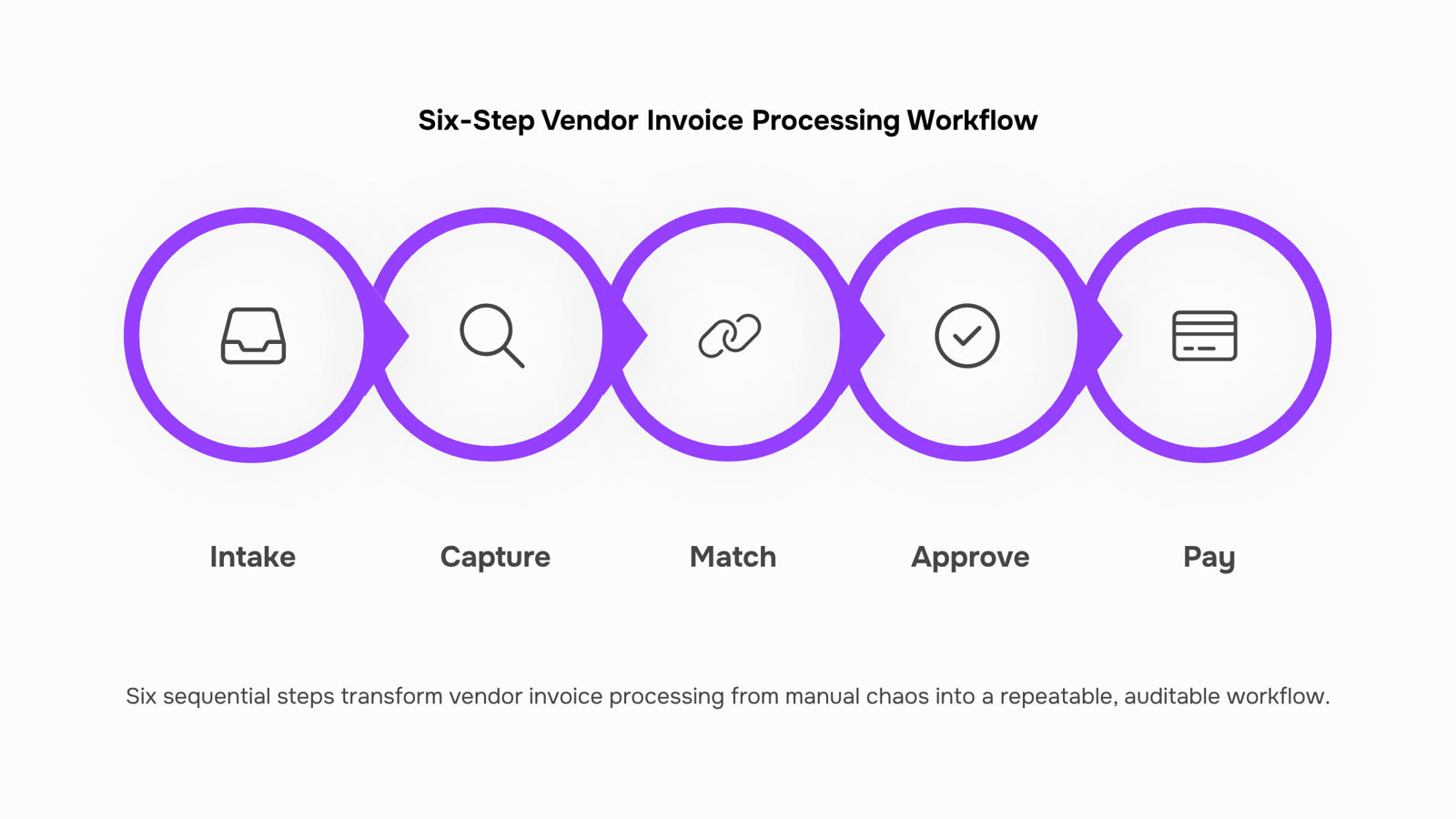
Six steps to implement vendor invoice processing
Vendor invoice processing breaks down at predictable points: invoices arrive in the wrong format, approvals stall in someone's inbox, and reconciliation happens weeks after the fact. The six steps below give you a sequence that closes those gaps, from the moment an invoice lands to the moment it's matched and filed.
Step 1: Establish a single intake channel
Every invoice needs one front door. Whether that's a dedicated AP email address, a vendor portal, or a direct upload link, the rule is the same: invoices that arrive outside the channel don't get processed until they're routed through it. For an IT company managing SaaS subscriptions, hardware vendors, and subcontractors simultaneously, this single constraint alone eliminates the "I forwarded it to someone" problem that derails most approval timelines.
Step 2: Capture and validate invoice data on receipt
Once an invoice arrives, extract the key fields immediately: vendor name, invoice number, date, line items, and total. Then validate against your vendor master list. An invoice from a vendor not in your system shouldn't enter the approval queue until it's verified. This is where automated invoice processing pays off fastest. Research from the Institute of Finance and Management consistently shows that manual data entry is the single largest source of invoice errors, and that automation reduces processing time from days to hours.
Step 3: Match the invoice to a purchase order or contract
Three-way matching (invoice, purchase order, delivery confirmation) is standard practice for a reason: it catches billing errors before payment, not after. For IT companies, this step is especially important when billing clients for vendor costs passed through on a project. If a vendor invoice for cloud infrastructure doesn't match the PO you raised, you need to know before you pay, not when a client disputes their bill. Set a clear rule: invoices without a matching PO go into a hold queue, not the approval queue.
Step 4: Route through a defined invoice approval workflow
Approval routing is where most vendor bill management systems stall. The fix is a defined matrix: who approves what, up to what amount, and within what timeframe. A practical starting point for an IT company might look like this:
Invoices under $500: auto-approved if matched to a PO
$500 to $5,000: department lead approval within 48 hours
Above $5,000: finance director sign-off required
Without this matrix, every invoice becomes a judgment call, and judgment calls create delays. Tools like Inzo let you configure expense approval workflows so invoices route to the right person automatically, with escalation triggers if no action is taken within the defined window.
Step 5: Post, pay, and record
Once approved, the invoice moves to payment. At this stage, three things need to happen in sequence: the invoice is posted to your accounting system, payment is scheduled or released, and the payment is allocated against the correct vendor account. Skipping the allocation step is a common mistake that shows up as reconciliation errors at month end. Inzo's vendor payment tracking and allocation handles this directly, so each payment is matched to the originating invoice rather than sitting as an unallocated credit in your ledger.
Step 6: Reconcile and archive
Reconciliation isn't a month-end task. It's a continuous check that your accounts payable balance matches what's been invoiced, approved, and paid. Run a weekly reconciliation pass: pull open invoices, confirm payment status, and flag anything overdue or unapproved. Archive the completed invoice with its PO, approval record, and payment confirmation attached. This three-document bundle is what your auditor will ask for, and having it ready in one place reduces audit prep from days to an hour.
For a more detailed look at structuring the intake and matching stages, How to Set Up a Vendor Invoice Processing System That Actually Works covers the configuration decisions most IT companies get wrong the first time.
The sequence above isn't complicated, but it only holds if every step has a named owner and a defined tool. The next section covers the failure points that break this sequence in practice, including what happens when PO matching is skipped and why a missing audit trail creates compliance risk you can't fix retroactively.
Common mistakes that break the process
Four failure points show up repeatedly in vendor invoice processing, and each one is preventable before you build.
Skipping PO matching: When an invoice arrives without a linked purchase order, your team has no baseline to verify the amount against. IT companies with recurring SaaS and infrastructure spend are especially exposed here. Wire up purchase order to bill conversion and approval workflows before you onboard your first vendor, not after a disputed charge.
No approval audit trail: Email approvals disappear. If a payment gets questioned six months later, "I remember approving that" is not a defensible answer. Every approval step needs a timestamp, an owner, and a record.
Manual reconciliation errors: Automated invoice processing replaces manual data entry with rules-based workflows, which matters because manual entry is where duplicate payments and transposed amounts enter the ledger. One miskeyed line item can take hours to untangle.
Treating vendor bill management as finance-only: Operations, procurement, and finance all touch the invoice lifecycle. When ownership is unclear, invoices stall. Assign a named owner to each stage before the first invoice moves.
Fix these four points first. Everything else in your vendor invoice processing system that holds together across your whole operation depends on them.
Vendor invoice processing vs. accounts payable: what is the difference
These two terms describe different scopes of work, and mixing them up leads to ownership gaps.
Vendor invoice processing covers the operational steps: receiving an invoice, matching it to a purchase order, routing it for approval, and logging it in your system. It's a workflow problem.
Accounts payable (AP) is the broader financial function that includes processing, but also manages vendor relationships, payment terms, aging reports, and cash flow forecasting.
Dimension | Vendor invoice processing | Accounts payable |
|---|
Scope | Single invoice lifecycle | Full vendor payment function |
Ownership | Operations or finance ops | Finance / accounting team |
Timing | Triggered per invoice | Ongoing financial management |
Tooling | Vendor invoice processing system | Accounting software + reporting |
The practical implication: if your AP team owns the payment but no one owns the processing workflow, invoices stall between receipt and approval. That gap is where duplicate payments and missed due dates happen. Fixing it means treating processing as its own operational system, not a sub-task inside AP.
Spreadsheets and email threads create the exact handoff gaps that delay payments. When invoice receipt, approval, and payment tracking live in separate tools, something always falls through — a bill sits unreviewed, a due date passes, a vendor follows up twice before anyone notices.
A connected vendor invoice processing system that holds together across your whole operation puts all of that in one place: bills come in, get matched to purchase orders, route for approval, and update payment status automatically. Automated invoice processing replaces manual data entry with rules-based workflows, which cuts the back-and-forth that slows most IT teams down.
Inzo handles vendor bill tracking, payment allocation, and credit management inside WorksBuddy. When a project closes in Taro, Inzo can generate the invoice automatically — no manual trigger needed. That's the difference between a process that runs and one you have to chase.
Closing
Vendor invoice processing only works when every step has a named owner and a clear trigger. The six steps above give you that structure, but the real win comes when the workflow runs on its own. That's where Inzo enters the picture. It's the operational layer that captures vendor bills on arrival, routes them through your approval matrix automatically, matches them to purchase orders, and reconciles payments without manual tracking. Once you've defined your approval thresholds and vendor rules, Inzo handles the routing, escalation, and reconciliation so your team focuses on exceptions, not data entry. The question isn't whether to automate vendor invoice processing. It's whether you want to keep chasing approvals in email or build a system that works while you're billing clients.
FAQ
What information should I include on a vendor invoice?
A vendor invoice needs vendor name, invoice number, date, line items with descriptions, amounts, and total. For IT companies billing clients, tie it to the project or cost center it belongs to so it routes to the right approver.
How do I create a professional vendor invoice?
This article covers receiving and processing vendor invoices your vendors send to you, not creating them. Your vendors handle invoice creation; your job is capturing and validating their data on arrival.
Can I send vendor invoices electronically?
Yes. Establish a single intake channel—email, portal, or upload link—so all invoices arrive in one place. Consistency matters more than the method.
What is the difference between a vendor invoice and a purchase order?
A purchase order is your request to buy; a vendor invoice is their bill for what they delivered. Match them together before you pay to catch billing errors early.
How long should vendor invoice processing take?
From receipt to payment, a matched invoice with clear approval authority should move through in 3 to 5 business days. Delays usually signal missing POs, undefined approval thresholds, or invoices stuck in someone's inbox.


 Siddharth Rao15 September 2026


