TL;DR: Most AI-in-sales content lists tools and stops there. This piece explains the mechanism behind each stage: what the AI is actually doing with your pipeline data, why that specific action changes close rates, and how IT company owners can wire it up without rebuilding their entire sales process. You'll leave with a clear implementation path, not a feature checklist.
What AI in sales actually means
AI in sales means software that reads data and acts on it, not just stores it. A CRM that logs a call is automation. A system that scores that lead, flags the rep, and drafts a follow-up within minutes is AI. The distinction matters because most IT sales teams already have automation; what they're missing is the decision layer on top of it.
In practice, knowing how to use AI in sales comes down to three mechanisms: pattern recognition (which leads are worth pursuing), prediction (when to reach out and what to say), and routing (getting the right lead to the right rep before a competitor does). Research consistently shows that B2B buyers tend to choose the first vendor to respond, which makes speed a structural advantage, not just a nice-to-have.
For a 5-to-15 person sales team, that means AI handles the judgment calls that currently eat rep time: lead prioritization, building a composite score from firmographic fit and engagement signals, and reading pipeline signals to produce a forecast without waiting for manual CRM updates. Reps spend time selling, not sorting.
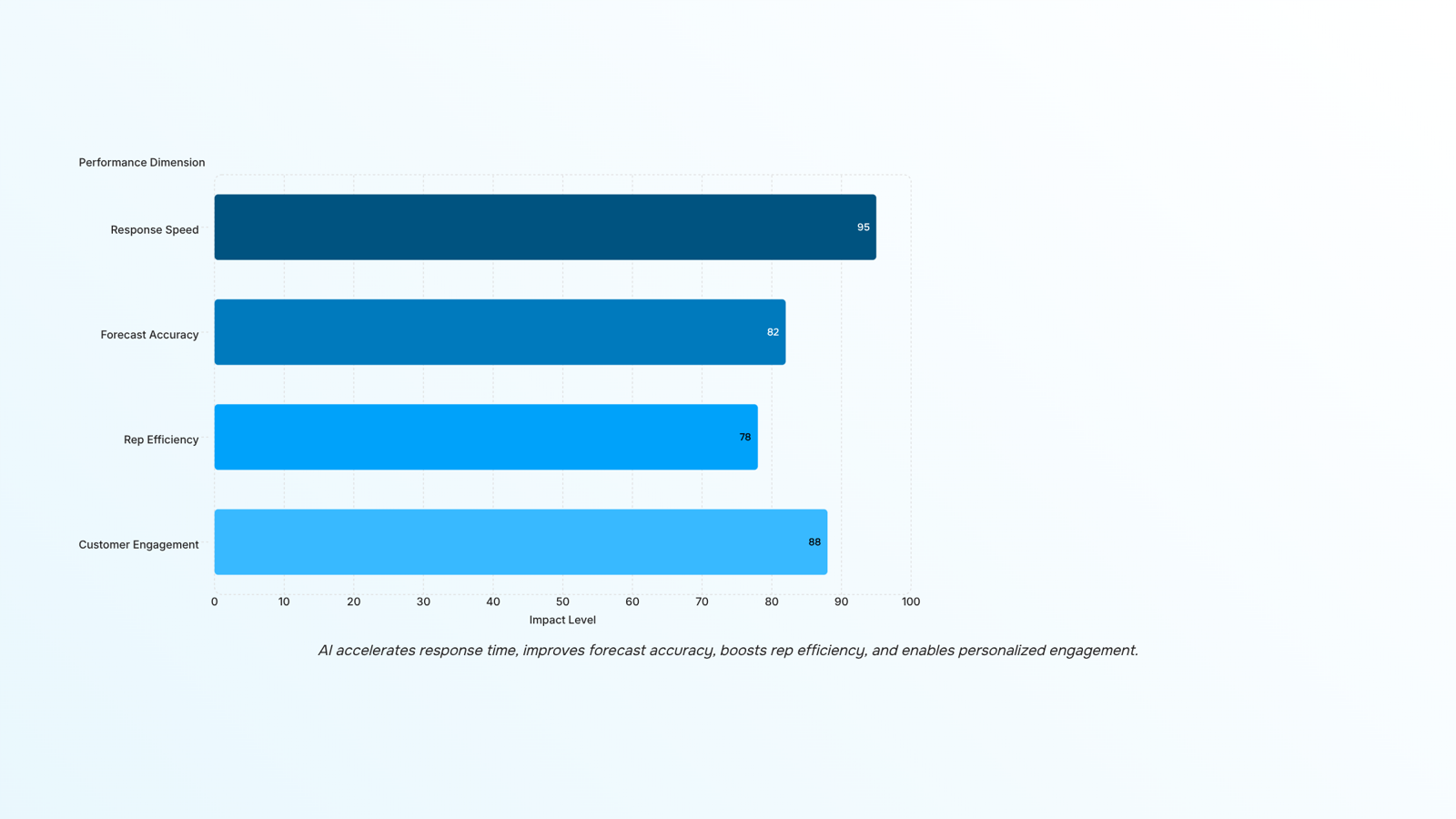
Response speed is where ai in sales pays off first. When a lead fills out a form or clicks a pricing page, the window to engage is short. Research from InsideSales shows that 35-50% of sales go to the vendor that responds first — and most B2B teams without automation respond in hours, not minutes. AI-driven sales automation closes that gap by triggering a personalized outreach the moment a signal fires, without a rep having to notice it.
Forecast accuracy is the second gain, and it compounds over time. Manual pipeline reviews rely on a rep's gut read of a deal. AI-powered sales tools pull in deal age, email response rates, and historical close patterns to produce a probability score that reflects actual behavior. Your forecast stops being a best guess and starts being a working model.
Rep efficiency follows from the first two. When AI handles initial outreach, lead scoring, and follow-up sequencing, a five-person sales team can work a pipeline that would normally require eight. Time that used to go to data entry and chasing cold leads shifts to closing conversations.
Customer engagement is the fourth outcome, and it's where ai in sales and marketing converge. AI tracks which content a prospect opened, which pages they visited, and how long they went quiet — then surfaces that context to the rep before a call. The rep walks in knowing what the buyer cares about, not guessing.
Each of these outcomes depends on the same underlying mechanic: AI reads signals faster than a human can, then acts or alerts before the moment passes. For a deeper look at the specific tools that handle each layer, the best AI tools for marketing and sales automation covers the current stack in detail.
Can AI predict sales outcomes and improve forecasting
A rep's gut estimate of a deal's close probability is usually optimistic. Sales forecasting AI removes that bias by reading signals the rep doesn't track consciously: how long a deal has sat at a given stage, how often the prospect has opened emails or attended calls, and how similar deals closed historically.
The mechanic is straightforward. The model assigns a weight to each signal, combines them into a probability score, and updates that score as new activity comes in. A deal that stalled at proposal stage for 22 days with no email opens gets a lower score than one where the prospect requested a security review last week. That gap is visible before the rep's next pipeline review, not after a missed quarter.
For an IT company owner running a 5-to-15 person sales team, this matters because how AI reads pipeline signals to produce a forecast shows you which deals need attention now, not which ones your reps feel good about. The same logic applies to cash flow: if three high-probability deals slip a week, your revenue projection shifts, and AI flags that before you've committed to headcount or vendor spend.
The underlying data that powers these scores, including firmographic fit and engagement history, is how a 0-to-100 composite score is built from firmographic fit and engagement data.
How to use AI in sales: 6 steps your team can run today
Run these six steps in order. Each one removes a specific bottleneck that slows IT services sales teams down.
1. Audit where leads stall
Pull your last 90 days of CRM data and map every stage where deals sat for more than two weeks without activity. AI tools can surface these patterns automatically, but even a manual pass reveals the two or three stages that eat your pipeline. Once you know where leads stall, you can target the next steps precisely instead of improving everything at once.
2. Capture and qualify leads on arrival
Wire an AI agent to your website, inbound email, and any form where prospects first appear. The agent asks qualifying questions, checks firmographic fit, and logs the response before a rep ever looks at the record. Research consistently shows that B2B buyers heavily favor the first vendor to respond, so cutting that gap from hours to minutes changes win rates in a measurable way.
3. Score and route automatically
Once a lead is captured, AI builds a 0-to-100 composite score from firmographic fit and engagement data, then routes the record to the right rep based on territory, deal size, or product line. Your reps stop sorting inboxes and start calling contacts who already match your ICP. For a team of 5 to 15, this alone recovers several hours a week.
4. Build contact context before the first call
Before a rep dials, AI pulls company news, LinkedIn activity, tech stack signals, and prior touchpoints into a one-page brief. The rep walks into the call knowing the prospect's current pain rather than asking questions the contact answered three weeks ago. This is one of the clearest ai in sales examples where prep time drops and call quality rises at the same time.
5. Automate follow-up sequences
Set up ai-driven sales automation for every post-meeting or post-demo touchpoint. The AI sends the follow-up email, attaches the relevant case study based on the prospect's industry, and schedules the next nudge if there is no reply. Your reps review replies and handle objections; they stop managing send schedules manually.
6. Read the forecast and adjust pipeline weekly
Each week, have your sales manager review the AI-generated forecast rather than asking reps to update a spreadsheet. As covered in how AI reads pipeline signals to produce a forecast, the model weighs deal age, engagement frequency, and historical close rates to produce a probability score that is more reliable than a rep's gut estimate. The manager's job shifts from collecting data to acting on it: pushing stalled deals, reallocating rep time, or adjusting the quarter's target before it is too late to recover.
For a deeper look at which tools handle the automation steps without adding more manual setup, that breakdown covers the specific platforms worth evaluating for each stage above.
How AI-driven automation improves customer engagement
Fixed-schedule follow-ups are one of the most common ways IT services deals stall. A rep sends a proposal on Monday, waits five days, then sends a generic check-in regardless of whether the prospect opened the document twice or never touched it. The timing is arbitrary. The message is impersonal. The deal goes quiet.
AI-driven sales automation changes the trigger. Instead of a calendar interval, the system monitors engagement signals: email opens, link clicks, pricing page visits, reply sentiment. When a prospect revisits your managed services pricing page three days after the demo, that action fires the next touchpoint automatically, with context pulled from their firmographic profile and prior conversation history. The rep gets a task that says "they looked at pricing again, send the ROI one-pager" rather than "follow up now."
For a 10-person IT services team, the before-and-after is concrete. Before: reps follow up on gut feel, deals sit untouched for a week, and how a 0-to-100 composite score is built from firmographic fit and engagement data never gets used because no one built the process. After: engagement-triggered sequences run in the background, and reps spend call prep time on accounts that are actually showing buying signals.
This is where ai in sales and marketing separates from basic CRM automation. The CRM records what happened. The AI decides what to do next, and when.
AI in sales vs. traditional CRM: what changes and what stays the same
Your CRM isn't going anywhere. The question is what it can't do on its own.
Most IT company owners already have a CRM tracking contacts, logging calls, and storing deal history. What a CRM doesn't do is act on that data in real time. That's the gap ai-powered sales tools fill.
Dimension | Traditional CRM | AI in Sales |
|---|
Lead response time | Rep-dependent, often hours | Automated triggers respond in minutes |
Forecast method | Manual pipeline review, rep estimates | Pattern-based scoring across historical data |
Rep workload | High data entry, manual follow-up scheduling | AI handles logging and next-step prompts |
Data input required | Relies on rep discipline to stay current | Pulls from email, calendar, and engagement signals automatically |
The response time row is where the gap is most measurable. Research consistently shows that the first vendor to respond wins a disproportionate share of B2B deals, yet most teams without automation are responding hours after a lead comes in.
Forecasting is the other dimension that changes materially. A CRM shows you what reps entered. AI surfaces what the data actually predicts, flagging deals that look healthy on paper but show weak engagement signals underneath.
What stays the same: your CRM remains the record of truth. Knowing how to use ai in sales means adding an intelligence layer on top of existing data, not replacing the system your team already trusts.
Closing
AI in sales works because it removes the judgment calls that slow reps down: which leads to call, when to follow up, and whether a deal is actually closing. The payoff isn't a shiny dashboard—it's rep time back on the phone, forecasts that reflect reality, and response times measured in minutes instead of hours. Start with step one this week: pull your last 90 days of CRM data and find the two stages where deals stall longest. That's where your first AI implementation will pay off fastest.
FAQ
How can AI technology enhance sales performance?
AI reads pipeline data to score leads, predict close probability, and route contacts to the right rep before competitors respond. This shifts rep time from sorting to selling, and speeds response from hours to minutes.
What are the benefits of using AI-powered sales tools?
Four core gains: faster response speed (first vendor wins), accurate forecasts (signals, not gut feel), higher rep efficiency (5 reps handle 8-rep pipelines), and better customer engagement (context before calls).
Can AI help predict sales outcomes and improve forecasting?
Yes. AI removes rep bias by weighing deal age, email opens, call attendance, and historical close patterns into a probability score. That score updates in real time as new activity arrives, surfacing stalled deals before your pipeline review.
How does AI-driven sales automation improve customer engagement?
AI tracks prospect behavior—content opened, pages visited, engagement gaps—and surfaces that context to reps before calls. Reps walk in knowing what the buyer cares about instead of guessing, raising call quality immediately.
Is AI in sales only useful for large sales teams?
No. For 5-to-15 person teams, AI recovers several hours per week by automating lead scoring, routing, and follow-up sequences. Smaller teams see faster payoff because every rep's time is more visible.
What data does AI need to start improving sales results?
CRM records (deal stage, age, activity), email engagement (opens, clicks, reply rates), and firmographic data (company size, industry, tech stack). Most AI tools pull this from your existing systems without manual setup.


 Siddharth Rao02 September 2026


