TL;DR: > TL;DR: Most Instantly AI email guides show you a finished template without explaining why it worked. This one breaks down the five inputs, prompt structures, and sequencing decisions that turn generic AI output into emails that get replies, then connects each step to a repeatable campaign workflow IT company owners can run without manual follow-up.
What AI-generated email examples actually look like
Professional 3D render of laptop showing polished email template interface with modern lighting and clean workspace
Most AI-generated email templates fall into three categories. Here is what each looks like when the inputs are specific enough to produce something sendable, not just a skeleton.
Cold outreach (first touch): "Hi [First Name], I noticed [Company] expanded its DevOps team by 4 hires last quarter. When teams grow that fast, onboarding tooling usually lags behind. We help mid-market SaaS companies cut new-rep ramp time from 6 weeks to 3. Worth a 12-minute call Thursday or Friday?"
Follow-up (3 days after no reply): "Hi [First Name], quick bump on my note from Tuesday. If onboarding speed isn't a priority right now, no worries. But if it is, here's a 90-second walkthrough showing how [similar company] handled the same scaling pain: [link]. Happy to answer questions async."
Re-engagement (60+ days cold): "Hi [First Name], we last spoke in March when your team was evaluating workflow tools. Since then we shipped [specific feature]. If the original problem still exists, I can send a 2-minute update. If not, I'll close your file out. Either way, just reply with a thumbs up or down."
Notice what makes these instantly ai email examples work: each one references a concrete trigger (hiring data, a previous conversation, a time gap), names a specific benefit with a number, and closes with a low-friction ask. The AI didn't produce this quality on its own. The operator fed it a clear prompt with the prospect's context, the value prop in one sentence, and the desired CTA format.
Generic guides show you a blank template with [INSERT VALUE PROP HERE] placeholders. That tells you nothing about what inputs produce good output versus bad. The five-step workflow in this article teaches you how to describe your campaign goal in plain English and generate the email structure, then refine the result until it reads like the examples above. If you want to compare platforms first, see our breakdown of the best AI tools for generating cold outreach emails.
Why AI email generation matters for IT sales teams
Most IT sales reps spend 15 to 20 minutes drafting a single outbound email when writing from scratch. Multiply that across 30 to 50 daily touches and you lose half a workday to composition alone. AI email generation compresses that to under two minutes per message, freeing reps to spend time on calls and demos instead.
Consistency across your team is the second payoff. When five reps write their own copy, you get five different value propositions, five tones, and five levels of quality. AI email personalization applied through a shared prompt framework means every outreach reflects the same positioning while still adapting to the recipient's industry, role, or pain point. You can build and save your AI-generated templates for reuse so new hires hit the same quality bar on day one.
Speed of follow-up is where deals are won or lost. Research from multiple sales benchmarks suggests that responding within five minutes of a prospect's engagement increases qualification rates dramatically. Instant email responses AI makes that window realistic even for lean teams. Instead of a rep noticing an open notification an hour later and then spending ten minutes crafting a reply, the draft is ready the moment intent signals fire.
Three outcomes, one pattern: less time writing, more time selling.
How to generate better emails with AI in 5 steps
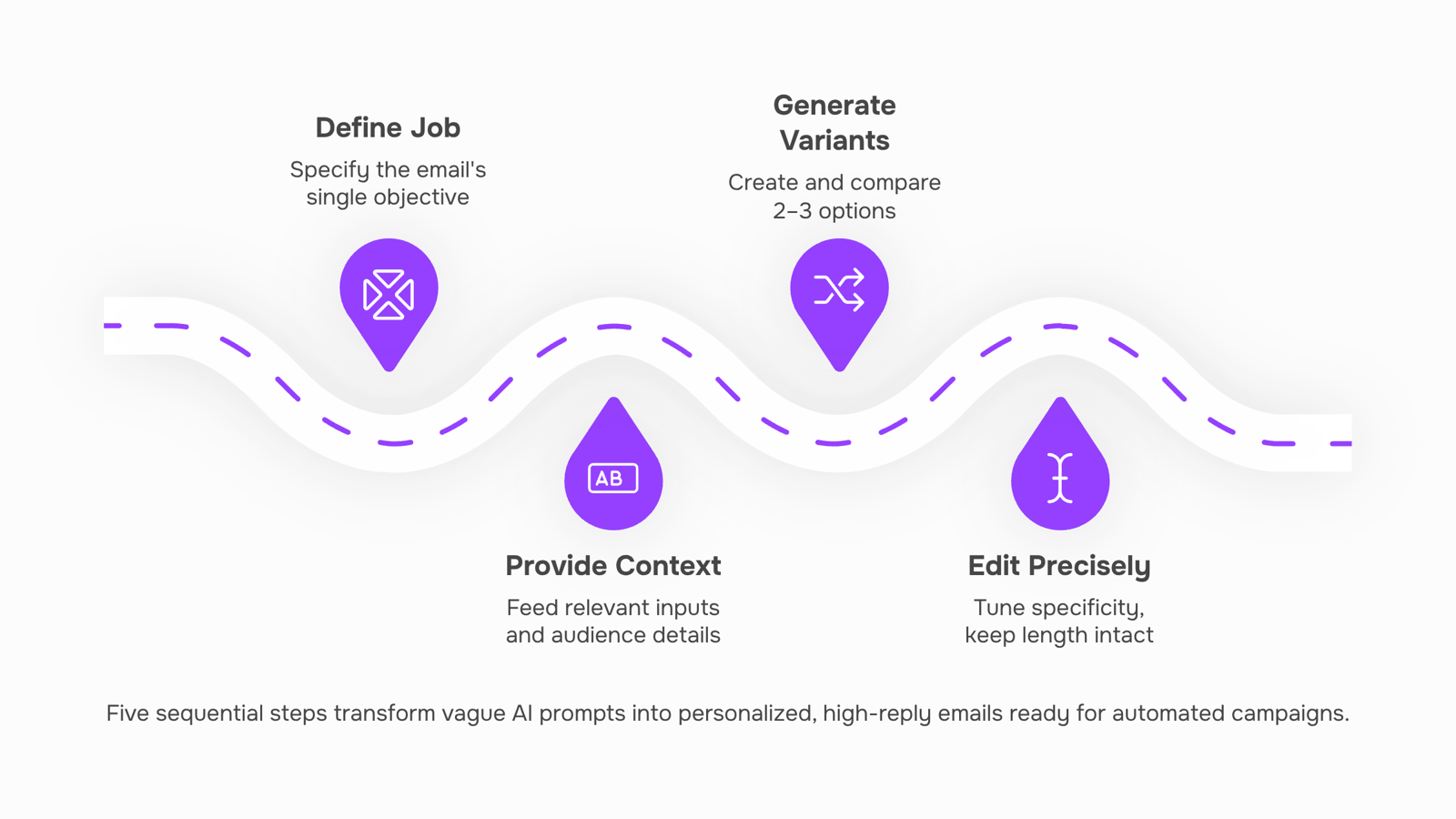
Most guides hand you a list of AI-generated email templates and call it done. That skips the part that actually determines quality: what you feed the AI before it writes. Here's the five-step process from goal to send, designed so anyone on your team can produce consistently strong outbound emails starting today.
1. Define the email's single job.
Before you touch any tool, write one sentence describing what you want the recipient to do after reading. "Book a 15-minute call," "reply with their current vendor name," or "click through to a case study." One email, one ask. If you have two goals, you need two emails in a sequence, not a longer single message.
2. Feed the AI your context inputs.
This is where most people under-invest. The AI can only personalize what you give it. At minimum, provide:
Recipient's role and company size
The specific pain point you're addressing (not a generic industry challenge)
Your value proposition in one line, tied to their pain
Desired tone (direct, consultative, casual)
Any constraint (word count, CTA type, compliance language)
The richer your inputs, the less editing you do on the output. A prompt like "write a cold email to a CTO" produces generic filler. A prompt like "write a 90-word cold email to a CTO at a 40-person MSP who's losing deals because follow-ups slip through cracks, offering automated multi-step sequences" produces something usable on the first pass.
3. Generate and compare two to three variants.
Never accept the first output. Generate at least two versions with slightly different angles (pain-focused vs. outcome-focused, question opener vs. stat opener). You can describe your campaign goal in plain English and generate the email structure without writing HTML or formatting by hand.
4. Edit for specificity, not length.
Read each variant and ask: could this email be about any company, or does it clearly reference this recipient's world? Replace every generic phrase ("companies like yours") with a named detail ("MSPs running 3-person sales teams"). This is where AI email personalization actually happens, in the edit, not the generation. Cut filler until the email is under 120 words for cold outreach.
5. Slot the winner into a multi-step sequence.
A single email converts at a fraction of what a timed sequence does. Take your best variant, build a 3-to-5 touch sequence around it (initial send, value-add follow-up, breakup email), and schedule sends based on recipient time zones. Evox handles multi-step email campaign creation with automation baked in, so your reps aren't manually queuing follow-ups at 7 AM.
Once you've built a sequence that converts, build and save your AI-generated templates for reuse across your team. That way every rep starts from a proven structure instead of a blank screen. For more options beyond Evox, see best AI tools for generating cold outreach emails.
How AI-generated emails improve customer engagement
Three mechanisms explain why AI-generated emails consistently outperform manual ones in open and reply rates.
AI email personalization at scale. A rep writing 40 outreach emails per day defaults to copy-paste with a swapped first name. AI pulls from CRM fields, recent activity, and firmographic data to rewrite the value proposition for each recipient. The result reads like a one-to-one note, not a mail merge. Teams that shift from generic bulk sends to personalized AI-generated emails typically see reply rates climb by 2 to 3x, because the message matches the recipient's actual situation.
Consistent follow-up timing. Most deals die in the gap between first touch and second touch. AI systems schedule instant email responses AI-timed to behavioral triggers (opened but didn't reply, clicked a link, visited pricing). A human rep forgets or deprioritizes; automation doesn't.
Relevance matching. AI scores which value prop, case study, or CTA variant fits a given lead's industry and stage. Instead of guessing, you send the version statistically most likely to earn a click.
The gap between knowing this and executing it is tooling. Platforms like Evox combine the generation layer with send-time optimization and lead scoring, so personalization doesn't require a separate step. For a deeper look at how AI email marketing improves personalization and send-time optimization, that breakdown covers the analytics side.
How to automate your email campaigns using AI
A single AI-generated email is useful. A multi-step sequence that sends, waits, follows up, and adapts based on recipient behavior is where automated email marketing campaigns actually produce pipeline.
Here's how the shift works in practice:
Start with your best-performing email. Take the AI-generated cold email you refined in the previous steps. This becomes step one of your sequence.
Map the follow-up logic. Define what happens if the recipient opens but doesn't reply (nudge at day 3), doesn't open at all (resend with a new subject line at day 5), or clicks a link (trigger a case-study email immediately).
Set delays between steps. Most IT services sales cycles respond well to 3-5 day gaps between touches. Shorter feels pushy; longer loses momentum.
Queue and send without babysitting. This is where manual work disappears. Instead of setting calendar reminders to follow up, the system handles scheduling and delivery while you focus on prospects who reply.
Evox handles this entire workflow natively. You build multi-step email campaigns with configurable delays, and its queue system sends each step on schedule. Two-way inbox sync means replies land in your CRM automatically, so no lead slips through because someone forgot to check a separate inbox.
The difference between AI email automation and just "using AI to write emails" is this operational layer. Writing the email is 10% of the work. Sending it to the right person at the right time, then following up consistently, is the other 90%.
If you're evaluating tools for this, compare options that handle the full AI email marketing workflow end to end.
Common mistakes that make AI emails miss
Three errors turn AI-generated email templates from useful drafts into inbox noise.
Vague prompts. Typing "write a follow-up email" gives you filler. The AI has no idea who you are selling to, what pain you solve, or what action you want. Instead, describe your campaign goal in plain English and generate the email structure. Include your ICP's role, industry, and the specific outcome you promise. That single change can shift reply rates from under 2% to 5%+ on cold sends.
No personalization context. Generic bulk emails underperform personalized ones by wide margins. If your AI email automation workflow feeds the same prompt for every contact, you are broadcasting, not selling. Feed the model a company name, a recent trigger event, or a named pain point per recipient. Even one dynamic variable outperforms zero.
Skipping review. AI drafts hallucinate details, invent case studies, and default to bland CTAs. Sending unedited output damages trust faster than sending nothing. Read every email before it enters your sequence. Compare your templates against best AI tools for generating cold outreach emails to calibrate what "good" looks like.
Closing
The five-step process turns AI from a template generator into a personalization engine. But one strong email is just the start. Teams that see real lift are the ones who connect that email to a timed, multi-touch sequence so follow-ups land automatically instead of slipping through cracks. That's where AI email generation becomes a revenue lever instead of a time saver. Ready to build sequences your team can reuse and scale? See how Evox handles both generation and campaign automation.
FAQ
How can I use AI to generate instant email responses?
Feed the AI your prospect's context (role, company, pain point) and your value prop in one sentence, then generate 2-3 variants. Edit the winner for specificity, not length, and slot it into a multi-step sequence so follow-ups fire automatically.
What are some examples of AI-generated email templates?
Cold outreach names a hiring trigger and offers a specific time commitment. Follow-ups add social proof with a link. Re-engagement emails reference a past conversation and offer a low-friction ask. Each works because it references a concrete trigger, not a generic pain point.
Can AI help me automate my email marketing campaigns?
Yes. Once you generate a strong email, build a 3-to-5 touch sequence around it and schedule sends by time zone. Automation platforms like Evox handle multi-step campaign creation so reps don't manually queue follow-ups.
How does AI-powered email generation improve customer engagement?
AI personalizes each message to the recipient's role and situation instead of copy-paste templates, driving reply rates up 2-3x. Timed follow-ups based on behavioral triggers (opened but didn't reply) close gaps where deals die.
What information do I need to give AI to get a good email?
Recipient's role and company size, the specific pain point you're solving, your value prop in one line, desired tone, and any constraints like word count or CTA type. The richer your inputs, the less editing you do on the output.
How do I know if an AI-generated email is ready to send?
Replace every generic phrase with a named detail specific to this recipient's world. Cut filler until the email is under 120 words for cold outreach. If it could be about any company, it needs more specificity before you send.


 Elena Petrova15 September 2026


