TL;DR: Most articles on project portfolio management define the term and move on. This one gives IT company owners a concrete 6-step process for building a portfolio tied to real resource allocation and prioritization decisions, not theory. You'll finish with a working structure you can apply to your current project mix, not a framework you'll shelve after one read.
What a project portfolio actually is
A project portfolio is the complete set of projects your organization is running or planning at any given time, viewed as a single managed collection rather than as separate efforts.
That distinction matters. A single project has a defined scope, timeline, and outcome. A program groups related projects that share a goal. A portfolio holds all of them, related or not, and asks a different question: given our capacity and strategy, which of these should we be running, and in what order?
What is project portfolio management, then? It's the discipline of actively governing that collection: tracking status, balancing resource demand against supply, and making deliberate decisions about what starts, pauses, or stops. PPM project portfolio processes replace the informal "whoever asks loudest gets headcount" model with a structured view of trade-offs.
For IT teams, this matters more than in most functions. IT typically runs infrastructure work, product builds, compliance projects, and internal requests simultaneously. Without a portfolio view, those efforts compete invisibly for the same engineers, budget, and attention.
The next section covers the four concrete outcomes a managed portfolio produces, including how prioritization methods reduce delivery risk before it compounds.
Why your portfolio view changes how you work
Managing projects one at a time feels manageable until you have eight running simultaneously and no clear picture of which ones share the same three engineers. A structured approach to project portfolio management changes that by shifting your view from individual delivery to collective performance.
Four outcomes follow almost immediately:
Prioritization clarity. When every project sits in the same view, ranked against shared criteria, the "which one matters more" debate becomes a data conversation instead of a political one. The best project prioritization methods for IT teams rely on exactly this kind of consolidated input.
Resource visibility. PPM project portfolio management surfaces who is allocated where, so you catch over-commitment before it causes a missed deadline, not after.
Faster decisions. Executives reviewing a single portfolio dashboard can approve, pause, or redirect work in one meeting rather than waiting for status updates from five separate project managers.
Reduced delivery risk. Interdependencies between projects become visible early. A delay in one initiative stops quietly cascading into three others. The six-step portfolio risk framework covers how to formalize that process.
None of this requires a dedicated PMO. It requires one shared view that your team actually updates. Taro gives every project a single source of truth from day one, which is the foundation the rest of this process builds on.
Build your project portfolio in 6 steps
Start with a complete inventory. Before you can manage a portfolio, you need to see everything in it. Pull every active project, every initiative in planning, and every "we should do this soon" item sitting in someone's inbox. A simple spreadsheet works at this stage. The goal is one list with a project name, owner, current status, and rough budget figure for each item. Most IT teams discover three to five projects they had mentally deprioritized but never formally paused.
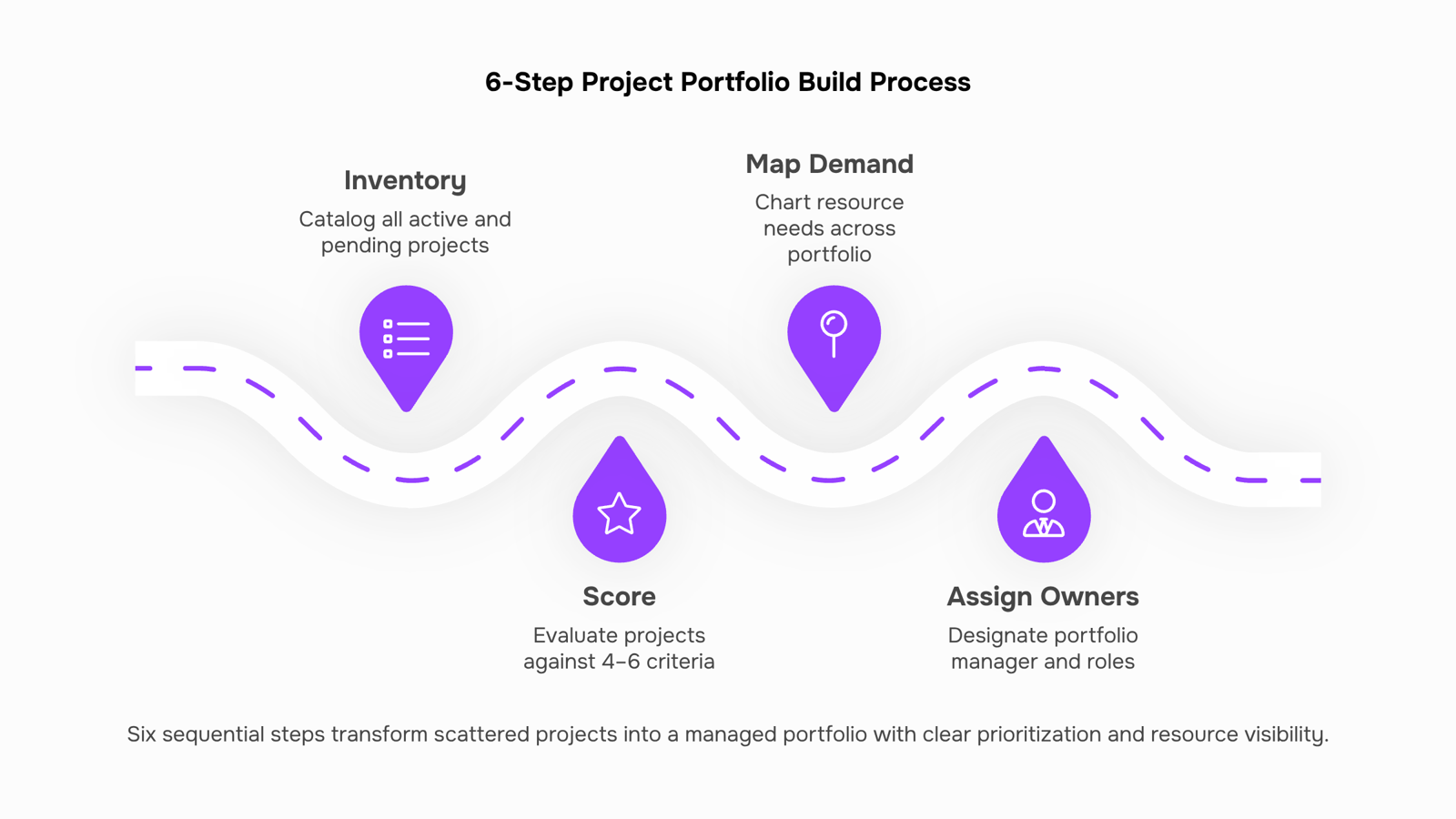
Step 1: Inventory every active and pending project. Capture project name, owner, estimated cost, expected completion date, and strategic goal it supports. If a project can't be tied to a strategic goal, that's your first decision point.
Step 2: Score each project against a consistent set of criteria. Pick four to six criteria that reflect your business priorities: strategic alignment, revenue impact, resource demand, technical risk, and regulatory urgency are a reasonable starting set. Score each project 1–5 on each criterion. This turns a subjective conversation into a comparable number. A 50-person IT services firm using this approach typically finds that two or three projects consuming 40% of engineering capacity score below average on strategic alignment.
Step 3: Map resource demand across the full list. Once you have scores, lay each project's resource requirements against your actual headcount and budget. This is where conflicts become visible. If three projects each need your only senior network engineer for the same six-week window, the portfolio view forces that conversation before it becomes a missed deadline. This is the step most teams skip, and it's the main reason delivery risk stays high. For a deeper look at how to structure that trade-off conversation, the best project prioritization methods for IT teams covers scoring models that hold up under stakeholder pressure.
Step 4: Assign a project portfolio manager and define ownership. Someone needs to own the portfolio view, not just individual projects. A project portfolio manager holds the cross-project perspective: they flag resource conflicts, escalate trade-off decisions to leadership, and keep the scoring criteria from drifting over time. In smaller IT companies, this is often the IT director wearing a second hat. The role doesn't need to be full-time; it needs to be explicit.
Step 5: Choose a project portfolio template and build the tracking layer. A project portfolio management tool gives every project a single source of truth from day one. At minimum, your template should show status, owner, budget consumed vs. allocated, milestone progress, and risk level in one view. Taro's project management features are built for exactly this structure, so you're not manually assembling a dashboard from disconnected spreadsheets.
Step 6: Set a review cadence and stick to it. A portfolio without a review schedule is just a list. Monthly reviews work for most IT teams: check whether priorities have shifted, whether any project has moved into high-risk territory, and whether resource allocation still reflects the scoring from Step 2. Quarterly, revisit the scoring criteria themselves. For a structured approach to the risk side of that review, the portfolio risk management framework for IT teams gives you a six-step process you can run alongside your existing cadence.
Use your portfolio to allocate resources and prioritize work
A portfolio view does something a single project plan cannot: it shows you where the same three engineers are promised to five different workstreams at once. That conflict is invisible until you look across all active work simultaneously.
Resource allocation becomes a decision, not a guess, when you can see utilization by person or team across every initiative. If your senior network engineer is at 140% capacity in Q3, you have three real options: delay a lower-priority project, hire, or descope. PPM project portfolio management tooling surfaces that choice before the deadline forces it on you.
Prioritization follows the same logic. Rank projects by strategic value, revenue impact, or compliance risk, then match available capacity to the top of that list. Work that doesn't fit gets deferred or cut, not quietly deprioritized while still consuming partial attention. That partial attention is where most IT teams lose time.
Project prioritization methods like weighted scoring or MoSCoW work best when the full portfolio is visible in one place. Without that view, you're ranking in a vacuum.
Portfolio risk management also depends on this visibility: a project that looks low-risk in isolation may share critical dependencies with two others.
Project portfolio management software like Taro keeps ownership, capacity, and priority in one place so trade-off conversations happen with data, not assumptions.
Project portfolio vs. program portfolio: what is the difference
The confusion is common: teams use "project portfolio" and "program portfolio" interchangeably, then wonder why their reporting feels off.
A project portfolio groups unrelated initiatives managed together for resource and priority decisions. A program portfolio groups related projects that share a common outcome, like a multi-phase infrastructure modernization. The distinction matters because the success metrics and ownership structures are different.
Dimension | Project portfolio | Program portfolio |
|---|
Scope | Independent projects across business units | Interdependent projects toward one goal |
Ownership | Portfolio manager or PMO | Program manager |
Success metric | ROI across the mix, resource utilization | Delivery of the shared outcome |
Typical IT use case | PPM project portfolio balancing new builds vs. maintenance | ERP rollout across three phases |
If your projects share dependencies, you likely have a program inside a larger project portfolio. If they compete for the same budget and headcount without sharing an end goal, that is a portfolio, and portfolio risk management applies directly.
Spreadsheets break down fast when you're tracking six or eight concurrent projects. A status column updated last Tuesday tells you nothing about whether a milestone is actually on track today.
Taro's project planning features give your portfolio a single source of truth. You can map each project into a workspace with defined phases and milestones, then view the whole portfolio on a Timeline or Gantt chart to spot scheduling conflicts before they compound. When one project slips, you see immediately which downstream deliverables are at risk, without cross-referencing three separate files.
The practical difference shows up during portfolio reviews. Instead of assembling a status deck, you open the Timeline, filter by project health, and make resourcing decisions in the same tool where the work lives. Revo can trigger automated status updates when milestones change state, so the portfolio view stays current without manual input.
If you're evaluating project portfolio management software more broadly, the deciding factor is usually whether the tool connects planning to execution or just tracks it. Taro does both.
Common mistakes that stall portfolio progress
Four mistakes consistently derail project portfolio management after the initial build.
Tracking too many metrics. Pick five or fewer KPIs per portfolio. More than that, and your project portfolio manager spends review time gathering data instead of making decisions.
Skipping a review cadence. A portfolio without a fixed monthly or quarterly review drifts. Priorities shift; the portfolio doesn't.
Conflating projects with programs. A program is a group of related projects managed together for strategic benefit. Treating them as interchangeable creates false resource availability.
Ignoring dependencies. One delayed project quietly blocks three others. Map dependencies before they surface as emergencies — minimizing portfolio risk starts here.
Closing
A project portfolio transforms how your IT team makes decisions. Instead of managing projects in isolation and letting resource conflicts emerge as missed deadlines, you get a single view that surfaces trade-offs before they compound. The six-step framework above moves you from inventory to active governance in one cycle, and the monthly review cadence keeps priorities aligned as your business shifts. Start by pulling together that first complete list of active and pending work—that inventory is your foundation. What's the biggest resource conflict you're managing right now that a portfolio view would make visible?
FAQ
How do I create a project portfolio that showcases my skills?
A project portfolio isn't a resume artifact—it's an operational tool your team uses to govern work. Build one by inventorying active projects, scoring them against business criteria, and mapping resource demand. The portfolio itself showcases your ability to prioritize under constraint and make trade-offs visible to leadership.
What is the difference between a project portfolio and a program portfolio?
A program groups related projects that share a single goal. A portfolio holds all projects—related or unrelated—and manages them as a collection against organizational capacity and strategy. A portfolio is the broader governance layer; programs are clusters within it.
How can I use a project portfolio to improve resource allocation?
Map each project's resource demand against your actual headcount in Step 3. When you see that three projects need the same engineer simultaneously, you make deliberate trade-off decisions instead of letting conflicts surface as missed deadlines. The portfolio view forces resource conflicts into the open before they become problems.
What are the benefits of using a project portfolio management tool?
A dedicated tool replaces manual spreadsheet assembly with a single source of truth. You see status, budget, milestones, and risk across all projects at once, catch over-commitment early, and run monthly reviews without recreating dashboards each time.
Can a project portfolio help me prioritize projects more effectively?
Yes. In Step 2, you score all projects against consistent criteria—strategic alignment, revenue impact, resource demand, risk—which turns subjective debates into comparable numbers. Rank by score, match available capacity to the top projects, and defer the rest. That's prioritization with data, not politics.
What should a project portfolio template include?
At minimum: project name, owner, status, strategic goal, estimated cost, completion date, resource demand by role, risk level, and milestone progress. This gives you enough visibility to catch conflicts and make trade-off decisions without overwhelming detail.
How often should you review and update your project portfolio?
Review monthly to check status shifts, resource conflicts, and risk changes. Quarterly, revisit the scoring criteria themselves to ensure they still reflect your business priorities. A portfolio without a review schedule is just a list.


 Elena Petrova15 September 2026


