TL;DR: Most guides on swim lane process maps stop at the drawing steps. This one walks IT company owners through the decisions behind the map: how to set lane boundaries that reflect real accountability, where handoffs typically break down, and how to read the finished map to find bottlenecks before they delay a project.
What a swim lane process map is
A swim lane process map is a flowchart that divides work into horizontal or vertical bands, where each band represents one owner: a person, a role, a team, or a system. Tasks sit inside the lane responsible for them. Handoffs are the lines that cross between lanes.
That structure is what separates a swim lane diagram from a standard flowchart. A regular flowchart shows sequence. A swim lane business process map shows sequence and accountability at the same time, so you can see exactly who does what and where work passes between owners.
The lane metaphor comes from competitive swimming: each swimmer stays in their lane, and the race is won or lost at the transitions. Your process works the same way. Most delays don't happen inside a lane; they happen at the handoff between them.
Understanding how swimlanes partition work by role or system is the foundation before you draw anything. If you want broader context, business process modeling techniques complement what a swim lane map captures at the task level.
The next section covers what you actually gain once the map exists.
Why swim lane maps improve workflow clarity
Most workflow problems aren't process problems. They're ownership problems. A swim lane process map forces every task into a named lane, so there's no ambiguity about who acts next.
Four outcomes make this worth building:
Ownership clarity. Each lane belongs to one role or team. When a task sits in the IT department's lane, the IT department owns it. No shared-responsibility fog.
Faster handoffs. The moment a task crosses a lane boundary, both sides can see it. Teams stop waiting for an email to know work has arrived.
Process bottleneck visibility. Tasks that pile up at a lane boundary are a visual signal, not a buried metric. You can spot where a cross-functional flowchart jams before it becomes a missed deadline.
Stakeholder alignment. Executives and clients read swim lanes without training. The map shows what each department does and when, which makes approval conversations shorter.
Swimlanes in workflow management covers the structural logic in more depth, but the practical payoff is straightforward: teams that map handoffs explicitly spend less time on clarification loops and more time executing.
A concrete example: an IT onboarding process with five departments typically has three to five handoff points where tasks stall. A swim lane map makes each one visible in under a minute.
Swim lane map vs. traditional flowchart
A standard flowchart shows what happens. A swim lane diagram shows who does it and when their responsibility ends. That distinction matters most in cross-functional work, where handoffs between roles are exactly where delays and rework accumulate.
If you want to understand what swimlanes are and how they partition work by role or system, the core difference is structural: lanes force you to assign every step to an owner before the map is finished.
Dimension | Traditional flowchart | Swim lane process map |
|---|
Ownership visibility | Steps only, no owner assigned | Each step sits inside a named lane |
Complexity handling | Works well for single-role processes | Built for multi-role, multi-system workflows |
Primary audience | Individual contributors following a sequence | Managers and stakeholders reviewing handoffs |
Best use case | Documenting a simple linear process | Mapping a business process map across teams |
For IT company owners running cross-functional projects, a swim lane vs flowchart comparison almost always resolves the same way: use a flowchart for internal SOPs, use a swim lane when two or more roles touch the same process. The next section walks through building one step by step.
How to create a swim lane process map in 6 steps
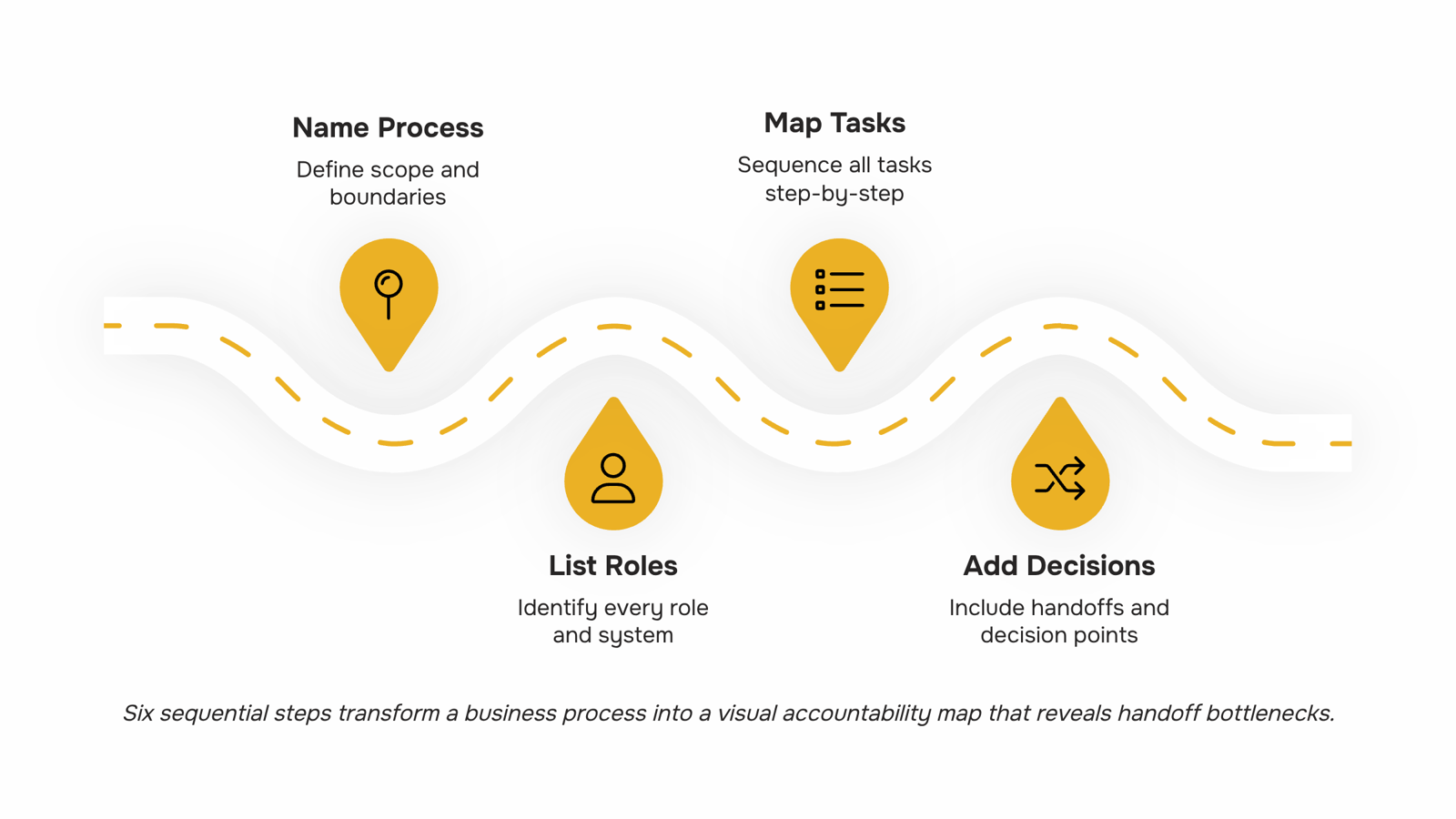
Step 1: Name the process and set its boundaries
Pick one process, not a department. "Client onboarding" is a process. "Sales" is not. Write a one-sentence scope statement that defines where the process starts and where it ends. For an IT company, that might be: "Starts when a signed contract is received; ends when the client completes their first login."
Step 2: List every role or system involved
Before you draw anything, write out every actor who touches the process. Roles, teams, and external systems each get their own lane. If you are unsure whether to organize lanes by role, team, or system, default to role for processes with five or fewer people, and team for anything larger. This lane-assignment decision is where most cross-functional flowcharts go wrong, because grouping too broadly hides the handoffs that cause delays.
For context on what swimlanes are and how they partition work by role or system, the core idea is that each lane represents a single owner, not a shared bucket.
Step 3: Map every task in sequence
List every task from start to finish, in order. Do not filter yet. A typical IT client onboarding process has 15 to 25 discrete tasks once you write them all out. Put each task in the lane belonging to whoever owns it, not whoever requested it or whoever benefits from it. Ownership is the operative word here.
Step 4: Add decision points and handoffs
Decision points are diamonds on your map. Handoffs are arrows that cross lane boundaries. These two elements are what make a swim lane process map more useful than a plain checklist. Every arrow that crosses a lane boundary is a potential process bottleneck, so mark them clearly. In an IT onboarding context, a common handoff is the moment the sales team passes account credentials to the implementation team. That crossing deserves its own arrow and a clear trigger condition.
This is also where broader business process modeling techniques that complement swim lane maps can sharpen your notation choices, particularly if your process includes conditional branches or parallel tracks.
Step 5: Validate with the people in each lane
Show the draft to one person from each lane before you finalize anything. Ask them two questions: does every task in your lane actually belong to you, and is the sequence accurate? Expect to move at least three tasks and add one you missed entirely. Skipping this step produces a map that reflects how leadership thinks the process works, not how it actually runs.
Step 6: Clean the map and connect it to your workflow
Remove duplicate steps, tighten the sequence, and confirm every lane has a clear start and end point. A finished swim lane process map should be readable by someone who was not in the room when you built it. Once it is clean, the map becomes the foundation for turning your mapped process into a repeatable automated workflow.
For IT companies specifically, the map also surfaces the people, process, and technology layers that need to stay aligned as the business scales. A workflow mapping exercise that ends with a clean diagram is useful. One that ends with a documented, automated process is the version that actually reduces rework.
How to spot bottlenecks in your finished map
Three signals in a finished swim lane diagram tell you where work is stalling.
Lane pile-ups. When one lane holds significantly more steps than the others, that role is a bottleneck. In an IT company context, this often shows up in the QA lane during a release cycle. Redistribute tasks or add a second owner for that lane.
Long horizontal arrows. A handoff arrow that skips two or more lanes means a task is traveling far to find the right person. That gap usually signals a missing role or a step that belongs to a different team entirely. Unclear handoffs in cross-functional projects are one of the most common sources of rework.
Single-owner sequences. Three or more consecutive steps in one lane with no handoff creates a dependency risk. If that person is unavailable, the whole process stops. Break the sequence or document a backup owner.
Once you spot these patterns, your swim lane process map becomes more than a diagram. It becomes a prioritized list of process bottleneck fixes. Broader business process modeling techniques can help you decide which fixes to tackle first.
Automate the handoffs your map reveals
A finished swim lane process map is already a workflow automation blueprint — you just need to act on it. Every long horizontal arrow between lanes is a handoff that currently depends on someone remembering to pass work forward. Those are your automation targets.
Revo converts that handoff logic into triggered workflows without writing code. When your business process map shows "QA approves → Developer deploys," Revo turns that approval event into an automatic trigger, removing the follow-up entirely.
Start with your two or three longest arrows. Map the condition ("when X is marked complete") and the recipient lane. That's the rule Revo needs.
For a deeper look at turning your mapped process into a repeatable automated workflow, the linked guide walks through the full build.
Common mistakes that weaken swim lane maps
Three failure patterns kill most swim lane process maps before they get used twice.
Too many lanes. When every sub-role gets its own lane, the cross-functional flowchart becomes unreadable. Cap lanes at the decision-making units, not every individual contributor.
Missing decision points. A map without diamond-shaped decision nodes shows what happens in the happy path only. Real processes branch. If your map doesn't show where a handoff can go wrong, it won't survive contact with reality.
No named owner per lane. A lane labeled "Operations" assigns accountability to no one. Name the role responsible for each lane, or the map partitions work by role on paper but not in practice.
Fix these three before you build anything on top of the map.
Closing
A swim lane process map turns invisible handoff problems into visible ones. Once you've mapped your process and validated it with the people actually doing the work, you have a blueprint that shows exactly where delays happen and who owns each step. The next move is to take that map and automate it. Revo turns the handoff logic you just documented into a workflow that runs without manual intervention, so tasks move between lanes automatically and nothing gets stuck waiting for an email. Start a free trial to see how your mapped process runs on automation.
FAQ
Can I use a swim lane process map to identify bottlenecks in my process?
Yes. Tasks piling up at lane boundaries are visual signals of bottlenecks. Handoff arrows that cross frequently or trigger delays show exactly where your process jams before it becomes a missed deadline.
How does a swim lane process map differ from a traditional flowchart?
A flowchart shows what happens; a swim lane map shows who does it and when their responsibility ends. Swim lanes force you to assign every step to a named owner, making cross-functional handoffs visible.
How many lanes should a swim lane diagram have?
One lane per role, team, or system that touches the process. Most IT workflows have four to eight lanes. More than ten usually signals you should group lanes by team instead of individual role.
When should I update my swim lane process map?
Update it when you add a new role or system to the process, when a handoff consistently stalls, or when you automate a step. Quarterly reviews catch drift before it compounds.


 Elena Petrova15 September 2026


