TL;DR: Most ops plan guides hand you a structure and leave the execution gap to you. This one shows IT company owners how to build a plan that connects strategy to daily work, with clear ownership, early blocker detection, and a review cycle that doesn't depend on someone remembering to run it. You'll leave with a six-step framework you can put to work this week.
What an ops plan actually is
An ops plan (short for operational plan) is the document that translates your company's strategy into the specific work that gets done each quarter. It names who owns what, what resources are allocated, and what "done" looks like by a fixed date.
A strategic plan answers "where are we going?" An operational plan answers "how do we get there this week, this sprint, this quarter?" Without that second document, strategy stays on a slide deck and your team runs on instinct and Slack threads.
The distinction matters for IT company owners specifically. Your strategic plan might say "reduce client churn by 20%." Your ops plan says which team handles the retention workflow, what the timeline is, and which tasks are blocked on what. That level of specificity is what turns a goal into a deliverable.
A good ops plan also isn't a one-time artifact. Teams that treat it as a living system, updated as priorities shift, consistently outperform teams that revisit it once a quarter. Pairing your plan with a clear action plan template keeps individual tasks connected to the broader operational picture.
Why your team needs an ops plan
Without an ops plan, your team defaults to whoever shouts loudest. Work gets done, but not the right work, not in the right order, and rarely by the right person.
The four outcomes that matter most to operations planning for IT teams are clarity, accountability, speed, and reduced firefighting. Each one breaks down practically:
Clarity means every person knows what they own this week, not just this quarter. Vague priorities produce duplicated effort and missed handoffs.
Accountability ties deliverables to named owners. When a task slips, you know exactly where to look, and so does the person responsible.
Speed comes from decisions made in advance. A team that has already mapped dependencies doesn't pause to debate sequencing mid-sprint.
Reduced firefighting is the compounding benefit. Most teams spend a significant portion of each week reacting to problems that documented planning would have caught earlier.
The cost of skipping this isn't abstract. It shows up as missed deadlines, duplicated work, and managers pulled into triage instead of strategy.
One of the clearest benefits of having an ops plan is that it gives tools like Taro's auto-prioritization something real to work with. Without documented priorities, even smart automation guesses. With them, it executes.
For the task-level detail that sits underneath an ops plan, an action plan template fills the gap.
Key components every ops plan needs
Five components show up in every operational plan that actually gets executed. Miss one and the plan either stalls or drifts.
Goals anchor everything else. Each goal should map directly to a business outcome — "reduce ticket resolution time by 20% in Q3" beats "improve support." Vague goals produce vague execution.
Resources cover budget, headcount, and tooling. List what you have and what you need before the plan goes live, not after the first blocker surfaces.
Timelines break the plan into phases with hard dates. A 90-day operational plan with weekly milestones is far easier to track than a floating "by end of year" commitment.
Owners are the difference between a plan and a wish list. Every deliverable needs one named person accountable for it. If two people own something, nobody does. For IT teams managing overlapping workstreams, tools like Taro's task management make ownership visible across the full backlog without a separate status meeting.
Success metrics tell you whether the plan is working before the deadline arrives. Define them upfront: response time, deployment frequency, cost per ticket, whatever fits your operation. If you can't measure it, you can't course-correct.
These five components work together. Goals without metrics drift. Timelines without owners slip. Resources without goals get misallocated. Before you write a single line of your operational plan, confirm all five are present.
How to create an ops plan in 6 steps
Before you write a single line, confirm the five components from the previous section are documented somewhere your team can actually reference. A shared doc, a project board, a spreadsheet — format doesn't matter yet. What matters is that goals, resources, timelines, owners, and success metrics are visible before you start structuring the plan.
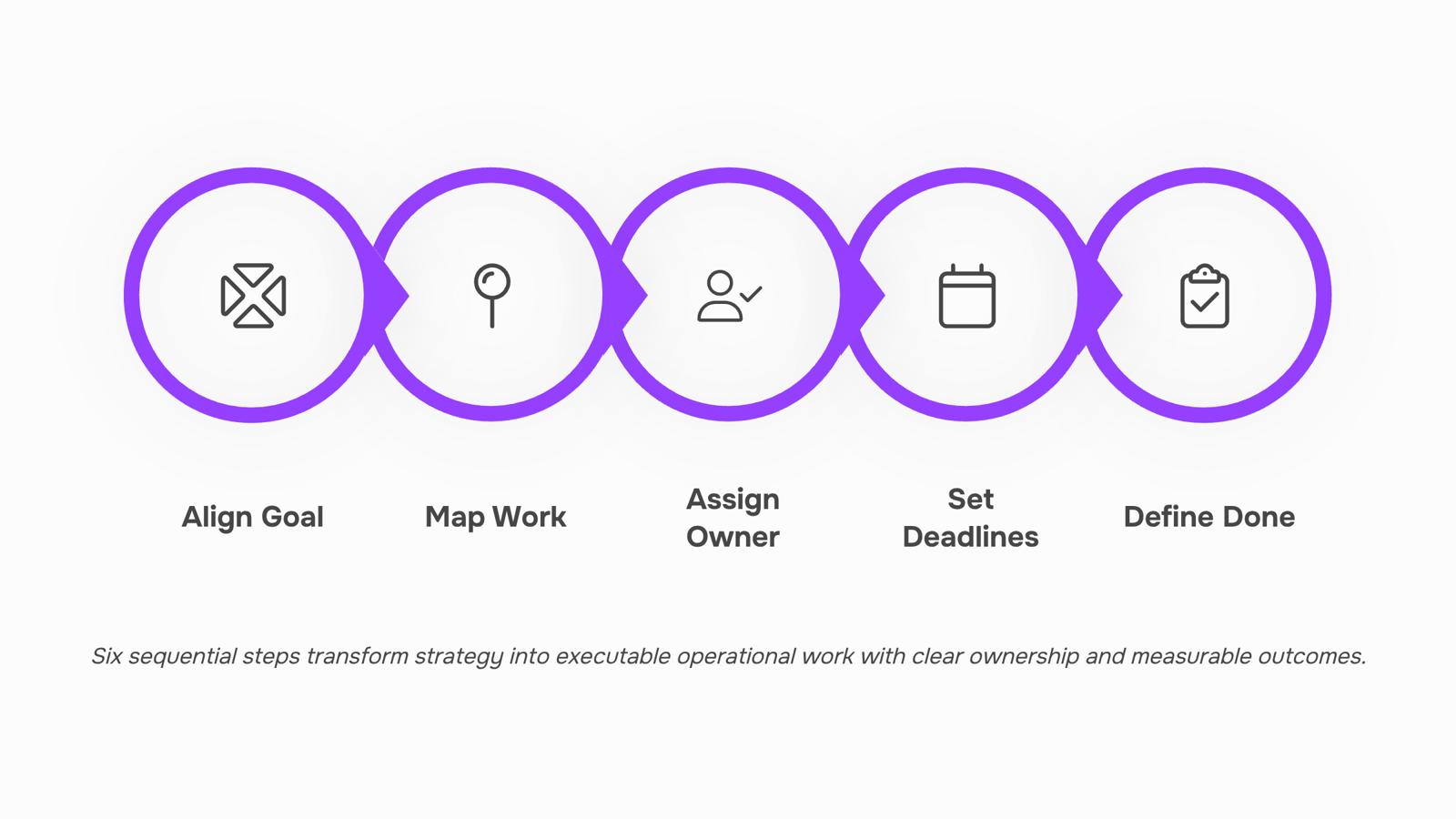
Align on the strategic goal driving this plan. Start with the one business outcome this ops plan is meant to support. Not five outcomes — one. For an IT services company, that might be: "Reduce average client onboarding time from 14 days to 7 days by Q3." Everything else in the plan traces back to that anchor.
Map the work required to hit that goal. Break the goal into the specific operational activities needed to achieve it. This is where most teams go too broad. Instead of "improve onboarding," write "audit current onboarding checklist," "rebuild client intake form," and "train account managers on new handoff process." Three to eight discrete activities is the right range for most IT ops plans.
Assign a single owner to each activity. Not a team. One person. If two people share ownership of an activity, no one owns it. This is the step most plans skip, and it's why they stall. A useful action plan template makes this explicit with a dedicated owner column.
Set deadlines, not just target quarters. "Q2" is not a deadline. "April 18" is. Assign a due date to every activity. For multi-week tasks, add a midpoint check-in date so the owner has a natural moment to flag blockers before the deadline arrives.
Define what done looks like for each activity. This is your success metric at the task level, not just the plan level. "Onboarding checklist audited" is vague. "Onboarding checklist reviewed, redundant steps removed, and new version approved by ops lead by April 4" is done. Tools like Taro's task management let you attach completion criteria directly to each task so nothing ships without a clear finish line.
Prioritize before you publish. Before the plan goes live, rank activities by impact and dependency. Auto-prioritization tools can surface which tasks are blocking others, so your team starts on the right things instead of the easiest ones.
Once those six steps are done, you have a working first draft. The harder part — keeping it moving after day one — is what the next section covers.
How to implement your ops plan without losing momentum
Most ops plans die in the first two weeks. Not because the plan was wrong, but because no one owned the follow-through.
The fix is simpler than most operations planning for IT teams guides suggest: assign a named owner to every workstream before the plan goes live. Not a team, not a department. One person. When something slips, you know exactly who to call.
From there, run a 15-minute weekly check-in against three questions: What moved forward? What's blocked? What needs a decision this week? Keep it async if your team prefers it. The format matters less than the consistency.
Two things accelerate this cadence. First, tie each task to a clear outcome, not just an activity. "Deploy updated monitoring stack by Friday" beats "work on infrastructure." Second, surface blockers early. A task that's been "in progress" for eight days without movement is a blocker wearing a disguise.
When you implement an ops plan this way, the check-in itself becomes a forcing function. Owners prepare because they know they'll be asked. Blockers get named before they become crises.
For task ownership specifically, Taro's auto-prioritization reads your backlog and flags what needs attention first, which removes the guesswork that usually stalls execution mid-cycle.
If your plan needs tighter task-level structure before you get to the check-in stage, the action plan template guide covers exactly what to include so nothing falls through.
Ops plan vs. project plan: what is the difference
The confusion is understandable. Both documents describe work, assign tasks, and set timelines. But they solve different problems.
An operational plan runs the business continuously. It covers a full quarter or year, spans multiple teams, and answers: "How do we keep everything running and hit our targets?" Ownership sits with department leads or an ops manager. The output is a living system: recurring processes, metrics, and check-in cadences.
A project plan is temporary. It has a defined start and end, a single deliverable, and a project manager who closes it out when the work ships.
Dimension | Ops plan | Project plan |
|---|
Time horizon | Quarter or year | Fixed start to end date |
Scope | Whole department or company | Single initiative |
Ownership | Ops or department lead | Project manager |
Output | Ongoing processes and metrics | Delivered asset or milestone |
Use a project plan when you're building something new. Use an operational plan when you're running something repeatedly. Conflating the two is how recurring work gets treated as a one-time task and then quietly falls apart.
Common mistakes that break an ops plan
Four patterns kill ops plans before they get traction.
Planning without operators. When managers write the plan without input from the people executing it, the task sequences are wrong and the timelines are fiction. Pull in at least one person from each function before you finalize how to create an ops plan.
No named owner. A plan owned by "the team" is owned by no one. Every key component of an ops plan needs a single accountable name next to it.
No update cadence. A plan reviewed once a quarter becomes a historical document, not an execution tool. Set a fixed weekly or biweekly review.
Disconnected tools. When tasks live in one place and the plan lives in another, both rot. Keeping your action plan and task backlog in the same system is the simplest fix.
Closing
The real test of an ops plan isn't how well it's written—it's whether your team actually follows it once work starts. That means building the plan into your daily workflow, not storing it in a folder and checking it quarterly. The hardest part is keeping it current as priorities shift and blockers surface. Taro is built for exactly this: it's where your ops plan lives, tasks get assigned with clear ownership, and priorities adjust automatically as dependencies change. Your team sees what matters this week, blockers surface before they derail the quarter, and you spend less time in status meetings chasing down what moved. Start a free trial and wire your first ops plan into Taro this week.
FAQ
How do I create an effective ops plan?
Start with one strategic goal, break it into three to eight discrete activities, assign a single owner to each, set hard deadlines (not quarters), define what done looks like, and prioritize by impact and dependency before launch.
What are the key components of an ops plan?
Goals, resources, timelines, owners, and success metrics. Miss one and the plan either stalls or drifts. Every deliverable needs a named owner and a measurable outcome.
How can I implement an ops plan in my business?
Assign a named owner to every workstream, run weekly 15-minute check-ins against progress and blockers, and keep the plan in a live task management tool so priorities adjust as work moves, not in a static document.
What are the benefits of having an ops plan?
Clarity on weekly ownership, accountability tied to named people, faster execution from pre-made decisions, and reduced firefighting because planning catches blockers early.
What is the difference between an ops plan and a project plan?
A strategic plan answers where you're going. An ops plan answers how you get there this week and this quarter with clear ownership and resource allocation.
How often should an ops plan be updated?
Teams that treat it as a living system updated as priorities shift consistently outperform those that revisit it once a quarter. Review and adjust weekly during check-ins.
Who should own the ops plan in an IT company?
Assign a named owner to every workstream and deliverable—not a team. When something slips, you know exactly where to look. One person per activity ensures accountability.


 Elena Petrova15 September 2026


