TL;DR: Most process flow guides stop at the diagram. This one gives IT company owners a six-step method to map, document, and automate a process flow end to end, with specific triggers, handoff points, and automation logic so work moves forward without manual pushing. You'll finish with a framework you can apply to a real process this week.
What a process flow actually is
Professional 3D process flow diagram with blue and gray geometric shapes connected by arrows
A process flow is a step-by-step map of how work moves from start to finish inside your business. It shows who does what, in what order, and what triggers the next action.
Two terms often get confused with it. A workflow describes the sequence of tasks assigned to people or systems. A process flow goes one level deeper: it captures decision points, handoffs, and the conditions that route work down different paths. A process flow map (sometimes called a process flow diagram or work process chart) is simply the visual version of that logic, drawn as shapes and arrows.
For IT company owners, the distinction matters because most bottlenecks hide in the handoffs, not the tasks themselves. When a ticket escalation stalls, it's rarely because someone forgot how to escalate. It's because the condition that triggers escalation was never written down.
Before you build and automate a business process workflow, you need that shared vocabulary. Once your team agrees on what a process flow includes, you can identify which processes are ready to automate instead of guessing where to start.
Why mapping your process flow improves team efficiency
Mapping your process flow does one thing before anything else: it makes invisible work visible. Once every step is drawn out, four concrete gains follow.
Faster bottleneck diagnosis: A work process flow chart shows exactly where tasks stall, who holds them, and for how long. Without it, you're guessing. With it, you can point to the specific handoff where a client approval sits for three days and fix that step alone.
Clearer ownership: Undocumented processes create ownership gaps. When two people assume the other handles a step, things drop. A mapped process assigns each action to a role, so accountability is structural, not assumed.
Shorter onboarding time: New hires in IT service teams spend the first weeks reverse-engineering how things actually work. Process flow diagrams cut that ramp by giving them a reference they can follow from day one rather than shadowing colleagues for answers.
A reliable base for automation: You can't automate what you haven't defined. Once the process is mapped, you can identify which processes are ready to automate and automate the process flow end to end without guessing which steps to hand off to a tool.
If you want to go deeper before building your diagram, model your process before you map it to avoid redrawing it twice.
Process flow diagram symbols you need to know
Each symbol in a process flow diagram carries a specific meaning. Using the wrong one makes your chart ambiguous to anyone reading it later.
The six you need:
Oval (terminator): marks where the process starts or ends. Every process flow chart has exactly two.
Rectangle (process step): represents a single action or task, like "send client invoice" or "deploy build to staging."
Diamond (decision): signals a yes/no branch. If your flow has an approval gate, this is the shape.
Circle (connector): links separate parts of a diagram when the flow continues on another page or section.
Document symbol: indicates a form, report, or file is produced or required at that step.
D-shape (delay): shows a waiting period, like a client review window or an SLA hold.
Most process flow diagrams only use the first three regularly. The others appear when your process involves handoffs, approvals, or waiting periods common in IT service workflows.
Once you know what each shape means, you can model your process before you map it and catch gaps before they become bottlenecks.
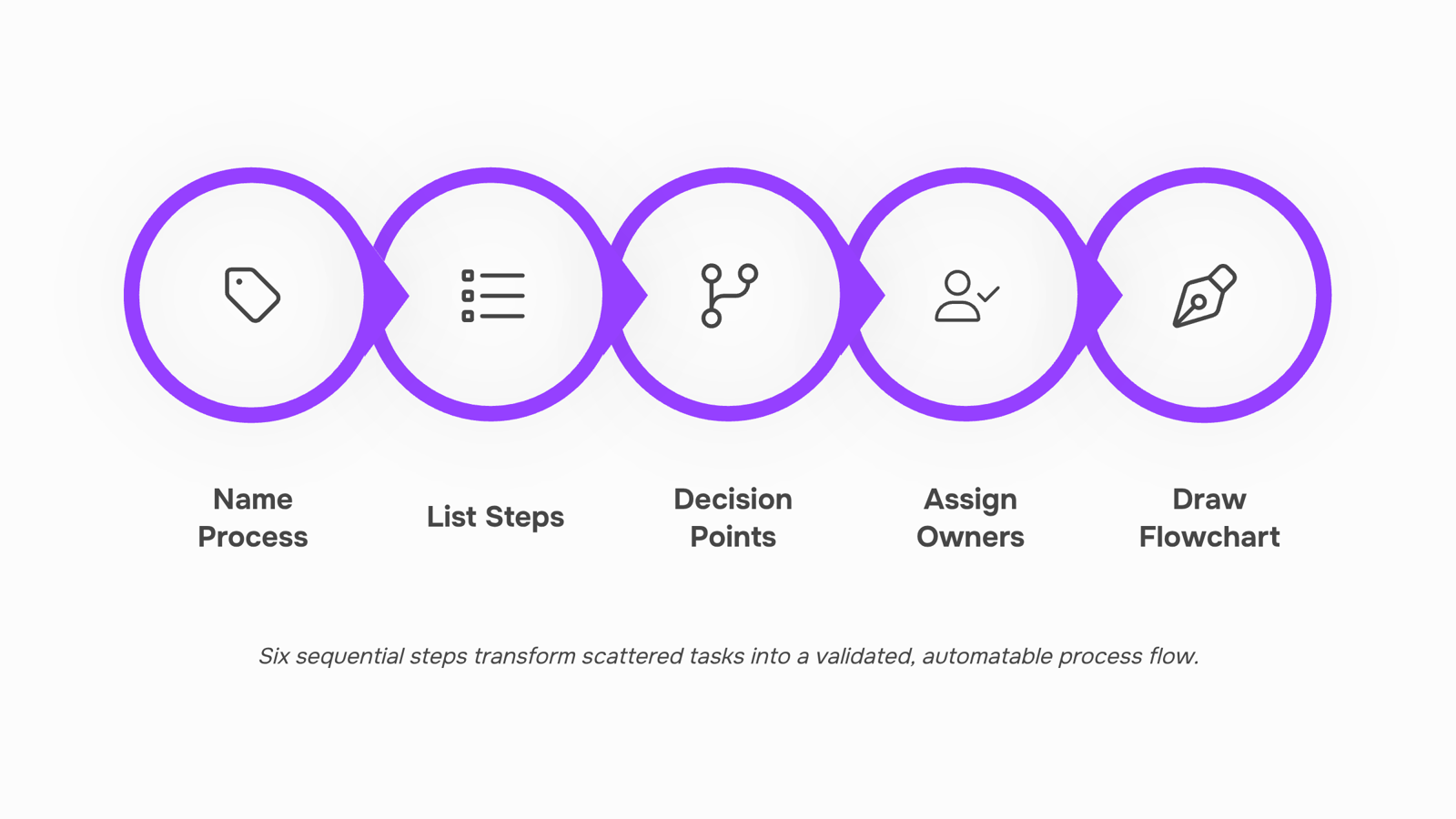
How to create a process flow in 6 steps
Six steps sounds like a lot until you realize most teams skip half of them and wonder why the diagram never gets used.
Step 1: Name the process and set its boundaries: Pick one process, not a department. "Client onboarding" is a process. "Operations" is not. Write a one-sentence scope statement: where the process starts, where it ends, and who it touches. Without this, your process flow map will sprawl into every adjacent workflow and become unreadable.
Step 2: List every step in plain language before you draw anything: Open a doc and write each step as a verb-noun pair: send welcome email, assign account manager, schedule kickoff call. Don't skip steps you consider obvious. A typical IT onboarding process has 15 to 25 discrete actions; most teams document eight and wonder why handoffs break. If you want to model your process before you map it, do that here, not after the diagram is half-built.
Step 3: Add decision points: Go back through your list and mark every step where the answer could be yes or no, or where the path splits. "Client signed NDA? is a decision. "Credentials approved?" is a decision. These become your diamond symbols on the chart. Skipping this step is one of the four failure patterns covered in the next section, so mark every fork now.
Step 4: Assign an owner to each step: Write a name or role next to every action and decision. Not a team, a role: Account Manager, IT Lead, Billing. If two people share ownership, one of them effectively owns nothing. A process flow chart without owners is a diagram, not a system.
Step 5: Draw the process flow chart: Now open your diagramming tool and map what you documented. Use the six standard symbols covered in the previous section. Start with a linear draft, then add decision branches. Keep the flow moving left to right or top to bottom. A process flow chart template gives you the correct symbol layout without building from scratch, which cuts first-draft time significantly.
Step 6: Validate the flow with the people who run it: Walk the diagram with the team members who execute each step. Ask one question per step: "Does this match what actually happens?" You will find at least three steps that are wrong, missing, or in the wrong order. Fix those before you share the diagram more widely or consider any automation.
Once the diagram is validated, you have a working process flow map, not just a picture. That map is what lets you identify which processes are ready to automate without guessing, and it's the input Revo uses to automate the process flow end to end once the manual version is clean.
The sequence matters. Teams that skip to step five produce diagrams no one trusts. Teams that complete all six produce something they can actually hand off, improve, and eventually run without manual intervention.
Common mistakes that break a process flow
Four patterns account for most of the rework IT owners face when building process flows.
Automating before documenting: Wiring up automation on a process you haven't fully mapped means you're scaling the chaos, not removing it. Document every step on paper first, then automate.
Skipping decision points: A process flow that only shows the happy path breaks the first time an exception hits. Every "if/then" branch needs to be drawn explicitly, including what happens when a client rejects a deliverable or an approval stalls.
No owner assigned: A step without a named owner is a step that waits. Each node in your flow should map to a specific role, not a department. "DevOps team" is too vague; "DevOps lead" is not.
Treating the diagram as final: Effective workflow management is a living practice, not a one-time exercise. Process flows drift the moment a tool changes, a team grows, or a client adds a requirement. Build a review trigger into the flow itself, such as a quarterly check or a post-incident audit, so updates happen before the next failure.
If any of these patterns sound familiar, building a cleaner business process workflow starts with fixing the documentation layer first.
How to automate a process flow once it is mapped
A mapped process flow is only useful if it drives action. Once your work process flow chart shows every step, decision point, and owner, you have exactly what an automation tool needs to run the process without manual handoffs.
The translation from diagram to automation follows a clear sequence:
Identify the trigger: Every automated process starts with an event: a form submission, a status change, a calendar date. Pull this directly from the first step in your process flow diagram.
Map conditions to decision points: Each diamond shape in your diagram becomes an if/then rule in your automation tool. If the ticket is marked "urgent," route it to the on-call engineer. If not, add it to the standard queue.
Assign actions to each path: Every step with a named owner becomes an automated task, notification, or handoff. No owner in the diagram means no clear action in the automation, which is why the previous section flagged that failure pattern.
Test against the original diagram: Run a live scenario and check whether the automated output matches what the diagram prescribes.
Revo's workflow automation lets you use a visual workflow builder to automate the steps directly from your documented process, so the diagram and the running automation stay in sync. If you want to identify which processes are ready to automate before you start, that's a useful checkpoint before step one.
Process flow vs. workflow: what the difference means for your team
Dimension | Process flow | Workflow |
|---|
Scope | One specific process, start to finish | A series of connected tasks across a system |
Visual format | Process flow chart with decision points | Linear or parallel task sequence |
Ownership | Usually one team or function | Often spans multiple teams |
Automation readiness | High — documented steps map directly to triggers | Varies — depends on how well process flows are defined first |
The practical rule: if you can draw it as a process flow chart with clear inputs and outputs, you can automate the process flow end to end. If ownership is still fuzzy across teams, build and automate a business process workflow first.
Closing
A mapped process flow is only useful if it actually runs—and that's where most teams stumble. You now have the six-step framework to document your process cleanly, validate it with your team, and identify exactly where automation will pay off. The difference between a diagram gathering dust and a system that moves work forward isn't the diagram itself; it's the automation layer underneath. Your next move is to take one real process from your business this week, walk it through these six steps, and then connect it to Revo's workflow automation to see where manual handoffs can become instant triggers. Start with the process that costs you the most time right now—that's where you'll see results fastest.
FAQ
How do I create an effective process flow for my business?
Follow six steps: name and scope your process, list every step in plain language, add decision points, assign an owner to each step, draw the diagram using standard symbols, then validate it with the team executing it. Skipping validation is where most teams fail.
What are the benefits of mapping out a process flow?
Mapping makes invisible work visible, enabling faster bottleneck diagnosis, clearer ownership, shorter onboarding time, and a reliable foundation for automation. Without it, you're guessing where work stalls.
Can process flow be automated using software tools?
Yes, but only after you've documented and validated the manual flow first. Automating an unmapped process scales the inefficiencies. Tools like Revo use your validated process flow diagram as the input to automate end to end.
How does process flow impact overall business efficiency and productivity?
A clear process flow eliminates ownership gaps, cuts onboarding ramp time, and pinpoints bottlenecks for targeted fixes. It also creates the foundation for automation, which removes manual handoffs entirely.
What is the difference between a process flow and a workflow?
A workflow describes the sequence of tasks assigned to people or systems. A process flow goes deeper: it captures decision points, handoffs, and the conditions that route work down different paths.


 Elena Petrova15 September 2026


