TL;DR: Most API integration content stops at definitions and never reaches the decisions that actually matter. This article walks IT company owners through authentication methods, error handling, data mapping, and trigger logic — the four points where integrations either hold up in production or fail quietly at 2am. You'll finish with a framework for evaluating and building connections that don't need babysitting.
What API and integration actually means
API integration is the process of connecting two or more software applications so they can exchange data automatically, without manual export, copy-paste, or re-entry.
When your project management tool updates a task status and your CRM reflects that change 30 seconds later, that's API integration working. The API (Application Programming Interface) is the contract each application publishes — the specific requests it will accept and the responses it will return. Integration is the layer you build, buy, or configure to send those requests reliably.
For IT company owners, the practical question isn't "what is an API?" It's "how do I integrate APIs with existing software without creating a maintenance burden my team has to babysit?" A custom-coded connector can take 40+ hours to build and breaks every time either vendor updates their schema. A no-code platform reduces that to hours, not weeks — though it trades flexibility for speed, which matters if your workflow is non-standard.
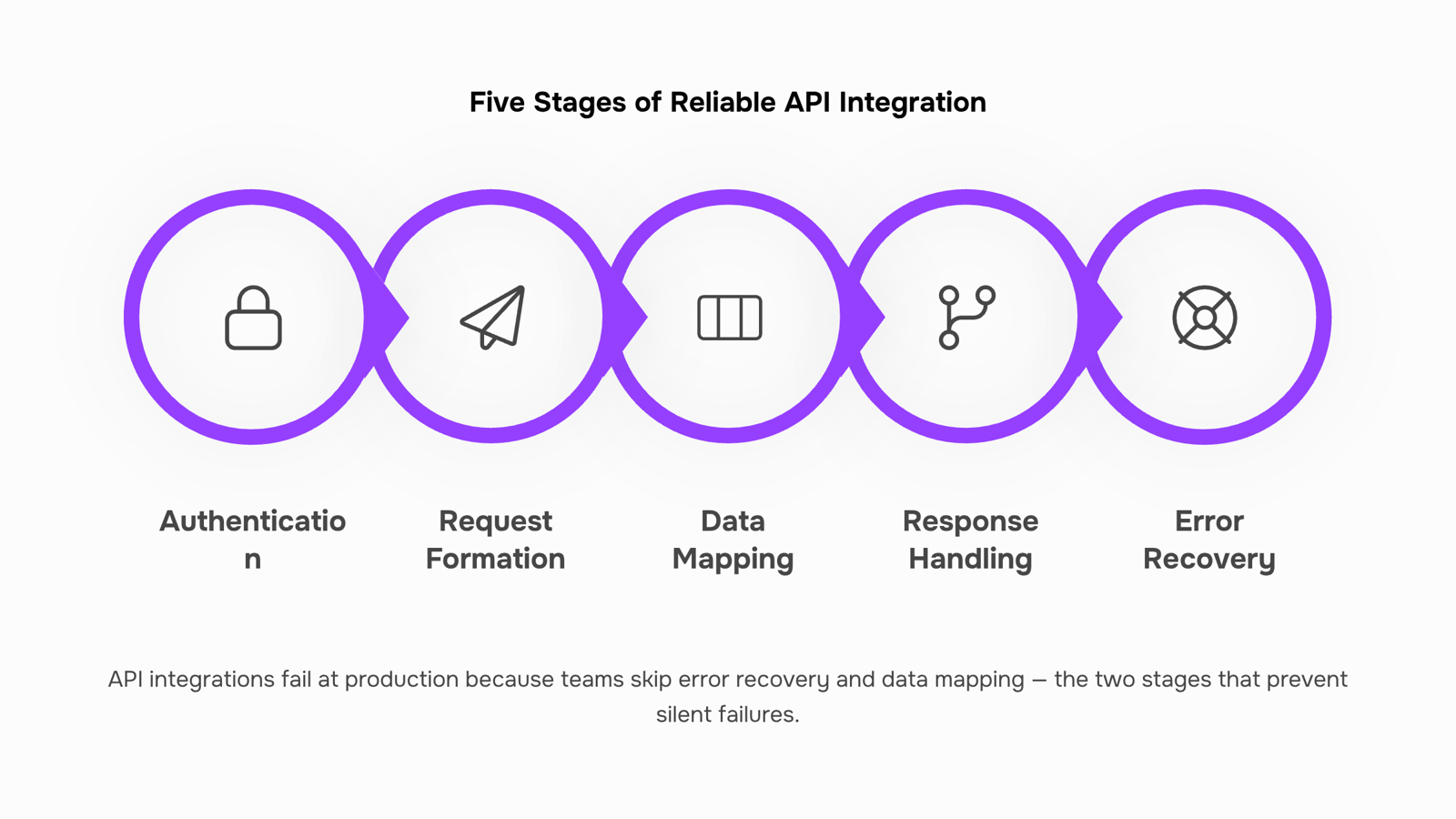
Most SMB IT teams run 10 or more SaaS tools simultaneously. Without deliberate integration, each tool becomes a data silo. The next section walks through the five stages every reliable API integration needs: authentication, request formation, data mapping, response handling, and error recovery. If you're evaluating whether to build or buy that layer, the B2B integration platform buying guide covers the decision criteria directly.
How API integration works step by step
Most API integrations don't fail because the technology is wrong. They fail because the five stages between "connected" and "working reliably" get collapsed into one rushed step.
Here's how each stage actually works:
Authentication: Before any data moves, your system proves it has permission to talk to the other system. Most modern APIs use OAuth 2.0 or API key authentication. Get this wrong and every subsequent request returns a 401 error. Get it right once and it runs silently in the background.
Request formation: Your system constructs a call to the API endpoint — specifying the method (GET, POST, PUT), the correct URL structure, and any required headers or query parameters. A single misplaced parameter here returns empty data or a 400 error with no obvious cause.
Data mapping: The source system calls a field "client_name." The destination calls it "contact_full_name." Data mapping is where you reconcile those differences before anything gets written to a database. Skipping this step is the most common reason a CRM sync produces duplicate or corrupted records.
Response handling; The API returns a response — usually JSON or XML. Your integration needs to parse that response, extract the relevant fields, and route them to the right place. For workflow automation to work reliably, this parsing logic has to handle both expected and unexpected response shapes.
Error recovery: APIs time out. Rate limits get hit. Payloads occasionally arrive malformed. A production-grade integration needs retry logic, dead-letter queues for failed records, and alerting when error rates spike. Most lightweight connectors skip this entirely, which is why so many integrations break quietly rather than loudly.
If you're deciding whether to build this stack yourself or use a platform that handles it, the B2B integration platform buying guide covers that tradeoff directly.
Benefits of using APIs for integration
When your tools share data through APIs, the operational difference is immediate and measurable. Here is what that looks like in practice:
Real-time data sync means a contract signed in Sigi updates the linked CRM deal in WorksBuddy within seconds, not the next morning after someone runs an export. No duplicate records, no version conflicts.
Reduced manual entry removes the copy-paste step entirely. For IT company owners managing client onboarding across five or more SaaS tools, that alone recovers several hours a week per person.
Faster response times come from triggering actions automatically. When a document reaches "signed" status, the next workflow step, whether that is invoicing, provisioning, or task creation, fires without a human in the loop.
Workflow automation compounds over time. Each API connection you wire up becomes a building block. Two connected systems become three, then five, and the manual coordination that once required a dedicated ops person starts handling itself.
System scalability means adding a new tool does not require rebuilding your process. A well-structured API integration absorbs new endpoints without breaking existing ones.
If you are weighing whether to build these connections yourself or use a platform that handles them natively, the B2B integration platform buying guide covers that decision in detail.
Common API integration challenges and how to handle them
Four API integration challenges show up repeatedly when IT company owners try to connect their software stack — and each one has a clear fix.
Authentication failures are the most common first-day problem. Expired tokens, misconfigured OAuth scopes, and hardcoded credentials that rotate without warning all cause silent breakdowns. Fix: store credentials in a secrets manager, not in your codebase, and set automated token refresh before expiry.
Rate limiting catches teams off guard once real traffic hits. An API that works fine in testing starts returning 429 errors when your actual user volume kicks in. Fix: build exponential backoff into every API call from day one, and monitor your request cadence against each vendor's documented limits.
Schema drift is the slow-burn version of a broken integration. A vendor updates their API response format — a renamed field, a new required parameter — and your integration silently starts passing bad data downstream. Fix: version-pin your API calls where the provider allows it, and run automated contract tests on a weekly schedule to catch drift before it corrupts records.
Error handling gaps turn recoverable failures into data loss. If your integration has no retry logic and no dead-letter queue, a dropped connection means a dropped record. Fix: log every failed call with a payload, set up alerts for error rate spikes, and test failure scenarios explicitly, not just happy paths.
These are the same failure points that make how to integrate APIs with existing software harder than it looks on paper. If you want to skip the custom connector maintenance entirely, see how built-in automation compares to external tools.
How secure API integrations handle sensitive data
Sensitive data moving through an API integration doesn't protect itself. The security model you configure at setup determines whether that data stays contained or becomes a liability.
OAuth 2.0 is the standard for delegated authorization. Instead of passing raw credentials between systems, OAuth issues short-lived access tokens. If a token is intercepted, it expires. If a system is compromised, you revoke that token without touching the rest of your auth setup.
Token scoping narrows what each integration can actually do. A contract-signing workflow doesn't need read access to your payroll records. Scope tokens to the minimum required permissions, and a breach in one integration can't cascade across your stack.
Payload encryption handles data in transit. TLS 1.2 or higher is the baseline; anything below that is a known vulnerability. For particularly sensitive payloads, field-level encryption adds a second layer so even a correctly authenticated request can't expose raw data if something goes wrong mid-transit.
Audit logging is where most api and integration setups fall short. Every token issuance, permission change, and data access event should write to an immutable log. Without that trail, you can't answer basic questions during an incident: who accessed what, and when.
These aren't advanced configurations. They're the minimum for any integration touching customer contracts, financial records, or personal data. If your current setup skips any of them, that's one of the more common API integration challenges worth fixing before you add another connection.
API integration in real workflows: 2 scenarios
Two scenarios show how this plays out in practice.
Scenario 1: CRM to invoicing tool
A 12-person IT services firm closes a deal in their CRM and someone still has to manually create the invoice. That gap costs 15 to 30 minutes per deal and introduces transcription errors on contract values, billing addresses, and payment terms.
With a direct API connection, a status change in the CRM (deal marked "Closed Won") triggers invoice creation automatically, pre-populated with the deal data. No copy-paste. No delay. The no-code API integration approach here requires no custom code: you map fields once, test with a live deal, and the workflow automation runs on every close after that.
Scenario 2: Lead capture form to sales pipeline
A contact fills out a demo request form on your site. Without an integration, that lead sits in a spreadsheet or email inbox until someone manually adds it to the pipeline. Leads go cold in hours, not days.
An API connection between your form tool and CRM pushes each submission directly into the pipeline, assigns an owner, and triggers a follow-up task. For the setup steps and field-mapping logic this kind of sync requires, the B2B integration platform buying guide covers the decision criteria in detail.
Both scenarios follow the same pattern: identify the manual handoff, map the trigger and destination, connect once, and let the workflow run.
Build vs. buy: custom connectors or a workflow automation layer
Custom connectors make sense in one scenario: your integration requirements are genuinely unusual, your team has a dedicated developer with bandwidth to maintain the code, and the workflow won't change much over the next 12 months. Outside that narrow window, you're trading ongoing engineering time for a problem a workflow automation layer already solves.
The maintenance cost is the part most teams underestimate. A custom connector isn't a one-time build. Every time a vendor updates their API, you're back in the code. For a 10-to-50 person IT team running eight or more SaaS tools, that compounds fast.
A no-code API integration platform handles version changes, authentication refreshes, and error retries without touching your codebase. You configure the logic once, and the platform absorbs the upstream changes. If you want a clearer picture of how that layer actually works, this breakdown of workflow builders is worth reading before you spec anything.
The honest tradeoff: custom code gives you more control over edge-case logic. A workflow automation platform gives you speed, lower maintenance overhead, and visibility into what's running. For most IT owners connecting standard tools like a CRM, invoicing system, or lead form, the platform wins on total cost of ownership.
If you're weighing a native automation layer against a third-party connector specifically, this comparison of built-in vs. bolt-on automation covers the decision in detail.
Closing
API integration isn't about understanding the technology — it's about building connections that run without constant maintenance. The five stages (authentication, request formation, data mapping, response handling, error recovery) are where most integrations either hold up or fail quietly. If you've decided to build rather than buy, start with authentication and error handling; skip those and everything else breaks downstream.
If maintaining custom connectors feels like overhead your team doesn't have, Revo handles the trigger logic, retries, and data mapping natively — no connector code required. Your integrations stay current as vendors update their APIs, and you recover the hours your team would spend on maintenance. Ready to see how it works? Check out the Revo features page to walk through a live integration build.
FAQ
Q. How do I integrate APIs with my existing software?
A. Start with authentication (OAuth 2.0 or API keys), then build request formation, data mapping, response parsing, and error recovery in sequence. Skipping any stage causes production failures. Most IT teams use a no-code platform to avoid custom connector maintenance.Q. What are the benefits of using APIs for integration?
A. Real-time data sync eliminates copy-paste, reduces manual entry by hours per week, triggers workflows automatically, and scales as you add tools. Each connection becomes a building block that compounds over time.Q. Can I customize API integrations for my business needs?
A. Yes. Custom-coded integrations offer maximum flexibility but require 40+ hours to build and break when vendors update their schema. No-code platforms trade some flexibility for speed and ongoing maintenance-free operation.Q. How secure are API integrations for sensitive data?
A. Security depends on your setup. Use OAuth 2.0 for delegated authorization, store credentials in a secrets manager (not code), enforce encryption in transit, and audit access logs regularly. Never hardcode credentials or pass raw passwords between systems.Q. What are some common API integration challenges?
A. Authentication failures, rate limiting, schema drift (vendor API changes), and missing error handling. Fix each by using secrets managers, exponential backoff, version-pinned API calls, and retry logic with dead-letter queues.Q. Do I need a developer to set up API integrations?
A. Not necessarily. No-code platforms let ops or product teams build integrations in hours. Custom connectors require developers and ongoing maintenance. Most SMB IT teams choose no-code to avoid the maintenance burden.


 Elena Petrova15 September 2026


