TL;DR: Most project plan guides hand you a template and call it done. This one shows IT company owners what each component actually does, where plans break down after kickoff, and how to build one that stays accurate through delivery — not just on day one. You'll leave with a step-by-step framework you can apply to your next project this week.
What Is a Project Plan and What Does It Actually Control?
A project plan is the decision-making backbone of a project — it defines what gets built, who owns what, and what "done" actually means. It's not a Gantt chart or a task list. Those are outputs of a plan, not the plan itself.
What a project plan actually controls is harder to see until something goes wrong. Scope creep, missed handoffs, and blown deadlines almost always trace back to a plan that was either incomplete or never updated after kickoff. According to PMI research, poor planning remains one of the leading causes of project failure across industries.
The plan answers three questions at any point in the project: what are we doing, who is responsible, and what are the constraints. When those answers live in one place, your team makes faster decisions and escalates fewer things to you.
A good project plan also creates a build a repeatable project planning process — not just a one-time document you file after kickoff. It should be the source of truth your team checks when priorities shift or a dependency slips.
The next section breaks down each component and what it controls in practice.
What Are the Essential Components of a Project Plan?
A project plan without clearly defined components isn't a plan — it's a list of intentions. Each component below controls a specific failure mode. Skip one, and that failure mode runs unchecked.
Scope defines what the project includes and, just as importantly, what it doesn't. Without a written scope boundary, work expands to fill whatever time and budget you have. Every change request, every "quick addition" gets measured against scope first.
Schedule maps deliverables to dates and sequences dependencies. This is where most teams reach for a project plan template too early — they jump to dates before scope is locked, then wonder why the timeline keeps shifting. The schedule is only as stable as the scope underneath it.
Resources covers people, budget, and tooling. Specifically: who is accountable for each workstream, at what capacity, and what happens when that person is pulled elsewhere. A resource section that just lists names is not a resource plan — it needs allocation percentages and a named backup for critical paths.
Risks is the component most teams write once and never revisit. A working risk register names each risk, assigns a probability and impact rating, and identifies the owner responsible for the mitigation. Deciding which work gets resourced first often comes down to which risks are highest-severity, not which tasks feel most urgent.
Communication plan answers who needs what information, how often, and through which channel. A weekly status email to stakeholders and a daily standup for the delivery team are different artifacts serving different audiences. Conflating them produces noise for both groups.
Success criteria closes the loop. These are the measurable conditions under which the project is considered done — not "the feature is shipped" but "error rate stays below 0.5% for 30 days post-launch." Without this, scope creep has no ceiling and sign-off has no trigger.
Most project plan templates include fields for all six. The discipline is filling them in sequence, because each component constrains the next. Scope before schedule. Schedule before resources. Risks and communication run in parallel once those three are stable.
What Is the Difference Between a Project Plan and a Project Schedule?
A project plan defines what you're building, why it matters, who owns it, and what success looks like. A project schedule answers a narrower question: when does each task happen, and in what order?
Conflating the two creates real problems. Teams that treat a Gantt chart as their entire project plan skip scope definition, risk planning, and success criteria. When something shifts, they have no baseline to measure against.
Think of it this way: the project plan is the contract your team signs off on before work begins. The schedule is the calendar that lives inside it. You can update the schedule every sprint without touching the plan. But if the plan changes, the schedule almost certainly needs to follow.
| Project Plan | Project Schedule |
|---|
Answers | What, why, who | When, in what order |
Contains | Scope, risks, resources, success criteria | Tasks, dependencies, milestones, dates |
Update frequency | At major scope changes | Weekly or per sprint |
Owner | Project manager + stakeholders | Project manager |
Both documents matter. But if your project planning process starts with a timeline instead of a scope statement, you're scheduling work that hasn't been defined yet. That's where most overruns begin.
How Do You Build a Project Plan Step by Step?
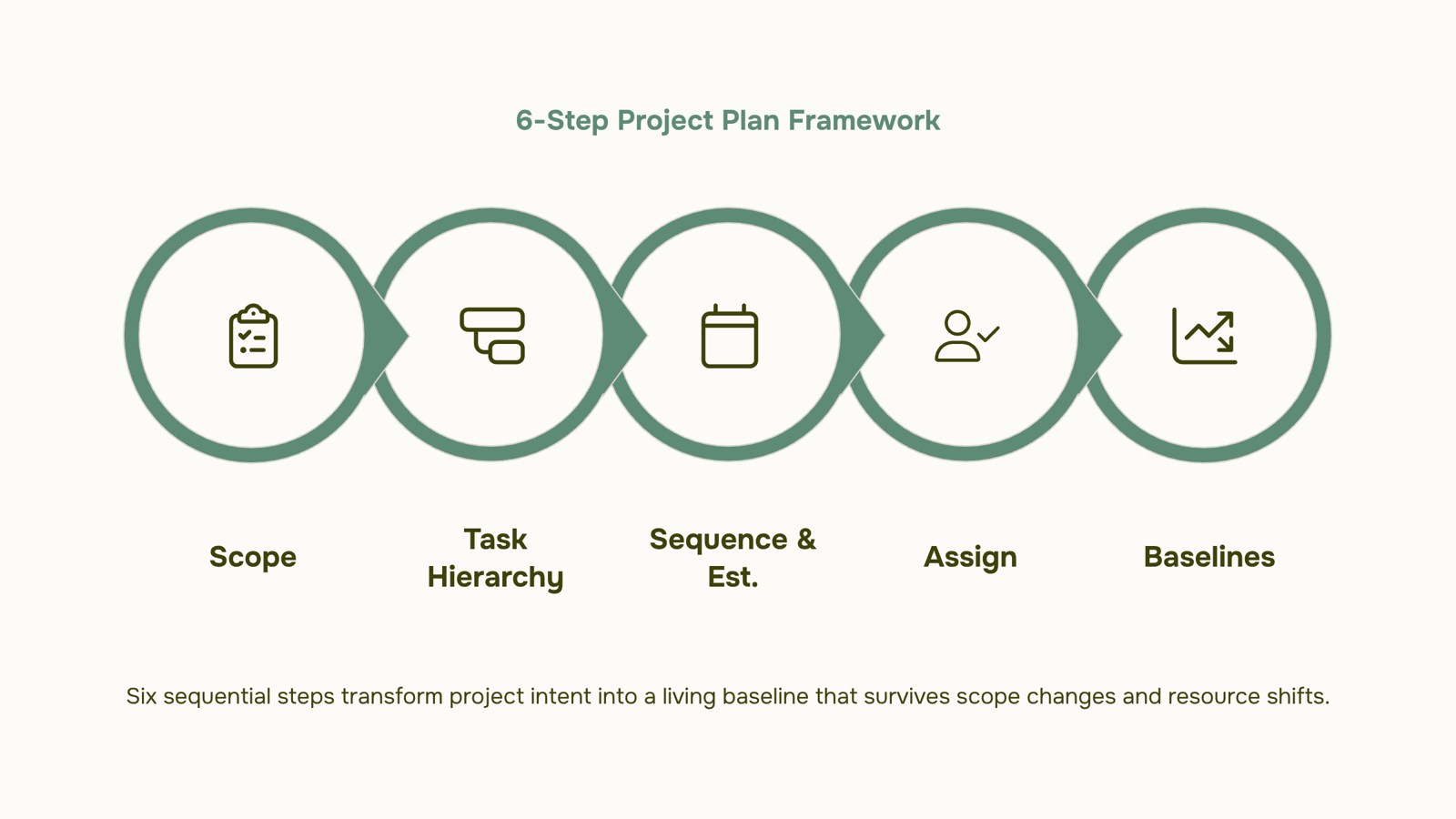
Building a solid project plan takes six steps. Each one produces a concrete output your team can act on, not just a box to check.
Step 1: Define scope and objectives: Write down what the project delivers and what it explicitly does not. This single output, a scope statement, prevents the creeping additions that derail timelines. Tie every objective to a measurable outcome ("reduce onboarding time by 30%" beats "improve onboarding").
Step 2: Break work into a task hierarchy: Start with major deliverables, then break each into tasks small enough to assign and estimate. This is your work breakdown structure (WBS). If a task takes longer than a week to complete, split it. Group related tasks under a single milestone so the plan stays readable at the executive level without losing the detail your team needs.
Step 3: Sequence and estimate: Order tasks by dependency, then attach time estimates. This is where a project plan template (Excel or otherwise) earns its keep: a simple table with task name, predecessor, duration, and owner catches sequencing gaps before they become schedule gaps. If you're using project planning software, dependency mapping is usually visual and faster to validate.
Step 4: Assign ownership: Every task needs one name, not a team name. "Marketing" doesn't miss a deadline; a person does. When ownership is ambiguous, tasks stall. Use your project planning templates to build this into the default structure so it never gets skipped.
Step 5: Set baselines: Once scope, sequence, and ownership are confirmed, lock the plan as a baseline. This gives you a reference point for every future change conversation. Without a baseline, scope creep is invisible because there's nothing to compare against. Keeping the plan and execution in one place makes baseline tracking automatic rather than a manual export exercise.
Step 6: Identify risks and assign mitigations: List the top three to five things most likely to delay the project. For each, name a trigger ("if vendor API is delayed past day 10") and a response ("activate backup integration path"). This isn't pessimism; it's the step most teams skip and later regret.
The output of all six steps is a living document, not a filing artifact. Taro keeps all six layers in one workspace, so when scope changes in step one, the task assignments in step four update in context rather than across three separate tools.
If you want a repeatable version of this sequence for future projects, build a repeatable project planning process before your next kickoff. And when resources are constrained, the sequence in step two depends on deciding which work gets resourced first.
How Often Should You Update Your Project Plan?
There's no universal answer, but most IT projects stay on track with three update triggers: a fixed weekly cadence, milestone completion, and any scope change.
Weekly updates are the baseline. Every Monday (or your team's sprint start), check task status, flag blockers, and confirm the critical path still holds. This takes 15–20 minutes if your project plan lives alongside execution rather than in a separate spreadsheet.
Milestone-triggered reviews go deeper. When a phase closes, re-baseline estimates for what's left. Actual durations almost never match the original plan, and carrying forward stale numbers compounds the error across every downstream dependency.
Scope-change-triggered updates are non-negotiable. Any approved change to deliverables, budget, or timeline requires an immediate plan revision. Teams that skip this step are the ones who decide which work gets resourced first reactively instead of intentionally.
What happens when plans go stale? Owners stop trusting the document. They track work in side channels, status meetings get longer, and the plan becomes a formality nobody reads. At that point, you're managing from memory, not from a shared baseline.
If you want to build a repeatable project planning process that holds up past week two, the update cadence is where it starts.
What Breaks a Project Plan After Kickoff?
Four failure modes account for most of the project plan breakdowns IT teams experience after kickoff.
Scope creep without re-baselining is the most common. A client adds two features, the team absorbs them quietly, and the original plan becomes fiction. The fix isn't saying no to every change — it's updating the baseline every time scope shifts, so the plan reflects reality.
No single owner per task creates the second failure. When a task belongs to "the dev team," it belongs to no one. Every deliverable needs one named person accountable for it, not a group.
Missing dependency mapping is where timelines collapse. If Task B can't start until Task A is done, that relationship needs to be explicit in your project planning software or whatever tool you're using. Undocumented dependencies turn a one-day delay into a two-week slip.
Plans that live in a spreadsheet nobody updates are the quietest killer. A project plan template in Excel works at kickoff. It stops working the moment someone forgets to update it after a status call. The plan and the actual work diverge, and the team starts running on Slack messages instead.
If any of these sound familiar, the issue usually isn't the team's discipline — it's the structure of the plan itself. Understanding what goes into project planning from the start prevents most of these from appearing at all.
Closing
A project plan only works if it stays accurate after kickoff. The six-step framework above gets you to a solid baseline, but the real test is what happens when scope shifts, a resource gets pulled, or a dependency slips. That's when most teams realize their plan lives in a spreadsheet that nobody updates, or worse, in someone's head. The difference between a plan that guides decisions and one that gathers dust is whether your team can see the current state of scope, ownership, and timeline without manual digging. Start with the framework this week, lock your baseline, and then ask yourself: once we're in delivery, how will we keep this plan in sync with reality? That answer determines whether your next project ships on time or becomes another lesson learned.
FAQ
How do I create a comprehensive project plan?
Follow six steps: define scope and objectives, break work into a task hierarchy, sequence and estimate tasks, assign clear ownership, set a baseline, and identify risks with mitigations. Each step produces a concrete output your team can act on.
What are the essential components of a project plan?
Scope, schedule, resources, risks, communication plan, and success criteria. Each controls a specific failure mode. Skip one, and that failure mode runs unchecked through delivery.
What is the difference between a project plan and a project schedule?
A project plan defines what you're building, why, and who owns it. A project schedule answers when each task happens and in what order. The plan is the contract; the schedule is the calendar inside it.
How often should I update my project plan?
Update your schedule weekly or per sprint. Update the plan itself only at major scope changes. Without a baseline, you can't see scope creep, so lock the plan before delivery starts.
Can I use a project plan template in Excel or do I need dedicated software?
Excel templates work for simple projects, but manual updates cause plans to drift from reality. Dedicated software keeps scope, tasks, and timelines in sync automatically, which is where most teams fail.


 Elena Petrova15 September 2026


