TL;DR: Most invoice guides stop at "fill in these fields" and leave the rest to you. This one walks IT company owners through the full creation-to-payment cycle: what information legally protects you, how to set up recurring billing that runs without you, and where manual invoicing quietly drains time and revenue. You'll finish with a process you can put to work today.
What an invoice actually is (and what it is not)
Modern 3D invoice template on professional workspace with calculator and documents
An invoice is a formal payment request. You send it after delivering a service, and it tells the client exactly what they owe, by when, and how to pay. That's it.
What it is not: a quote (which estimates costs before work begins), a receipt (which confirms payment already made), or a purchase order (which a buyer issues to authorize a purchase). Mixing these up creates disputes, delays, and accounting headaches. If you want to understand where the line sits between an invoice and a receipt specifically, the distinction matters more than most IT owners realize.
When you create invoice documents for IT services, you're creating a legally binding record of a transaction. Get the document type wrong and you're not just sending the wrong file. You're potentially delaying payment by weeks.
The next section covers every field a professional invoice needs.
Before you open any create invoice form, gather these details. Missing even one field is the most common reason IT invoices get disputed, delayed, or returned for correction.
Your business information: Legal business name, address, and tax or VAT registration number. For IT companies operating across jurisdictions, the tax ID is not optional — it affects how clients categorize the payment on their end.
Client information: The legal entity name, billing address, and the specific contact who approves payments. Sending to the wrong person inside a 200-person company adds days to your payment cycle.
Invoice number: A unique, sequential identifier. This protects you in disputes and makes reconciliation faster for both sides. If you're figuring out how to create invoices at scale, a consistent numbering format also matters for audit trails.
Service description: Specific enough that the client's accounts payable team can match it to a purchase order. "IT consulting services — March 2026" is weak. "Network infrastructure audit, 14 hours at $150/hr, March 3–17, 2026" is defensible.
Line items, rates, and totals: Break out each service, the unit price, quantity, and subtotal. For IT engagements, this typically means separating labor, software licensing, and any third-party costs.
Payment terms: Net 15, Net 30, or due on receipt — plus accepted payment methods and any late-fee clause. Vague terms are the single biggest driver of slow payment in service businesses.
Issue date and due date: Both fields, always. The issue date establishes when the obligation started; the due date removes ambiguity about when you'll follow up.
If you're converting a signed statement of work directly into a billable document, Inzo can pull these fields automatically, which removes the manual transcription step that causes most data errors.
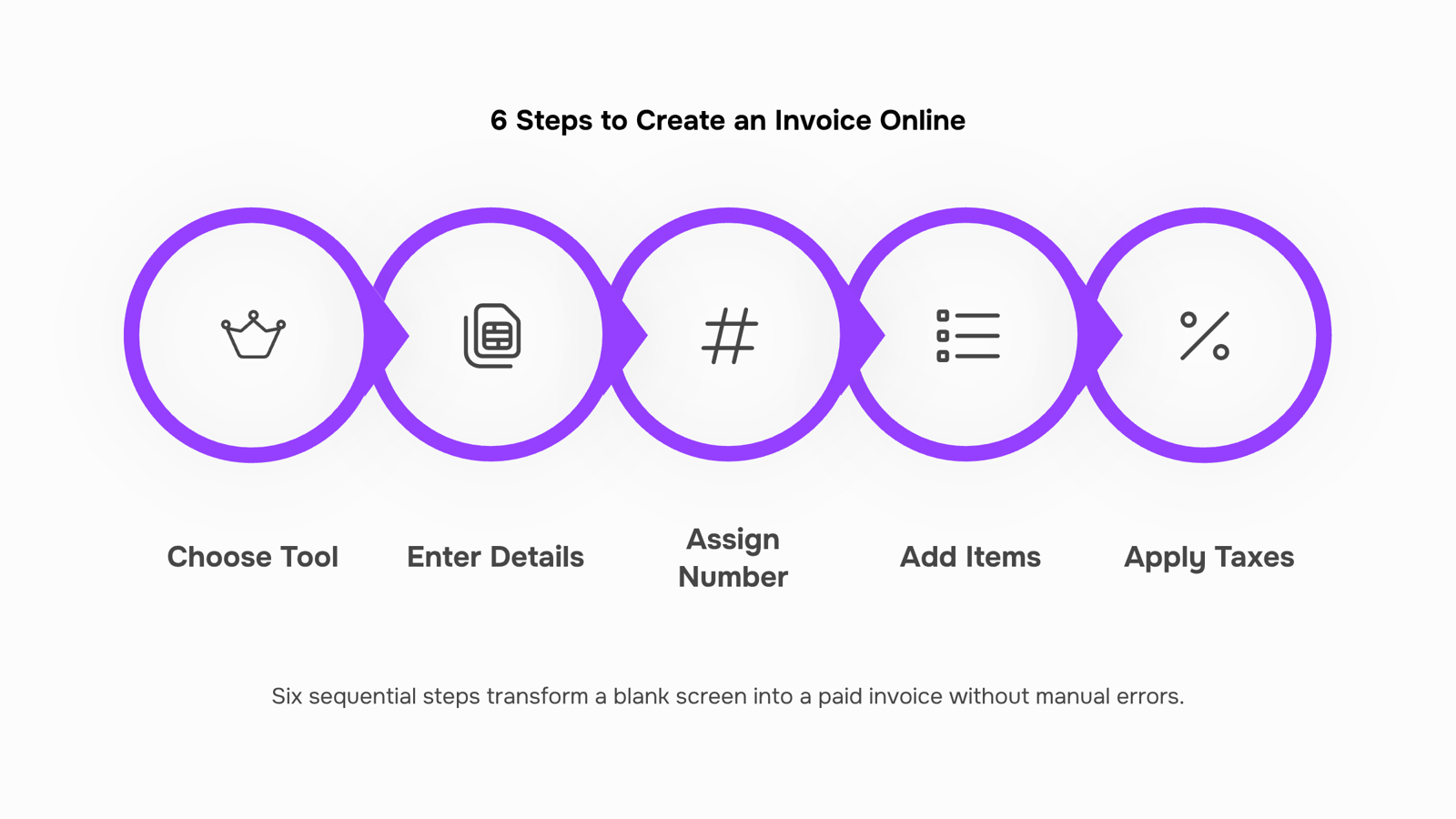
How to create an invoice online in 6 steps
Before you write a single line item, you need two things: a tool that handles the formatting automatically, and a clear sequence so nothing gets left out. Here are the six steps that take you from blank screen to paid invoice.
1. Choose your invoicing tool: Pick a tool built for service businesses, not a generic Word template. If you want to create invoice documents without paying upfront, several platforms let you create invoices free for a set number of clients or monthly sends. The right choice depends on your billing volume and whether you need recurring invoice support (covered in the next section). For a side-by-side breakdown, which online invoice tool fits your billing workflow walks through the main options.
2. Enter your business and client details: Your business name, address, and contact information go at the top. Below that: the client's legal entity name, billing address, and a contact name. For IT businesses billing a corporate client, use the accounts payable contact, not the project manager. Wrong recipient is one of the most common reasons invoices sit unpaid for two weeks.
3. Assign an invoice number and set the dates: Every invoice needs a unique number, an issue date, and a due date. Use a consistent numbering format (INV-2026-001, for example) so your records stay searchable. Net 15 or Net 30 are standard for IT services; if you have a signed contract specifying payment terms, match them exactly here.
4. Add your line items: List each service, the quantity or hours, the rate, and the subtotal. Be specific: "Website security audit, 8 hours @ $150/hr" is clearer than "Consulting services." Specific line items reduce disputes and speed up client approval. The every required field and what it does breakdown explains why each one matters for payment speed.
5. Apply taxes, discounts, and payment terms: Add applicable tax rates, any early-payment discounts, and your accepted payment methods. If you accept bank transfer, card, or a payment portal, list all three. Fewer friction points at checkout means faster payment.
6. Review, generate, and send: Do a final check: correct client name, accurate totals, right due date. Then generate the PDF and send it directly from your invoicing tool with a short, professional note. Tools like Inzo handle PDF generation and email delivery in one step, so you're not downloading a file and attaching it manually.
If you're billing a recurring client, you don't need to repeat steps 1 through 6 every month. How online invoicing reduces billing delays for IT businesses explains what happens to your cash flow when you automate that cycle instead.
How to create a recurring invoice
A recurring invoice is a billing document that generates and sends automatically on a fixed schedule — weekly, monthly, or quarterly — without you rebuilding it each cycle. For IT businesses running retainers, managed services contracts, or monthly support agreements, this removes the single biggest source of billing delays: forgetting to send.
To set one up, you need three things decided before you touch any tool:
Billing cycle — monthly is standard for most IT support contracts
Fixed line items — services that don't change each period (managed hosting, help desk hours, SLA coverage)
Send date — typically 5 to 7 days before payment is due, giving clients time to process
Once those are defined, you create invoices once and schedule the rest. In Inzo, you configure the recurrence rules at the invoice level, and the system handles generation and delivery from that point forward. Automated reminders fire if payment doesn't arrive by the due date, so follow-up doesn't fall on you.
The practical difference: a 10-client retainer book that once took 2 to 3 hours monthly to manage manually runs without intervention. If your billing mix includes both recurring and project work, how online invoicing reduces billing delays for IT businesses covers how to structure both in the same workflow.
What a freelance or project-based invoice looks like
A freelance or project-based invoice differs from a recurring one in a key way: it maps to deliverables, not calendar dates. For IT work specifically, that means your line items should reflect milestones, not vague hourly blocks.
Here is what a typical IT project invoice looks like in practice:
Project discovery and scoping — fixed fee, billed at kickoff
Development phase 1 (backend API build) — milestone-based, billed on completion
QA and testing — fixed fee, billed when sign-off is received
Deployment and handover — final payment, triggered by project completion
Each line item ties a payment trigger to a concrete event. That structure protects you legally and gives the client a clear basis for approving the payment. For a deeper look at every required field and what it does, that breakdown covers the legal and operational weight behind each one.
When you create invoice documents for project work, platforms like PayPal let you create invoice for free with basic line items. For IT businesses billing across multiple milestones, tools that convert a project completion event directly into a draft invoice cut the gap between "work done" and "invoice sent" from days to minutes.
A blank invoice template you can customize right now gives you a starting structure for this exact format.
Where manual invoice creation quietly costs you
Manual invoicing breaks at predictable points. You finish a project, open a spreadsheet, copy last month's template, adjust the line items, and somewhere in that process a figure is wrong or a field is blank. The invoice goes out late. The client pays late. That gap between delivery and payment is where IT businesses quietly lose cash flow.
The specific failure points: wrong rates pulled from an outdated template, missing payment terms, no automatic follow-up when the due date passes. Each one is small. Together, they explain why how online invoicing reduces billing delays for IT businesses is a question most IT owners eventually search.
When you create invoices from a connected system, those gaps close. The billing trigger is the project event itself, not someone remembering to act on it. That's the practical case for automation, and it's why the steps below matter.
Closing
Creating an invoice online takes six steps, but the real win is removing the manual work that delays payment. When you set up recurring billing for retainers and automate line-item generation from your contracts, you shift from spending hours each month on invoicing to spending minutes on exceptions. The faster your invoices reach clients with zero errors, the faster you get paid. Start by auditing your current billing process: how many invoices do you send monthly, and how many are recurring versus project-based? That answer tells you whether a simple free tool or an automated platform like Inzo will save you the most time.
FAQ
How do I create an invoice online?
Choose a tool built for service businesses, enter your business and client details, assign a unique invoice number, add line items with rates and quantities, apply taxes and payment terms, then review and send as a PDF. Most platforms handle all six steps in under five minutes.
What information do I need to create a professional invoice?
Your legal business name, tax ID, client's legal entity name and AP contact, invoice number, service description with specific hours or quantities, rates, subtotals, payment terms, issue date, and due date. Missing even one field delays payment or triggers a dispute.
Can I create an invoice without an account?
Yes, several platforms offer free invoice creation without sign-up, but you lose the ability to track payment status, send reminders, or automate recurring billing. For IT businesses billing multiple clients, an account-based tool pays for itself in time saved within the first month.
How do I create a recurring invoice?
Define your billing cycle, fixed line items, and send date, then configure the recurrence rules in your invoicing tool once. The system generates and sends automatically on schedule, and sends payment reminders if the client is late.
What are the steps to create an invoice for a freelance service?
Follow the same six steps as any invoice, but tie line items to deliverables and project milestones instead of calendar dates. Include the scope of work, hours or deliverables completed, and the contract terms that specify when payment is due upon completion.


 Elena Petrova15 September 2026


