TL;DR: Most invoice template customization guides stop at logo placement and color swatches. This one walks IT company owners through the three layers that actually matter: which fields to configure for complex, multi-line billing, how branding choices affect client trust, and when to replace manual templates with automated generation tied to your CRM or project data.
What Invoice Template Customization Actually Covers
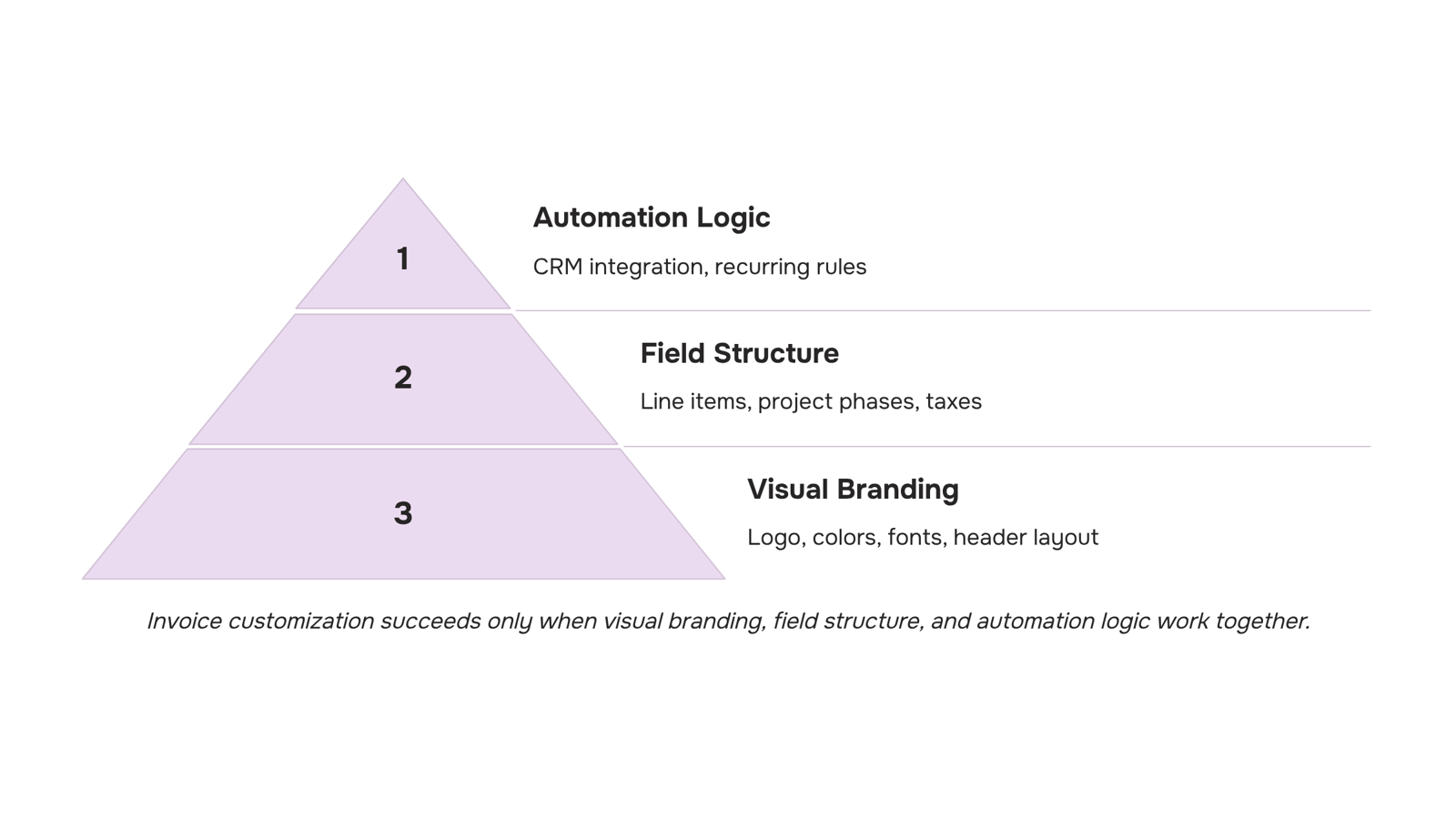
Invoice template customization breaks into three distinct layers, and most guides only cover the first one.
Visual branding is the surface layer: your logo, color palette, font choices, and header layout. It matters because a polished invoice signals that your business runs with the same care you bring to client projects. For IT firms billing across multiple engagements, brand consistency across every client-facing document compounds over time.
Field structure is where most IT company owners lose time. A generic template gives you "description" and "amount." A custom invoice template built for IT service work includes line items for project phases, retainer hours, licensing fees, and reimbursables — each labeled clearly so clients approve without back-and-forth. Getting the right fields into your blank invoice template is a structural decision, not a cosmetic one.
Automation logic is the layer almost no one talks about. This covers conditional payment terms, auto-populated client data, recurring billing rules, and triggered follow-up sequences. It's what separates a document you fill out from a system that runs. If you're still editing the same fields manually each cycle, you're working at layer one while the real efficiency lives at layer three.
For context on common invoice formats service businesses already use, that's a useful starting point before you decide what to change.
How to Match Your Invoice Template to Your Brand
Your invoice is often the last thing a client sees before they pay — and the first thing they'll reference if a dispute comes up. For IT firms billing multiple service lines, that document carries more weight than most owners realize.
Invoice branding starts with your logo, but placement matters more than most templates suggest. Put it top-left or top-center, at a size that reads clearly when printed or viewed on mobile. A logo squeezed into a corner, or stretched to fill the header, signals carelessness before the client reads a single line item.
Color scheme is the next decision. Pick one or two colors from your brand palette and apply them to the header background, column headers, and the total row. Avoid using color as decoration — use it to guide the eye toward the amount due and the payment terms. Clients should find those two things in under five seconds.
Font choices follow the same logic: one typeface for headings, one for body text, both matching what you use on your website and proposals. Mixing three fonts across your client-facing documents — proposal, contract, invoice — is one of those small inconsistencies that erodes trust without anyone being able to name why.
Header layout is where most custom invoice templates fall apart. Your header should carry your business name, contact details, invoice number, issue date, and due date. If a client needs to forward your invoice internally for approval, those fields need to be immediately visible — not buried below a decorative banner.
Consistency across all client-facing documents is what makes invoice branding worth the effort. When your invoice looks like it belongs to the same business as your proposal, clients perceive you as organized and deliberate. That perception directly affects how quickly they pay.
For a deeper look at common invoice formats used by service businesses, and how layout choices vary by engagement type, that reference covers the practical range well.
The fields on your invoice are not just labels — they're the first thing a client's accounts payable team reads when deciding whether to approve payment or send a query back to you.
For IT companies, the highest-risk field is the service description. Vague entries like "consulting" or "development work" generate disputes. Specific ones don't. Write descriptions that name the deliverable, the time period, and the engagement phase: "Backend API integration — Phase 2 — March 2025" leaves no room for confusion. If you run multi-line item invoicing across a single project, each line should map to a distinct scope item, not a catch-all summary.
Hourly vs. fixed-fee line items need different configurations. Hourly lines require a unit rate and quantity column so the client can verify the math independently. Fixed-fee lines need a scope reference — either a contract clause number or a milestone name — so the client knows what they're approving. Mixing both on the same invoice is common for IT firms; just make sure the column structure supports both formats without looking broken.
Tax configuration is where most teams lose time. If you bill clients across multiple states or countries, you need jurisdiction-level tax rates stored and applied per client, not manually entered each time. A single misconfigured rate can hold up payment for weeks. The same logic applies to discount fields: define whether discounts apply before or after tax, and whether they're percentage-based or fixed-amount. Ambiguity here creates reconciliation problems on both sides.
Project or deal reference fields — PO numbers, contract IDs, project codes — matter more than most templates acknowledge. Many enterprise clients cannot process an invoice without a valid PO number in a specific field. If that field is missing or buried, the invoice goes back to you. For invoicing best practices that hold up at scale, treat the reference field as mandatory, not optional.
Getting these invoice fields right at the template level means fewer back-and-forth emails per invoice — and faster payment cycles as a direct result.
The tool you choose determines how much customization is actually available — and how much work that customization creates over time.
Word and Excel templates give you full visual control. You can adjust every cell, font, and formula. The tradeoff is maintenance: every time your tax rate changes or you add a new service tier, you're editing the source file manually. For IT companies billing multi-line service engagements across different jurisdictions, that overhead compounds fast. Most teams using spreadsheets for invoicing spend several hours a month just keeping templates consistent across clients.
Generic invoicing tools (think entry-level SaaS products) typically let you upload a logo, change a color, and reorder a few fields. That covers basic branding. It rarely covers the layered logic IT companies need: conditional tax fields, project reference numbers, hourly-vs-fixed line item switching, or per-client discount rules. You can find a useful breakdown of what these tools actually support in this comparison of online invoice creator tools.
Purpose-built platforms handle the logic layer that generic tools skip. They let you save template variants per client type, apply jurisdiction-specific tax rates automatically, and pull project or deal references directly from a connected CRM. The invoice template customization happens once at setup; the platform applies the right variant at send time.
The honest tradeoff: purpose-built platforms require an upfront configuration investment. Word templates require ongoing manual effort. For IT companies billing fewer than 10 clients on simple retainers, a well-maintained Excel file may be enough. Beyond that, the maintenance cost of manual templates usually exceeds the setup cost of a dedicated tool.
If your invoicing connects to your sales pipeline, automating the invoice process becomes the more practical next step.
When to Stop Editing Templates Manually
Manual invoice template customization has a clear breaking point. For a one-off project invoice, opening a Word doc and adjusting a few fields takes five minutes. Do that same task across 15 recurring clients, three service tiers, and a mix of fixed-fee and time-and-materials engagements, and you're looking at hours of repetitive editing every billing cycle.
The specific failure modes are predictable:
Recurring billing forces you to duplicate last month's invoice, update the date, and hope you didn't miss a line-item change. One wrong copy-paste and you've billed the wrong amount.
Project-based invoicing means your template needs to match the scope agreed in the project record. When that lives in a separate tool, you're manually reconciling two sources of truth every time.
CRM-linked deals create the same gap. If a deal closes with custom pricing or a negotiated discount, that detail rarely makes it into the invoice template automatically. Someone has to carry it over.
The compounding cost isn't just time. It's accuracy. Common invoice formats used by service businesses vary enough that a single template rarely covers every engagement type cleanly, which pushes teams toward one-off edits that introduce errors.
Automated invoice creation removes that reconciliation step. When your invoice system connects directly to your project records and CRM deals, the line items, rates, and client details populate from the source of truth, not from memory.
This is where Inzo's integrations with Taro (project and task management) and Lio (lead and deal tracking) matter practically. A recurring invoice template tied to a Taro project pulls the current scope. A deal closed in Lio carries its negotiated terms straight into the invoice. You review and send; you don't rebuild.
For teams following invoicing best practices for professional service firms, that connection between delivery and billing isn't optional. It's where invoice template customization stops being a design task and becomes a workflow decision.
Does Inzo Support Custom Invoice Template Creation and Management
Inzo handles invoice template customization end to end, so you're not stitching together a PDF builder, a CRM, and a spreadsheet to get one clean invoice out the door.
Inside Inzo, you can configure multi-line service items with individual rates, quantities, and descriptions. Tax rules and discount logic apply at the line-item level, not just as a footer adjustment. When you're done, Inzo generates a branded PDF automatically, no export step required.
Where it connects to your broader workflow: templates link directly to active projects in Taro and deals in Lio. When a project closes or a deal moves to billing, the relevant line items pull through without manual re-entry. That's the gap most invoice creation tools leave open.
For IT firms running multi-line service engagements, automated invoice creation matters most at the point where scope, time, and billing rate all vary by client. Inzo lets you save template variants per project type, so a managed-services retainer and a one-off deployment each get the right structure from the start.
If you're still deciding which fields belong in your base template, this breakdown of blank invoice template fields is a useful starting point.
Closing
Invoice template customization isn't about making your invoices prettier — it's about removing friction from billing cycles and signaling professionalism to clients before they even open the payment window. The three layers matter equally: branding builds trust, field structure prevents disputes, and automation logic is what actually saves you time. Start by auditing your current template against the field checklist in this article, then decide whether your tool can handle multi-line IT service billing without manual workarounds. If spreadsheets or generic tools are still your baseline, you're leaving efficiency on the table.
FAQ
How can I customize invoice templates to match my brand?
Place your logo top-left or top-center, apply one or two brand colors to headers and totals, use consistent fonts across all client documents, and ensure your header shows business name, contact details, invoice number, and due date immediately. Consistency across proposals, contracts, and invoices signals organization and speeds client approval.
What invoice creation tools allow for template customization?
Word and Excel give full control but require manual maintenance. Generic SaaS tools let you adjust logos and colors but lack multi-line logic. Purpose-built platforms support jurisdiction-specific tax rates, project references, hourly-vs-fixed line switching, and per-client variants — the layers IT companies actually need.
Does Inzo support custom invoice template creation and management?
Inzo generates invoices directly from completed projects and closed deals with templates already configured. Data populates automatically from your CRM or project system, so you're not rebuilding fields each cycle — the template structure and automation logic are built in.
Can I use different invoice templates for different clients or project types?
Yes. Purpose-built platforms let you save template variants per client type, apply client-specific tax rates and discount rules, and pull different data fields based on engagement type. This prevents one-size-fits-all invoices that generate back-and-forth questions.
What fields should I always include in a custom invoice template?
Service descriptions (specific, not vague), unit rate and quantity for hourly work, scope references for fixed-fee items, project or PO numbers, jurisdiction-specific tax configuration, and payment terms. Enterprise clients often cannot process invoices without valid PO numbers — treat reference fields as mandatory.
How do I set up recurring invoice templates so I'm not rebuilding them each month?
Store template variants per client and service type in your tool, define recurring billing rules at the template level (not per-invoice), and link the template to your CRM or project system so client data and project details auto-populate. Automation logic at layer three removes manual rebuilding entirely.


 Elena Petrova15 September 2026


