TL;DR: Most guides walk you through the fields on a reimbursement form and stop there. This one covers what actually triggers rejections: missing documentation, mismatched amounts, and policy gaps that approvers flag every time. IT company owners also get a practical look at how automated expense workflows cut the approval cycle without chasing employees for receipts.
A reimbursement form is a document an employee submits to recover money they spent out of pocket for a legitimate business expense. Travel, client meals, software subscriptions, office supplies — anything you paid personally that the company owes you back.
You need one any time a business expense isn't billed directly to the company. Most organizations require a completed expense reimbursement form before finance will cut a payment, regardless of the amount.
Getting it right matters more than most people expect. A missing receipt reference, a vague expense description, or a mismatched date sends the form back to the start — and manual paper-based processes make that loop slower. Many finance teams report that incomplete documentation is the leading reason claims get returned.
Before you fill out a single field, it helps to understand what an approver is actually checking: that every line ties back to a real, documented business cost. The next section covers every required field in detail so you know exactly what to gather first.
For a broader look at how approvals connect to payments, see how teams track reimbursement payments end to end.
Most reimbursement forms get rejected not because the expense was invalid, but because a required field was blank, vague, or formatted wrong. Knowing what an approver expects before you open the form saves a round-trip.
Every standard expense reimbursement form asks for the same core set of information, aligned with IRS Publication 463 requirements for substantiating business expenses:
Employee details: Full name, department, employee ID, and manager name. Some forms also ask for your job title if the expense category depends on role.
Expense date: The date the expense was incurred, not the date you're filing. Approvers flag these when they don't match the receipt.
Amount: The exact amount paid, in the currency it was paid. If you converted currency, include the original amount and the rate used.
Expense category: Meals, travel, software, supplies, client entertainment — pick the category your company uses. Miscategorized expenses are one of the most common reasons reimbursement forms get returned.
Business purpose: A one-sentence description of why the expense was necessary. "Dinner" fails. "Client dinner with Apex Solutions to close Q3 contract" passes.
Receipt reference: A receipt number, file name, or attachment label that ties your claim to the supporting document. Learn how to attach a receipt or invoice to your claim correctly if you're unsure what format works.
Payment method: Whether you paid out of pocket, on a company card, or through a third-party platform.
Once you have all of this ready, the form itself takes under five minutes. The bottleneck is almost never the form — it's gathering the right details before you start. A clear expense approval workflow makes that process faster for everyone involved.
You have all the fields. Now the question is how to fill them in without triggering a rejection.
Work through the form in this order:
Employee details. Write your full legal name, not a nickname. Add your employee ID if your company uses one, your department, and your direct manager's name. Approvers route forms based on this information, so a missing manager name can stall the whole submission before anyone reviews the expenses.
Submission date. Use the date you are actually submitting, not the date of the oldest expense on the form. Format it consistently with whatever your company uses (MM/DD/YYYY is standard in the US). A mismatch between this date and your receipt dates raises questions.
Expense date. Enter the date the expense occurred, not when you paid the credit card bill. IRS Publication 463 requires businesses to record the date of each expense for travel and business cost deductions, so this field carries real compliance weight. If you are claiming a multi-day trip, list each day separately.
Amount. Write the exact amount from the receipt, including cents. Do not round up. If the expense was in a foreign currency, convert it using the exchange rate on the transaction date and note the original amount in the description field.
Category. Match the category to your company's chart of accounts: travel, meals, software, office supplies, and so on. Choosing the wrong category is one of the most common reasons a reimbursement form gets returned, because it routes to the wrong budget owner for approval.
Business purpose. One clear sentence is enough. "Client dinner with Acme team, Q3 contract review" tells an approver everything. "Dinner" does not. Vague purpose fields are the second most common rejection trigger after missing receipts.
Receipt reference. Number your receipts to match each line item on the form. If you are submitting digitally, attach a receipt or invoice to your claim as a PDF or clear photo. A blurry image or a missing attachment will hold up the entire form.
Once every line is complete, check that your totals add up and that the form has moved into your company's expense approval workflow. Submitting is not the same as confirming receipt. Follow up if you have not seen a status update within the window your finance team has set, and use a system that lets you track reimbursement payments so nothing disappears into a queue.
Yes, and for most IT businesses, online submission is the better default.
Paper-based expense reimbursement forms get lost, arrive incomplete, and require someone to manually re-enter data into accounting software. A missing signature or illegible receipt means the form bounces back, adding days to an already slow cycle. Most small-to-mid-size businesses processing paper claims take two to four weeks to close a reimbursement request.
Digital submission removes most of that friction. When you fill out a reimbursement form through an online tool, you can attach a receipt or invoice to your claim at the point of entry, route it to the right approver automatically, and get a timestamped record without chasing anyone by email.
| Paper form | Online form |
|---|
Receipt attachment | Stapled or scanned separately | Uploaded inline |
Approval routing | Manual handoff | Automated by rule |
Processing time | 2 to 4 weeks | 2 to 5 days |
Rejection risk | High (missing fields, lost docs) | Low (required fields enforced) |
Inzo handles this as part of a structured expense approval workflow, so approvers see complete claims and you can track reimbursement payments without a separate spreadsheet.
Manual reimbursement forms typically take 5 to 15 business days to process at small-to-mid-size companies. Digital submissions cut that to 2 to 5 days when the form is complete on arrival.
The word "complete" is doing most of the work there. A form that reaches your approver with a missing receipt, a vague expense description, or the wrong budget category doesn't move forward — it bounces back. Each round trip adds 3 to 7 days to your wait. If you need to attach a receipt or invoice to your claim and forget to, that's the single most common reason reimbursement forms stall.
Submission method also matters. Paper forms routed through internal mail add handling time before anyone even opens them. An expense approval workflow that timestamps submission and routes to the right approver automatically removes that lag entirely.
Once approved, payment timing depends on your payroll cycle. To track reimbursement payments and confirm funds landed, you need a paper trail that starts at submission, not after the fact.
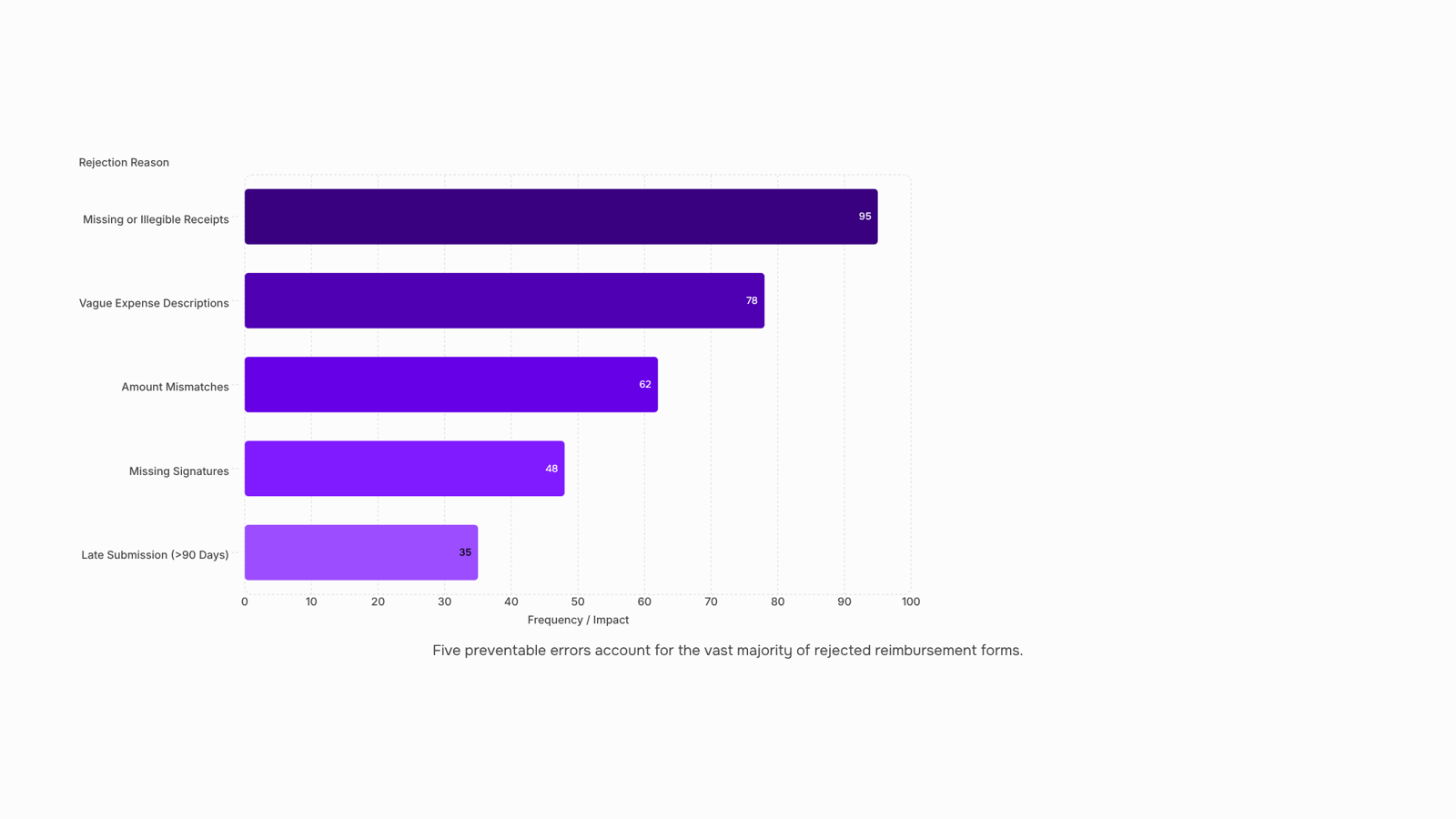
Five errors account for the vast majority of returned expense reimbursement forms. Check each one before you hit submit.
Missing or illegible receipts top the list. Approvers need documentation for every line item, and a blurry phone photo often fails the same way a missing receipt does. When you attach a receipt or invoice to your claim, make sure the vendor name, date, and total are all readable.
Vague expense descriptions are the second most common reason a reimbursement form stalls. "Lunch" tells an approver nothing. "Client lunch with Acme team, pre-sales meeting, 4 attendees" gives them everything they need to approve it without a follow-up.
Amount mismatches happen when the figure on the form doesn't match the receipt total, often because someone entered pre-tax instead of post-tax, or forgot a tip. Match the numbers exactly.
Missing signatures — your own or your manager's — send a form straight back. Check your company's expense approval workflow to confirm which sign-offs are required before submission.
Late submission is the mistake that costs you money. Most companies enforce a 30 to 90-day window. Once that closes, the claim is typically denied regardless of how clean the form is.
Run through this list as a self-audit. A clean submission the first time is almost always faster than resubmitting after a rejection, and you can track reimbursement payments once it moves into processing.
Once you submit, the form moves into an expense approval workflow that typically runs in two stages: direct manager review, then finance sign-off. On paper-based systems, that cycle commonly takes one to two weeks. Automated systems compress it to two to three business days.
If a form comes back, the rejection reason is usually one of three things: a missing document, a mismatched amount, or a policy violation the submitter didn't catch. Fix the specific item flagged, don't resubmit the whole package from scratch.
To track reimbursement payments while you wait, ask finance for a reference or batch number at submission. Most accounting systems update status daily.
One practical step that prevents most returns: before you submit, attach a receipt or invoice to your claim directly rather than emailing it separately. Separated documents are the single most common reason reimbursement forms stall at the review stage.
Closing
The difference between a reimbursement form that sails through approval and one that bounces back comes down to one thing: treating it like a compliance document, not a casual request. Missing receipts, vague business purposes, and mismatched dates are what actually kill claims — not the expense itself. When you gather your documentation first, match categories to your company's chart of accounts, and attach clear receipt images, you've already solved 90% of rejection risk.
If your team is still filling out reimbursement forms by hand and chasing approvals over email, Inzo's expense workflow handles submission, categorization, and approval in one place — worth a look if the manual process is costing you more time than the reimbursements are worth.
FAQ
How do I fill out a reimbursement form?
Fill in employee details first, then submission date, expense date, exact amount (with cents), category matching your company's chart of accounts, a clear one-sentence business purpose, and a receipt reference number. Attach receipts as PDFs or clear photos, verify totals, and confirm submission through your approval workflow.
What information is required on a reimbursement form?
Employee name, ID, department, manager name, expense date, exact amount, category, business purpose, receipt reference, and payment method. IRS Publication 463 requires date and business purpose for substantiation; missing either triggers rejections.
Can I submit a reimbursement form online?
Yes, and you should. Online submission cuts processing time from 2–4 weeks to 2–5 days, enforces required fields automatically, and lets you attach receipts inline. Digital workflows eliminate lost documents and manual data re-entry.
How long does it take to process a reimbursement form?
Paper forms take 5–15 business days; digital submissions typically process in 2–5 days. Speed depends on completeness, approver availability, and whether your system routes claims automatically.
What are the common mistakes to avoid on a reimbursement form?
Missing or blurry receipts, vague business purposes, mismatched expense dates, wrong category selection, and incomplete employee details are the top rejection triggers. Verify receipt references match line items and amounts include cents.


 Elena Petrova15 September 2026


