TL;DR: Most articles on cloud-based workflow system software stop at "accessible anywhere" and call it done. This one maps each cloud advantage to the specific operational failure it prevents, from version drift to after-hours process breakdowns, so you can evaluate platforms on mechanics, not marketing. You'll also see why cloud hosting alone is no longer the differentiator; AI-native execution is.
What Workflow System Software Actually Does
Abstract digital workflow system visualization with interconnected nodes and data flow in modern 3D render
Workflow system software is the execution layer between your business rules and the tools your team uses every day. It doesn't just track tasks — it runs processes: routing approvals, triggering notifications, moving data between systems, and enforcing the sequence your operations depend on.
Most IT teams still manage significant chunks of this through email threads and spreadsheets. That works until it doesn't. When a step is missed, there's no audit trail. When someone leaves, the process leaves with them.
Business process automation software sits at a different level than a simple to-do list or project tracker. A project tracker tells you what needs doing. Workflow system software actually does it — conditionally, on a schedule, or in response to an event — without someone manually kicking it off each time. If you want to understand how trigger logic and event-based execution work inside a workflow builder, that distinction matters before you evaluate any platform.
The other thing most category definitions skip: execution control. A real workflow system lets you pause a running process, abort it mid-flight, or resume it after a manual review step. That's not a feature — it's what separates a process execution layer from a glorified checklist.
Choosing the right workflow automation software starts with understanding what the category actually covers. That context matters even more when the deployment question — cloud vs. on-premise — comes next.
Cloud vs. On-Premise: The Tradeoffs IT Owners Should Know
The honest answer is that neither deployment model wins on every dimension. The right choice depends on what your team actually controls and what failure modes you can afford.
Setup time is where cloud wins cleanly. A cloud-based workflow automation platform is typically running within hours, not weeks. On-premise installations require server provisioning, network configuration, and IT sign-off before a single workflow executes. For most IT company owners, that gap translates directly into delayed automation and longer exposure to manual process errors.
Maintenance overhead follows the same pattern. With cloud, the vendor handles patches, uptime, and infrastructure scaling. On-premise puts that burden on your team, which means your engineers are managing servers instead of building workflows. If your team is small, that tradeoff compounds quickly.
Integration surface favors cloud by a wide margin. Modern cloud-based workflow automation connects to APIs, webhooks, and SaaS tools your team already uses. On-premise systems often require custom middleware to reach the same endpoints. If you want to understand how trigger logic and integrations actually wire together, the architecture difference matters more than most vendors admit.
Data control is where on-premise has a real argument. Regulated industries with strict data residency requirements, air-gapped environments, or legacy systems that cannot expose APIs may have genuine constraints that cloud cannot satisfy. That is a legitimate reason to choose on-premise, not a marketing talking point.
For most IT company owners evaluating a workflow automation platform, the question is not "which is better" but "which constraints apply to us." If data residency is not a hard requirement, cloud removes more friction than it introduces. Use this framework for choosing the right workflow automation software to pressure-test that decision against your actual environment.
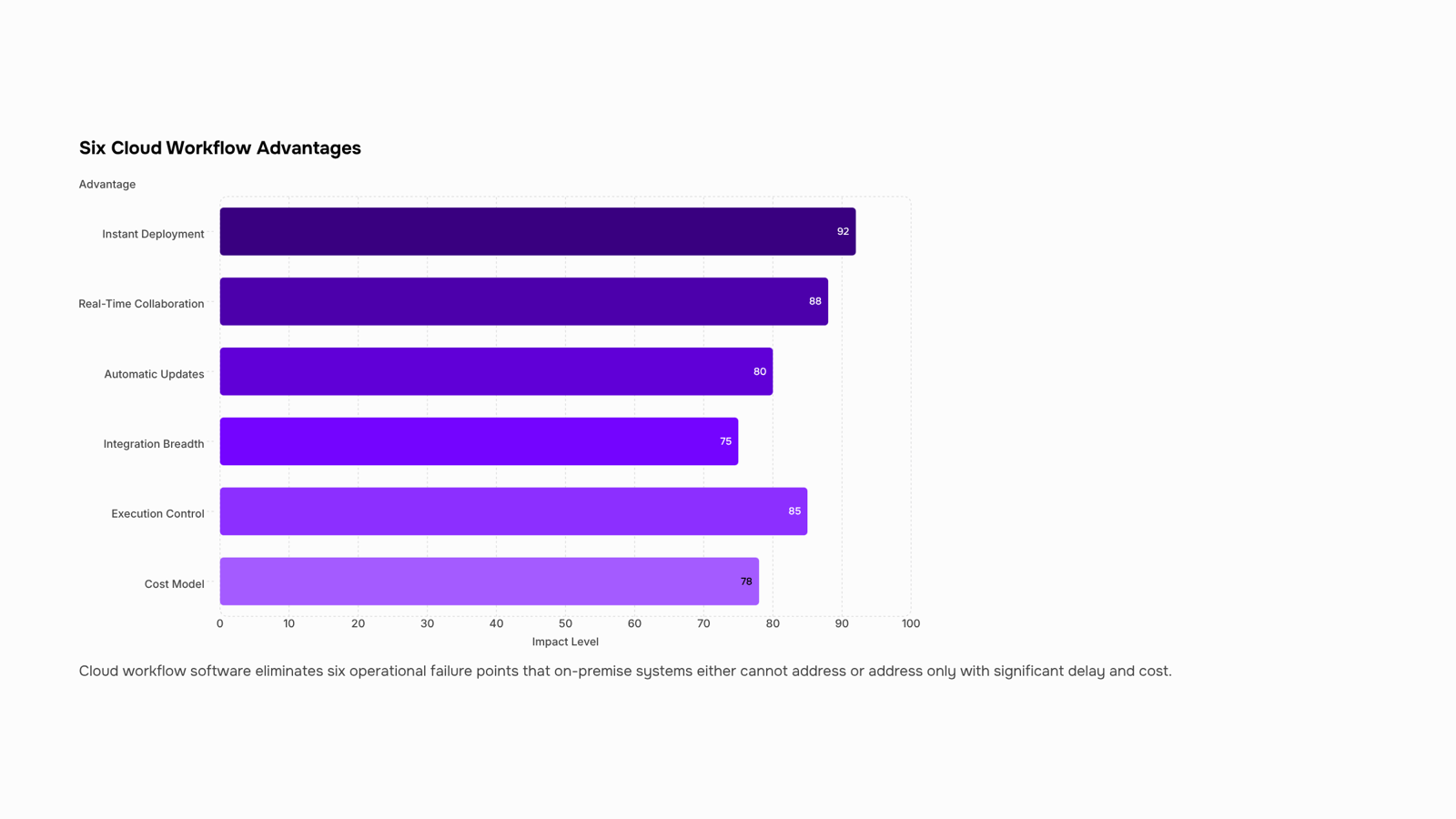
Six Advantages of Cloud-Based Workflow System Software
Cloud-based workflow system software removes six specific failure points that on-premise deployments either can't address or address slowly.
Instant deployment: On-premise installations typically take weeks to configure, test, and roll out. Cloud platforms are live in hours. That matters when a process is breaking now, not in Q3 when the server provisioning clears.
Real-time collaboration: When a workflow lives on a local server, only the people with access to that server can see it run. Cloud-based workflow automation puts execution logs, task status, and trigger history in front of every stakeholder simultaneously. Bottlenecks surface in minutes rather than at the end-of-week status call.
Automatic updates: On-premise software requires your IT team to schedule, test, and deploy every patch. Cloud platforms handle that in the background. Your team gets new integrations and security fixes without a maintenance window or a change request ticket.
Integration breadth: Most modern businesses run 10 to 20 SaaS tools at once. Cloud-based platforms connect to those tools through pre-built APIs and webhooks, which means your CRM, project management software, and billing system can share data without custom middleware. Choosing the right workflow automation software for your stack depends heavily on how wide that integration surface is.
Execution control: This is where most cloud comparisons stop short. The operational advantage isn't just that workflows run automatically — it's that you can pause, resume, or abort a running workflow mid-execution when something changes. A client cancels an order. A compliance rule shifts. An upstream API goes down. Without execution control, you're waiting for the workflow to finish and then cleaning up manually. With it, you intervene in real time. Scheduled and timer-based execution compounds this further — workflows can run on triggers or clocks without anyone watching the queue.
Cost model: SaaS workflow software runs on per-seat subscriptions. On-premise runs on upfront licensing, server hardware, and ongoing IT overhead. For most IT company owners under 200 employees, the SaaS model costs less in year one and significantly less by year three once you account for maintenance labor.
The six advantages compound each other. Fast deployment means you can automate a broken process this week. Real-time visibility means you catch failures before they escalate. Execution control means you can correct mid-flight rather than post-mortem. If you're evaluating where to start, understanding how a drag-and-drop workflow builder works in practice gives you a concrete picture of what building on a cloud platform actually looks like.
Key Features to Look For in Workflow System Software
Not every workflow tool fails at execution — most fail at configuration. The features that matter aren't the ones on the marketing page; they're the ones that prevent a broken process from running silently for three weeks before anyone notices.
Drag-and-drop workflow builder: A visual builder lets you map logic without writing code, but the real test is whether it enforces structure. A good workflow builder forces you to define triggers, conditions, and outputs before a workflow goes live. That prevents the most common failure mode: automating a process that was never clearly mapped.
Trigger logic: Triggers determine when a workflow fires — on a form submission, a status change, a time condition, or an API event. Weak trigger logic means you're either running workflows too broadly (wasting compute and creating noise) or too narrowly (missing the cases that actually need automation). Look for multi-condition triggers, not just single-event ones.
Cross-tool integrations: A workflow automation platform that can't reach your existing stack creates more manual work, not less. Native integrations with your CRM, project tools, and communication apps matter more than the total number of connectors listed on a pricing page. Depth beats breadth.
Execution tracking: You need to see what ran, when, and what the output was. Without an execution log, debugging a failed automation means guessing. Real-time visibility into workflow runs is what separates a production-grade system from a prototype.
Pause, resume, and abort controls: These are the operational safety net. If a workflow fires incorrectly — wrong data, wrong timing, wrong recipient — you need to stop it mid-run without losing the context to restart it. Most teams only discover they need this feature after something goes wrong.
Revo covers all five of these, including a drag-and-drop interface built for non-technical operators. If you're still weighing options, the guide on how to choose the best workflow automation software walks through the evaluation criteria in more detail.
Can Workflow System Software Be Customized for Your Industry
Customization in workflow system software splits into two distinct layers, and most buyers confuse them.
Surface-level customization means renaming fields, swapping colors, or picking a pre-built template. That's theming, not configuration. Real customization operates at the logic layer: conditional branching that routes a ticket differently based on client tier, role-based access that restricts which team members can approve a step, and custom triggers that fire when a specific API event lands rather than on a fixed schedule.
Most business process automation software lets you configure all three of these without writing code. A concrete example: an IT services company can build a client onboarding workflow where contracts under a certain value auto-approve, contracts above that threshold route to a senior account manager, and any unsigned document after 48 hours triggers a follow-up task automatically. That's conditional logic, role-based routing, and a time-based trigger working together.
Where the limits appear: highly regulated industries (healthcare, finance) sometimes need audit-trail formats or data residency rules that generic platforms don't support out of the box. Check whether the vendor supports custom field encryption, region-specific data storage, and compliance export formats before assuming the platform fits your industry.
For a broader view of what this kind of configuration unlocks operationally, the benefits of automated workflow software covers the downstream outcomes once logic-layer customization is running.
Before you sign anything, pressure-test the platform on four points.
Integration depth: Ask for a full connector list, not a logo wall. A workflow automation platform that connects your CRM, helpdesk, and billing tool natively is worth more than one that routes everything through a generic webhook. Check whether the integrations are read-only or bidirectional.
Execution visibility: Can you pause, resume, or abort a running workflow mid-execution? Most vendors treat cloud as a deployment model and stop there. Execution control is what separates a cloud-based workflow automation tool from a scheduled script. See how trigger logic actually works before you assume the platform handles edge cases.
Free trial scope: A 14-day trial with capped automations tells you nothing about real load. Push for a trial that lets you run your actual processes, not demo data.
Support model: Find out whether onboarding support is included or sold separately. For a deeper evaluation framework, how to choose the right workflow automation software covers the criteria most vendor comparison pages skip.
Closing
Cloud-based workflow system software wins because it removes friction at every stage: deployment happens in hours instead of weeks, real-time visibility replaces end-of-week surprises, and execution control lets you intervene when circumstances change mid-process. The real differentiator isn't that it's in the cloud — it's that you get a no-code builder, automatic updates, and broad integrations without IT overhead. The question isn't whether cloud workflow software works; it's whether it works for your specific processes. The fastest way to find out is to test it against one broken process you own right now. Revo offers a free trial with no infrastructure setup required — wire up a real workflow in your environment and see whether the execution control and builder capabilities actually hold up against what you're running today.
FAQ
What are the advantages of using a cloud-based workflow system software?
Cloud workflow software deploys in hours (not weeks), enables real-time team visibility, updates automatically, integrates broadly with SaaS tools, gives you execution control mid-process, and costs less than on-premise by year three. The key advantage is removing manual process errors and bottlenecks without IT overhead.
How does workflow system software improve business efficiency?
It automates conditional routing, triggers, and data movement between systems without manual intervention. Teams catch bottlenecks in real time, audit trails replace guesswork, and processes run consistently even when people leave. Efficiency gains compound when execution control lets you pause or correct mid-flight.
Can workflow system software be customized for specific industries?
Yes, cloud platforms with no-code builders and broad API integrations adapt to industry-specific rules and compliance requirements. The real test is whether the builder enforces structure (triggers, conditions, outputs) before workflows go live, preventing silent failures.
What are the key features of a workflow system software?
A drag-and-drop visual builder, execution control (pause/resume/abort mid-process), real-time audit logs, conditional routing, broad integrations, and scheduled or event-based triggers. The builder should enforce structure before deployment to prevent broken processes from running silently.
Is there a workflow system software that offers a free trial?
Yes. Revo offers a free trial with no infrastructure setup or IT ticket required. You can wire up a real workflow against your own processes and test execution control and the no-code builder against what you're actually running.


 Elena Petrova11 September 2026


