TL;DR: Most portfolio management content explains what a portfolio is and stops there. This guide covers the specific scoring criteria, prioritization decisions, and tooling choices that separate a portfolio delivering business outcomes from one that just tracks project status. You'll finish with a repeatable system for deciding which projects get resources and which get cut.
What IT Portfolio Management Actually Requires
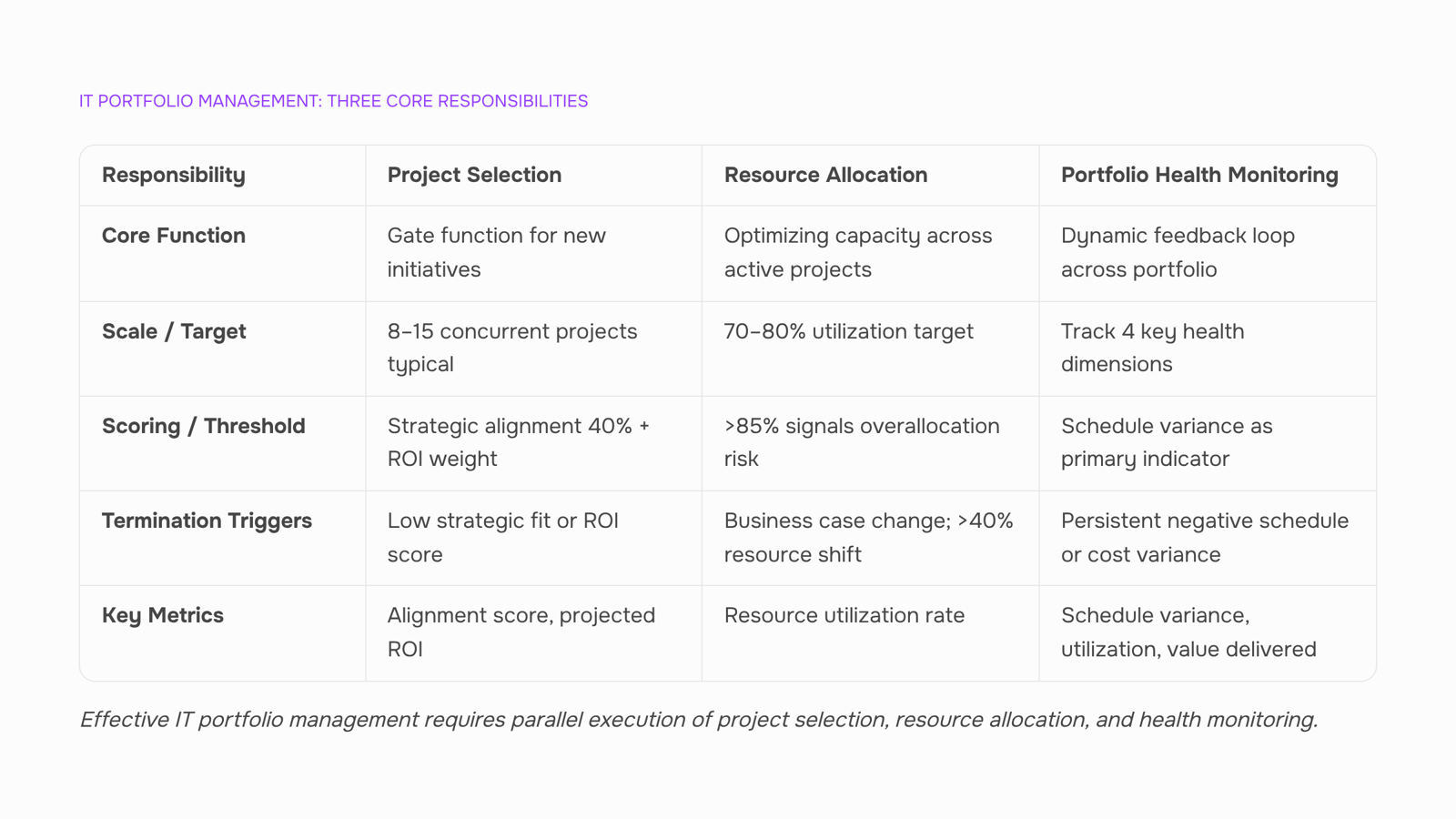
Portfolio management for an IT company isn't a quarterly review meeting. It's three ongoing responsibilities running in parallel, every week.
Project selection is the gate. You decide which engagements, internal builds, or client projects enter your active portfolio. Most IT firms with 10 to 60 employees run 8 to 15 concurrent projects. Without a deliberate intake process, that number creeps up until delivery quality drops. If you want a deeper look at how project portfolio management works end-to-end, start there.
Resource allocation is the constraint. PPM project portfolio management fails when every project is approved but the same three senior engineers are assigned to all of them. Healthy utilization for IT delivery teams sits around 70 to 80 percent. Above that, you're borrowing from future capacity.
Portfolio health monitoring is the feedback loop. You track whether active projects still justify their slot: are timelines holding, is the client still funded, has scope shifted enough to change the ROI math. As Stage-Gate's research frames it, project portfolio management is "a dynamic decision process, whereby a business's list of active projects is constantly updated".
These three responsibilities set the frame for everything that follows, starting with scoring and prioritizing projects before they enter the portfolio.
How to Select Projects That Belong in Your Portfolio
Most IT company owners don't struggle to find projects. They struggle to say no to projects that look reasonable on paper but quietly drain capacity from higher-value work. A scoring approach fixes this by forcing every candidate project through the same filter before it earns a slot.
Score each project candidate across three dimensions:
Strategic alignment (weight: 40%). Does this project directly advance one of your top three business goals this quarter? If the answer requires a paragraph of justification, the alignment is weak. Strategic portfolio management fails when "nice to have" projects score the same as "must win" engagements.
ROI threshold (weight: 35%). Set a minimum return bar, whether that's gross margin, contract value, or lifetime client revenue. For a 30-person IT services firm running 8-12 concurrent projects, a project that clears your threshold by less than 10% probably isn't worth the coordination overhead.
Capacity feasibility (weight: 25%). Check whether your team can absorb the project without pushing utilization past 80%. Beyond that line, you lose the slack needed to handle scope changes and production incidents. If staffing the project requires pulling a senior engineer off an active delivery, that cost belongs in the score.
Add the weighted scores. Any project below your cutoff line stays in the backlog, not the portfolio. Review the cutoff quarterly as your team size and strategy shift.
The discipline here is project and portfolio management at its most practical: a short scoring exercise that takes 20 minutes per candidate and prevents months of resource drag. For a deeper breakdown of scoring and prioritizing projects before they enter the portfolio, that guide walks through weighted-scoring templates you can adapt to your own criteria.
Resource Allocation Across Concurrent Projects
The scoring model from the previous section tells you which projects deserve a slot. This section covers what happens after: distributing a finite team across those approved projects without burning people out or starving critical work.
Most IT companies between 10 and 100 employees run 5 to 12 concurrent projects at any time. That means the same senior engineers, architects, and project leads appear on multiple Gantt charts simultaneously. The failure mode is predictable: context-switching eats 20 to 30 percent of productive time, and no single project gets the focused effort it needs.
Set a utilization ceiling, not a floor. A healthy target for IT delivery teams sits around 70 to 80 percent billable utilization. Push past 85 percent and you lose the slack needed to absorb scope changes, sick days, or urgent client escalations. When your project portfolio management cadence shows utilization creeping above that threshold for two consecutive weeks, treat it as an early conflict signal, not a sign of productivity.
Three signals that a resource conflict is forming:
A single person is allocated to three or more active projects in the same sprint
Delivery dates on two projects shift in the same direction (right) within the same reporting period
Standup blockers reference "waiting on [person]" more than twice per week
What to do when you spot them:
Pull the shared resource off the lowest-priority project (your scoring model already ranks these)
Reassign or pause that project's current sprint scope
Communicate the trade-off to the affected stakeholder before they discover it through a missed deadline
Lean portfolio management treats this as a flow problem, not a scheduling problem. You are not trying to pack every hour. You are protecting throughput on the projects that scored highest.
If you are evaluating tools to make this visible in real time, compare options in our breakdown of top PPM tools for project portfolio management.
When to Stop a Project — and How to Make That Call
Killing a project feels like admitting failure. It isn't. A portfolio manager might cancel a project because the market shifted, even if the project manager was doing everything right. The decision protects the portfolio, not the ego.
Sunk cost is the trap. The money and hours already spent are gone regardless. Your only question is: does the remaining investment still produce enough value to justify the resources it holds? If the answer is no, continuing burns capacity that a higher-value initiative needs.
Set termination criteria before a project starts. Three signals that should trigger a formal review:
The business case changed (client cancelled, regulation shifted, competitive window closed)
Resource demand exceeded the original estimate by more than 40% with no proportional value increase
The project has missed two consecutive milestone gates without a credible recovery plan
When you make the call, communicate it as a strategic portfolio management decision, not a punishment. Share what was learned, reassign the team immediately, and update your scoring and prioritization framework so similar projects get flagged earlier at intake.
The hardest part of project and portfolio management is not starting things. It is stopping them cleanly. Build the termination process into your governance model from day one, and your team will trust the system enough to raise red flags before you have to.
Portfolio Health Metrics That Actually Tell You Something
Most portfolio dashboards track too many numbers and signal too little. Four metrics give you a real read on execution quality across your active projects.
Schedule variance measures the gap between planned and actual timelines at the portfolio level, not just per project. When three of your twelve active engagements slip simultaneously, that's a capacity signal, not a project management failure. Track it as a percentage deviation from baseline.
Resource utilization rate tells you whether your team is overloaded or underdeployed. The healthy range for IT delivery teams sits around 70–80%. Push past 85% consistently and you'll see quality drop, attrition rise, and estimates get worse. Below 60%, you're carrying cost without output. If you're applying a lean portfolio management approach to WIP limits and continuous flow, utilization is the first metric that confirms whether your WIP caps are realistic.
Benefits realization rate answers the uncomfortable question: did the finished project actually deliver what the business case promised? Track this 90 days post-delivery. Most IT companies skip it because the answer is often "partially."
Portfolio ROI aggregates return across all active and recently completed projects. It forces you to weigh winners against losers rather than celebrating individual successes while ignoring the drag from underperformers.
Together, these four metrics surface whether your ppm project portfolio management practice is producing results or just producing activity. Review them monthly, not quarterly.
Most lists of project portfolio management software rank tools by feature count without telling you which features actually matter for a 10-to-50-person IT delivery team. Four criteria separate useful tools from expensive dashboards:
Agile support at the portfolio layer: Your tool should handle sprint-level tracking and roll it up into portfolio views without manual re-entry. If your teams run Scrum or Kanban at the project level but your portfolio reporting lives in a spreadsheet, you have a visibility gap, not a process.
Real-time resource visibility: You need to see who is allocated where, at what percentage, right now. Not last week's export. Teams running 10 to 15 concurrent projects cannot afford to discover conflicts in standup.
Reporting depth beyond status colors: The metrics from the previous section (schedule variance, utilization rate, portfolio ROI) should be computable inside the tool, not assembled manually in Sheets.
Integration with your existing workflow: A portfolio management tool that doesn't connect to your ticketing system, time tracker, or CRM creates the same data silos you're trying to eliminate.
Taro, WorksBuddy's AI-powered task and sprint tracker, is a concrete example of what built-in AI looks like in practice: it surfaces task misalignment and ownership gaps at the sprint level, then feeds that data upward so your portfolio view reflects actual execution, not optimistic estimates.
For a broader comparison, see the top PPM tools available for IT teams. If you're still defining how product portfolio management fits your strategy, start with how project portfolio management works end-to-end.
Common Portfolio Management Mistakes IT Owners Make
Most IT owners repeat four patterns that undermine even well-structured project portfolio management efforts.
Data silos between delivery and finance. When timesheets live in one tool, budgets in a spreadsheet, and project status in Slack threads, you cannot calculate true cost-per-project. Decisions get made on gut feel instead of margin data.
No kill criteria. Competitor content avoids this topic entirely, but it matters most. If you have not defined upfront what "failing" looks like (missed three consecutive sprint goals, client disengaged for 30+ days), zombie projects consume capacity indefinitely. A lean portfolio management approach demands explicit exit rules before a project starts.
Treating all projects as equal priority. When a 10-person IT shop runs 12 concurrent projects, everything feels urgent. Without a scoring model, your highest-value client and a speculative internal tool compete for the same developer hours.
Confusing activity with progress. Tickets closed per week is not the same as business value delivered. Track outcomes (revenue recognized, features shipped to production) rather than volume.
If you recognize two or more of these, start by addressing how to minimize portfolio risk before layering on new process.
Closing
Portfolio management isn't a quarterly ritual—it's a weekly discipline of deciding which projects get your team's finite capacity and which don't. The scoring model, utilization guardrails, and termination criteria you've just walked through aren't theoretical. They're the operational levers that separate IT firms delivering predictable outcomes from those stuck in reactive mode, constantly firefighting scope creep and resource conflicts.
The gap between knowing these practices and running them consistently is tooling. Taro, WorksBuddy's project execution hub, wires these decisions into your actual workflow: sprint planning anchored to portfolio priorities, real-time task tracking that surfaces resource conflicts before they become missed deadlines, and team visibility that replaces manual status reporting. Ready to see how your portfolio looks when these practices become operational? Start with Taro.
FAQ
What is the best project portfolio management software for large teams?
The best tool depends on your scoring criteria and resource constraints. For IT teams managing 8–15 concurrent projects, prioritize software that surfaces utilization conflicts in real time and enforces your intake gate—not just Gantt chart visualization.
How do I select the right project portfolio management tool for my business?
Evaluate tools against your three core responsibilities: project selection (intake scoring), resource allocation (utilization tracking), and portfolio health monitoring (milestone tracking). Avoid tools that optimize for reporting over execution.
What are the key features of a project portfolio management software?
Essential features: weighted scoring for project intake, real-time resource utilization tracking, milestone gate enforcement, and stakeholder communication tools. Avoid feature bloat; prioritize clarity over customization.
Can project portfolio management software help with resource allocation?
Yes. PPM software prevents over-allocation by surfacing when a single person is assigned to three or more concurrent projects or when utilization exceeds your 70–80% ceiling. Early visibility prevents context-switching drag.
Which project portfolio management software is best for agile teams?
Choose tools that integrate sprint planning with portfolio priorities and allow rapid scope adjustments when resource conflicts surface. Agile portfolios need weekly visibility, not quarterly reviews.
How many projects should be in an IT portfolio at one time?
Most IT firms with 10–60 employees run 8–15 concurrent projects. Beyond that, context-switching eats 20–30% of productive time. Use your scoring model to enforce a hard cap tied to team size and utilization ceiling.
What is the difference between project management and portfolio management?
Project management executes individual work. Portfolio management decides which projects deserve resources in the first place—and which to stop. Portfolio management is the gate; project management is the delivery.


 Elena Petrova15 September 2026


