TL;DR: Most task management guides stop at prioritization tips. This one shows IT company owners how to build a system that handles unlimited task volume without breaking: intake rules, dependency mapping, AI-assisted triage, and workload distribution covered in one repeatable framework. You'll finish with a structure your team can run this week.
Why unlimited tasks break standard project workflows
Standard project workflows assume you can scan the backlog, spot what matters, and assign it. That assumption holds for 20 or 30 tasks. It breaks somewhere around 80, and by the time you're managing hundreds of open items, the workflow itself becomes the bottleneck.
The core failure is structural. Most task management methods treat prioritization as a one-time decision made by one person. When project task overload hits, that model collapses. No single person can review 200+ tasks with enough context to triage accurately, and manual review cycles slow down faster than the backlog grows.
Three specific things go wrong at high volume:
Status fields stop reflecting reality because updates require manual effort no one has time for
Dependencies become invisible, so teams block each other without knowing it
High-priority work gets buried under volume, not urgency
The result is that teams default to recency bias: whatever came in last gets worked first. Deadlines slip not because the work is hard, but because the system can't surface what matters.
To manage unlimited tasks without that breakdown, you need intake rules, naming conventions, and dependency logic that work automatically, not rules that depend on someone reviewing everything. The best task tracker apps enforce this structure at the tool level, which is where the discipline actually sticks.
How to structure tasks so volume does not create chaos
Four rules govern whether a large backlog stays navigable or becomes noise.
Consistent naming: Every task title should follow a subject-verb-object pattern: "Migrate staging database to AWS RDS" beats "Database stuff." When a team runs tasks unlimited across multiple projects simultaneously, vague titles force people to open each card just to understand what it is. That reading cost compounds fast at volume.
Mandatory status on intake: Tasks that enter the backlog without a status (Backlog, In Progress, Blocked, Done) become invisible to the people who need to route or pick them up. Assign status at the moment of creation, not as a cleanup task later. A best practice for setting task priority is to treat status as a required field, not an optional one.
Dependency tagging before work starts: If Task B cannot begin until Task A ships, that link needs to exist in the system before either task is assigned. Undocumented dependencies are the most common reason a sprint looks healthy on Monday and falls apart by Thursday. Tag them at intake, not during the retrospective.
Owner on every task, no exceptions: Shared ownership is no ownership. One name, one accountable person. Teams that skip this step find tasks sitting in "In Progress" for weeks because everyone assumed someone else was moving it.
These four rules do not require a new process. They require enforcement of the intake moment. For task prioritization for teams to work at scale, the backlog has to be clean enough that a teammate can scan 200 items in under five minutes and know exactly what is ready to move.
How to prioritize tasks when you have an unlimited number to complete
When you're managing unlimited tasks across a live project, "prioritize better" is not actionable advice. You need a repeatable scoring method your whole team can apply in under two minutes per task.
Use three inputs for every triage decision:
Urgency — Does this task block a deadline or a client deliverable in the next 48 to 72 hours? If yes, it moves to the top regardless of effort.
Impact — What breaks if this task slips a week? Score it on a simple 1-to-3 scale: 1 = internal inconvenience, 2 = team velocity affected, 3 = client or revenue impact.
Dependency — Is another task waiting on this one? Blocked tasks create cascading delays. Any task with two or more dependents gets priority treatment even if its own deadline looks distant.
Run those three inputs together. A task that scores high on all three goes to the top of the sprint. A task that scores low on all three goes to the bottom of the backlog, no debate needed.
For task prioritization for teams to work at scale, the scoring has to be consistent across team members, not left to individual judgment. Assign one person per sprint to own the triage pass, using the same three criteria every time.
A concrete example: a mid-sized IT services team running 80-plus active tasks per sprint can cut triage time significantly by tagging each task with urgency, impact, and dependency status at intake. Decisions that used to require a 30-minute standup get resolved in the backlog view before the meeting starts.
To manage unlimited tasks without project task overload, the goal is a system your team trusts enough to stop second-guessing the order.
How AI changes triage when the backlog is too large to review manually
Manual triage breaks down somewhere around 200 tasks. At that scale, a project lead reviewing the backlog item by item will miss dependencies, underweight high-impact work, and default to recency bias, clearing whatever was added last rather than what matters most.
AI task management changes this by processing the three triage inputs covered in the previous section (urgency, impact, dependency) across the entire backlog simultaneously, not just the top 20 items you can hold in working memory. The result is a ranked queue that reflects actual project risk, not whoever shouted loudest in the last standup.
If you want to understand how an AI task manager improves productivity beyond surface-level sorting, the mechanism matters: the system needs to read due dates, blocker relationships, and business-value signals together, not in isolation. Tools that score urgency alone will keep surfacing low-impact fires at the top of the list.
Taro handles this through AI backlog auto-prioritization, which continuously re-ranks tasks as new items land and existing ones shift state. When a blocker resolves or a deadline moves, the queue updates without a manual review cycle. For teams running an unlimited task management platform at scale, that continuous recalculation is the difference between a backlog that guides the sprint and one that just stores complaints.
The practical outcome: your team stops the weekly "what should we work on?" meeting and starts the sprint from a queue that already reflects current project reality. For a deeper look at how to prioritize tasks on your to-do list, the same logic applies at the individual level.
How to distribute unlimited tasks across a team without overloading anyone
Prioritization frameworks like Eisenhower or MoSCoW are built for one person managing their own list. When you're trying to manage unlimited tasks across a five- or ten-person team, those frameworks break down fast because they ignore capacity entirely.
The assignment logic that actually works at team scale follows three steps:
Map current load before adding anything: Check how many active tasks each person carries before assigning new ones. A developer with eight open items shouldn't absorb three more just because they own that domain.
Assign by capacity, not familiarity: The default instinct is to route tasks to whoever did similar work last. That concentrates load on your strongest people and quietly burns them out.
Flag blockers at assignment, not at deadline: When a task lands on someone's board, surface any dependencies immediately. Blocked tasks inflate perceived workload and distort your visibility into what's actually moving.
Workload visibility is the piece most task prioritization for teams guides skip. You can't distribute work fairly if you can't see, in one view, who has capacity and who is at the ceiling.
Taro's task management layer gives you that view across the whole team, so managing unlimited tasks doesn't mean manually auditing everyone's board each morning. Assignments reflect real availability, not just who's online.
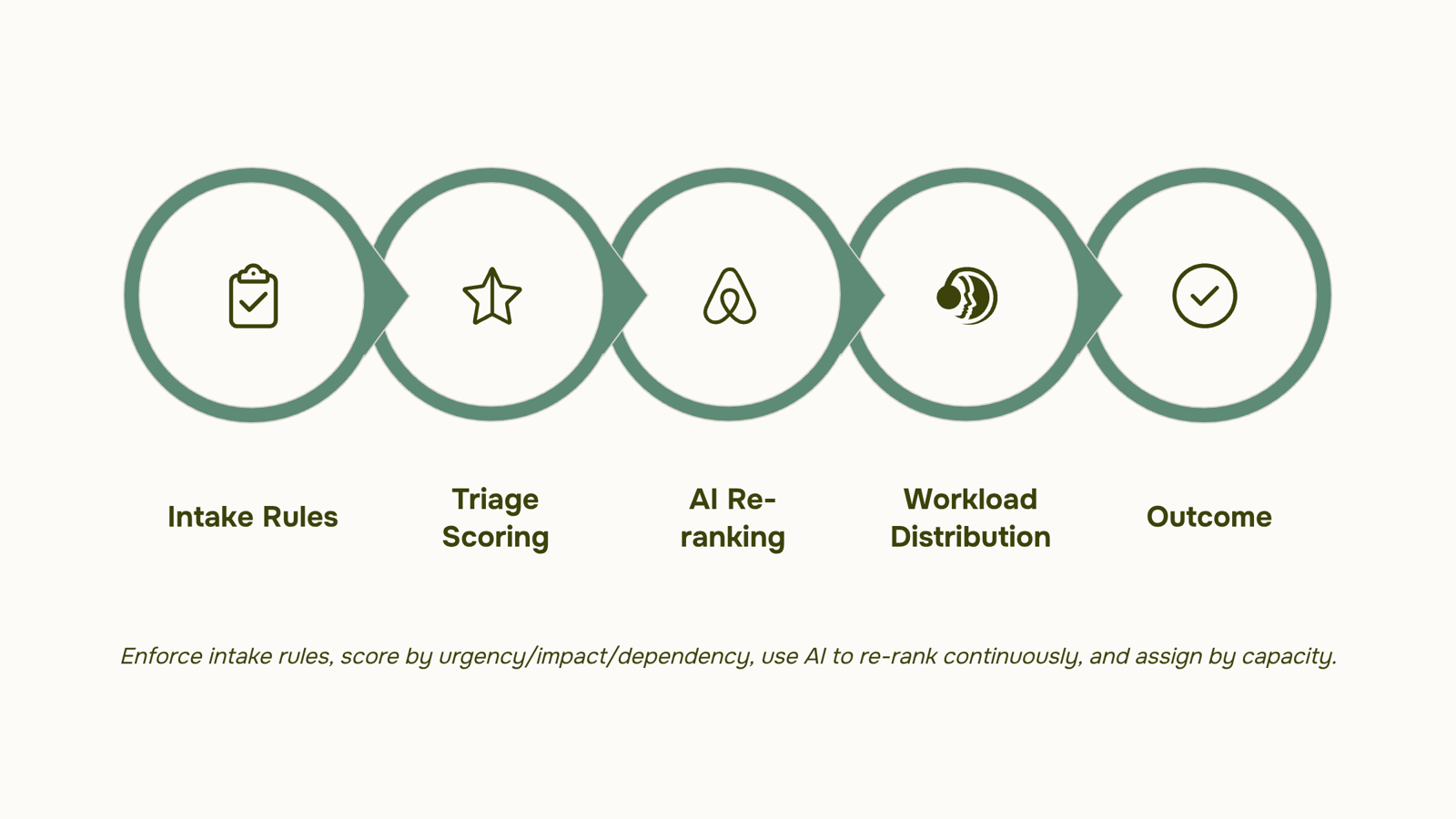
Most platforms that advertise tasks unlimited have the same catch: the free tier caps members, storage, or automations long before you hit a real project load. Before you pick a tool, apply four criteria.
Actual task volume limits: Check whether "unlimited tasks" applies at every paid tier or only at the top one. Some tools gate bulk imports or recurring task creation behind enterprise plans.
AI-assisted triage: When your backlog runs into the hundreds, manual sorting breaks down. Look for a platform where AI flags blocked tasks, surfaces what's overdue, and suggests reassignment based on current workload, not just due dates. This is the gap most task tracker apps skip entirely.
Cross-project visibility: A single project view is not enough. Your team needs to see task load across all active work, so one sprint's overflow doesn't silently delay another.
Integration depth: An unlimited task management platform that doesn't connect to your billing, CRM, or time-logging tools creates data silos. Tasks completed in isolation from revenue context are tasks your business can't learn from.
Taro covers all four: no task caps, built-in AI triage, portfolio-level visibility, and native connections to Revo, Inzo, and Lio. Review task priority best practices before you configure your first board.
Switching from a capped plan to a true tasks unlimited platform changes how your team operates day-to-day, not just how your backlog looks.
The practical gains are specific:
Sprint predictability improves because every task, dependency, and blocker is visible in one place. Nothing hides in a spreadsheet or a chat thread.
Backlog visibility becomes actionable when you can filter, sort, and triage across hundreds of open items without hitting a plan limit. Applying task priority best practices at scale only works if the platform lets you see the full picture.
Blocking drops when ownership is explicit on every task, not just the ones that fit inside a free-tier cap.
Speed increases because teams stop triaging what to log and start logging everything. That data feeds AI triage, which matters when your backlog is too large for manual review.
An unlimited task management platform also gives managers the signal quality they need to prioritize daily work for maximum productivity without guessing what's missing.
Closing
The system works only if your tool enforces it automatically. Intake rules, dependency mapping, and AI-assisted triage only stick when the platform itself prevents shortcuts—when a task can't enter the backlog without a status, when dependencies surface before work starts, when the queue re-ranks without manual intervention. That's where most teams break down: they build the framework but run it on a tool that still forces manual triage at every sprint. Taro's auto-prioritization feature shows what happens when the system handles volume for you—no weekly "what should we work on?" meetings, no recency bias, no buried deadlines. Want to see how that plays out with your actual backlog? Check out Taro's auto-prioritization in action.
FAQ
What are the best practices for managing unlimited tasks in a project?
Use consistent naming (subject-verb-object), mandate status on intake, tag dependencies before work starts, and assign one owner per task. Then apply a three-input triage score—urgency, impact, and dependency—across the entire backlog to keep it navigable at scale.
How can I manage an unlimited number of tasks with my team?
Map current load before assigning new work, distribute tasks by capacity and skill match (not just availability), and use AI-assisted prioritization to re-rank the queue as deadlines and blockers shift. This prevents overload and keeps the backlog aligned with actual project risk.
How do I prioritize tasks when I have an unlimited number to complete?
Score every task on urgency (48–72 hour deadline impact), impact (1–3 scale: internal to revenue), and dependency (blocked tasks). Run one person per sprint through the same three criteria to keep decisions consistent and triage time under two minutes per task.
What tools offer unlimited tasks for free?
Most free task management tools cap storage or feature access rather than task count. Focus on whether the tool enforces intake structure and auto-prioritization—those features matter more than raw volume limits when managing scale.
What are the benefits of using a tasks unlimited platform?
You eliminate manual triage bottlenecks, surface dependencies before they block sprints, and keep high-impact work visible even at 200+ active tasks. The result is faster sprint planning and fewer missed deadlines caused by system breakdown, not work difficulty.


 Elena Petrova15 September 2026


