TL;DR: Most sprint planning guides stop at "define your goals and estimate your tasks." This one gives IT team leads the specific mechanics: where capacity math goes wrong, which estimation techniques hold up under pressure, and a framework for setting sprint goals that the whole team actually commits to. You can run it this week.
What sprint planning actually is
Professional 3D render of organized sprint planning dashboard with task cards and timeline visualization
Sprint planning is the structured session that kicks off every sprint in agile development. The team agrees on a goal, selects backlog items they can realistically finish, and maps out how the work gets done. That's the whole job.
The sprint planning meeting is time-boxed to roughly one hour per sprint week, per the 2020 Scrum Guide. A two-week sprint gets two hours. A four-week sprint gets four. The cap exists to keep the conversation focused, not exhaustive.
What agile and sprint planning share is a commitment to short feedback loops. Planning isn't bureaucracy; it's the mechanism that keeps the team building the right thing instead of discovering a misalignment on day nine.
For a deeper look at how to run the session effectively, or if you're still deciding how long your sprint should run, both questions have direct answers worth reading before the next section.
Why sprint planning determines sprint outcomes
Poor sprint planning doesn't just slow a team down — it determines whether the sprint succeeds at all. When a team enters a sprint with vague goals, an unrefined backlog, or capacity estimates pulled from thin air, scope creep and missed commitments follow almost automatically. According to Digital.ai's State of Agile research, a significant share of sprints fail to meet their sprint goal, and the root cause traces back to the planning session far more often than to execution.
The sprint planning meeting is where ambiguity either gets resolved or gets carried into the sprint. Unresolved ambiguity compounds: a story that wasn't properly sized in planning becomes a blocker by day three. A goal that wasn't agreed on becomes a debate by day seven.
This is why agile project management sprint planning deserves more than a calendar slot. The decisions made in that one session — what to build, how much to take on, and what "done" means — shape every standup, every review, and every retrospective that follows. Understanding how to conduct effective sprint planning in Agile is the fastest way to protect the rest of the sprint cycle.
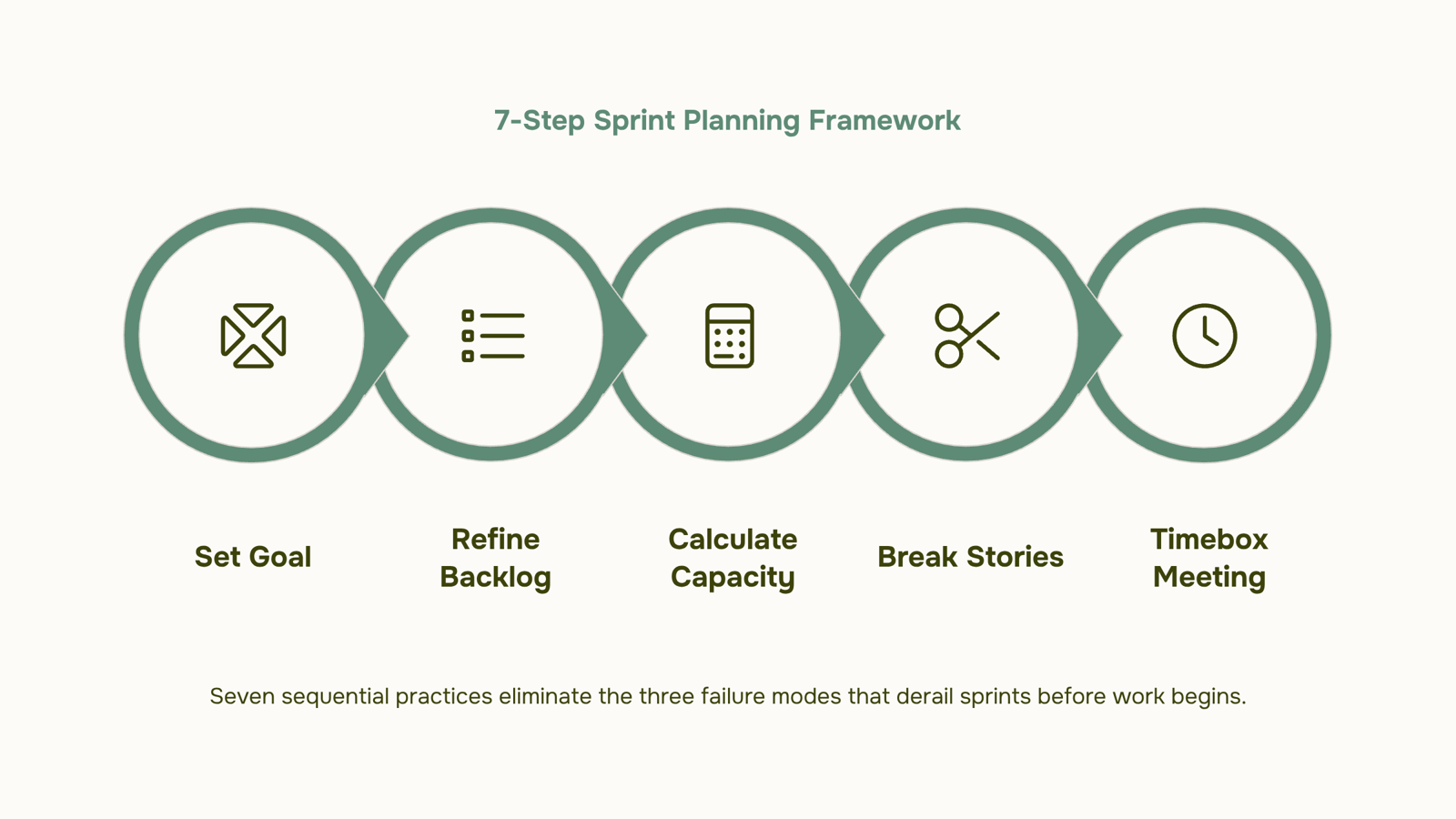
7 best practices for sprint planning in agile development
Each of these practices addresses a specific failure mode. Skip one and you'll usually feel it by day three of the sprint.
1. Timebox the planning meeting to the sprint length
According to the 2020 Scrum Guide, the planning event is timeboxed to a maximum of eight hours for a one-month sprint, which works out to roughly one hour per week of sprint duration. A two-week sprint gets two hours. If you're regularly running over, the backlog wasn't refined enough going in. Set a hard stop and treat it as a signal, not a ruleSet a sprint goal before you assign a single task
Write the sprint goal as a one-sentence outcome, not a task list. "Ship the invoice export feature so finance can close month-end without manual CSV work" is a goal. "Build export endpoint, write tests, update docs" is a task list dressed up as a goal. The goal gives the team a decision filter when scope questions come up mid-sprint. Without it, every new request looks equally valid.
Refine the backlog before the planning session, not during it
If your team is reading user stories for the first time at the planning table, you've already lost 30 minutes to clarification that should have happened earlier in the week. Backlog refinement is a separate session, typically 30 to 60 minutes mid-sprint, where you groom the top items: acceptance criteria written, dependencies flagged, stories sized. Planning then becomes a selection exercise, not a discovery session.
Build your sprint from capacity, not optimism
Count actual available hours before you pull stories. Subtract meetings, on-call rotations, planned time off, and a realistic buffer for interruptions. A five-person team with 40-hour weeks doesn't have 200 hours of sprint capacity. Most teams find 60 to 70 percent of theoretical capacity is closer to reality once overhead is accounted for. Capacity-first sprint planning prevents the most common failure mode: committing to 13 story points when the team can realistically deliver nine.
Break stories down until a single task fits inside one day
If a story can't be completed in a day, it's probably two stories. Large tasks hide complexity and make progress invisible. A developer who spends three days on one card before it moves to "done" creates false confidence in the sprint board. Break work down until each task has a clear output someone else could verify by end of day. This matters especially for solo developers running sprint planning alone, where there's no one else to catch an underestimated task before it derails the week.
to override when things get complicated.
Align the team on who owns what before the meeting ends
Every task on the sprint board should leave the planning session with a named owner. Unassigned tasks drift. They get picked up late, duplicated, or quietly dropped when the sprint gets busy. Ownership doesn't mean isolation: the person responsible for a task can still ask for help. It means there's one person who notices if it stalls and raises the flag. For teams using a backlog management tool, assigning ownership at the task level during planning takes 30 seconds per item and saves a full stand-up of confusion later.
Agree on the definition of done before the sprint starts
Done means different things to different people unless the team defines it explicitly. Does done mean code merged? Code merged and tested? Merged, tested, and deployed to staging? Write it down, put it somewhere visible, and refer to it when a task gets marked complete that doesn't meet the criteria. Teams that skip this step consistently find themselves arguing about whether something is "really" done during sprint review, which is the wrong time to have that conversation.
A note on solo dev sprint planning: When you're the only developer, steps 1, 3, and 7 matter most. You don't need a 90-minute planning meeting with yourself, but you do need a written goal, a realistic capacity number, and a clear definition of done. A 20-minute planning session with those three elements produces better outcomes than a two-hour session without them.
State of Agile data consistently shows that goal clarity and estimation accuracy are the two factors most correlated with sprint success. These seven practices address both directly.
How to estimate tasks for sprint planning
Start with capacity, not the backlog. Before you assign a single story point, calculate how many hours your team actually has: total working hours minus meetings, code reviews, and support overhead. A five-person team running a two-week sprint rarely has more than 60–70 productive engineering hours once you subtract that overhead.
Once you have that number, map it to your estimation method. Story points work well for teams that have run several sprints and have velocity data to anchor against. T-shirt sizing (S, M, L, XL) works better for new teams or when agile and sprint planning is still being introduced to the group.
The practical rule: never fill capacity to 100%. Most experienced teams cap planned work at 70–80% of available hours to absorb unplanned requests and review cycles.
If you want a starting point, a sprint planning template that pre-calculates capacity per team member saves the first 15 minutes of every session. Prax handles this automatically, pulling in each person's availability and mapping it against backlog items before the meeting starts.
Common sprint planning mistakes and how to fix them
Three failure modes collapse most sprint plans before the work even starts.
No sprint goal: Teams list tasks but skip the why. Without a goal, every item feels equally urgent, and the sprint loses focus the moment something unexpected lands. Fix: write one sentence that defines what "done" means for the sprint before you populate the backlog.
Overcommitment: This is the most common problem in agile project management sprint planning. Teams pull in more than their actual capacity allows, then scramble by day four. Fix: use the capacity-first method from the previous section, and treat that number as a ceiling, not a target.
Unrefined backlog: Bringing vague, unsized stories into a sprint planning meeting wastes the entire timebox. According to Digital.ai, a significant share of sprints miss their goal partly because teams skip refinement. Fix: refine stories at least two days before planning, so the meeting is a decision, not a discovery session.
A good sprint planning tool does four things: manages the backlog, shows team capacity, visualizes the sprint board, and tracks burndown in real time. Without all four, you're making decisions with incomplete information.
Taro handles backlog management and burndown in one place, so you're not switching between a spreadsheet and a board mid-planning. That matters most when you're diagnosing the failure modes covered above — overcommitment shows up immediately in capacity view.
If you want a structured starting point, see what to include in your sprint planning agenda before your next session.
Closing
Sprint planning succeeds when three things happen before the meeting even starts: the backlog is refined, capacity is calculated honestly, and the team knows what done looks like. The seven practices in this guide address each one. The difference between a sprint that ships and one that stalls often comes down to whether you spent 30 minutes grooming stories mid-sprint or tried to do it at the planning table. The manual prep work—backlog grooming, capacity tracking, task assignment—is where most teams lose time before the meeting even starts. Taro handles that layer so your planning session starts with clean data, not a spreadsheet cleanup. Start this week: pick one practice that feels weakest in your current process and lock it in for your next sprint.
FAQ
How do I conduct effective sprint planning?
Start with a written sprint goal, refine the backlog before the meeting, build from actual capacity (not optimism), break stories into single-day tasks, timebox the session to one hour per sprint week, assign ownership to every task, and agree on your definition of done upfront.
What are the best practices for sprint planning in agile development?
Set sprint goals before assigning tasks, refine the backlog separately, build from capacity not optimism, break work into day-sized chunks, timebox meetings per the Scrum Guide, assign clear ownership, and define done explicitly. These seven practices directly address the two factors most correlated with sprint success: goal clarity and estimation accuracy.
How can I improve my sprint planning process?
Audit where you lose time: if planning runs over, your backlog isn't refined enough beforehand. If sprints miss goals, your capacity math is off. If tasks slip, ownership isn't clear. Fix the bottleneck first, then layer in the remaining practices.
What tools are used for sprint planning?
Backlog management tools that handle refinement, capacity tracking, and task assignment before the planning session reduce manual prep work and keep data clean. The tool matters less than the workflow: refined backlog, accurate capacity, and clear ownership going in.
How do I estimate tasks for sprint planning?
Calculate actual team capacity first (total hours minus meetings, code reviews, support). Most teams find 60–70% of theoretical capacity is realistic. Then map that to your estimation method: story points work best with velocity data, T-shirt sizing works better for new teams.


 Elena Petrova15 September 2026


