TL;DR: Most process mapping tool roundups compare flowchart features and stop there. This one gives IT company owners a decision framework for choosing tools that move from documentation to actual execution, with specific criteria tied to automation readiness, integration depth, and workflow ownership. You'll leave knowing which tool fits your current stage and what to do with the map once it's drawn.
What process mapping software actually does
Process mapping software turns a process you can describe into a process you can see, measure, and improve.
Most business process mapping tools stop at the diagram. You get a flowchart in Lucidchart or Miro, share it with your team, and then manually execute every step it describes. The map and the work stay separate.
The tools worth evaluating in 2026 close that gap. They connect the diagram to actual execution — triggering tasks, routing approvals, and flagging bottlenecks without manual handoffs. That's the line between a diagramming tool and a visual workflow builder that runs your operations.
If you're still deciding which processes deserve this treatment, identifying which processes to automate first will save you time here. The criteria in the next section score tools on exactly that execution gap.
Not every process mapping tool deserves the same consideration. Here are the criteria that separate tools worth your time from ones that just produce pretty diagrams.
Execution connection. A map that stays in a slide deck doesn't change how work gets done. Look for process mapping software that links directly to task assignment, triggers, or workflow automation — so the diagram becomes the process, not a description of it.
Collaboration depth. Can multiple people edit simultaneously, leave comments, and see version history? For cross-functional processes, this isn't optional.
Integration range. The tool should connect to the apps your team already uses. A map built in isolation creates a second source of truth nobody trusts.
Learning curve. If your team needs a training week before mapping a single process, adoption stalls. Prioritize tools your non-technical staff can use on day one.
Scalability. What works for five processes should still work at fifty. Check whether the tool supports business process modeling conventions like BPMN as complexity grows.
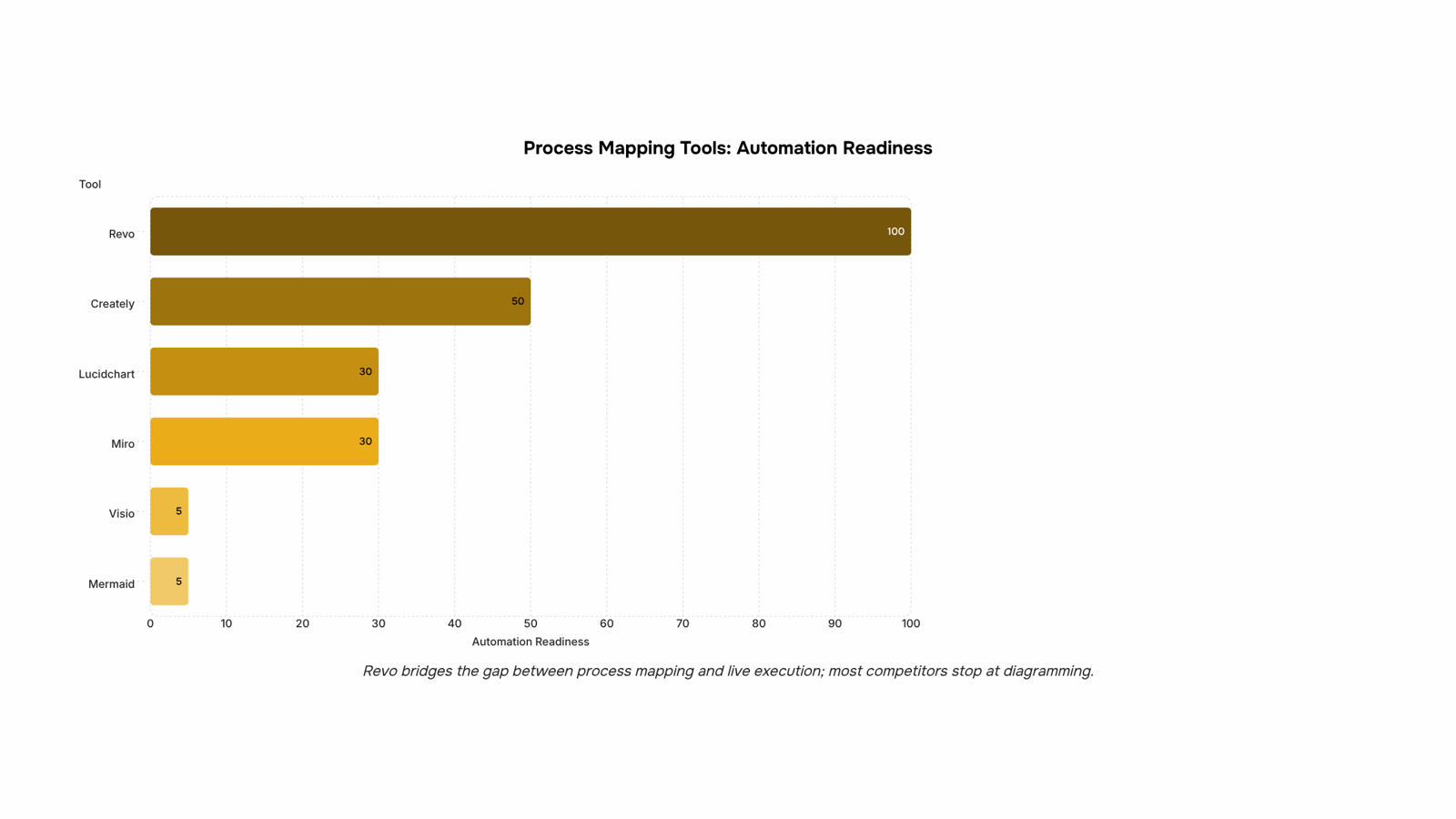
Automation readiness. The best tools let you identify which processes to automate directly from the map itself — not as a separate project.
Here's how the top 7 business process mapping tools compare across the criteria that actually matter for IT operations:
Tool | Best for | Automation | Free plan | Starting price |
|---|
Revo | End-to-end workflow automation | Yes (native) | Yes | Free |
Lucidchart | Collaborative diagramming | Limited | Yes | ~$9/user/mo |
Miro | Visual brainstorming | Limited | Yes | ~$10/user/mo |
Visio | Enterprise org charts | No | No | ~$5/user/mo |
Creately | Process documentation | Partial | Yes | ~$8/user/mo |
Mermaid | Developer-led diagrams | No | Yes | Free |
Lucidspark | Ideation and mapping | No | Yes | ~$7/user/mo |
Most tools stop at the diagram. Revo's visual workflow builder connects the map directly to live automation, which is the gap most process mapping tools leave open.
Seven tools dominate this space in 2026. They split into two categories: diagramming tools that help you visualize processes, and automation platforms that actually run them. Knowing which you need before you buy saves weeks of re-evaluation.
1.Revo
Most process mapping tools stop at the diagram. Revo goes further — it turns the map into a running workflow. Once you've documented a process (say, client onboarding or invoice approval), Revo automates the handoffs, triggers the next step, and flags anything that stalls. Your team stops chasing status updates.
The practical difference shows up fast. A typical IT services company using Revo to automate their support ticket routing eliminates the manual triage step entirely. Tickets arrive, get categorized by rule or condition, and route to the right person without a coordinator in the middle.
Key capabilities:
Visual workflow builder with drag-and-drop logic, no code required
Connects internal tools and external apps in the same workflow
Conditional branching so edge cases don't fall through
Runs 24/7 without manual restarts or check-ins
Revo fits teams that have already identified their repetitive processes and want to stop doing them manually. If you're still at the discovery stage, use it alongside a diagramming tool, then migrate the finalized process into Revo for execution. The guide on how to identify which processes to automate is a useful starting point before you build.
Best for: IT company owners who want workflow automation, not just documentation. Pricing: Check current tiers on the Revo product page.
2.Lucidchart
Lucidchart is a diagramming tool built for process documentation. Strong template library, real-time collaboration, and clean exports to PDF or Confluence. The learning curve is low for anyone familiar with Visio. Free plan covers basic diagrams; paid plans start around $9/user/month. Best for teams that need shareable, version-controlled process maps without automation.
3.Miro
Miro is a visual collaboration board that doubles as a process mapping tool. Useful when your team needs to map a process together in a workshop setting rather than document one solo. Integrates with Jira, Asana, and Slack. Free plan available; paid starts at $10/user/month. Best for cross-functional teams doing live process discovery sessions.
4.Microsoft Visio
Microsoft Visio is an enterprise standard for business process modeling, especially in organizations already on Microsoft 365. BPMN and UML support built in. Steep for smaller teams at $5 to $15/user/month depending on plan, and it requires a 365 subscription for full functionality. Best for large IT departments with compliance documentation requirements.
5.Creately
Creately is a mid-market option with stronger database and org chart features than most diagramming tools. Useful when your process maps need to connect to data rather than just describe flow. Free plan available; paid starts around $8/user/month. Best for teams who want process documentation that doubles as a lightweight knowledge base.
6.Mermaid
Mermaid is a code-based diagramming tool that generates flowcharts and sequence diagrams from plain text. No GUI, which makes it fast for developers and unusable for non-technical stakeholders. Free and open source. Best for engineering teams who want process maps living inside a codebase or documentation repo.
7.Notion (with process templates)
Notion is not a dedicated process mapping tool, but many IT teams use it as one. Notion's database views and linked pages handle lightweight process documentation well. Free plan available; paid starts at $10/user/month. Best for small teams who want process docs and project management in one place without buying a separate tool.
Process mapping vs. workflow automation: what is the difference
Process mapping is diagnostic. Workflow automation is operational. Confusing the two leads to buying the wrong tool.
Process mapping tools (Lucidchart, Miro, Visio) help you document and analyze how work currently flows. They answer "what is actually happening?" That clarity is the foundation of good business process modeling.
Workflow automation tools execute the process once you've designed it. They replace manual steps with triggered actions, running 24/7 without human input.
Most teams need both, in sequence. Map first to identify which processes to automate, then automate the ones where repetition creates the most drag.
Some tools sit on the spectrum between both. Revo, for example, pairs a visual workflow builder with live automation, so the diagram and the running process stay in sync.
The right choice depends on what your team actually needs to do after the map is drawn.
If you're documenting processes for compliance or audits, Lucidchart or Visio fits. Both handle BPMN notation cleanly, integrate with SharePoint, and produce the kind of structured diagrams auditors expect. Lucidchart starts at $9/user/month; Visio requires a Microsoft 365 Business plan.
If you're a small team mapping workflows to find inefficiencies, Miro or Creately gives you enough structure without the overhead. Good for business process modeling sessions where speed matters more than notation precision.
If you've already identified the bottleneck and need to automate it, a diagramming tool stops being useful. That's where process mapping software with built-in execution matters. Revo handles this directly — you can identify which processes to automate, then wire up the automation in the same platform using its visual workflow builder.
The short version: map first, automate second. Pick your business process mapping tools accordingly.
Closing
The choice between process mapping tools comes down to one question: do you need a diagram, or do you need the process to actually run differently? Diagramming tools like Lucidchart and Miro excel at documentation and collaboration. But if your goal is to eliminate manual handoffs, reduce approval delays, or stop chasing status updates, you need a tool that connects the map to live execution. That's where automation-ready platforms like Revo separate themselves. Start by identifying which processes cost your team the most time each week, map them in whatever tool fits your team's workflow, then ask yourself whether the map alone changes anything. If the answer is no, it's time to move to the next step.
FAQ
How do I choose the right process mapping software?
Score tools on execution connection (does it trigger tasks or just document them), collaboration depth, integration range, and learning curve. If you're past documentation and ready to automate, prioritize automation readiness over pretty diagrams.
Can process mapping tools improve workflow efficiency?
Yes, but only if the map connects to actual execution. A diagram alone doesn't change how work gets done. Tools that automate handoffs and trigger next steps based on conditions eliminate manual coordination and reduce delays.
What is the difference between process mapping and workflow automation?
Process mapping documents how work flows today. Workflow automation executes that flow without manual intervention. Most mapping tools stop at documentation; automation platforms like Revo turn the map into a running system.
How do I create a process map using online tools?
Start with a diagramming tool like Lucidchart or Miro, add shapes and connectors to show each step and decision point, then invite your team to review and refine. Once finalized, migrate it into an automation platform if you want it to run live.


 Elena Petrova15 September 2026


