TL;DR: Most software-and-sales guides hand you a ranked list of brand names and leave the matching to you. This one organizes sales tools by the pipeline job they do, so you can identify your actual bottleneck first and pick the right category second. You'll leave knowing which tool type fixes which problem, and in what order to deploy them.
What sales software actually does for your team
Sales software is any tool that removes manual steps from the pipeline so your team spends more time selling and less time updating spreadsheets.
Most teams treat software and sales as separate concerns until the pipeline breaks. A rep misses a follow-up. A lead goes cold. A deal falls out of the forecast with no explanation. Sales operations software exists to close those gaps before they cost you revenue.
Across the category, these tools perform five functional jobs:
Capture incoming leads from every channel and log them automatically
Score and qualify leads based on fit, behavior, or engagement signals
Route leads to the right rep the moment they arrive
Automate follow-up so no contact goes silent between touches
Report on pipeline health so managers see what's real, not what reps remembered to log
The tools that do this well connect to CRM software built for IT sales teams and pipeline management software that gives IT teams full visibility rather than sitting in isolation. That connected layer is what separates a tool from a system.
Key benefits of using software in sales operations
The case for pairing software and sales operations together comes down to five measurable outcomes.
Faster lead response: Sales automation software can cut response time from hours to minutes. Most B2B buyers form a strong preference for the first vendor who responds, so that gap matters more than most teams realize.
Consistent follow-up: Research consistently shows it takes eight or more touches to close a B2B deal, yet most reps stop after two or three. Automated sequences remove the memory burden and keep every lead in motion without manual tracking.
Accurate pipeline data: When reps log activity manually, data arrives late, incomplete, or not at all. Sales operations software captures activity automatically, so your pipeline view reflects what's actually happening, not what someone remembered to type.
Reduced admin load: A meaningful portion of a rep's week disappears into data entry, scheduling, and status updates. Automating those tasks returns that time to actual selling conversations.
Shorter sales cycles: When leads are scored, routed, and followed up without delay, deals move faster through each stage. The bottleneck shifts from process friction to genuine buyer readiness, which is the only bottleneck worth having.
Each benefit compounds the others. Faster response feeds better data; better data drives smarter follow-up. That's why teams who adopt sales performance management software rarely go back to spreadsheets.
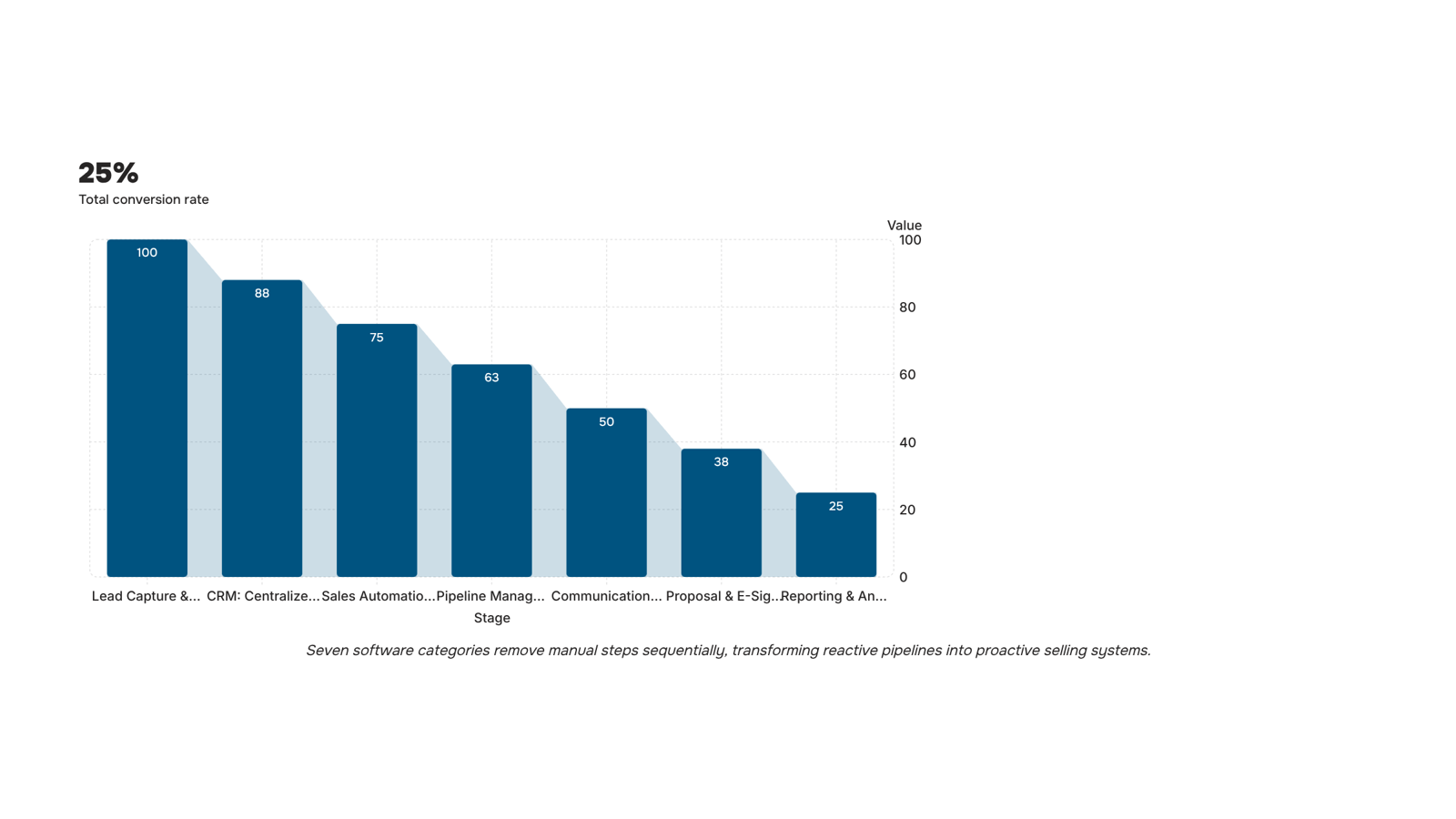
The seven software categories every sales team needs
Most tool roundups hand you a brand list organized alphabetically or by popularity. That's not a buying decision framework — it's a catalog. The seven categories below are organized by the pipeline problem each one solves. Find your bottleneck first, then match it to the right tool type.
1. Lead capture and management software This is where the pipeline starts. Lead management software pulls in contacts from web forms, ads, email, and inbound calls, then routes each one to the right rep automatically. Without it, leads sit in inboxes until someone notices. For IT company owners evaluating options, best sales lead management software for small businesses covers the specific features worth prioritizing.
2. CRM (Customer Relationship Management) A CRM stores every interaction, deal stage, and contact detail in one place. The problem it solves isn't storage — it's visibility. When a rep leaves or a deal stalls, the context stays in the system rather than disappearing with a person. CRM software built for IT sales teams breaks down what separates a CRM that fits IT service workflows from one that was built for retail.
3. Sales automation software Repetitive tasks — follow-up emails, meeting reminders, lead status updates — eat selling time. Sales automation software handles the sequence so reps focus on conversations, not admin. This category overlaps with CRM, but the distinction matters: CRM records what happened, automation decides what happens next. If repetitive tasks are the bottleneck, sales software built for automating repetitive tasks is worth reading alongside this section.
4. Pipeline management tools Pipeline tools give sales managers a live view of every deal, its stage, and its probability of closing. The problem they solve is forecasting accuracy, not just tracking. Pipeline management software that gives IT teams full visibility covers how to set up stage gates that actually reflect how IT deals move.
5. Communication and outreach tools Email sequencers, dialers, and LinkedIn automation tools belong here. Their job is consistent, timed outreach at scale. Research from RAIN Group suggests it takes an average of eight touches to book a first meeting with a new B2B prospect — outreach tools make those eight touches systematic rather than manual.
6. Proposal and e-signature software Late-stage deals stall when contracts bounce between inboxes waiting for signatures. This category removes that friction by combining document creation, approval routing, and signing into one workflow.
7. Reporting and analytics tools These sit on top of everything else and answer the question: what's actually working? Conversion rates by source, average deal length, rep activity versus results — analytics tools turn activity data into decisions.
The best software tools for sales teams aren't the ones with the longest feature list. They're the ones that address the specific stage where your pipeline slows down. Identify that stage, then evaluate tools within that category.
How software can improve your sales strategy
The difference between a reactive and proactive sales team usually comes down to one thing: when information moves and who acts on it.
Consider a 20-person IT services firm before automation. A new inquiry lands in a shared inbox. Someone manually logs it into a spreadsheet, assigns it two hours later, and the rep follows up the next morning. By then, the prospect has already talked to two competitors. Research from InsideSales shows that responding within five minutes of a lead's first contact makes conversion significantly more likely than responding even 30 minutes later.
With the right software and sales workflow integration in place, that same inquiry triggers automatic scoring, instant assignment, and a timed follow-up sequence before the rep even opens their laptop.
That shift happens in layers. Lead capture software stops leads from falling through the inbox. A tool like Lio qualifies and routes them the moment they arrive. Sales software built for automating repetitive tasks handles follow-up sequencing. Pipeline management software gives your team visibility into where every deal stands.
Each tool removes a specific bottleneck. Together, they replace a reactive process with one that runs without manual intervention at every step.
How to integrate new software with your existing sales workflow
Most teams buy a full stack before they've validated a single connection. That's how you end up with three tools, two spreadsheets, and a workflow that's slower than before.
A cleaner approach: integrate in sequence.
Audit what you already use: List every tool touching your sales process — email, calendar, CRM, lead forms. Note where data lives and who enters it manually. This is your baseline for any sales workflow integration.
Find the highest-friction handoff: Usually it's the gap between lead capture and first contact. That's where deals go cold. If a lead sits in a form for four hours before a rep sees it, that's your first problem to solve, not your reporting dashboard.
Connect at that point first: Wire your lead source directly into your sales operations software before touching anything else. One clean connection, tested and confirmed working, is worth more than five half-built ones.
Expand only after validating: Once that handoff runs without manual intervention, move to the next friction point. Qualification, assignment, follow-up — each layer builds on the last.
For IT teams, the highest-friction handoff is almost always lead capture to assignment. Sales lead management software built for small businesses can close that gap without requiring a full CRM rollout first.
Common mistakes teams make when buying sales software
Three mistakes show up repeatedly when IT company owners buy software and sales tools.
Buying a CRM before fixing lead capture: A CRM organises existing data. If your lead capture is broken, you're just organising the mess. Fix the intake process first, then layer in pipeline tracking.
Choosing tools that don't share data: Two platforms that can't talk to each other force your team to copy data manually. That's where deals get lost and response times slow down. Before you buy, ask one question: does this tool have a native integration with what we already use, or does it require a third-party connector?
Underestimating setup time: Most lead management software rollouts take two to four weeks longer than the vendor's estimate. Budget for configuration, data migration, and team training before you go live.
Each mistake is avoidable. All three are common.
How to manage your sales stack in one place
The data-sync problem is what kills most sales stacks. You buy a lead tool, an email tool, and a pipeline tracker, and then spend half your week reconciling three dashboards that never agree.
The fix is sales workflow integration: one platform where lead capture, follow-up sequences, and pipeline stages share the same data layer. When Lio captures a new lead and Evox fires the first follow-up automatically, your pipeline updates without anyone touching a spreadsheet. That's what sales automation software is supposed to do — remove the manual handoff, not just digitize it.
For IT company owners evaluating CRM software built for IT sales teams, the question worth asking is simple: do these tools share data natively, or do they require a third-party connector to stay in sync? Native beats connected every time.
Closing
The gap between a pipeline that moves and one that stalls isn't about having more tools — it's about removing the manual steps that slow response time and kill follow-up consistency. When lead capture, qualification, and routing happen automatically the moment a prospect arrives, your team shifts from reactive firefighting to proactive selling. The bottleneck stops being process friction and becomes genuine buyer readiness — the only bottleneck worth having.
Start by identifying where your pipeline actually breaks: Are leads sitting in inboxes? Are reps missing follow-ups? Is your forecast guesswork? Once you know the problem, the tool category becomes obvious. Most IT teams find that lead response time is the first domino — fix that, and better data and faster cycles follow. Ready to see how Lio captures and qualifies leads the moment they arrive, with zero manual entry required? Schedule a quick walkthrough to see it in action.
FAQ
How can software solutions improve my sales strategy?
Software removes manual steps so your team responds to leads in minutes instead of hours, maintains consistent follow-up across eight or more touches, and bases decisions on accurate pipeline data rather than guesswork. This shifts focus from process friction to genuine buyer readiness.
Can software automate sales tasks and processes?
Yes. Sales automation handles follow-up sequences, meeting reminders, lead routing, and status updates automatically. This returns reps' time from admin work to actual selling conversations, directly shortening sales cycles.
How do I integrate software with my existing sales workflow?
Start with lead capture and CRM as your foundation, then layer in automation, pipeline visibility, and reporting tools. The key is choosing tools that connect to each other rather than sitting in isolation — that connected layer is what separates a tool from a system.
What are the key benefits of using software in sales operations?
Faster lead response (hours to minutes), consistent follow-up without memory burden, accurate pipeline data captured automatically, reduced admin load on reps, and shorter sales cycles. Each benefit compounds the others.
How do I know which sales software my team actually needs?
Identify where your pipeline breaks first: Are leads lost in inboxes? Are follow-ups inconsistent? Is forecasting inaccurate? Match that bottleneck to the right tool category — lead capture, CRM, automation, pipeline management, outreach, contracts, or analytics — rather than chasing feature lists.


 Elena Petrova11 September 2026


