TL;DR: Most guides on project management reports hand you a template and assume the rest is obvious. This one tells IT company owners exactly what data belongs in each report type, how often to run them, and what to look for in a tool that generates them automatically rather than making someone compile them by hand.
What a project management report actually is
A project management report is a structured document that communicates the current state of a project against its plan. It answers three specific questions: where does the project stand today, what changed since the last update, and what decisions or actions are needed next.
That distinction matters. A meeting summary captures what was said. A status update might be a single-line Slack message. A project management report ties scope, schedule, budget, and risk into one coherent picture, so a stakeholder who wasn't in the room can make an informed decision.
The format varies by audience. An executive sponsor needs a one-page summary with RAG (red-amber-green) status and financial variance. A delivery team needs task-level detail and blockers. Both are project management reports; they just serve different readers.
According to PMI research, poor communication is consistently among the top reasons projects fail, which means the report itself is a risk management tool, not just an admin task.
If you're building the infrastructure behind these reports, setting up a project tracking dashboard is the logical first step before deciding what to include.
What to include in a project management report
A solid project management report covers six components. Each one earns its place by answering a question a stakeholder or team lead would otherwise ask in a meeting.
Project summary: One paragraph covering scope, objectives, and current phase. Gives anyone reading cold enough context to follow the rest of the report without a briefing call.
Status indicators: Red, amber, green (RAG) ratings for schedule, budget, and scope. These only work if your team applies the labels consistently — a "green" that means different things to different project managers corrupts every metric downstream.
Milestone and task progress: Percentage complete against the planned schedule. A sample of project management report formats that skip this section leave readers guessing whether the project is on track or just busy.
Budget snapshot: Planned spend versus actual spend to date. Even a rough figure here prevents the end-of-quarter surprises that derail stakeholder trust.
Risk and issue log: Active risks with an owner and a mitigation action. An unowned risk is just a worry written down.
Decisions and blockers. What decisions are pending, who holds them, and what's blocked until they're made. This is the section most project management report templates leave blank, and it's the one executives read first.
Next steps: Three to five actions with owners and due dates. Closes the report with accountability rather than a narrative summary.
When you audit your current reports against this list, gaps show up fast. A useful starting point is the best practices for project management planning, which covers how planning decisions shape what belongs in each report type.
Key metrics to track in every report
Four numbers tell you whether a project is healthy before anyone writes a status update: schedule variance, budget burn rate, task completion rate, and open risk count.
Schedule variance measures the gap between planned and actual progress. If your project was supposed to be 60% complete by Friday and it's at 44%, that 16-point gap is your real story — not the "on track" label someone typed into a slide. Budget burn rate tells you how fast you're consuming funds relative to the work delivered, not just the calendar. Task completion rate shows whether the team is closing work or just moving it. Open risk count tracks how many identified risks are unmitigated — a number that tends to grow quietly until it doesn't.
Here's the gap most project management reports miss: these four metrics are only as accurate as your status labels. If one project manager calls a delayed task "in progress" and another calls the same situation "at risk," your aggregated numbers are noise. Standardize the labels first, then trust the metrics.
Two additional metrics worth adding to any project management report that covers multiple workstreams: resource utilization (actual hours logged vs. planned) and dependency blockers (tasks that can't start because something upstream is stuck). Both surface problems that completion rate alone hides.
If you're reporting across a project portfolio, these same metrics scale — you're just rolling them up one level. The math doesn't change; the audience does.
For a concrete example of project management report structure that captures all six metrics in one view, choosing a tool that generates reports automatically removes the manual aggregation step entirely.
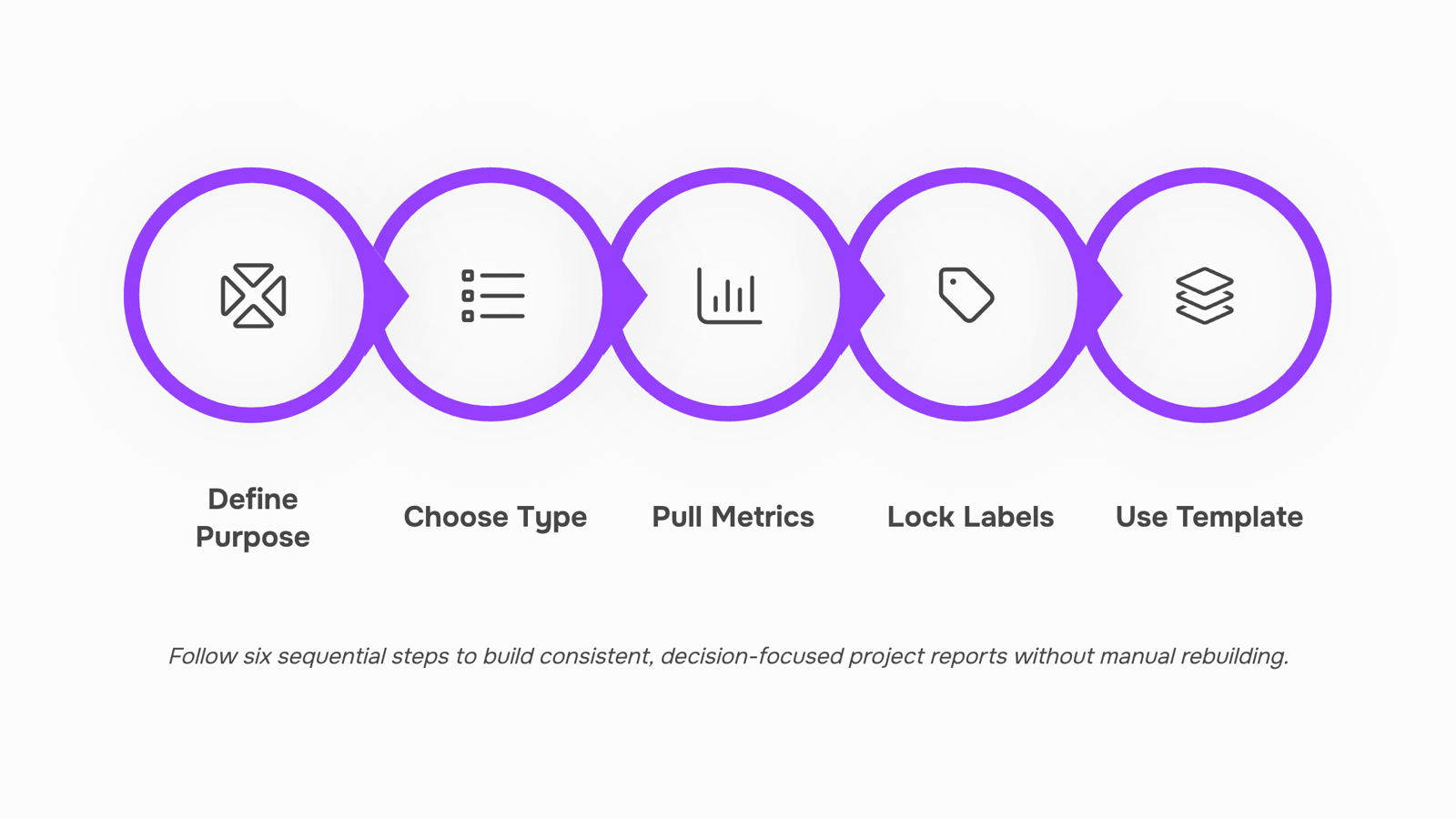
How to build a project management report in 6 steps
Define the report's purpose before you open any template: Decide who reads this report and what decision it needs to support. A status update for your team looks nothing like a budget summary for an executive sponsor. If you skip this step, you end up with a document that answers questions no one asked.
Choose the right report type for the audience: Status reports, budget burn reports, risk registers, and milestone summaries each serve a different reader. Mixing them into one document creates noise. If a stakeholder has to search for their number, the report has already failed.
Pull only the metrics that tie to a real work outcome: From the previous section: schedule variance, budget burn rate, task completion rate, and open risk count are the four that matter most. Resist the urge to add ten more because the data is available. A bloated project management report signals that no one decided what success looks like.
Lock your status labels before you populate the data: This is the step most teams skip. "On track," "at risk," and "delayed" need written definitions that everyone on the project uses the same way. One team lead calling a 5% schedule slip "on track" while another calls it "at risk" corrupts every aggregate number downstream. Define the thresholds once, document them in your project management report template, and enforce them.
Build the report from a reusable structure, not from scratch each time: A Word-based project management report template word doc works fine for smaller teams. For anything cross-functional or portfolio-wide, a static file creates version-control problems fast. If you're reporting across a project portfolio, a connected tool that pulls live data removes the copy-paste step entirely.
Add a single "so what" statement at the top: One sentence: what is the overall project health, and what action, if any, does the reader need to take? Executives read this line and stop if nothing needs their attention. If you can't write that sentence, the report isn't ready to send.
For teams that want to skip manual assembly entirely, Prax generates reports from live project data so the structure, metrics, and status labels stay consistent without a weekly build cycle. The alternative is choosing a tool that generates reports automatically and connecting it to your existing workflow.
How often to send project management reports to stakeholders
Frequency isn't a calendar decision — it's a risk decision.
During initiation, a weekly summary is usually enough. Stakeholders need context, not data. Once execution starts, reporting cadence should match the pace of change: fast-moving sprints warrant twice-weekly check-ins; stable phases with predictable milestones can hold at weekly. At project close, a single comprehensive project management report covering outcomes, variance, and lessons learned is more useful than a flurry of status updates.
Stakeholder type matters as much as project phase. Executives want a monthly or milestone-triggered view: budget, schedule, and RAG status. RAG updates are particularly useful here because they compress complex status into a signal that busy sponsors can act on in under a minute. Delivery teams need higher-frequency updates tied to blockers and dependencies, not board-level summaries.
A practical rule: if your report triggers no decisions and no questions, you're sending it too often or to the wrong audience.
Default cadence by phase:
Initiation: weekly summary
Execution (active sprint): twice weekly
Execution (stable): weekly
Closure: one final report, distributed within five business days of handoff
The tools worth your time fall into three categories: dedicated reporting platforms (like Power BI or Tableau), built-in PM tool dashboards, and AI-native project management software that generates reports without a manual data-pull step.
Dedicated BI tools give you flexibility but require someone to build and maintain the data pipeline. That's a real cost for most IT teams.
Built-in dashboards inside tools like Jira or Monday.com get you closer, but you're still configuring widgets and exporting CSVs when a stakeholder asks for a custom view. A practical example of a project management report from these tools often takes 20-30 minutes to assemble from raw data.
The cleaner option for IT teams managing active projects is a tool where the project management report generates itself from live task data. Taro does this: it pulls status, ownership, blockers, and timeline data into structured reports without requiring a separate export step. You can set up a project tracking dashboard once and surface the same data across stakeholder views.
If you're reporting across a project portfolio, that single-source approach matters even more.
Project management report template: a starting point
A solid project management report template covers six sections, each pulling a specific type of data:
Project summary: name, owner, reporting period, current status (Red/Amber/Green)
Progress against milestones: planned vs. actual completion dates for active deliverables
Budget snapshot: approved budget, spent to date, forecast to completion
Risks and issues: each item rated by likelihood and impact, with a named owner
Next period priorities: three to five actions with due dates and assignees
Decisions needed: blockers requiring stakeholder input before work can continue
This structure works for a sample of project management report in Word, a slide deck, or a live dashboard. If you're reporting across a project portfolio, add a seventh row for cross-project dependencies.
Closing
A project management report only works when it answers a specific question for a specific reader—and when the data behind it stays consistent across your team. The six-step framework above removes the guesswork: lock your purpose, standardize your labels, pull only the metrics that matter, and build from a reusable structure instead of rebuilding from scratch each week.
Taro's real-time reporting and custom analytics let you run this entire process without manual compilation. Explore the project tracking dashboard to see how live data flows into your reports automatically, or jump straight into a template inside the tool to start generating your first report today.
FAQ
What should be included in a project management report?
A solid report covers six components: project summary, RAG status indicators, milestone and task progress, budget snapshot, risk and issue log, decisions and blockers, and next steps with owners. Each section answers a question a stakeholder would otherwise ask in a meeting.
What are the best tools for generating project management reports?
Tools that pull live data automatically—like Taro—eliminate manual compilation and version-control problems. Look for real-time reporting, custom analytics, and pre-built templates that connect to your project tracking dashboard rather than static file-based solutions.
How often should I submit a project management report to stakeholders?
Frequency depends on stakeholder needs and project phase. Executive sponsors typically need weekly or bi-weekly summaries; delivery teams may need daily task-level updates. Define the cadence by audience and decision timeline, not by calendar convention.
What are the key metrics to track in a project management report?
Four metrics matter most: schedule variance (planned vs. actual progress), budget burn rate (spend relative to work delivered), task completion rate, and open risk count. Add resource utilization and dependency blockers for multi-workstream projects.
What is the difference between a project status report and a project management report?
A status report is often a single-line update on current state. A project management report ties scope, schedule, budget, and risk into one coherent picture with decisions and actions, so stakeholders can make informed choices without being in the room.


 Elena Petrova11 September 2026


