TL;DR: Most articles on RAG updates explain what red, amber, and green mean and leave the rest to you. This one gives IT company owners a five-step process for building, sending, and automating status updates that carry real context, not just a color. You'll finish with a framework you can put into practice this week.
What a RAG update actually is
A RAG update is a structured status report that tells stakeholders whether a project is on track (Green), at risk (Amber), or in trouble (Red). It combines a color-coded signal with a brief written summary: what changed, why the status shifted, and what action is needed.
That distinction matters. A RAG status label is a single field on a dashboard. A RAG status report is the full update, including the label, the reasoning behind it, and any decisions the label is asking stakeholders to make. Conflating the two is how teams end up with a red indicator that nobody acts on because the context was never attached.
In IT project governance frameworks like PRINCE2 and PMBOK, RAG thresholds are defined against specific tolerances: schedule variance, budget deviation, scope creep, or risk exposure. Green means within tolerance. Amber means tolerance is threatened but recovery is still possible. Red means a tolerance has been breached and escalation is required.
If you want a single source of truth for your project, the RAG update is the mechanism that keeps it current. For a deeper look at how the status labels themselves work, the RAG status in project management guide covers threshold-setting in detail.
Why RAG updates matter for your project
A well-structured RAG update does four things that narrative status emails cannot.
Faster decisions. When every stakeholder reads the same color-coded signal, there is no ambiguity about whether a project health update requires action. A Red rating triggers escalation immediately; a Green one does not. No one needs to parse three paragraphs to find the problem.
Fewer surprises at review gates. PMI research consistently shows that poor stakeholder communication is a leading driver of missed deadlines and budget overruns in IT projects. A weekly project status update in RAG format keeps drift visible before it becomes a crisis, not after.
Clearer escalation paths. Amber is the most operationally useful rating. It signals that a workstream needs attention but has not failed yet. That distinction gives project managers a defined window to act, rather than waiting until Red forces a reactive conversation with the sponsor.
Time saved. Most project managers spend several hours each week assembling status narratives. A standardized RAG template cuts that to minutes because the structure is fixed. You fill in the rating, the reason, and the next action. The format does the rest.
Together, these four outcomes explain why RAG updates have become standard practice in PRINCE2 and PMBOK-aligned governance frameworks.
What to include in a RAG update report
A well-structured RAG update report answers three questions at a glance: where does the project stand, what changed since last week, and what needs a decision now. Every field below earns its place by answering one of those three.
Here are the eight fields every RAG update report should include:
Project name and reporting period. Sounds obvious, but reports get forwarded. Anchor the document with the project name, sponsor, and the exact dates covered (e.g., "Week 3: 14–18 July").
Overall RAG rating. A single Red, Amber, or Green status for the project as a whole. This is the headline. Stakeholders scan it first.
Per-workstream RAG ratings. Break the overall rating down by workstream or delivery track. A project can be Green overall while one workstream is quietly Red. That gap is where surprises come from.
Key accomplishments. Two to four bullet points covering what was completed in the reporting period. Keep it factual, not promotional.
Risks and issues. List active risks with their current severity and the owner responsible for mitigation. An RAG status in project management framework only works if risks are visible, not buried in meeting notes.
Next actions. Specific tasks due before the next reporting cycle, each with an owner and a due date. "Review vendor contract by 21 July — Sarah" is useful. "Follow up on contract" is not.
Escalations required. Flag any decision that cannot be made at team level. This is the field most project status update templates skip, and the one executives actually need.
Report owner. Name the person who compiled the update. Accountability for the report itself matters when numbers get questioned.
Storing these fields in a single source of truth for your project cuts the time spent chasing updates before each reporting cycle.
How to create and send RAG updates in 5 steps
Before the project kicks off, define what each colour means in measurable terms. Red might mean a milestone is more than five days late or a blocker has no owner. Amber means a risk is identified but contained. Green means delivery is on track within agreed tolerances. Document these thresholds in your project charter so ratings stay consistent across reporting periods, not subject to whoever filled in the form that week.
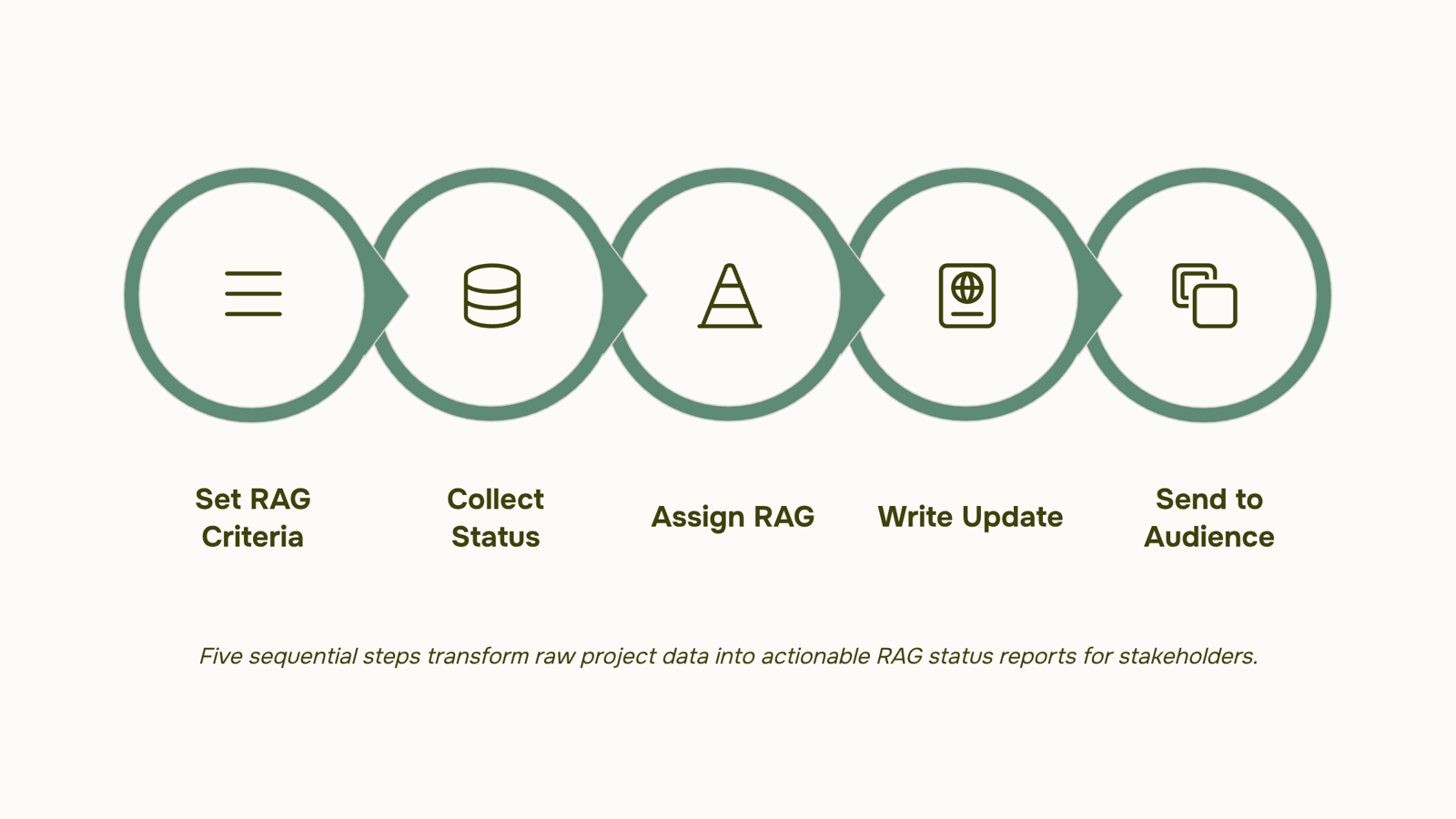
Step 1: Set your RAG criteria before the project starts. On an IT infrastructure migration, this looks like: Red = server cutover delayed beyond the sprint boundary, Amber = dependency on a third-party vendor unresolved but tracked, Green = all tasks progressing within the sprint plan.
Step 2: Collect status from workstream owners. Send a short structured prompt, not an open question. Ask each owner to confirm their RAG colour and provide one sentence of evidence. For a software rollout, that means the QA lead reports "Amber: regression suite at 78%, target is 90% by Friday." You get a signal, not a paragraph to interpret.
Step 3: Assign the overall RAG rating with evidence. The overall project rating is not an average. If any critical-path workstream is Red, the project is Red. A RAG status in project management framework treats the overall rating as the highest-severity colour on any path that directly threatens the delivery date.
Step 4: Write the update using the standard field list. Use the fields from the previous section in order: project name, reporting period, overall RAG rating, per-workstream ratings, key accomplishments, risks and issues, next actions, and owner. Keep each field to two or three lines. On a network upgrade project, "next actions" might read: "Vendor to confirm firewall config by Thursday. Network lead to retest VPN tunnel Friday morning."
Step 5: Send to the right audience at the right cadence. Executives get the one-page summary with the overall RAG rating and top three risks. The delivery team gets the full workstream breakdown. Sending the same RAG status report to both groups creates noise for one and gaps for the other.
Running this process manually across multiple projects adds up fast. A single source of truth for your project removes the copy-paste step entirely, keeping RAG ratings, owner assignments, and next actions in one place. The risk alerts dashboard flags colour changes automatically, so your project health update reaches stakeholders before someone has to chase it.
How often to send RAG updates
Frequency should follow drift risk, not a fixed calendar slot.
A sprint-based IT project moves fast enough that a weekly project status update catches most issues before they compound. Waterfall projects have natural checkpoints built in, so sending RAG updates at each phase gate, rather than weekly, keeps reporting proportional to actual change. High-risk or executive-sponsored projects warrant twice-weekly updates because the cost of a late amber signal is too high to wait seven days.
Project type | Recommended cadence |
|---|
Sprint-based (Agile/Scrum) | Weekly, aligned to sprint review |
Waterfall | At each phase gate |
High-risk or exec-sponsored | Twice weekly |
Steady-state maintenance | Bi-weekly |
The underlying logic: send an update when the gap between what stakeholders know and what is actually happening starts to widen. If your RAG status in project management has not changed and no new risks have emerged, a shorter update is fine. If scope, budget, or timeline has shifted since the last report, send one sooner regardless of the schedule.
Keep the cadence as a single source of truth for your project, documented and visible to all stakeholders.
Manual RAG status reporting typically costs project managers several hours a week, most of it spent chasing status emails and reconciling spreadsheets rather than acting on what they find.
A purpose-built tool changes that ratio. Taro monitors task completion, due-date drift, and dependency gaps continuously, then surfaces risk signals through its risk alerts dashboard before they compound. When a milestone slips past its due date or a blocker sits unresolved for more than 24 hours, Taro flags it automatically. Your job shifts from gathering data to confirming whether the system's read is correct.
That matters for RAG status reports specifically. Instead of polling five team leads every Friday, you open a single source of truth for your project where task status, owner, and last update are already current. Automated project updates mean the Amber or Red signal appears the moment the threshold is crossed, not when someone remembers to mention it.
Taro's real-time collaboration features also let you annotate a RAG rating with evidence and next actions in the same view, so stakeholders see not just the color but the reasoning behind it.
For broader context on how RAG ratings map to project governance, the guide on RAG status in project management covers the threshold definitions in detail.
Common mistakes that make RAG updates useless
The most common one: rating everything Green to avoid a difficult conversation. It feels easier in the moment, but it means stakeholders get no warning before a deadline slips.
Second, sending a project health update with no evidence or next actions. A status of Amber means nothing without a named blocker, an owner, and a resolution date.
Third, using a single project-level rating when workstreams are moving at different speeds. One Red workstream buried under an overall Green is how scope creep goes unnoticed for weeks.
Fourth, updating too infrequently. RAG updates catch drift only if they run on a cadence tight enough to act on. Weekly is the floor for most IT projects; high-risk phases need twice that.
A single source of truth for your project makes all four mistakes harder to make.
Closing
RAG updates work because they strip ambiguity out of project health reporting. A color-coded signal paired with clear evidence and next actions means stakeholders spend less time decoding status and more time unblocking work. The five-step process above takes an hour each week when done manually, but it doesn't have to. Taro collects RAG data from workstream owners automatically, flags color changes as risks emerge, and surfaces escalations to the right stakeholders without manual assembly. Explore Taro's project management and risk alerts features to see how the process collapses from an hour to minutes. Start by mapping your current RAG thresholds into Taro's framework this week.
FAQ
How do I create and send RAG updates to stakeholders?
Collect RAG ratings and evidence from workstream owners using a structured prompt, assign the overall project rating based on the highest-severity color on critical paths, then populate the eight standard fields (project name, overall rating, per-workstream ratings, accomplishments, risks, next actions, escalations, and owner) and send to the appropriate audience.
How frequently should I provide RAG updates during a project?
Weekly is standard practice in PRINCE2 and PMBOK frameworks. Weekly cadence keeps drift visible before it becomes a crisis and gives Amber-rated workstreams a defined window to recover before escalation.
Can RAG updates be automated using project management tools?
Yes. Tools like Taro collect RAG data from workstream owners automatically, flag color changes as risks emerge, and route escalations to stakeholders without manual assembly, collapsing the process from an hour to minutes each week.
What is the difference between a RAG status and a RAG update?
A RAG status is a single color label on a dashboard. A RAG update is the full report: the color, the reasoning behind it, what changed, and what action is needed. Context is what makes the color actionable.
What does it mean when a project is rated Amber in a RAG update?
Amber means a workstream or project is at risk but recovery is still possible within defined tolerances. It signals that attention is needed now, before the issue escalates to Red and requires reactive crisis management.


 Elena Petrova15 September 2026


