TL;DR: Most work plan guides list components like a packing checklist. This one shows IT company owners how each component of a project management work plan functions as a dependency, so you understand what actually breaks when one is missing, and how to build them in the right sequence inside a single connected workspace.
What a project management work plan actually is
A project management work plan is the operational layer of a project: it maps who does what, by when, with which resources, and in what sequence. It sits between strategy and execution.
That distinction matters. A project plan covers scope, budget, stakeholders, and governance. A task list is just a backlog. A work plan connects the two: it takes the scope defined in the project plan and breaks it into assigned, time-boxed activities with clear dependencies. Remove any one of those elements and you have something less useful.
For IT company owners, the difference is concrete. A project plan answers "what are we building and why." A work plan answers "who is building it, when does each piece ship, and what blocks what." The work plan vs project plan distinction is where most delivery failures start: teams skip the work plan because the project plan exists, then wonder why deadlines slip.
A well-structured work plan also gives you a repeatable project planning process rather than a one-off document you rebuild from scratch each engagement.
Why your work plan determines project success
Skipping a work plan doesn't save time. It borrows it from a deadline you'll miss later.
Four delivery problems trace back directly to this decision:
Missed deadlines from undefined scope: When the boundaries of a project aren't written down, teams build the wrong things or keep adding to the right ones. According to PMI's research, scope creep is one of the leading causes of schedule overruns on IT projects.
Unclear ownership: Without a named owner per deliverable, tasks stall at handoffs. Someone assumes someone else is handling it. Nobody is.
Resource conflicts: Two workstreams pulling from the same two engineers, with no visibility into the overlap, is a resource allocation problem that a work plan surfaces before it becomes a crisis.
No early warning on risk: A project management work plan forces you to think through dependencies before work starts, not after a delay surfaces them in a status meeting.
These aren't edge cases. They're the default outcome when the project planning process skips formal documentation.
The key components of a work plan exist precisely to close each of these gaps. Each one maps to a failure mode. Remove any component, and that failure mode reopens.
The 7 key components of a project management work plan
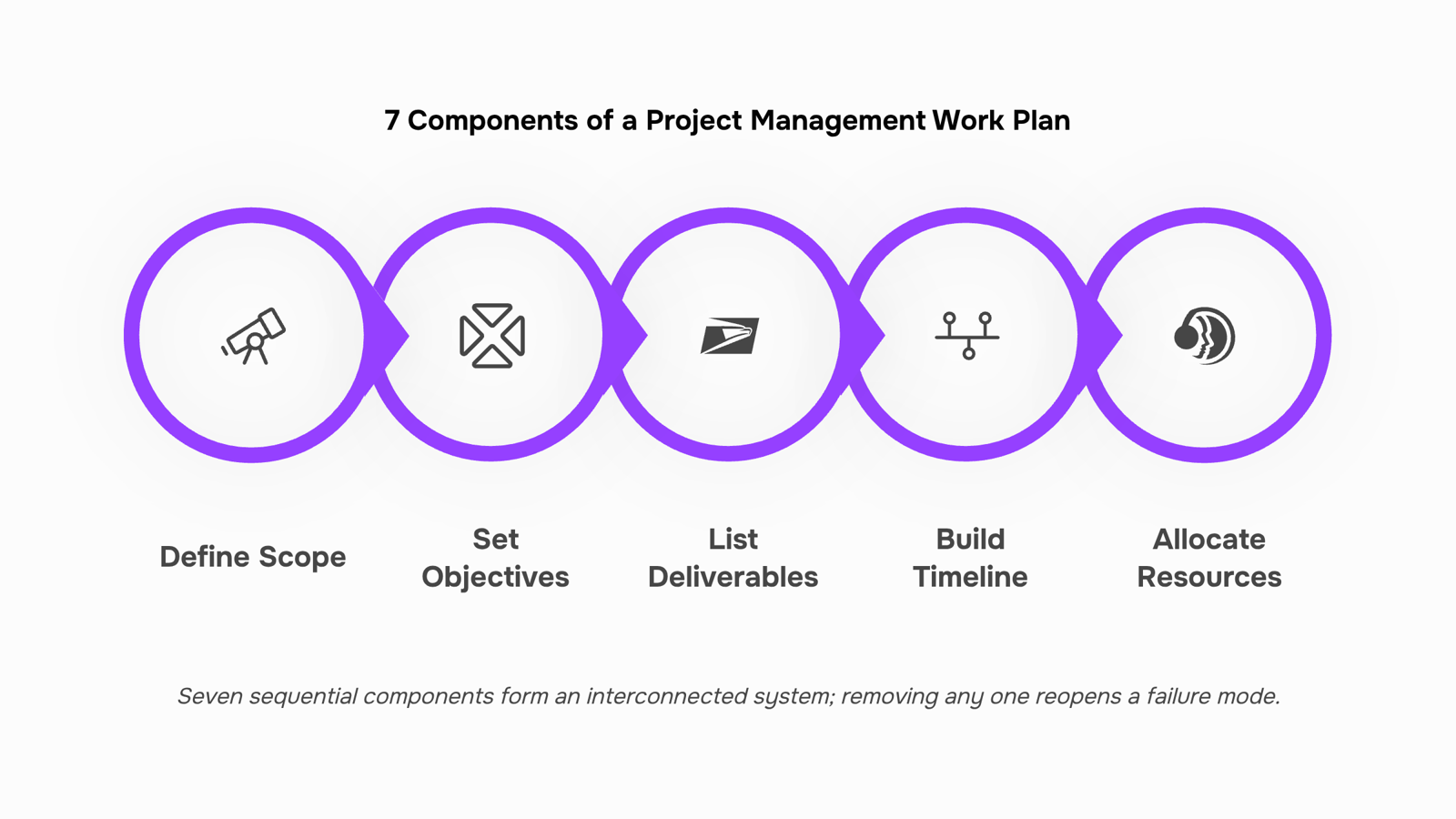
Each component in a project management work plan isn't a box to tick. It's a dependency. Remove one and the others start to fail.
Scope defines what the project includes and, just as importantly, what it doesn't. Without a written scope boundary, every stakeholder request becomes a valid addition. That's how a six-week infrastructure migration becomes a four-month engagement with no clear end state.
Objectives translate scope into measurable outcomes. "Migrate the client's ERP to cloud infrastructure by Q3 with zero downtime during business hours" is an objective. "Improve the system" is not. Vague objectives make it impossible to tell when the project is done, which means it rarely is.
Deliverables are the tangible outputs that prove each objective was met. They give your team something concrete to point to at each milestone and give your client something concrete to sign off on. Missing deliverables means missing the checkpoint that would have caught scope drift early.
Timeline sequences the work against a calendar. It's not just a Gantt chart. It's the mechanism that surfaces conflicts before they become missed deadlines. A timeline without dependencies mapped is a list of dates, not a plan.
Resource allocation in project management is where most IT work plans break down. Assigning a task to a person is not the same as confirming they have capacity. According to PMI's Pulse of the Profession, resource conflicts are among the top contributors to project failure. Allocation means matching skill, availability, and workload simultaneously, not just putting a name next to a task.
Roles and responsibilities remove ambiguity about who owns what. A RACI matrix (Responsible, Accountable, Consulted, Informed) is the standard format. Without it, two people assume someone else is handling the critical path item, and nobody catches it until the deadline passes.
Risk log captures known unknowns before they become active problems. For IT projects, that means third-party API dependencies, client approval delays, and infrastructure access timelines. A risk log without assigned owners and trigger conditions is decoration. Each risk needs a named owner and a response plan.
If you want to see how these components connect into a build sequence, creating a project management project plan from scratch walks through the exact order.
How to build your project management work plan in 7 steps
Seven steps, in order. Each one removes a specific failure mode from the plan you're about to publish.
Define scope in writing: Write one paragraph that names what the project delivers and what it explicitly excludes. For an IT team migrating a client's infrastructure to AWS, that means stating "this engagement covers EC2 setup and IAM configuration" and naming what it doesn't: "DNS cutover is out of scope." Scope without exclusions is just a wish list.
Set measurable objectives: Attach a number or a date to every goal. "Improve system reliability" is not an objective. "Reduce downtime from 4 hours/month to under 30 minutes by Q3" is. If you can't measure it, you can't defend the plan when priorities shift.
List deliverables with owners: For each deliverable, name the person responsible and the format it ships in. A QA report is not done until someone owns it and a due date exists. This is where breaking scope into a structured task hierarchy pays off: it forces ownership to the task level, not just the phase level.
Build the timeline with dependencies mapped: Start from your hard deadline and work backward. Mark which tasks block others. A developer can't begin integration testing until the API spec is signed off — if that dependency isn't visible in the plan, the delay will surprise you.
Allocate resources before you lock dates: Check actual capacity, not assumed availability. If your senior developer is already at 80% on another engagement, the timeline you just built is wrong. The next section covers this step in detail, but don't skip past it to get the plan "done."
Log known risks with mitigations: Three to five risks with a named mitigation each. For IT projects, common ones include vendor API changes, delayed client sign-offs, and environment access issues. A risk log with no mitigation is just a worry list.
Publish the plan where the team actually works: A plan saved in a folder no one checks is not a plan. Taro keeps your project planning, task ownership, and timeline in one place, so the plan stays live rather than becoming a document people reference once and forget.
For a faster starting point, how to create an effective work plan for your team includes a work plan template you can adapt to your next IT delivery engagement.
How to allocate resources without overloading your team
Start by listing every developer and QA engineer on the project, then map their available hours against the task list you built during scope definition. This is the core of resource allocation in project management: matching real capacity to real work before a single deadline is set.
The conflict you're looking for is simple. If a senior developer is already carrying 30 hours of sprint work and your plan assigns them another 20, that's a collision you need to resolve now, not in week three. Most teams discover this too late because they plan tasks and capacity in separate tools.
For team capacity planning, a working rule is to treat 80% of each person's available hours as the actual ceiling. The remaining 20% absorbs code reviews, unexpected bugs, and handoff delays that every IT project generates.
Once you've mapped capacity, flag any task with no clear owner or with two owners. Both are risk signals. A task with no owner gets dropped; a task with two owners gets duplicated.
Building a repeatable project planning process covers how to encode these checks so you run them consistently, not just on high-stakes projects.
Work plan vs. project plan: what the difference means for you
A project plan sets the strategic frame: objectives, milestones, budget, stakeholders, and overall timeline. A project management work plan sits one level below that. It answers the operational question: who does what, by when, and with which resources.
Think of it this way. The project plan tells your team where they're going. The work plan tells each developer and QA engineer exactly what they're building this sprint to get there.
For IT company owners, the distinction matters most during the project planning process. If you're assigning tasks and sequencing dependencies, you need a work plan. If you're presenting scope and budget to a client, you need a project plan.
Building one from scratch? Start here.
Keep your work plan live, not locked in a document
A project management work plan loses accuracy the moment scope shifts or a developer goes on leave — and a PDF or shared doc has no way to reflect that. The plan drifts. The team works from stale information.
The fix is treating your work plan as a live execution layer, not a published artifact. In Taro, milestones update as tasks close, capacity changes surface before they become delays, and everyone works from one source of truth instead of the last version someone remembered to save.
If you want the system that keeps your work plan running after you publish it, that starts with where the plan actually lives.
Closing
A project management work plan only works when it stays live. The moment it becomes a static document filed away, it stops preventing the four failure modes it was built to catch: scope creep, unclear ownership, resource conflicts, and missed risk signals. The seven components we've covered aren't a checklist to complete once—they're a system that needs to breathe alongside your actual work. That's the difference between a work plan that sits in a folder and one that actually steers delivery. Start a free trial of Taro and see how a work plan transforms when milestones, task ownership, and capacity live in one connected workspace instead of scattered across email and spreadsheets.
FAQ
How do I create a comprehensive project management work plan?
Start with written scope, then layer in measurable objectives, named deliverables, a timeline with dependencies mapped, resource allocation checked against actual capacity, roles defined via RACI, and a risk log with mitigations. Build in that sequence—each step removes a specific failure mode.
What are the benefits of using a project management work plan template?
Templates force discipline: they ensure scope is bounded, ownership is clear, and dependencies are surfaced before work starts. They also create a repeatable process, so you're not rebuilding the planning structure from scratch each engagement.
How can I allocate resources effectively in a project management work plan?
Match skill, availability, and workload simultaneously—not just names to tasks. Check actual capacity against other commitments before locking dates. PMI research shows resource conflicts are top contributors to project failure; allocation prevents that.
What role does a project management work plan play in ensuring project success?
It surfaces four failure modes before they become crises: scope creep, unclear ownership, resource conflicts, and hidden risks. Each component maps to one failure mode; remove any component and that failure mode reopens.
What is the difference between a work plan and a project plan?
A project plan answers 'what are we building and why.' A work plan answers 'who is building it, when does each piece ship, and what blocks what.' The work plan is the operational layer that connects strategy to execution.


 Elena Petrova15 September 2026


