TL;DR: Most guides hand you a project plan template and call it done. This one walks IT team leads through every decision point in building a project management project plan from scratch, including what to cut when the timeline is tight and how the plan itself differs from the planning process that produces it.
What a project management project plan actually is
A project management project plan is a single working document that defines what your team will deliver, how they will deliver it, and what success looks like when they do. It is not a project brief, which only captures goals and stakeholders. It is not a task list, which only captures what needs doing. And it is not the project planning process itself, which is the series of conversations and decisions that produce the plan.
The plan is the output. It holds your scope, objectives, milestones and timeline, resource assignments, risk register, roles, and communication plan in one place. Every one of those components earns its spot because it answers a specific question a team member or stakeholder will ask during execution.
For IT company owners, this matters more than most guides acknowledge. IT projects carry high coordination overhead, shifting technical requirements, and real cost exposure when scope drifts. A documented plan gives your team a shared reference point, not just a starting checklist.
The next section breaks down each component so you know exactly what to include before you write a single line.
Key components every project plan needs
A solid project management project plan is built from a specific set of components, each doing a distinct job. Miss one and you'll feel it: scope creep, missed handoffs, or a risk that blindsides the team in week six.
Here are the key components of a project management project plan:
Scope statement — defines what's in and, just as importantly, what's out. For IT projects, this means naming the systems, integrations, and environments included.
Objectives — measurable outcomes tied to business value. "Launch the client portal by Q3" beats "improve client experience."
Milestones — the fixed checkpoints that tell stakeholders the project is on track. Aim for one every two to four weeks on projects longer than a month.
Timeline — a sequenced schedule showing task dependencies, not just end dates. A Gantt view or dependency map works better than a flat list.
Resource plan — who is assigned, at what capacity, and for how long. IT teams often skip this and then wonder why engineers are overloaded mid-sprint.
Risk register — a short list of likely blockers with an owner and a mitigation plan for each. Three to five risks is enough to start.
Roles and responsibilities — maps each deliverable to one accountable person. A RACI chart (Responsible, Accountable, Consulted, Informed) is the standard format.
Communication plan — how often stakeholders get updates, through which channel, and who sends them.
If you want to see how these components connect to the broader planning process, the steps involved in project planning covers the sequence in detail. A project management project plan template built around these eight components gives your team a repeatable starting point for every engagement.
Why a detailed project plan pays off
Skipping a formal project management project plan feels like saving time. It rarely does.
Reduced scope creep is the most immediate payoff. When scope is written down and signed off before work starts, adding new requirements mid-sprint requires a documented change request, not a quick Slack message. That friction alone stops most scope drift.
Faster stakeholder alignment comes next. A written plan gives every stakeholder, from the IT director to the client, a single reference point. Disagreements about priorities get resolved against the document, not in a meeting room.
Clearer accountability follows from that. When roles and deliverables are mapped together, "I didn't know that was mine" stops being a valid excuse. Each person can see exactly what they own and when it's due.
Earlier risk visibility is the one most teams undervalue. According to PMI, organizations that invest in formal project management project planning waste significantly less budget on failed initiatives. Identifying risks during planning, before a vendor is late or a dependency breaks, gives you time to respond rather than react.
The four outcomes compound. A plan that controls scope, aligns stakeholders, assigns ownership, and surfaces risks early is what separates a project that ships from one that quietly stalls.
How to build a project plan from scratch in 7 steps
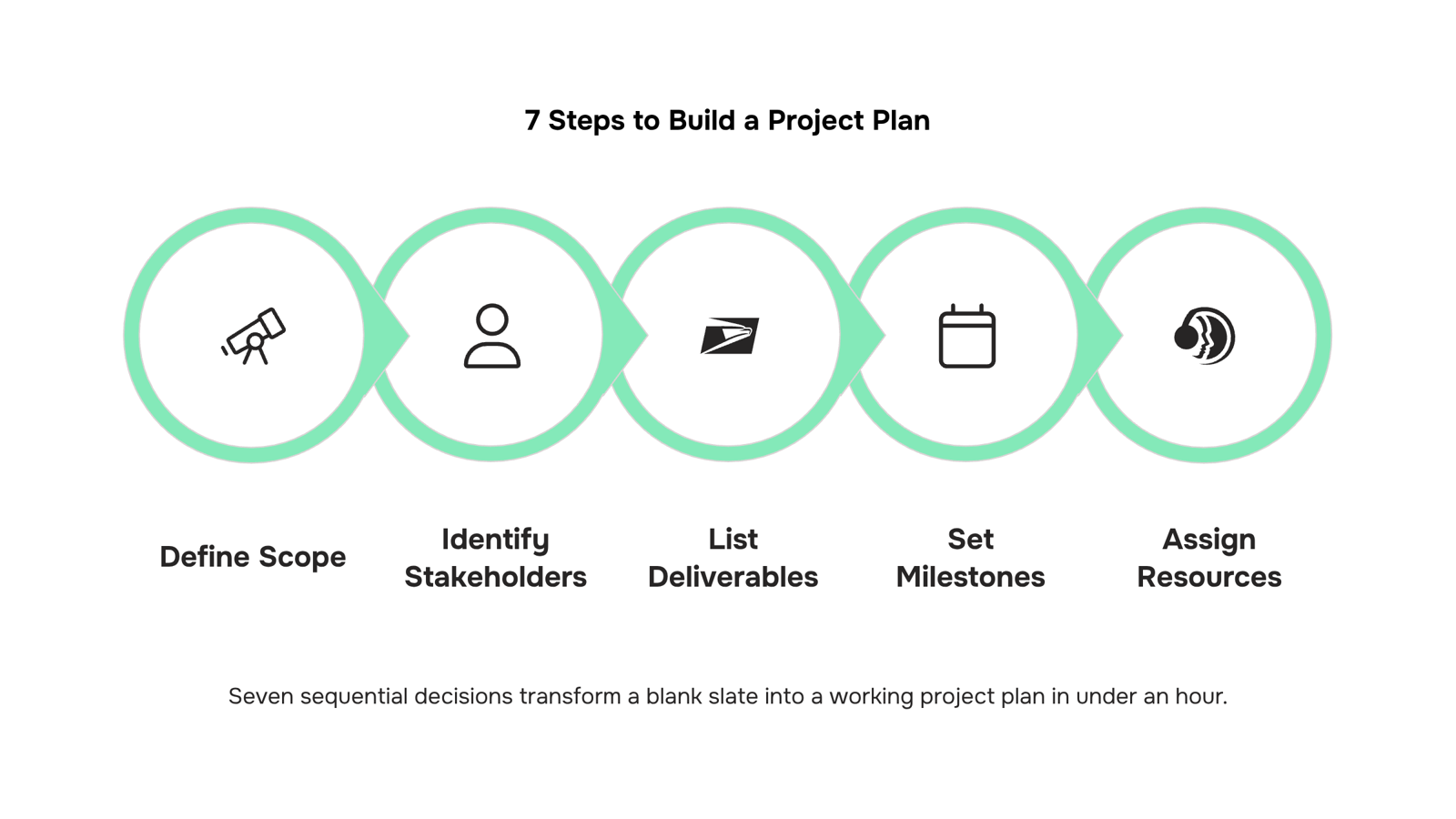
Building a project management project plan from scratch feels harder than it is. Most teams skip steps not because they're lazy, but because no one has shown them the decision logic behind each one. Here are seven steps that actually hold up in an IT context.
1. Define scope Write one sentence that describes what the project delivers and one sentence that describes what it does not. For an IT team, this might be: "This project delivers a migrated CRM instance. It does not include end-user training." That boundary prevents the most common source of late delivery before the project even starts.
2. Identify stakeholders List every person or group whose work feeds into the project or who approves the output. In IT, this typically includes the project sponsor, the technical lead, department heads whose workflows depend on the system, and any external vendors. Knowing who has sign-off authority early saves you from a late-stage veto.
3. List deliverables Break the project into concrete outputs, not activities. "Configured staging environment" is a deliverable. "Work on configuration" is not. Deliverables give your team something to check off and give stakeholders something to review. If you need a starting structure, a work plan can help you organize deliverables before you sequence them.
4. Set milestones and a timeline Attach a date to each major deliverable, then work backwards to confirm the timeline is realistic. For IT projects, build in buffer around vendor dependencies and testing cycles, which almost always run longer than estimated. A detailed guide on how to set milestones and a timeline covers the sequencing logic in full.
5. Assign resources to each deliverable Every deliverable needs one named owner, not a team. "DevOps team owns server setup" is how tasks go unfinished. "Priya owns server setup" is how they get done. When you assign resources to each deliverable, also note the capacity each person has available, not just their name.
6. Document risks For each major deliverable, write down the one thing most likely to delay it and what you'll do if it happens. A two-column table works fine: risk on the left, response on the right. IT projects commonly face risks around third-party API availability, compliance review timelines, and internal resource conflicts. Naming them now means your team responds instead of reacts.
7. Establish a communication cadence Decide in advance how often you'll report status, to whom, and in what format. A weekly async update to stakeholders and a twice-weekly sync with the core team covers most IT projects. Vague communication plans are where accountability quietly breaks down.
Once these seven steps are documented, you have a working project plan. Tools like Taro let you hold all of this in one place, so scope, owners, milestones, and risks stay connected rather than scattered across documents. You can also track your project plan in real time as the work moves, rather than reconciling stale spreadsheets at the end of each week.
The project planning process that produces this plan is a separate topic, covered in the next section.
Project plan vs. project planning process: what is the difference
The confusion is common: people use "project plan" and "project planning process" interchangeably, but they describe different things. One is a document; the other is the system that produces it.
Dimension | Project plan | Project planning process |
|---|
What it is | A static artifact: scope, timeline, resources, risks | A repeatable workflow for building that artifact |
When you use it | During execution, as a reference and control document | Before execution begins, and again at each project kickoff |
Who owns it | Project manager or team lead | The organization or delivery team as a standard practice |
IT example | The documented rollout plan for a server migration | The steps your team runs every time a new infrastructure project starts |
Your project management project plan is the output. Project management project planning is the discipline that shapes it. If you only have the document but no repeatable process behind it, every new project starts from zero.
Build the process that produces better plans every time.
A simple project management project plan sample
Here is what a finished project management project plan looks like for a real scenario: a 90-day IT infrastructure rollout for a 200-person company migrating from on-premise servers to a cloud environment.
Project: Cloud Migration, Q3 Owner: IT Director Goal: Migrate 12 on-premise servers to AWS by September 30, zero unplanned downtime
Section | Example entry |
|---|
Scope | Migrate servers 1–12; exclude legacy payroll system |
Milestones | Week 2: audit complete. Week 6: staging live. Week 10: cutover |
Deliverables | Network diagram, test report, runbook, sign-off doc |
Resources | 2 engineers, 1 vendor, $40K budget |
Risks | Payroll dependency, firewall config delays |
Timeline | Set milestones and a timeline before locking scope |
Use this as your project management project plan template starting point. Swap the entries for your actual project, assign resources to each deliverable, and you have a working plan in under an hour. A work plan handles the day-to-day tasks underneath each milestone.
A static document — whether a Word file or a shared spreadsheet — can't tell you when a milestone slips. You update it manually, or it goes stale.
Moving your project management project plan into a live tool changes that dynamic. When tasks update, the plan updates. When a deadline shifts, dependent milestones adjust automatically. Your team stops asking "is this current?" because the answer is always yes.
Taro is built around this model. You can track your project plan in real time, with task ownership, sprint progress, and logged hours visible in one workspace. AI flags risks before they reach your client. Approval workflows keep sign-offs from sitting in someone's inbox for three days.
This matters most during project management project planning, when you're still assigning resources to each deliverable and the plan changes daily. A live tool absorbs those changes without a version-control headache.
Closing
A project management project plan transforms from a static document into a living tool the moment your team starts executing against it. The seven steps above give you the structure—scope, stakeholders, deliverables, milestones, resources, risks, and communication cadence—but the real power emerges when phases shift, dependencies break, and your team needs to see the ripple effect instantly.
Taro turns that plan into an AI-assisted project where timeline changes, resource conflicts, and risk flags surface automatically. Instead of manually updating a spreadsheet, your team sees how a delayed milestone cascades through the schedule and which person is overallocated. Ready to move from a static plan to a live one? Check out how Taro's project management features handle phases, milestones, and timelines in practice.
FAQ
How do I create a project management project plan from scratch?
Follow seven steps: define scope, identify stakeholders, list deliverables, set milestones and timeline, assign resources to each deliverable, document risks, and establish a communication cadence. Each step answers a specific question your team will ask during execution.
What are the benefits of having a detailed project management project plan?
A detailed plan reduces scope creep, speeds stakeholder alignment, clarifies accountability, and surfaces risks early. According to PMI, organizations with formal project planning waste significantly less budget on failed initiatives.
How do I develop a project management project plan for a construction project?
The seven-step framework applies to construction: define scope clearly, identify all stakeholders including contractors and inspectors, list physical deliverables, set realistic milestones with buffer for weather and inspections, assign named owners, document risks like material delays, and establish weekly status cadence.
What is the difference between a project plan and a project planning process?
A project plan is the single output document holding scope, milestones, resources, and risks. A project planning process is the series of conversations and decisions that produce that plan. The plan is what you execute against; the process is how you build it.
How long should a project management project plan be?
Length depends on project complexity, not a fixed page count. Include only the eight core components—scope, objectives, milestones, timeline, resources, risks, roles, and communication plan. If it's longer than one document can hold, break it into a summary plan and supporting annexes.


 Kayla Morgan11 September 2026


