TL;DR: Most dashboard guides hand you a list of metrics and leave the architecture to you. This one organizes project metrics by decision layer — team execution, manager oversight, executive reporting — so every number has a named owner and a clear decision it drives. You'll finish with a framework for building a metrics dashboard that actually changes how your team acts on information.
What a Metrics Dashboard Actually Needs to Do
A metrics dashboard has one job: give the right person the right signal at the moment they need to act. That sounds obvious, but most project dashboards fail it. They surface every available data point, leave the viewer to sort out what matters, and end up as a reporting artifact nobody checks.
The functional definition is narrower than most teams expect. A useful metrics dashboard answers a specific question for a specific decision-maker on a specific cadence. Change any one of those three variables and you need a different view, different metrics, and often a different refresh rate.
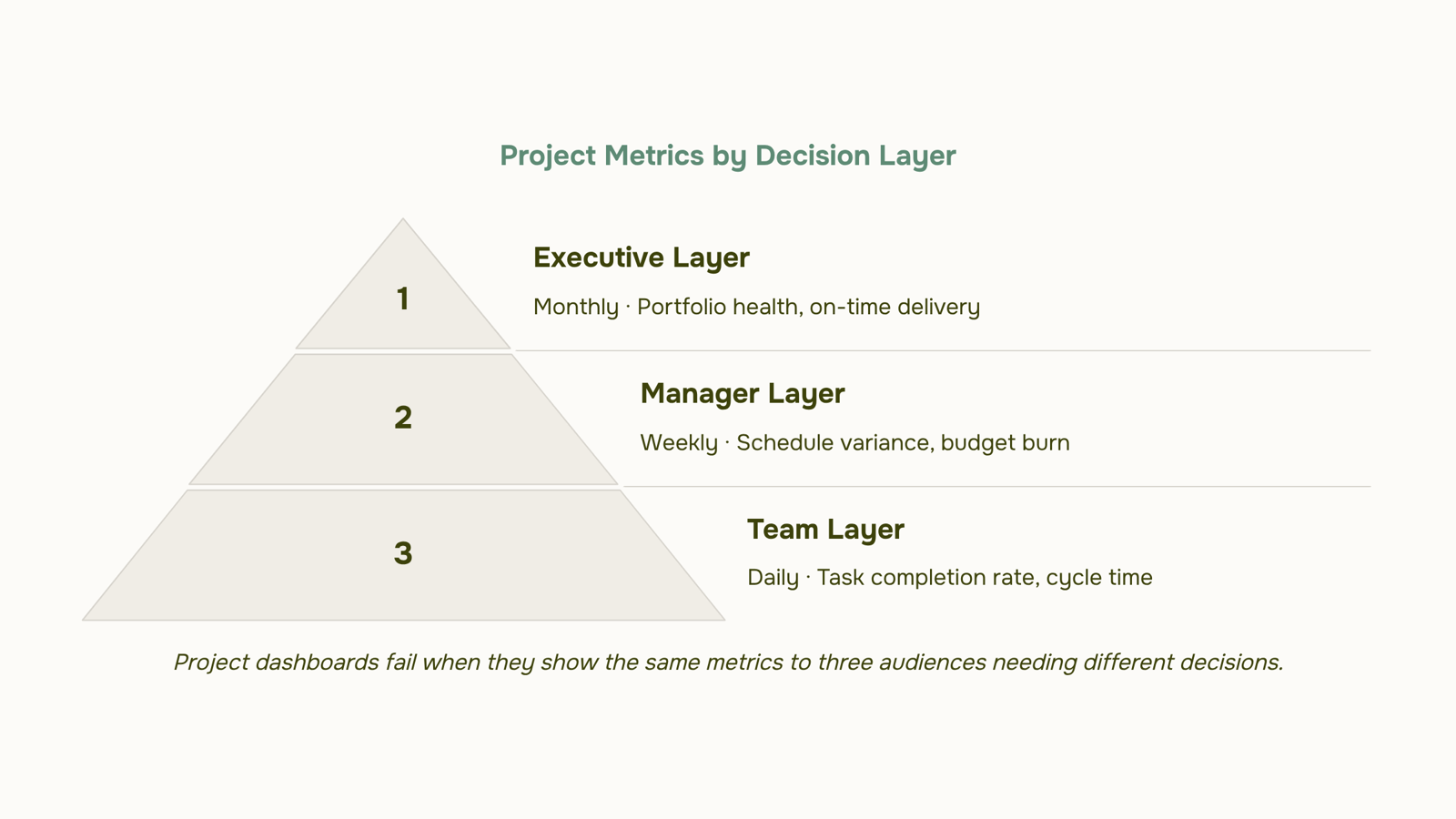
This matters because a team member tracking daily task completion needs different signals than a manager reviewing weekly schedule variance or an executive scanning monthly delivery rates. Treating all three as one audience is where most company metrics dashboards break down. The data is there; the decision layer is missing.
That selection logic, who decides what and when, is what separates a dashboard from a data dump. If you're building or auditing your current setup, how to create an effective operations dashboard covers the structural decisions that apply across project and operational views.
The next section maps this to three concrete decision layers: team execution, manager oversight, and executive reporting.
The Three Decision Layers Every Project Dashboard Serves
A project metrics dashboard doesn't fail because it shows the wrong numbers. It fails because it shows the same numbers to three people who need completely different answers.
The execution layer runs daily. Team members need task completion rate, active blockers, and cycle time — signals that tell them whether today's work is on track. These metrics change fast, so staleness of even 24 hours makes them useless.
The oversight layer runs weekly. Managers need schedule variance, resource utilization, and sprint velocity. They're not asking "is this task done?" They're asking "are we drifting, and do I need to intervene before the deadline moves?"
The executive layer runs monthly. Owners and stakeholders need budget burn rate, on-time delivery rate, and portfolio health. Granular task data is noise at this level. What matters is whether the project is tracking against the business outcome it was funded to deliver.
Most teams build one flat company metrics dashboard and push it to everyone. The result: executives wade through sprint velocity, and team members can't find their blockers because they're buried under financial summaries.
Metric selection has to start with "who decides what." Before you choose a single KPI, map the decision each audience makes and the cadence they make it on. Project dashboard design varies significantly by role, and getting that match right is what separates a useful dashboard from a data wall.
Team-Level Metrics: What the People Doing the Work Need to See
Four metrics belong on every team-level metrics dashboard. Each one has a failure mode worth knowing before you build.
Task completion rate tells you what percentage of assigned tasks closed in a given period. The catch: teams learn to game it fast. When completion rate becomes a target, low-priority tasks get closed first because they're easy, and the blockers on high-stakes work stay open. Filter by task priority before you trust this number.
Cycle time measures how long a task takes from "in progress" to "done." A rising cycle time usually means scope creep or unclear handoffs, not a slow team. If your average cycle time doubles mid-sprint, check the task definition before you check the calendar.
Blocker count is the metric most teams track too late. One open blocker sitting for three days is a project manager problem. Five blockers sitting for three days is a process problem. Log blockers the moment they're raised, not during the retrospective.
Sprint velocity shows how much work a team completes per sprint, measured in story points or task count. It's useful for forecasting, not for judging performance. Velocity drops when teams take on poorly scoped work, not necessarily when effort drops. Comparing velocity across teams is almost always misleading.
A fifth metric worth adding for IT delivery teams: rework rate, the share of completed tasks that come back for revision. High rework rate is a signal that acceptance criteria were unclear at the start, not that the team executed poorly.
These five metrics give the people doing the work a clear picture of where execution is healthy and where it's stalling. For guidance on what each role's dashboard should look like in practice, or on setting up the dashboard structure itself, both are worth reading before you configure anything.
Manager-Level Metrics: Tracking Schedule, Budget, and Risk
Four metrics separate a manager who catches problems early from one who inherits them.
Schedule variance (SV) tells you whether earned work matches planned work. The formula is SV = Earned Value (EV) minus Planned Value (PV). A negative number means you're behind; a positive means you're ahead. Most teams check this weekly, but the number only means something if your task estimates were honest in the first place.
Budget burn rate shows how fast you're spending against the approved budget. Divide actual spend to date by the percentage of the project timeline elapsed. A burn rate above 1.0 means you're spending faster than you're delivering. Catching this at the 30% mark gives you options; catching it at 80% gives you a conversation with finance.
Resource utilization measures whether your people are over-allocated, under-used, or blocked. Anything above 85% sustained utilization is a leading indicator of missed deadlines, not just a capacity note.
Open risk count with severity weighting is the most underused metric on a manager-level metrics dashboard. A project carrying 12 open risks rated "high" looks identical to one with 12 risks rated "low" if you're only counting. Weight them.
On the real-time vs. lagging question: burn rate and utilization are lagging indicators — they confirm what already happened. Open risk count is a leading indicator — it signals what's about to happen. A well-structured dashboard shows both, not just the ones that look good.
For setting up the dashboard structure itself, the configuration matters as much as the metrics. Taro surfaces these four metrics in real time, so you're reacting to current data rather than last week's export. The customer service metrics dashboard layer follows the same logic: leading indicators front and center, lagging indicators in context.
Executive Metrics: What Goes on the Reporting Dashboard
Executives don't need a live feed of every task status. They need to answer one question fast: is this portfolio on track, and where is it bleeding?
Four metrics belong on every executive-level company metrics dashboard.
Portfolio health score aggregates schedule, budget, and risk signals into a single RAG (red-amber-green) status per project. It gives a sponsor a 10-second read across 20 active projects without opening a single task list.
On-time delivery rate measures the percentage of milestones hit by their committed date. For IT services companies, industry benchmarks typically sit in the 60–70% range, which means anything below 65% warrants a conversation before the quarter closes.
Budget variance at portfolio level shows cumulative spend against approved budget across all projects, not just the one currently on fire. A single project 15% over budget is a project problem. Three projects over budget simultaneously is a resourcing or estimation problem.
Milestone completion rate tracks whether the work that was supposed to be done this period actually finished. Pair it with a trend line over 8–12 weeks, not a point-in-time snapshot.
That last point matters most. Executives make resource and priority decisions based on direction, not position. A project at 72% complete and declining is a different conversation than one at 60% and accelerating. Trend lines expose that. Static numbers hide it.
For tracking portfolio-level health across multiple projects, the metrics above give you the right inputs. What each role's dashboard should look like in practice covers how to separate these views by audience.
How to Build Metric Cards That Actually Drive Decisions
A metric card earns its place on a metrics dashboard when it answers four questions at a glance: what is the current value, what is the target, which direction is the trend moving, and who owns it. Strip any of those four and the card becomes a number without context.
Build each card around a single KPI. Budget variance gets one card. On-time delivery rate gets another. Combining them collapses the signal. A useful card shows the current figure, a target threshold (green/amber/red), a 30-day trend line, and the name of the person accountable for moving it.
Role matters here. An executive card for schedule variance shows portfolio-level trend. A team lead's card for the same metric shows individual project variance. The underlying data is identical; the aggregation layer differs. What each role's dashboard should look like in practice covers this separation in detail.
Taro's drag-and-drop analytics widgets let you configure cards per role without touching the data layer. A project manager sets their own card layout; an exec sees a rolled-up version of the same source. No duplicate data entry, no manual exports.
For the structural foundation before you build cards, start with setting up the dashboard structure itself.
Three Metrics That Look Useful But Mislead Project Teams
Three metrics show up on nearly every company metrics dashboard and quietly produce bad calls.
Percent complete sounds objective. It isn't. One team member calls a task 80% done when the hard work hasn't started. Another calls it 50% done when it's essentially finished. You're averaging opinions, not measuring progress.
Number of open tasks measures volume. It tells you nothing about which tasks carry risk, which are blocked, or which are on the critical path. A team with 12 open tasks and one blocked dependency is in worse shape than a team with 40 open tasks and clear runway.
Hours logged is the most common offender. Effort and progress are not the same thing. A team can log 200 hours on a deliverable that hasn't moved an inch toward done.
All three belong in a time-tracking log or a workload report. They don't belong on a metrics dashboard built for decisions.
The fix isn't adding more metrics. It's choosing metrics that signal risk, not activity. What each role actually needs to see differs significantly from what most default dashboards show.
Closing
The metrics that matter depend entirely on who's reading them and what decision they're making. A team executing daily needs task completion and blockers. A manager needs schedule variance and burn rate. An executive needs portfolio health and delivery rate. The harder problem isn't knowing which metrics belong on each view — it's configuring a dashboard that shows the right one to the right person without manual filtering every time. That's where role-based dashboard widgets remove the friction. Taro's analytics dashboards feature lets you build once, then each team member sees only the metrics tied to their decisions, refreshed automatically. See it in practice on the analytics dashboards feature page, or start by mapping your three decision layers this week and naming one metric owner for each.
FAQ
What should I include in a metrics dashboard for executive reporting?
Portfolio health score, on-time delivery rate, budget burn rate, and revenue impact. Executives need aggregated signals tied to business outcomes, not granular task data. Refresh monthly unless a risk threshold triggers an alert.
How do I build a dashboard with metric cards to track KPIs?
Start by naming the decision each audience makes and the cadence they make it on. Select metrics that directly answer that decision, then configure cards to refresh at the right interval. Separate team, manager, and executive views so each role sees only what they act on.
Which tools offer the best executive dashboards with customizable metric cards?
Taro, Monday.com, Jira, and Asana all support role-based dashboards. The best choice depends on whether your team already lives in that tool and whether it supports automated role-based filtering without manual setup.
Does Taro provide an executive dashboard with metric cards for real-time monitoring?
Yes. Taro's analytics dashboards feature delivers role-based metric cards that refresh automatically, so executives see portfolio health, burn rate, and delivery metrics without manual filtering or stale exports.
How many metrics should a project management dashboard show?
Four to five per decision layer. Team-level: task completion, cycle time, blockers, velocity. Manager-level: schedule variance, burn rate, utilization, open risks. Executive-level: portfolio health, delivery rate, budget burn, revenue impact. More than five per view creates decision paralysis.
What is the difference between a team dashboard and an executive dashboard?
Team dashboards show daily execution signals (task completion, blockers, cycle time) and refresh hourly or daily. Executive dashboards show monthly portfolio signals (health score, delivery rate, budget) and refresh weekly or monthly. Same data, different aggregation and cadence.


 Elena Petrova15 September 2026


