TL;DR: Most CRM guides for small businesses stop at feature checklists and pricing tiers. This one gives IT company owners a decision framework: what operational breakdowns signal you actually need a CRM, which capabilities to prioritize at your current headcount, and how to evaluate whether a tool scales before you're locked in.
What CRMs are and what they actually do
A CRM, or customer relationship management platform, is software that stores every contact, conversation, and deal in one place instead of scattered across inboxes, spreadsheets, and sticky notes.
The core function is simple: capture data about the people your business sells to, then make that data useful. Most teams think of a CRM as a contact database, but that undersells it. A well-configured CRM does three distinct jobs.
Track contacts: Every lead, prospect, and client gets a record with history, notes, and communication logs attached.
Manage pipeline: Deals move through defined stages, so you can see at a glance what's close, what's stalled, and what needs attention.
Automate follow-up: Reminders, sequences, and triggers replace the mental overhead of remembering who to contact and when.
That third job is where most small teams feel the gap first. Without it, follow-ups depend entirely on memory, and memory fails under volume.
For IT company owners evaluating CRM options built specifically for IT sales teams, understanding this three-part function is the right starting point before comparing tools.
Why small businesses lose deals without a CRM
The failure chain is simple and repeatable. A lead fills out your contact form. Someone logs it in a spreadsheet, or a Gmail thread, or a sticky note. Three days pass. By the time anyone follows up, the prospect has already signed with someone who called back the same afternoon.
Research from Harvard Business Review found that companies contacting leads within an hour were nearly seven times more likely to qualify them than those waiting even 60 minutes longer. For small teams without crms for small business, that window closes constantly because there's no system triggering the follow-up.
The breakdown happens in three places:
Capture: leads arrive from different channels and land in different tools, so no one has a complete picture
Ownership: without assignment rules, follow-up becomes a guessing game about whose job it is
Timing: without automated reminders, deals go cold while the team is heads-down on delivery work
Small businesses running on spreadsheets don't lose deals because they lack effort. They lose them because the process has no memory. A contact goes quiet, gets buried under newer rows, and never resurfaces.
This is the core problem the top crms solve: they replace a fragmented, human-dependent chain with a single system that tracks every touchpoint and flags what needs attention next. Pair that with lead management software built for small teams and the gaps close fast.
Not every feature in a CRM demo matters for a team of 10 or 15 people. The best crms for small businesses share five capabilities that actually move deals forward — and skip the enterprise overhead that slows you down.
Contact and pipeline management is the foundation. You need a single place where every lead, conversation, and deal stage lives. If two reps can't see the same record in real time, you're back to the spreadsheet problem.
Lead capture and auto-assignment is where most popular crms separate themselves. Leads that sit unassigned for more than five minutes see dramatically lower conversion rates — auto-routing to the right rep the moment a form submits is the mechanism that closes that gap.
Email integration matters because your team lives in their inbox. A CRM that logs sent emails automatically, without manual entry, is the difference between a complete contact history and a half-empty one.
Reporting doesn't need to be complex. For a small team, pipeline velocity (how fast deals move between stages) and lead-to-close rate are the two numbers worth tracking weekly. Anything beyond that is noise until you're past 20 people.
AI-assisted qualification is increasingly standard in the best crms on the market. Scoring leads by engagement signals — email opens, page visits, form fills — lets your team prioritize without gut-feel guessing.
What you can ignore: territory management, complex workflow builders, and multi-currency forecasting. These features are built for enterprise sales orgs. For a small team, they add configuration time without adding revenue. If a platform buries its core pipeline view under those layers, that's a signal to look elsewhere — CRM options built specifically for IT sales teams tend to stay leaner by design.
How a CRM improves customer engagement and follow-up speed
The gap between a lead arriving and a rep reaching out is where most small business deals die. Research on lead response time consistently shows that conversion rates drop sharply when response time exceeds five minutes — yet most teams running on spreadsheets or email threads take hours, sometimes days.
A CRM closes that gap through two specific mechanisms: auto-assignment and activity tracking.
Auto-assignment means the moment a lead fills out a form or clicks an ad, the CRM routes it to the right rep with no manual handoff. Lio does this at the capture stage, so the rep gets a notification before the lead has moved on to a competitor. That speed difference is the mechanism most crms for small business comparisons skip over entirely.
Activity tracking handles the follow-up problem. Every call, email, and meeting logs automatically against the contact record. The CRM surfaces which contacts haven't heard from anyone in seven days and flags them before they go cold. No rep has to remember who needs a nudge.
Together, these two features change how a small team operates. Reps spend time selling instead of triaging inboxes. Managers see pipeline health in real time instead of asking for updates in Slack.
The best crms also connect these workflows to sales tools that work alongside a CRM, which is where the next section picks up.
A CRM works best when it's the connective tissue between every tool your team already uses, not another silo to check separately.
Here's what a connected workflow looks like in practice. A lead fills out a form on your website. The CRM captures the contact, scores it, and triggers an email sequence through your marketing automation tool (Mailchimp, ActiveCampaign, or similar). When the deal closes, the CRM pushes the data to your invoicing tool and generates the first invoice automatically. No copy-pasting, no dropped handoffs.
Most popular CRMs support this kind of stack through native integrations or Zapier connections. Calendar sync keeps meeting history attached to each contact. Email sync logs every thread without manual entry. For small teams, this matters because the rep handling the deal is often the same person sending the invoice.
Free CRMs like HubSpot's free tier include basic email and calendar sync out of the box, which covers most small business needs without a paid plan. If your stack grows, sales tools that work alongside a CRM can extend what the CRM handles natively.
For teams evaluating lead management software built for small teams, integration depth is often the deciding factor between a CRM that saves time and one that creates more of it.
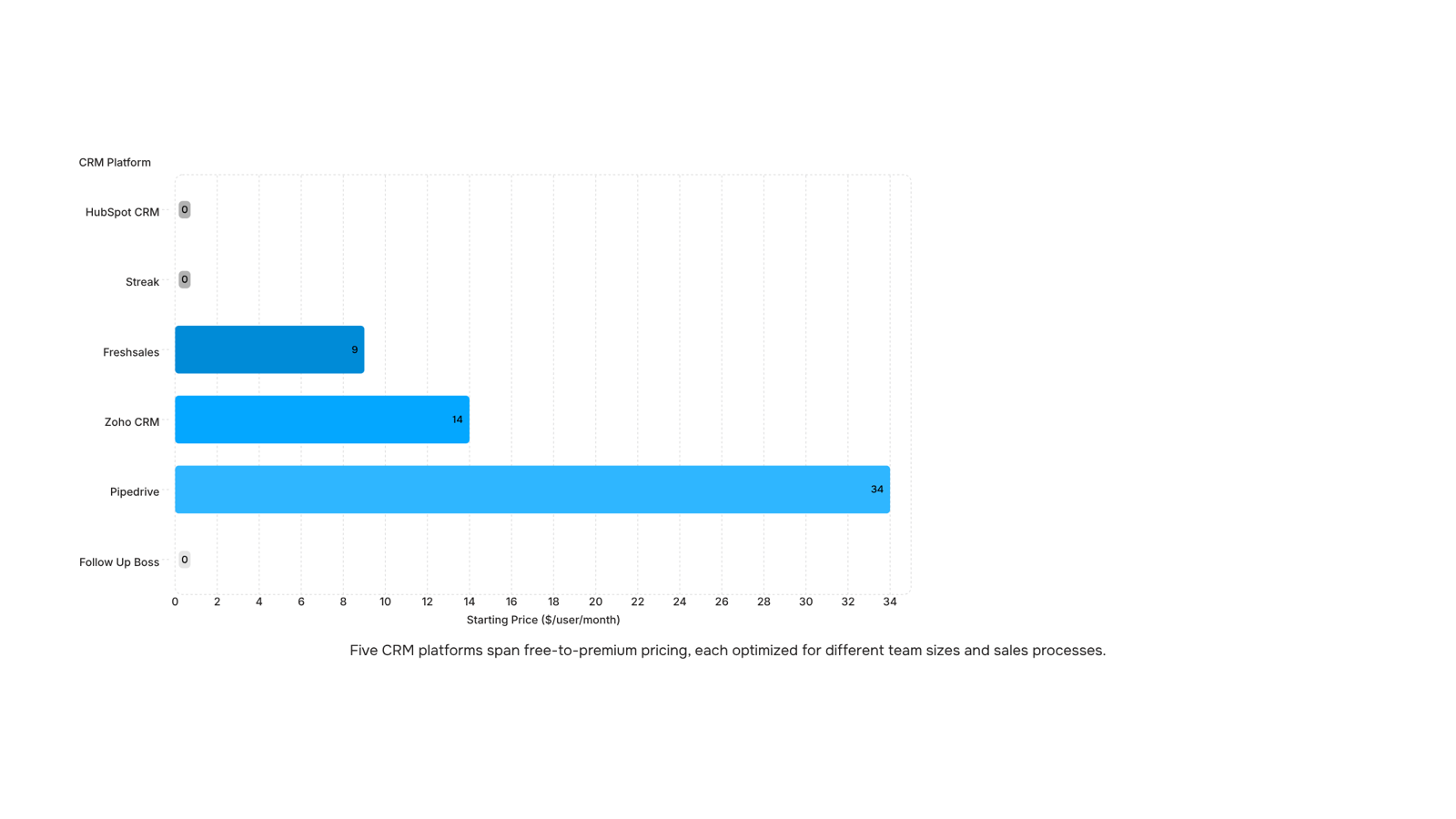
Top CRMs for small businesses in 2026
Five tools cover most of what small businesses actually need from a CRM in 2026. Here's how they stack up.
HubSpot CRM is the default starting point for most teams. The free tier handles up to 1 million contacts, includes email tracking, and connects to Gmail, Outlook, and most marketing tools without configuration. It gets expensive fast once you need automation sequences or reporting beyond the basics.
Zoho CRM fits teams that want more workflow control at a lower price. The Standard plan runs around $14 per user per month and includes scoring rules, email automation, and a canvas interface you can configure without a developer. It rewards teams willing to spend a few hours on setup.
Pipedrive is built for sales-first teams that live in their pipeline. Its visual deal board is one of the cleaner implementations in this category, and the AI sales assistant on the Advanced plan ($34/user/month) flags stalled deals before they go cold. Less useful if your process is relationship-heavy rather than transaction-heavy.
Freshsales suits small teams that want a built-in phone, email, and chat in one place without stitching tools together. The Growth plan starts at $9/user/month and includes AI contact scoring.
Follow Up Boss is purpose-built for real estate crms use cases. It pulls leads from Zillow, Realtor.com, and most IDX sources automatically, then routes them to agents with response-time rules. If you're comparing CRM options that also handle document workflows, that combination matters more in real estate than almost any other vertical.
Streak is the free crms option worth knowing if your team already lives in Gmail. It embeds a full pipeline directly into your inbox, with no data migration required.
How to choose the right CRM for your team
Picking from the best CRMs comes down to four questions, not a feature checklist.
How many reps do you have? Teams under five rarely need pipeline automation. A simple contact view and activity log is enough. Once you pass ten reps, shared visibility and assignment rules become non-negotiable.
Where do your leads come from? If most arrive through a website form or ad campaign, prioritize CRMs with native web-to-lead capture. If they come through referrals or cold outreach, you need manual entry that's fast and frictionless.
What does your follow-up process look like today? If it lives in a spreadsheet or your inbox, any structured CRM will improve it. If you already have a sequence in place, look for a CRM that maps to those exact stages rather than forcing a rebuild.
What's already in your tech stack? Switching costs compound fast for small teams. Check which crms for small business integrate natively with your email provider, calendar, and billing tool before committing.
For a deeper breakdown of how these questions translate to specific platforms, choosing the right CRM for your business walks through the tradeoffs by team type.
Closing
The right CRM for your small business isn't the one with the longest feature list—it's the one that closes the gap between a lead arriving and your team responding. Start by mapping where deals actually die in your current process: Are leads sitting unassigned? Is follow-up scattered across email and spreadsheets? Is pipeline visibility missing? Once you know the breakdown, you can evaluate tools against that specific problem instead of comparing pricing tiers.
If lead response time is your bottleneck, Lio is built specifically for small sales teams that can't afford to let leads sit. It captures leads, auto-assigns them to the right rep, and surfaces activity gaps—no manual routing, no memory games. The difference between a five-minute response and a five-hour one compounds fast. What's the biggest operational breakdown costing you deals right now?
FAQ
What are the top CRMs for small businesses?
HubSpot (free tier), Pipedrive, Zoho CRM, and Freshsales are popular choices. The best fit depends on your specific breakdowns: lead response speed, pipeline visibility, or integration needs. Evaluate against your actual operational gaps, not feature checklists.
What are CRMs and how do they work?
A CRM stores every contact, conversation, and deal in one place instead of scattered across inboxes and spreadsheets. It tracks contacts, manages pipeline stages, and automates follow-up reminders—replacing manual memory with a system that flags what needs attention next.
How can a CRM system improve customer engagement?
CRMs close the lead-response gap through auto-assignment and activity tracking. Leads route to the right rep instantly, and the CRM surfaces contacts that haven't been touched in days—so follow-ups happen before deals go cold, not after.
What are the key features to look for in a CRM platform?
Prioritize contact and pipeline management, lead capture with auto-assignment, email integration, basic reporting on pipeline velocity, and lead-to-close rates. Skip territory management and complex workflows until you're past 20 people—they add configuration time without revenue.
How does a CRM integrate with other sales and marketing tools?
Most CRMs connect via native integrations or Zapier to sync email, calendar, and marketing automation. A lead captured in the CRM can trigger an email sequence, log meetings automatically, and push closed deals to invoicing—eliminating manual handoffs across your stack.


 Elena Petrova15 September 2026


