TL;DR: Most PERT guides show you the diagram and leave the math unexplained. This one walks IT project managers through the full six-step build: dependency mapping, three-point time estimates, critical path calculation, and where each step changes a real scheduling decision. You'll finish with a method you can apply to your next project, not just recognize on a slide.
What PERT means in project management
PERT, which stands for Program Evaluation and Review Technique, is a scheduling method built for projects where you cannot predict task durations with confidence. The U.S. Navy developed it in 1958 for the Polaris missile program, specifically because the work involved unknowns that a fixed timeline could not absorb.
The core idea: instead of assigning one duration to each task, PERT uses three estimates. Optimistic (O), most likely (M), and pessimistic (P). Those three feed into a weighted formula, E = (O + 4M + P) / 6, which produces an expected duration grounded in statistical probability rather than guesswork. The formula weights the most likely estimate four times heavier than the extremes, reflecting a beta distribution across possible outcomes.
That statistical grounding is exactly why PERT fits IT projects. Software builds, infrastructure migrations, and integrations all carry duration uncertainty by default. A single-point estimate on any of those tasks is optimism dressed as a plan.
PERT also forces you to map task dependencies before you schedule anything, which surfaces the critical path and sequencing conflicts that sink timelines later. For teams who want that dependency structure visible from day one, Taro gives every project a single source of truth from day one.
Why PERT matters for scheduling complex projects
Most scheduling methods assume you already know how long things take. PERT doesn't. That's the core reason it holds up on complex IT projects, where task durations are genuinely uncertain and a wrong estimate in week two can collapse a deadline in week eight.
Four concrete outcomes make PERT worth the setup time.
Realistic time estimates. The three-point formula (optimistic, most likely, pessimistic) forces your team to surface uncertainty explicitly rather than bury it in a single guess.
Visible dependencies. A PERT chart maps which tasks must finish before others can start, so no one discovers a blocking relationship mid-sprint.
An identified critical path. PERT chart analysis isolates the sequence of tasks with zero float. Delay any one of them, and the whole project slips.
Reduced schedule risk. Because the method accounts for variance from the start, your buffer decisions are grounded in probability, not optimism.
Research consistently shows that IT projects with explicit dependency mapping and prioritized task sequences finish closer to their original deadlines than those managed by gut-feel scheduling alone.
The method also pairs well with structured task ownership. When every task has a clear owner and defined inputs, the estimates you feed into PERT are more accurate, and the critical path you identify actually reflects reality.
How to build a PERT chart in 6 steps
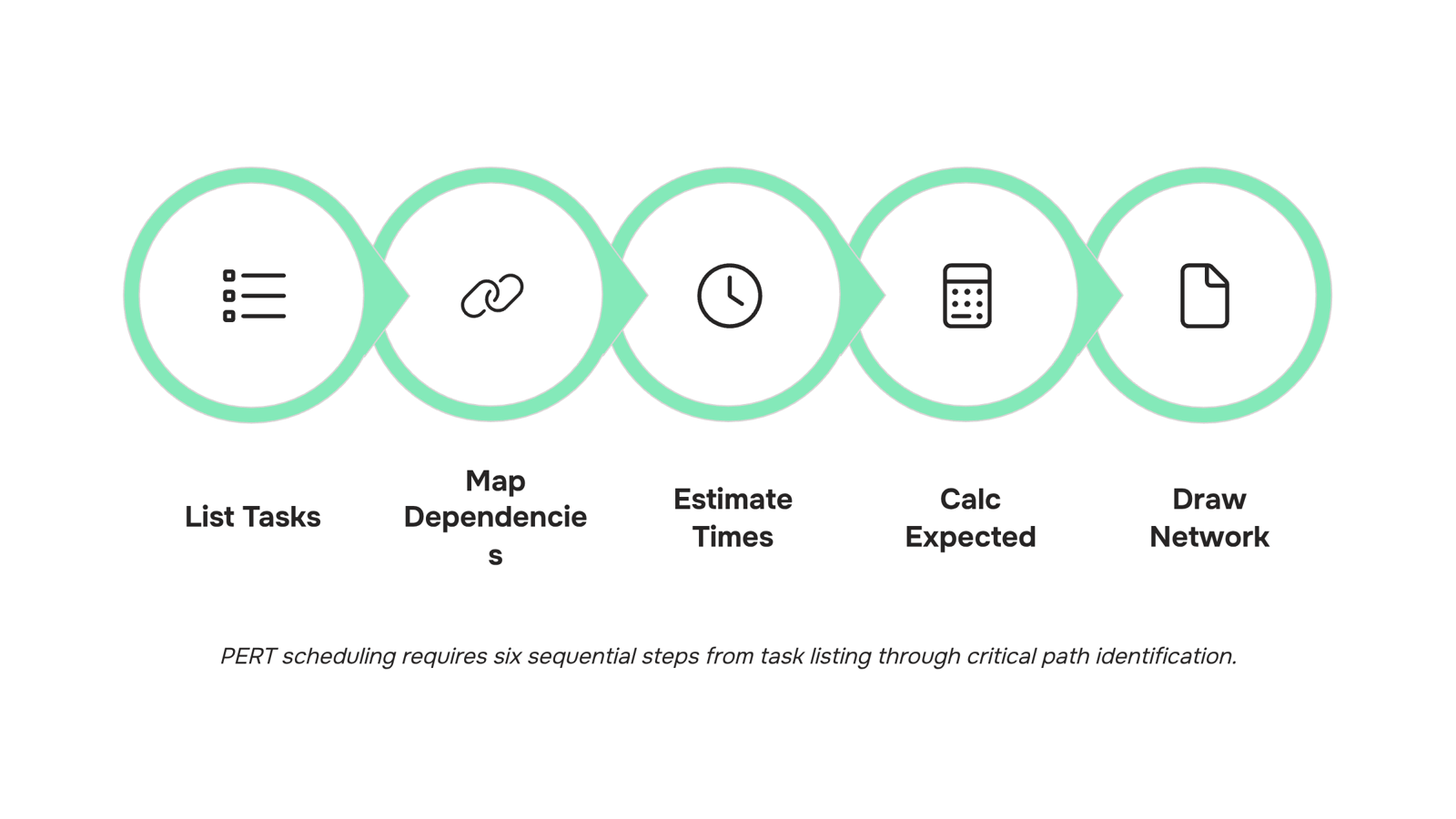
Start with listing every task, then sequence them, then estimate durations. That's the skeleton of a PERT chart build. Here's how each step works, using a mid-size IT team migrating a client to a new cloud infrastructure as the running example.
Step 1: List all tasks
Write down every deliverable the project requires. Don't group or sequence yet — just capture. For the cloud migration, this means tasks like requirements gathering, vendor selection, environment setup, data migration, UAT, and go-live sign-off. Missing a task here is the most common reason PERT estimates fall apart later.
Step 2: Map dependencies
For each task, identify what must finish before it can start. This is where pert chart analysis earns its value. In the migration example, environment setup can't begin until vendor selection is complete, and UAT can't start until data migration finishes. Draw those relationships explicitly. A task with no predecessor is a start node; a task nothing depends on is an end node.
Step 3: Estimate three time values per task
This is the step most scheduling tools skip. For each task, assign:
Optimistic (O): best-case duration if nothing goes wrong
Most likely (M): the realistic estimate based on past work
Pessimistic (P): worst-case if major blockers hit
For "data migration" on the cloud project: O = 3 days, M = 6 days, P = 15 days. These aren't guesses — they come from your team's historical delivery data or, if that doesn't exist, structured input from the engineers doing the work.
Step 4: Calculate expected duration
Apply the PERT formula, which is grounded in a beta distribution:
E = (O + 4M + P) / 6
For data migration: E = (3 + 24 + 15) / 6 = 7 days. That single number is more defensible than a gut-feel estimate because it weights the most likely outcome four times while still accounting for tail risk. Run this calculation for every task in the list.
Step 5: Draw the network diagram
Place each task as a node. Connect them with arrows that follow the dependency map from Step 2. Left to right is the standard direction. Each arrow represents a dependency; each node shows the task name and its expected duration (E). For the migration project, you'll end up with roughly two or three parallel tracks converging at UAT, then flowing to go-live. That visual is the PERT chart.
Step 6: Identify the critical path
Add up the expected durations along every path from start to finish. The longest path is the critical path. Any delay on a task sitting on that path delays the entire project — no buffer, no slack. In the migration example, if the path through environment setup, data migration, and UAT totals 22 days while the parallel vendor documentation track totals 14 days, the first path is critical. Focus your risk management there.
For IT teams running multiple concurrent projects, tracking these dependencies manually gets messy fast. Taro gives every project a single source of truth from day one, so dependency chains stay visible without a separate spreadsheet for each engagement. When a task slips, the downstream impact is immediate and visible rather than discovered in a status meeting two weeks later.
The six steps above cover the full pert definition in practice: structured estimation, explicit sequencing, and a clear view of where schedule risk actually lives. The output isn't a pretty diagram — it's a decision tool that tells you which tasks need the most attention before the project starts moving.
For teams deciding between this approach and a simpler timeline view, the next section compares PERT and Gantt charts directly across the dimensions that matter most for IT projects.
PERT vs. Gantt charts: which one fits your project
The right choice depends on what you need to see.
A PERT chart maps task dependencies as a network. It shows you which tasks must finish before others can start, and it handles uncertainty by building three time estimates into every duration. That makes it the right tool when your project timeline is genuinely unknown — a new software integration with unclear vendor timelines, for example.
A Gantt chart shows tasks on a calendar. It answers "what's happening this week" better than PERT does, but it assumes you already know how long each task takes. Uncertainty gets hidden inside a single bar.
Dimension | PERT chart | Gantt chart |
|---|
Time certainty | Low — uses optimistic, likely, pessimistic estimates | High — needs fixed durations upfront |
Dependency visibility | Strong — built into the network structure | Weak — dependencies are secondary |
Ease of creation | Harder — requires dependency mapping | Easier — most PMs build one in an hour |
Best use case | Complex, first-of-kind projects | Repeatable projects with known timelines |
For IT projects with external dependencies — API integrations, third-party approvals, infrastructure provisioning — PERT meaning becomes practical: it forces you to quantify uncertainty instead of ignoring it. Gantt charts work better once the unknowns are resolved and you're tracking execution against a fixed plan.
Many teams use both. PERT to plan, Gantt to execute. If your tool supports timeline views alongside dependency mapping, you don't have to choose. Best Project Prioritization Methods for IT Teams in 2026 covers how to sequence that decision before you open either chart.
Common mistakes that make PERT estimates unreliable
Three errors consistently break PERT schedules before the first milestone.
Single-point time estimates are the most common. A developer says "three days," and that number goes straight into the schedule. PERT exists precisely to avoid this: without separate optimistic, most likely, and pessimistic inputs, the formula E = (O + 4M + P) / 6 produces nothing useful. You're running pert chart analysis with Gantt-chart assumptions baked in.
Ignoring resource constraints comes next. PERT defines task duration, not who's available to do the work. If two critical-path tasks share the same engineer, your float calculation is wrong from the start.
Skipping float calculation is the third failure. Float tells you which tasks have slack and which have none. Teams that skip it discover their "buffer" in week two, usually when it's already gone.
All three errors compound. A schedule built on them will drift regardless of how precisely you define PERT at the planning stage. Best Project Prioritization Methods for IT Teams in 2026 covers how to sequence work once your estimates are solid.
A completed PERT chart analysis is only useful if the outputs stay connected to live work. When you export a static diagram and file it, the critical path becomes outdated the moment a task slips.
The practical move is to translate three specific outputs into your work management tool immediately after running the analysis:
Task dependencies — map predecessor and successor relationships as hard links, not notes. If Task B cannot start until Task A is complete, that constraint needs to enforce itself automatically.
Float values — log the calculated float for each task as a custom field. A task with two days of float should surface differently in your dashboard than one with zero.
Critical path flags — tag every critical path task so the team sees at a glance where delay has no buffer.
Once those three are in place, your pert chart stops being a planning artifact and starts functioning as a live schedule.
Taro handles exactly this layer: dependency tracking, bottleneck detection, and ownership clarity across tasks. When a critical path task stalls, Taro surfaces it before the delay compounds rather than after.
For remote teams managing distributed workloads, pairing PERT outputs with productivity tracking software gives you the visibility to act on float data in real time, not in the next retrospective.
Closing
PERT transforms scheduling from a single guess into a statistical method grounded in your team's actual uncertainty. The six-step build—dependency mapping, three-point estimates, formula calculation, network diagram, and critical path identification—gives you a defensible timeline before work begins. But a static PERT chart becomes outdated the moment a task slips. Bring your PERT outputs into Taro so dependencies, float, and critical path stay visible as the project runs. When reality diverges from your estimates, you'll see the downstream impact immediately instead of discovering it in a status meeting two weeks later. Ready to wire this into your next project?
FAQ
What does PERT stand for in project management?
PERT stands for Program Evaluation and Review Technique. The U.S. Navy developed it in 1958 for the Polaris missile program to handle projects where task durations cannot be predicted with confidence.
How is PERT used in project planning?
PERT uses three time estimates per task (optimistic, most likely, pessimistic) fed into a weighted formula to produce expected durations grounded in probability. It also maps dependencies explicitly so you identify the critical path before scheduling begins.
What is the difference between PERT and Gantt charts?
PERT maps task dependencies as a network and handles uncertainty with three-point estimates. Gantt shows tasks on a calendar and assumes you already know durations. PERT fits low-certainty projects; Gantt fits projects with known timelines.
Can you explain PERT chart analysis?
PERT chart analysis identifies which tasks have zero float (the critical path) by adding expected durations along every path from start to finish. The longest path determines your project deadline; any delay on that path delays the entire project.
How does PERT help with project scheduling?
PERT surfaces uncertainty explicitly, maps dependencies so blocking relationships are visible upfront, and identifies where schedule risk actually lives. This lets you focus risk management on the critical path before work begins.
What are the three time estimates used in PERT?
Optimistic (O) is best-case duration if nothing goes wrong, most likely (M) is the realistic estimate based on past work, and pessimistic (P) is worst-case if major blockers hit. The formula E = (O + 4M + P) / 6 weights M four times heavier.
What is the critical path in a PERT chart?
The critical path is the longest sequence of dependent tasks from project start to finish. Any delay on a task sitting on the critical path delays the entire project with no buffer, so it deserves the most risk management attention.


 Elena Petrova15 September 2026


