TL;DR: Most articles on the IT change management process walk you through ITIL stages and leave the hard part to you. This one shows IT company owners where the process actually breaks down — approval bottlenecks, risk gaps, and manual handoffs that kill change velocity — and how to fix each with structured workflows. You'll leave with a framework you can apply this week.
What is the IT change management process?
The IT change management process is a structured sequence of steps an IT team follows to request, evaluate, approve, and implement changes to infrastructure, systems, or services, while minimizing the risk of disruption.
Without a formal process, even routine updates, like a firewall rule change or a server patch, can cascade into outages. Gartner estimates that 80% of unplanned downtime is caused by people and process failures, including poorly controlled changes. That's the core problem this process solves.
The governing standard is the ITIL change management process (Information Technology Infrastructure Library). ITIL defines change management as a practice within IT service management (ITSM) that balances speed of delivery against risk of failure. Most IT service companies structure their change workflows around ITIL's terminology and stage gates, even when they don't follow the full framework to the letter.
ITIL classifies changes into three types:
Standard changes: pre-approved, low-risk, repeatable (a routine password reset policy update)
Normal changes: require full review and approval before implementation
Emergency changes: fast-tracked for critical fixes, with post-implementation review
For a deeper look at how these principles apply beyond IT, change management best practices in project management covers the overlap between ITIL discipline and broader project governance.
How does the IT change management process work?
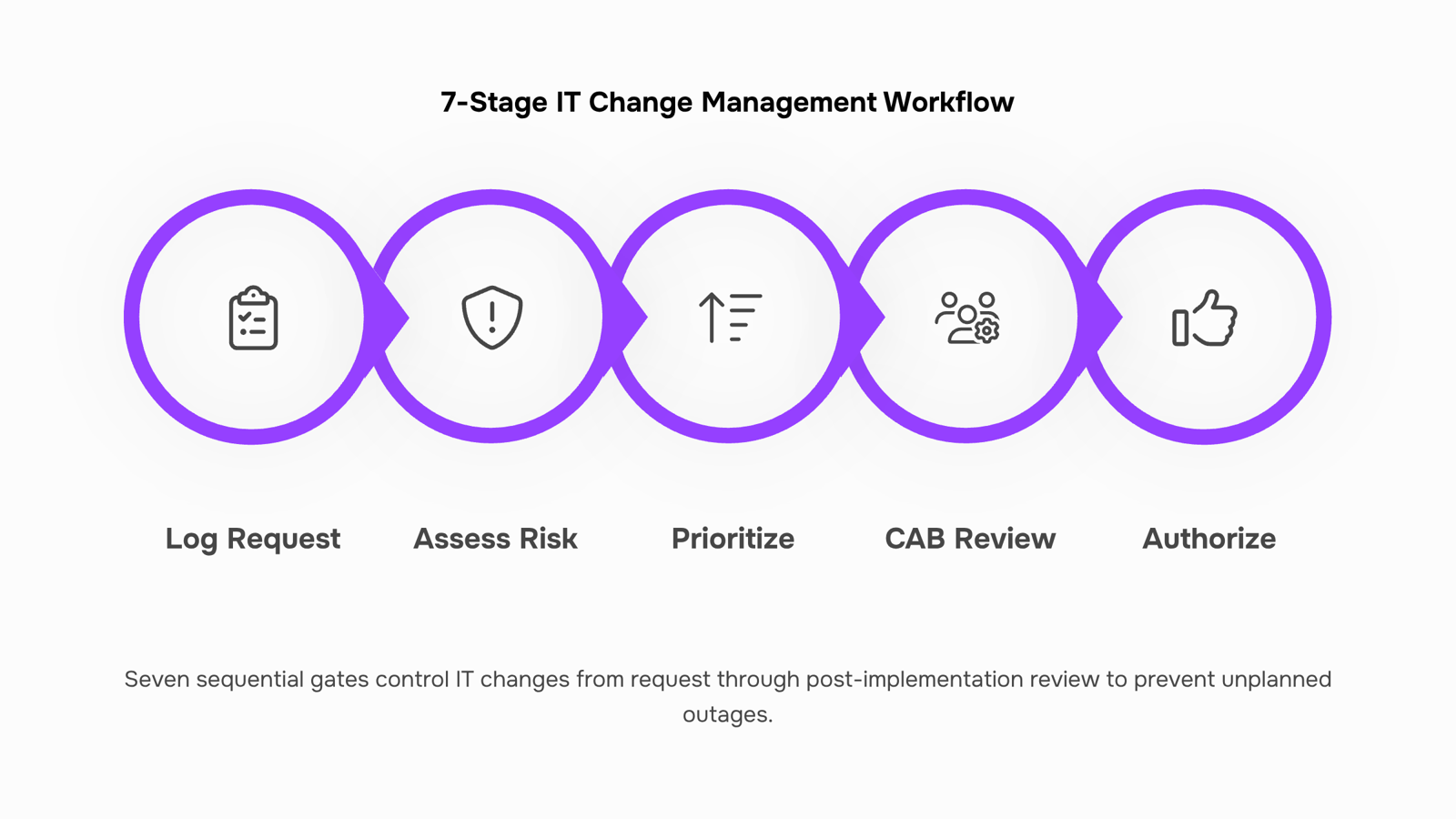
The seven ITIL stages form the backbone of every functional change request workflow. Each step is a control gate, not a formality.
Log the change request: Someone identifies a need, whether a patch, a configuration update, or a new service deployment, and submits a formal request. This creates the audit trail everything else depends on.
Assess impact and risk: The submitter (or a designated analyst) documents what could break, who gets affected, and how to roll back if something goes wrong. This is not a one-time checkbox. IT risk assessment and mitigation runs as a continuous control layer, revisited at each subsequent gate.
Categorize and prioritize: The request gets classified by type and urgency. This determines which approval path it follows, a distinction covered in the next section.
Review by the change advisory board: The change advisory board (CAB) evaluates higher-risk changes before approval. For standard or low-risk changes, this step is often pre-authorized. The CAB exists to catch what individual submitters miss.
Authorize the change: A designated approver, the CAB, or an automated rule grants or denies the change. No change moves to implementation without a recorded authorization.
Implement and test: The change goes live according to the approved plan, with a defined test window and a rollback trigger if the environment degrades. This is where IT lifecycle management intersects directly with change execution.
Review and close: Post-implementation review confirms the change achieved its goal, documents any deviations, and feeds lessons back into future requests.
Most process failures occur at steps two and five, where risk assessment is rushed and authorization is informal. The change control process in IT project management follows the same logic: no gate, no governance.
Standard, normal, and emergency changes: what is the difference?
The three change types aren't just labels — they determine which approval gates apply, how fast you can move, and who needs to be in the room.
Standard changes
A standard change is pre-approved. It follows a documented, low-risk procedure your team has run before: a routine patch deployment, a user account reset, a firewall rule update from an approved template. Because the risk profile is known, it bypasses the change advisory board and moves straight to execution. The change request workflow still applies for logging and audit purposes, but there's no committee review.
Normal changes
Normal changes require full assessment and CAB approval before implementation. These are modifications with meaningful risk or unknown variables — a new application deployment, a network architecture update, a database migration. The IT change management process runs its full cycle here: submission, impact review, CAB sign-off, scheduled implementation, and post-change review. Timeline depends on risk level; a low-risk normal change might clear in 48 hours, while a high-risk one could take two weeks.
Emergency changes
Emergency changes exist for one reason: something is broken and the business is bleeding. A production outage, a critical security patch, a failed failover. The process compresses, not disappears. You still document, still get approval (usually from an emergency CAB or a named authority), and still conduct a post-implementation review. Skipping documentation here is where teams create future incidents.
For a broader view of how these change types fit into governance, change control best practices in project management covers the overlap well.
How to assess and mitigate risk during a change
Risk assessment in the IT change management process is not a single sign-off box. It's a control layer you apply before, during, and after every change.
Start with an impact-and-likelihood score for each change request. Rate impact (1–5) on service availability, security posture, and compliance exposure. Rate likelihood of failure the same way. Multiply them. Any score above 12 goes to your change advisory board (CAB) for review before work begins. Below 12, the change owner can approve with documented justification. This keeps your CAB focused on high-stakes decisions rather than routine requests.
Once a change clears scoring, require a rollback plan before the work ticket moves to "approved." The rollback plan should name the exact steps to reverse the change, the person responsible, and the time window for deciding whether to execute it. A good rule of thumb: if the rollback takes longer than the change itself, escalate the risk score.
Testing gates are the third layer. Standard changes need a pre-production environment test. Emergency changes, which often skip this, should at minimum run a peer review of the implementation steps. IT risk assessment and mitigation practices consistently show that peer review catches the majority of configuration errors that automated tests miss.
For teams managing overlapping changes across infrastructure, application, and security domains, IT lifecycle management gives you the broader ownership model that makes risk scoring consistent across teams rather than person-dependent.
A formal IT change management process does more than prevent outages. It creates a repeatable control layer that compounds over time.
Here is what teams consistently gain:
Fewer unplanned outages: Gartner estimates that 80% of unplanned downtime is caused by people and process failures, most of which a structured change process would catch before deployment.
Faster approvals: Change management automation removes manual handoffs from the approval chain. Standard changes get pre-approved; only high-risk changes route to the CAB.
Audit readiness on demand: Every change carries a timestamp, an owner, and a documented rationale. When a compliance review hits, you pull the log, not your memory.
Cleaner rollback execution: Teams with documented rollback plans recover in minutes, not hours. Without them, recovery is improvised under pressure.
Reduced shadow IT: A visible change control process in IT project management gives engineers a legitimate, low-friction path to submit changes, so they stop bypassing the process entirely.
The operational payoff is predictability. You stop reacting and start controlling.
Common challenges that stall IT change management
Four failure points show up repeatedly across the IT change management process, and each one is fixable once you can name it.
CAB bottlenecks happen when every change, regardless of risk level, queues for the same weekly review meeting. Low-risk routine updates sit for days waiting on approvals that should take minutes. The fix is tiered authorization: standard changes get pre-approved, only significant or emergency changes reach the full change advisory board.
Undocumented rollback plans turn minor failures into major incidents. If your team can't answer "how do we reverse this in under 30 minutes," the change isn't ready to implement. Treat rollback documentation as a gate, not an afterthought.
Shadow changes are modifications made outside the formal process, usually because the process feels too slow. They're the leading driver of unplanned outages and a core IT risk assessment concern.
Manual handoffs between teams create gaps where requests stall, context gets lost, and nobody owns the next step. Better workflow and document management closes those gaps before they become incidents.
How AI and automation are changing IT change management in 2026
Manual change request workflows have a ceiling. At some point, routing tickets through email chains, chasing CAB approvals in Slack, and flagging risks in spreadsheets stops scaling — and starts causing the incidents you were trying to prevent.
In 2026, the IT change management process is shifting from human-routed queues to condition-based automation. The practical difference: instead of a coordinator manually assigning a change request to the right approver, the system reads the change type, checks the risk profile, and routes it automatically. Approvals that used to take 48 hours can clear in under four.
Change management automation also addresses the shadow change problem from the previous section. When every change request triggers an automated intake form with mandatory fields — affected systems, rollback plan, test evidence — undocumented changes become structurally harder to slip through.
This is where Taro and Revo do specific work. Taro handles task ownership and approval routing inside the change request workflow, so no ticket sits unassigned while two engineers assume the other is handling it. Revo fills the gaps that manual handoffs create: automated pre-checks, escalation triggers when SLAs are at risk, and post-change verification steps that run without someone remembering to schedule them.
The result isn't a faster version of the old process. It's a change control process that enforces its own rules — which matters most when your team is under pressure and shortcuts look tempting.
Closing
The IT change management process isn't a bureaucratic hurdle — it's the operational backbone that separates controlled delivery from cascading outages. Most teams know the seven ITIL stages exist, but they stumble at the real friction points: risk assessment gets rushed, approvals live in email threads, and rollback plans stay undocumented until something breaks. The fix isn't hiring a dedicated ITSM team. It's wiring structured change request tracking into your workflow so every submission, risk flag, and approval decision is visible and auditable from day one. Taro gives you that structured request layer — the single source of truth for what's changing and why. Pair it with Revo's automated approval routing and risk-triggered escalations, and your change process runs without manual coordination eating your team's time. The question isn't whether you need change management; it's whether you want it to work for you or against you. Ready to see how it looks in practice?
FAQ
What is the ITIL change management process and how does it work?
ITIL change management is a structured practice that balances delivery speed against failure risk through seven control gates: log, assess, categorize, review, authorize, implement, and close. Each gate prevents uncontrolled changes from cascading into outages — Gartner data shows 80% of unplanned downtime stems from poorly controlled changes.
How can I implement a successful IT change management process in my organization?
Start by classifying changes into standard (pre-approved, low-risk), normal (full CAB review), and emergency (compressed but documented) types. Then enforce the seven ITIL stages consistently, with risk scoring before approval and documented rollback plans before implementation. Automate approval routing so changes don't stall in email.
What are the benefits of having a formal IT change management process?
A formal process reduces unplanned downtime, ensures audit compliance, prevents configuration errors through peer review, and creates visibility across teams so changes don't conflict. It also speeds delivery because approvals follow predictable gates instead of ad-hoc decisions.
How do I assess and mitigate risks during the IT change management process?
Score each change by impact and likelihood (1–5 scale); escalate scores above 12 to your CAB. Require documented rollback plans before approval, and mandate pre-production testing for standard changes and peer review for emergency changes. Recheck risk at each gate, not just once.
What tools and software can help automate the IT change management process?
Taro structures change request tracking so every submission and approval is logged and auditable. Revo automates approval routing and triggers risk-flag escalations based on impact scores, eliminating manual handoffs that stall velocity.
What is the role of the change advisory board in IT change management?
The CAB reviews higher-risk normal and emergency changes before approval, catching what individual submitters miss. Standard changes bypass the CAB because they're pre-approved; the board stays focused on decisions that matter, not routine requests.


 Elena Petrova15 September 2026


