TL;DR: Most risk assessment template guides hand you a field list and call it done. This one shows IT company owners why each field exists, how the fields connect, and what a completed template should drive your team to do next. You'll leave with a structure that turns a static document into a repeatable decision-making process.
What a risk assessment template actually is
Professional 3D render of organized risk assessment framework with checklist and data visualization on corporate workspace
A risk assessment template is a structured document that captures every known risk in a consistent format so your team can compare, prioritize, and act on them. The key word is "consistent." A one-time risk list is a snapshot. A template is a repeatable system with fixed fields that force the same questions every time a new risk surfaces.
Those fields matter because they feed a priority score. Most templates use a simple formula: probability × impact = risk score. That number tells you which risks need a response plan this week and which can sit in a risk log template for later review.
A basic risk assessment template typically covers six to eight fields. Get those fields right and the rest of the process, including how to build a response plan for each risk, follows a clear sequence. Skip a field and you lose the ability to prioritize consistently across projects.
What to include in a risk assessment template
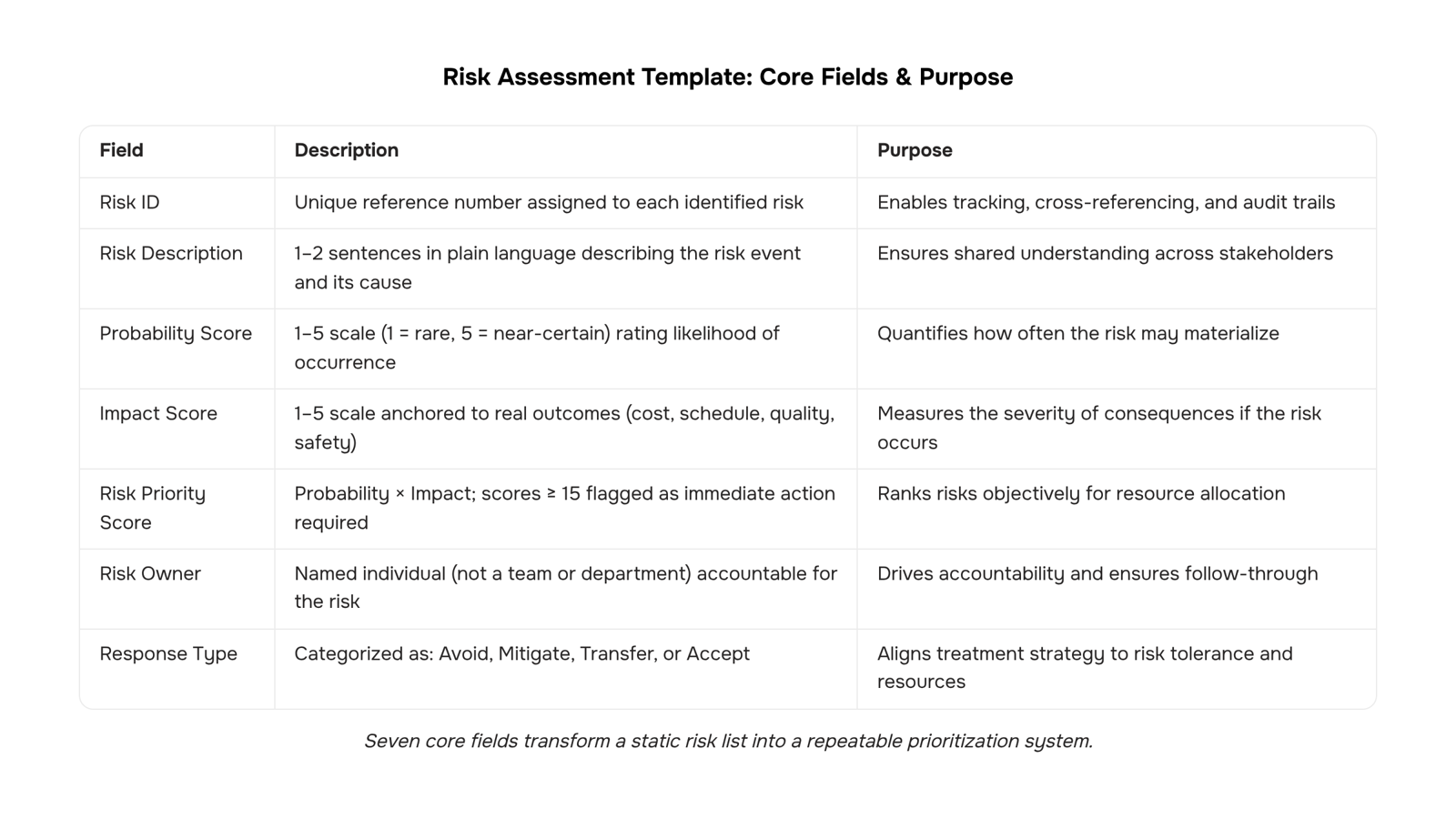
A well-built risk assessment template answers six questions for every risk your team identifies: what is it, where does it live, how likely is it, how bad would it be, who owns it, and what happens next.
Here are the core fields, and what each one actually does:
Risk ID: A unique reference number. Keeps your risk log template searchable when you're managing 30+ items across a project.
Risk description: One or two sentences in plain language. Avoid jargon. "Third-party API deprecation could break the client portal before go-live" is more useful than "vendor dependency risk."
Risk category: IT, operational, financial, compliance, or strategic. For an IT risk assessment template specifically, categories like infrastructure, security, and integration deserve their own buckets.
Probability score: Rate likelihood on a 1–5 scale (1 = rare, 5 = near-certain). Be consistent across your team so scores mean the same thing to everyone.
Impact score: Rate consequence severity on the same 1–5 scale, anchored to real outcomes: budget overrun, schedule slip, data exposure, client churn.
Risk priority score: Multiply probability by impact. A score of 15 or above (on a 25-point scale) typically signals immediate action. This is the calculation most free templates skip, but it's what separates a prioritized register from a list. ISO 31000:2018 frames this as the core output of any risk evaluation process.
Risk owner: The named person accountable, not the team. "DevOps" owns nothing. "Priya, infrastructure lead" owns something.
Response type: Avoid, mitigate, transfer, or accept. Each choice leads to a different next action. For anything above a priority score of 10, build a response plan for each risk before the project moves to the next phase.
Review date: Set a specific date, not "ongoing." For enterprise risk assessment templates covering multi-phase programs, review cadence should tighten as you approach major milestones.
A sample risk assessment template for an IT project might carry 15 to 25 rows at project kick-off. The goal isn't an exhaustive list. It's a structured record your team can track risk status without a manual weekly review and act on before a risk becomes an incident.
How to use your template in 6 steps
A blank template becomes useful only when your team runs the same process every time. These six steps take you from empty fields to a live risk register with owners, scores, and response plans attached.
List every risk before scoring any of them: Open your risk assessment template and do a full identification pass first. Pull from your project scope, your IT architecture diagram, past incident logs, and any vendor dependencies. Scoring mid-identification biases the list toward risks you already fear and misses the quieter ones.
Assign probability and impact scores to each row: Use the numeric scale you defined in your template (typically 1–5 for each). Multiply them to get a priority score. A risk scored 4 on probability and 4 on impact (score: 16) sits above a risk scored 2 on probability and 5 on impact (score: 10), even though the second feels more dramatic. Let the math set the order, not instinct.
Set an owner for every risk above your threshold: Pick a score cutoff, say 8 or higher, and assign a named owner to each risk above it. No owner means no accountability. For an IT risk assessment template specifically, owners are usually the team lead closest to the affected system, not the project manager.
Build a response plan for each risk that clears your threshold: Each plan needs four things: the action, the owner, the deadline, and the trigger condition that activates it. A response plan without a trigger is just a note. A trigger without a deadline is just an intention.
Move the completed template into a shared risk register: A risk log template structures how you track status changes over time. The assessment captures a point in time; the register keeps the record live. These are two different documents with two different jobs.
Schedule your review cadence before you close the file: ISO 31000:2018 recommends that risk monitoring be continuous and integrated into normal operations, not treated as a periodic audit. For most IT projects, that means a quick review at every phase gate and a full re-score at any major scope change. For a product risk assessment template, add a review trigger tied to each release cycle.
Once the cadence is set, the manual part shrinks. Tools that map controls to each identified risk or surface risks before your team discovers them manually handle the monitoring layer, so your team focuses on decisions rather than data collection.
Qualitative vs. quantitative risk analysis in one template
Most templates force a choice: score risks with words ("high/medium/low") or calculate them with numbers. A well-structured template handles both in the same row.
Qualitative fields cover the columns most teams fill out first: likelihood label (rare, possible, likely), impact label (minor, moderate, severe), and an overall risk rating derived from a simple 3×3 or 5×5 matrix. These work well for a basic risk assessment template where speed matters and precise data isn't available yet.
Quantitative fields sit alongside them: probability as a decimal (0.1 to 1.0), financial impact in dollars, and a calculated risk score using the standard formula probability × impact = risk score. This is the approach an enterprise risk assessment template needs when you're reporting to a board or justifying contingency budgets.
The practical setup: keep both field sets in the same row. During early project phases, fill the qualitative columns and leave the numeric ones blank. As data improves, populate the numbers. The risk log template structure supports this dual-column approach directly.
For each scored risk, build a response plan before the risk moves to active status. Scoring without a response is just documentation.
How often to review and update your template
Most teams review risks when something goes wrong. That's too late.
ISO 31000:2018 recommends treating risk review as a recurring process tied to project events, not a one-time exercise. For IT projects, that means four natural checkpoints:
Kickoff: Populate your IT risk assessment template before work starts. Baseline probability and impact scores here.
Mid-sprint (every 2 weeks): Re-score any open risks. Flag new ones surfaced during development.
Milestone gates: Before any major delivery or sign-off, run a full template review. Scores that haven't changed in two cycles deserve a second look.
Project close: Archive the completed template. Patterns across closed projects are your best input for the next kickoff.
This cadence works because it plugs into rhythms your team already has, standups, sprint reviews, steering meetings, rather than creating a separate process.
For teams managing risk and control matrices alongside their risk assessment template, the milestone gate review is where both documents should sync.
Risk assessment template vs. risk log: key differences
A risk assessment template and a risk log are not the same document, and mixing them up wastes time at exactly the wrong moment.
Dimension | Risk assessment template | Risk log |
|---|
Purpose | Identify and score risks before they occur | Track and monitor risks as they evolve |
Timing | Used at kickoff, milestone gates, and close | Updated continuously throughout the project |
Ownership | Project manager or risk lead | Whole team; each risk has a named owner |
Output | Prioritized risk register with probability × impact scores | Living record of status changes, decisions, and responses |
The template is your diagnostic tool. You pull it out at structured intervals to ask "what could go wrong?" The log is your operational record. Once a risk is identified and scored, it moves into the log for ongoing tracking.
A sample risk log template handles that second job. Your risk assessment template, whether a spreadsheet-based excel risk assessment template or a dedicated tool, handles the first.
Where to find a free risk assessment template
Three practical starting points work for most IT teams.
A free risk assessment template in Google Sheets or Excel gives you the fastest setup. Build five columns: risk description, probability (1–5), impact (1–5), risk score (probability × impact), and owner. That score is your triage mechanism — anything above 15 gets a response plan before the project moves forward. If you want a pre-built version, a risk log template covers the adjacent tracking layer.
The gap with spreadsheets: they don't alert you when scores change. A work management tool lets you track risk status without a manual weekly review and build a response plan for each risk directly inside the same workspace.
Start with the excel risk assessment template format to validate your scoring logic, then migrate once the columns stabilize.
Closing
A risk assessment template only works if it stays active between formal reviews. The fields matter—probability, impact, owner, response type—but only because they feed a priority score that tells your team what to act on now versus later. The real trap is treating your template as a one-time document. Risk shifts as projects move forward, dependencies surface, and scope changes. Without continuous monitoring, your template becomes a snapshot of last week's thinking, not a reflection of where your project actually stands today.
Taro's risk alerts dashboard closes that gap by surfacing overdue mitigation tasks and stalled workflows automatically, so your template stays current without manual weekly reviews. Start by exploring the free risk assessment template to map your core fields, then layer in risk prediction to catch emerging threats before they derail your timeline. Ready to turn your template into a live decision system?
FAQ
What should I include in a risk assessment template?
Include Risk ID, description, category, probability score (1–5), impact score (1–5), priority score (probability × impact), named owner, response type (avoid/mitigate/transfer/accept), and review date. These eight fields feed a consistent prioritization process across all identified risks.
How often should I review and update my risk assessment template?
ISO 31000:2018 recommends continuous monitoring integrated into normal operations. For most IT projects, review at every phase gate and re-score fully on any major scope change. Product templates should add review triggers tied to each release cycle.
Can I use a risk assessment template for both qualitative and quantitative risk analysis?
Yes. Keep both field sets in the same row: qualitative columns (likelihood/impact labels) for early phases when precise data isn't available, and quantitative columns (probability decimals, financial impact, calculated scores) as data improves and reporting demands increase.
How does a risk assessment template help with project risk management?
It enforces consistent scoring across all risks, eliminating bias and enabling prioritization. By forcing the same questions every time, it turns a one-time risk list into a repeatable decision-making system tied to response plans and owners.
Are there any free risk assessment templates available online?
Yes, many free templates exist online, but they often skip the priority score calculation that separates a prioritized register from a list. Taro offers a free template with built-in risk prediction to catch emerging threats automatically.


 Elena Petrova15 September 2026


