TL;DR: Most buying guides for KPI tracking software hand you a feature checklist and stop there. This one shows IT company owners how to match software capabilities to the work outcomes that actually move numbers, including how your tracking layer connects to the execution layer where KPIs get made or missed. You'll leave with a decision framework you can apply this week.
What KPI tracking software actually does
KPI tracking software connects your business goals to live data, so you can see whether you're hitting targets without waiting for someone to compile a report. That's different from general reporting tools, which surface historical data on demand. KPI software watches specific metrics continuously and alerts you when something drifts.
For an IT company owner, the practical difference matters. A reporting tool tells you last month's ticket resolution time. KPI tracking software tells you it's trending up this week, before it becomes a client complaint.
Most tools in this category let you set a target, assign an owner, and track progress in one place. The better ones, like a project KPI dashboard that updates as work moves, tie metrics directly to active work rather than pulling from a separate data warehouse.
Performance tracking software also handles the accountability layer. When a KPI slips, there's a named owner, not a shared inbox. That distinction is what separates a dashboard from an actual management tool.
If you're still deciding which category fits your needs, how OKR tracking software compares to KPI tracking tools is worth reading before you evaluate specific products.
Benefits of using KPI tracking software for decision-making
The case for dedicated kpi tracking software comes down to four concrete outcomes, not abstract "visibility."
Faster decisions: When metrics update automatically and surface in one place, your team stops waiting for the weekly report to find out something went wrong. Most IT owners report that manual data-chasing delays decisions by days, not hours. A kpi tracking tool removes that lag by connecting live data to the people who act on it.
Clearer accountability: When every KPI has an owner, a target, and a deadline visible to the whole team, "I didn't know that was my job" stops being a valid answer. Pairing your KPIs with a project KPI dashboard that updates as work moves means ownership is never ambiguous.
Earlier risk detection: Threshold alerts flag a metric before it becomes a crisis. A support ticket backlog creeping past SLA, a sprint velocity dropping two weeks in a row — kpi software for IT teams catches these signals while there is still time to course-correct, not after a client escalates.
Reduced reporting time: Manual reporting typically consumes several hours per person each week. Automated dashboards cut that to minutes. If you are still choosing the right task tracker for your IT team, the reporting overhead question is worth factoring in early, since the two tools share significant overlap in what they measure.
If you want context on how this compares to goal-setting tools, how OKR tracking software compares to KPI tracking tools is a useful next read before you evaluate options.
Key features to look for in KPI tracking software
Most feature lists for KPI tracking software read like a spec sheet: dashboards, alerts, integrations, done. That format doesn't help you evaluate a tool under demo conditions. These four capability questions do.
Can the dashboard show progress at every level? A project KPI dashboard should display company-level targets, team targets, and individual tasks in one view without requiring three separate reports. Ask the vendor to show you a live example with at least two hierarchy levels visible simultaneously.
Does the goal structure reflect how your team actually works? Good performance tracking software lets you nest KPIs under goals, and goals under strategic objectives. If you can only track flat metrics, you'll lose the thread between a developer's sprint output and a quarterly revenue target. Ask: "Can I link a task completion rate directly to a business objective?"
How does the alert system decide what's urgent? Automated alerts are only useful if they're threshold-based and role-specific. A generic "KPI is off track" email to everyone creates noise. Ask the vendor to show you how alert rules are configured and who receives what.
Does AI-assisted tracking explain the gap or just flag it? Some tools surface a red metric and stop there. The more useful ones tell you which inputs drove the variance, so your team spends time fixing the problem rather than diagnosing it. Ask: "What does the AI surface when a KPI misses its target?"
One structural note worth checking: tools where a project KPI dashboard updates as work moves inside the execution layer tend to stay current without manual input. That distinction matters more than connector count, which the next section covers directly.
The number of integrations a KPI tracking tool advertises tells you almost nothing useful. What matters is whether the connection is read-only or bidirectional, and whether data updates in real time or on a nightly sync.
A read-only connector pulls data in one direction. Your project management tool updates a task status, but your KPI dashboard only reflects it at midnight. By 9 a.m., you're already making decisions on stale numbers. Bidirectional, real-time integrations remove that lag entirely.
The more important question is where tracking lives relative to execution. Most standalone KPI dashboards sit outside the tools your team actually works in, which means someone has to manually bridge the gap. When your project KPI dashboard updates as work moves, the data is current because it's generated inside the execution layer, not imported from it.
For IT company owners, the practical test is this: pick three KPIs you track today, then trace each one back to its source system. If any step in that chain requires a manual export, a Zap, or a scheduled sync, you have a data latency problem, not an integration.
When choosing the right task tracker for your IT team, ask vendors specifically whether KPI updates trigger from task completion events or from scheduled API pulls. The answer separates tools built for visibility from tools built for reporting.
Yes, and for IT company owners, this is where good KPI tracking software earns its keep beyond the dashboard.
When project-level KPIs live inside the same system where work actually happens, individual performance visibility becomes a byproduct of normal execution, not a separate review cycle. A developer's ticket closure rate, a project manager's on-time delivery percentage, or a support engineer's average resolution time all surface automatically, without anyone building a separate report.
That's the practical case against treating employee performance management software as a distinct purchase. If your KPI software for IT teams is already tracking sprint velocity, utilization, and milestone completion, you already have the inputs most performance reviews need. The gap most teams hit is that their KPI tool sits outside the workflow, so the data is always one export behind.
For remote or distributed IT teams, this matters even more. Tools that connect KPIs to actual task execution give managers a real-time read on individual output without micromanaging. The best productivity tracking software for remote teams and the best progress tracking tools for teams both point to the same principle: visibility should come from the work layer, not a bolt-on HR module.
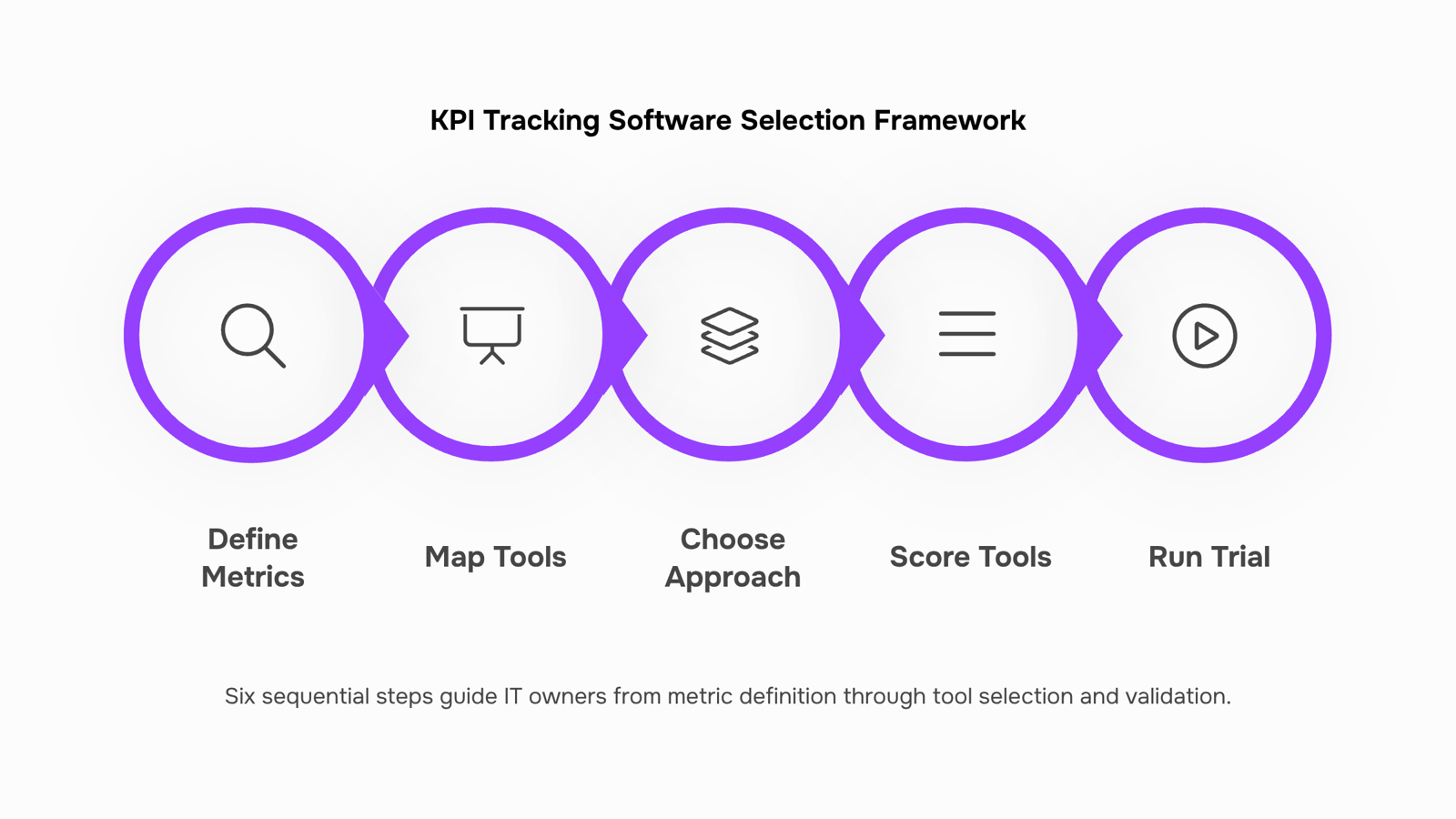
How to choose the right KPI tracking software in 6 steps
Define your must-track metrics first: Before you open a single demo, list the five to eight KPIs your business actually makes decisions on: ticket resolution time, project margin, utilization rate, whatever moves your numbers. Software should serve that list, not expand it.
Map your existing tools: Write down every platform your team touches daily: your PSA, time tracker, project board, billing system. The right performance tracking software connects to those sources rather than asking your team to enter data twice. An integration gap at this stage becomes a manual reporting burden every week.
Decide whether you need a standalone dashboard or an integrated tool: A standalone dashboard shows you charts. An integrated KPI tracking tool updates those charts automatically as work moves through your projects. For most IT owners running five or more concurrent projects, the integrated path wins because the data stays current without anyone touching it. If you want to see what that looks like in practice, a project KPI dashboard that updates as work moves is worth a look before your next demo call.
Score each shortlisted tool against your metric list: Build a simple grid: your KPIs down the left, your top three tools across the top. Mark which tool surfaces each metric natively, which requires a workaround, and which can't do it at all. This takes 30 minutes and eliminates half your shortlist.
Run a two-week trial with real data: Import one live project, not sample data. Assign one team member to log in daily. If the tool doesn't surface your core KPIs within the first three days without configuration help, it won't after you pay for it either. For broader context on how choosing the right task tracker for your IT team feeds into this decision, that comparison is worth reading alongside your trial.
Check how KPI tracking connects to performance visibility: If you're already wondering how OKR tracking software compares to KPI tracking tools, that question usually surfaces here, when you realize your chosen tool either ties individual output to team goals or it doesn't.
Three mistakes show up repeatedly when IT owners pick kpi tracking software, and each one is expensive to undo.
Tracking too many metrics: Most teams start with 20-plus KPIs because the tool makes it easy to add them. The result is a dashboard nobody reads. Pick 5-8 metrics tied directly to delivery or revenue, then expand only when those are stable.
Choosing a standalone dashboard over an integrated tool: A standalone kpi tracking tool shows you numbers; it can't act on them. If your KPIs live separately from where work happens, you'll spend hours reconciling data instead of fixing problems. Look for a project KPI dashboard that updates as work moves.
Skipping the integration audit: Before any trial, map every system the tool needs to connect with: your PSA, ticketing platform, and billing tool. If those connections require custom middleware, the real cost is higher than the license fee.
For kpi software for IT teams, the integration question matters more than any feature checklist. See also how OKR tracking software compares to KPI tracking tools before finalizing your shortlist.
Closing
Choosing KPI tracking software comes down to one principle: the closer your tracking layer sits to your execution layer, the fresher your data and the faster your decisions. A dashboard that updates as work moves beats a connector that syncs at midnight. Start by mapping your three most critical KPIs back to their source systems this week. If any step requires a manual export or scheduled sync, that's your signal that a tighter integration will pay for itself in hours saved and decisions made earlier. Ready to see how this works in practice? Explore how a project KPI dashboard that updates live can fit into your workflow, or start a trial to test it against your current metrics.
FAQ
How do I choose the right KPI tracking software for my business?
Match the tool's capabilities to your work outcomes: faster decisions, clearer accountability, earlier risk detection, and reduced reporting time. Test whether the dashboard shows progress at every level, reflects how your team works, and updates in real time as tasks move—not on a nightly sync.
What are the key features of KPI tracking software?
Look for multi-level dashboards, nested goal structures, threshold-based alerts, and AI-assisted gap analysis. Most importantly, verify the tool updates live from your execution layer rather than pulling data on a schedule.
Can KPI tracking software help with employee performance management?
Yes. When KPI tracking lives inside your work system, individual performance metrics (ticket closure rates, on-time delivery, resolution time) surface automatically without separate review cycles or manual reports.
How does KPI tracking software integrate with other business tools?
Real-time, bidirectional integrations beat read-only connectors and nightly syncs. The best approach is KPI tracking built into your execution layer, so data updates as work moves, not imported after the fact.
What is the difference between KPI tracking software and OKR software?
KPI software tracks ongoing operational metrics (ticket resolution time, utilization). OKR software sets and tracks quarterly objectives and key results. KPI tools are for continuous performance; OKR tools are for strategic planning cycles.


 Megan Foster15 September 2026


