TL;DR: Most progress tracker roundups list features and stop there. This one evaluates tools through the failure modes IT company owners actually face: deadlines that slip silently, bottlenecks that only surface after a sprint is already behind, and status updates that tell you what happened instead of what's coming. You'll leave with a clear decision framework, not a feature checklist.
Why most progress trackers fail IT teams
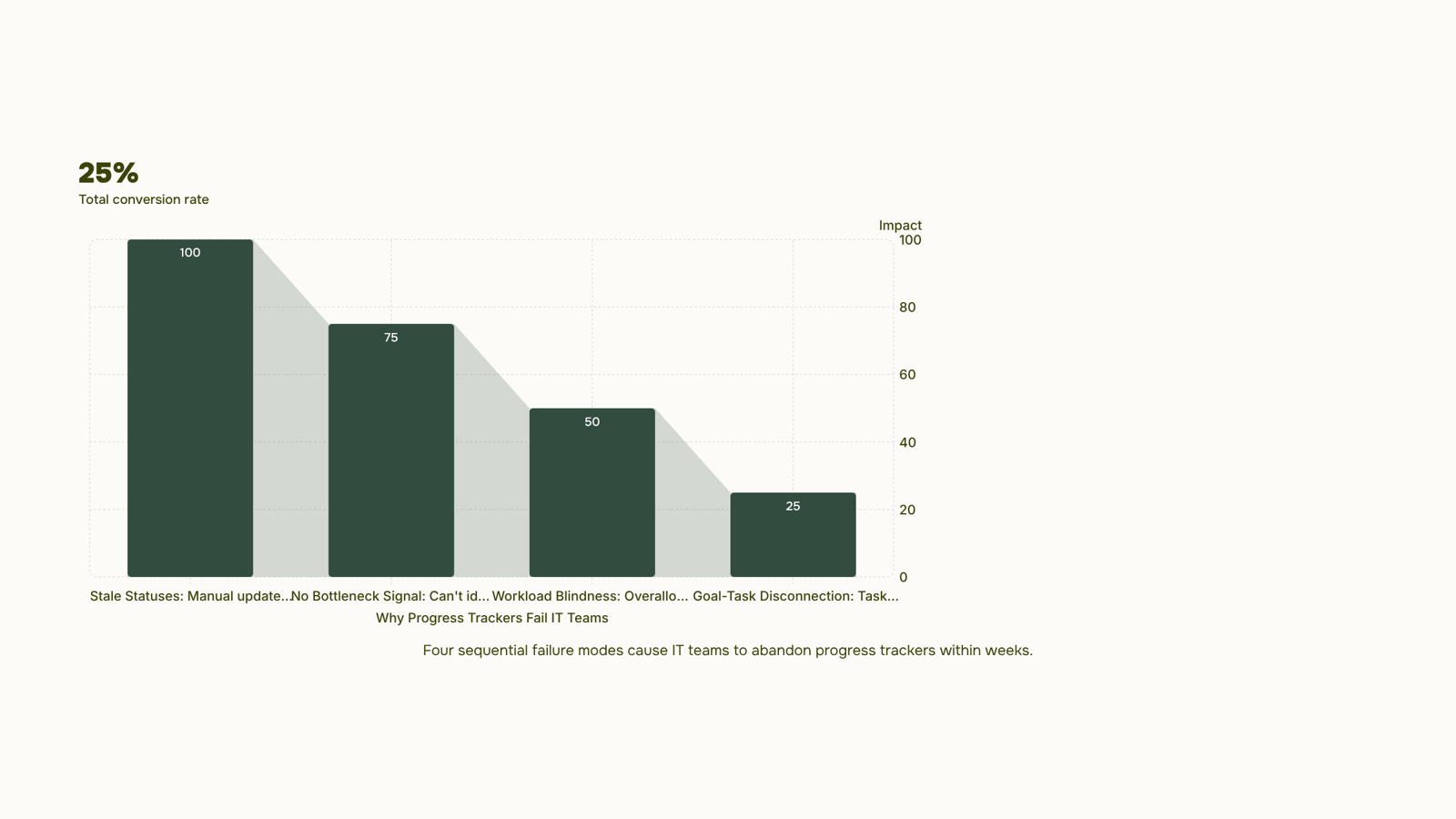
Most progress trackers fail for the same four reasons, and they show up in that order.
Stale statuses come first. A task marked "in progress" for eleven days tells you nothing about whether it will finish on time. When updating a status requires manual effort, people stop doing it, and the tracker becomes a historical record instead of a live signal.
No bottleneck signal is the second failure. A tool that shows you task completion rates but can't identify exactly which pipeline stages are stalling forces you to run a weekly standup just to find out what everyone already knows.
Workload blindness is the third. Most task progress trackers show you what's assigned, not what's overloaded. When two engineers are carrying fourteen open tasks each and a third has three, that imbalance is invisible unless the tool surfaces it. Tools with workload reports and risk alerts across 17 dashboard widget types catch this before it becomes a missed sprint.
Goal-task disconnection closes the loop. Individual tasks get completed, but no one can tell whether the sprint moved the project forward. That gap widens when you can't group related tasks into epics to track progress toward a larger goal, or set project milestones, budgets, and approval workflows in one place.
These four patterns are the diagnostic frame. The next section turns them into a feature checklist you can use to evaluate any tool.
Four features separate a useful progress tracker from one your team stops updating after two weeks.
Milestone tracking is the foundation. A tool that only shows task status can't tell you whether you're on track to hit a delivery date. You need the ability to set project milestones, budgets, and approval workflows in one place — so a slipping task registers as a project-level risk, not just a card moving columns.
Bottleneck detection is what most task progress tracker apps skip entirely. You want a view that shows where work is piling up, not just what's assigned. If your tool can't identify exactly which pipeline stages are stalling, you're diagnosing problems from memory instead of data.
Workload visibility matters more than most teams realize until someone burns out or misses a sprint. Look for workload reports and risk alerts across 17 dashboard widget types — capacity data that surfaces overallocation before it becomes a missed deadline.
Goal-to-task linkage closes the loop between daily work and actual outcomes. The best tools let you group related tasks into epics to track progress toward a larger goal, so a sprint board connects directly to a quarterly objective rather than floating in isolation.
One practical note on cost: many teams start with a progress tracker app free tier to test these features before committing. That's reasonable, but free plans typically cap users or disable sprint reporting, which are the two features IT teams hit limits on first. Evaluate those constraints before you build a workflow around them.
How to track progress in a project without losing the team
Three things break project tracking before a deadline does: tasks that live in "in progress" forever, milestones nobody reviews, and status fields that reflect what someone planned to do rather than what's actually done.
Fix the status field problem first. Replace binary done/not-done states with four or five specific completion states: Not started, In progress, Blocked, In review, and Done. "Blocked" alone surfaces more useful information in a weekly standup than a week of silence does.
Then link every task to a milestone. A task progress tracker that shows individual items but not how they roll up to a delivery date gives you activity, not progress. Map tasks to milestones, set the milestone date, and let the tool surface the gap automatically.
Set a review cadence and protect it. A daily async status update (two minutes per person, written) plus a weekly milestone review is enough for most IT projects. The daily update catches blockers early; the weekly review catches scope drift before it becomes a delay.
One concrete example: a five-person IT team running two-week sprints should have no more than three active milestones at once. More than that and "in progress" becomes the default state for everything.
If your team is still choosing a baseline tool, the guide on what is the best project tracker for small teams covers the structural criteria worth matching first.
Six tools make this list because they solve distinct problems — not because they cover the same ground with different logos.
Taro is built for IT teams that need a progress tracker and a risk engine in the same place. You can set project milestones, budgets, and approval workflows in one place, and the AI flags slipping tasks before they miss a deadline rather than after. Sprint boards, time logging, and workload reports and risk alerts across 17 dashboard widget types are all native, so you're not stitching together three tools to get one view. Where it falls short: teams outside IT or software delivery may find the sprint-first structure more than they need.
Linear is the strongest option for pure software teams running tight sprint cycles. Its cycle and project views are fast, keyboard-driven, and genuinely pleasant to use. The shortcoming is scope: it handles engineering work well and almost nothing else. If your IT company also manages client projects, internal ops, or cross-functional initiatives, Linear will leave gaps.
Jira remains the default for teams that need deep custom workflows and enterprise-grade audit trails. It handles complex dependency mapping and integrates with most CI/CD pipelines. The tradeoff is setup time: a Jira instance that actually reflects how your team works takes weeks to configure, and status fields drift out of date quickly without enforced update habits.
Asana covers a broader range of work types than Linear or Jira, with timeline views, workload management, and goal tracking in one interface. It's a reasonable choice for mixed teams that include non-engineers. The free tier caps you at 10 users and removes timeline view, which limits it as a free progress tracker app for anything beyond small pilots.
Notion works well when your team's primary need is documentation with lightweight task tracking layered on top. Its databases are flexible enough to build a basic progress tracker, and the free plan is genuinely usable for small teams. The gap: it has no native sprint management, no time tracking, and no built-in risk detection. You can build workarounds, but you will maintain them.
ClickUp tries to cover everything, and mostly succeeds at a surface level. It offers a free progress tracker app free tier with generous limits, and the feature list is long. The practical problem most IT teams hit: too many views, too many settings, and no clear opinionated structure for how sprint work should flow. Teams often spend more time configuring ClickUp than using it.
Tool | Best for | Free plan | Notable limit |
|---|
Taro | IT teams, sprint + risk tracking | Yes | Sprint-first; less suited to non-tech work |
Linear | Engineering sprint cycles | Yes (limited) | No cross-functional project support |
Jira | Complex workflows, enterprise | Yes (10 users) | High configuration overhead |
Asana | Mixed teams, goal tracking | Yes (10 users, no timeline) | Timeline locked behind paid tier |
Notion | Docs-first, light task tracking | Yes | No sprints, no time tracking |
ClickUp | Broad use cases | Yes (generous) | Configuration complexity |
If you need to identify exactly which pipeline stages are stalling rather than just seeing that a project is late, the tools with native analytics pull ahead fast. Most generic roundups skip that distinction entirely.
Can a progress tracker monitor employee productivity
Yes, but the distinction matters.
A task progress tracker shows you workload distribution, completion rates, sprint velocity, and whether a task has been sitting untouched for three days. That's workload visibility, and it's genuinely useful for IT team leads who need to spot blockers before they become missed deadlines.
Keystroke logging, screenshot capture, and idle-time monitoring are a different category entirely. Most experienced IT teams push back hard on that level of surveillance, and the research backs them up: intrusive monitoring correlates with lower trust and higher turnover, not better output.
The practical line: track work, not workers. A good progress tracker tells you a task is overdue or a sprint is at risk. It doesn't tell you how many minutes someone spent in a browser tab.
For IT company owners, the right setup is task-level visibility across projects, with clear ownership and due dates, not activity feeds that count mouse clicks. If your team is remote, productivity tracking software built for distributed teams covers what that looks like in practice.
Monitor outcomes. Trust the people producing them.
How a progress tracker supports goal setting for teams
Goal setting without structure is just wishful thinking. A progress tracker gives goals structure by creating a visible chain from daily tasks up to quarterly outcomes, so your team can see whether their work is actually moving the needle.
The mechanism works through hierarchy. When you group related tasks into epics to track progress toward a larger goal, each completed task registers as forward movement on something larger. Milestones mark the checkpoints where that movement becomes measurable. Without that chain, a team can be busy every day and still miss the quarter.
Set project milestones, budgets, and approval workflows in one place and you get a second benefit: accountability becomes automatic. When a milestone slips, everyone sees it immediately, not in the Friday standup two weeks later.
For IT teams specifically, this matters because goals often span multiple sprints. A free progress tracker app can handle single-sprint visibility, but quarterly goals need milestone-level tracking to stay coherent across handoffs and scope changes.
The third benefit is early warning. When tasks are tied to milestones, you can identify exactly which pipeline stages are stalling before a deadline is at risk, not after. That shifts goal management from reactive to deliberate, which is where most IT project managers want to be.
Closing
The right progress tracker does more than log what your team completed yesterday. It surfaces bottlenecks before they become delays, flags overloaded engineers before they burn out, and connects daily work to actual project outcomes. For IT teams running sprints and managing client commitments, that means you need a tool that shows workload imbalance, detects stalled pipeline stages, and ties tasks to milestones in real time. Start by auditing your current tool against the four failure modes: stale statuses, missing bottleneck signals, workload blindness, and goal-task disconnection. If gaps appear, Taro's bottleneck analysis and workload dashboards are built specifically to catch these problems. Try it and see whether your team's next sprint surfaces risks before the deadline does.
FAQ
How do I track progress in a project?
Link every task to a milestone, replace binary done/not-done states with specific completion states (Not started, In progress, Blocked, In review, Done), and set a review cadence: daily async updates plus weekly milestone reviews. Let the tool surface gaps automatically rather than waiting for standups.
What features should I look for in a progress tracking software?
Milestone tracking, bottleneck detection, workload visibility, and goal-to-task linkage. A tool missing any of these will hide delays until they become missed deadlines. Avoid free tiers that cap users or disable sprint reporting.
Can I use a progress tracker to monitor employee productivity?
A progress tracker shows task completion and workload balance, not productivity. It's useful for surfacing overallocation and blocked work, but it measures output and capacity, not effort or quality. Use it to catch burnout risk, not to micromanage.
How does a progress tracker help with goal setting?
The best trackers let you group related tasks into epics and link them to larger goals, so a sprint board connects directly to quarterly objectives. This closes the gap between daily work and actual outcomes, making progress visible at every level.
Is there a free progress tracker app for small teams?
Notion and ClickUp offer usable free tiers for small teams, but both lack sprint management and risk detection. Asana's free plan caps you at 10 users and removes timeline view. For IT teams, free tiers typically hit limits on users or reporting first.


 Elena Petrova15 September 2026


