TL;DR: Most articles on the Eisenhower time management matrix explain the four quadrants and leave the rest to you. This one shows IT company owners how to apply it to an actual task backlog, with specific sorting criteria, delegation rules, and the workflow gaps the matrix alone can't close. You'll finish with a system you can run on your team starting this week.
What is the Eisenhower time management matrix?
The Eisenhower time management matrix is a four-quadrant prioritization framework that sorts every task by two independent axes: urgency and importance. Urgency measures time pressure — how soon something demands a response. Importance measures impact — how much a task advances your goals, your team's output, or your clients' outcomes. A task can be high on one axis and low on the other, which is exactly where most prioritization breaks down.
The framework traces back to Dwight D. Eisenhower, who reportedly observed that the most urgent decisions are rarely the most important ones. That tension is the core insight. When you treat urgency and importance as the same signal, you spend your day reacting to noise and deferring work that actually moves the business forward.
For IT company owners, the gap between urgent and important tasks is where capacity gets quietly wasted. A client Slack message feels urgent. Reviewing your team's sprint backlog is important. Without a shared classification system, your team optimizes for the former and neglects the latter.
The matrix gives you a repeatable language for that classification. Once your team agrees on what belongs in each quadrant, prioritizing tasks on a to-do list becomes a structured decision rather than a gut call. The next section defines each quadrant precisely so you can apply that language starting with your next planning session.
What are the four quadrants of the Eisenhower matrix?
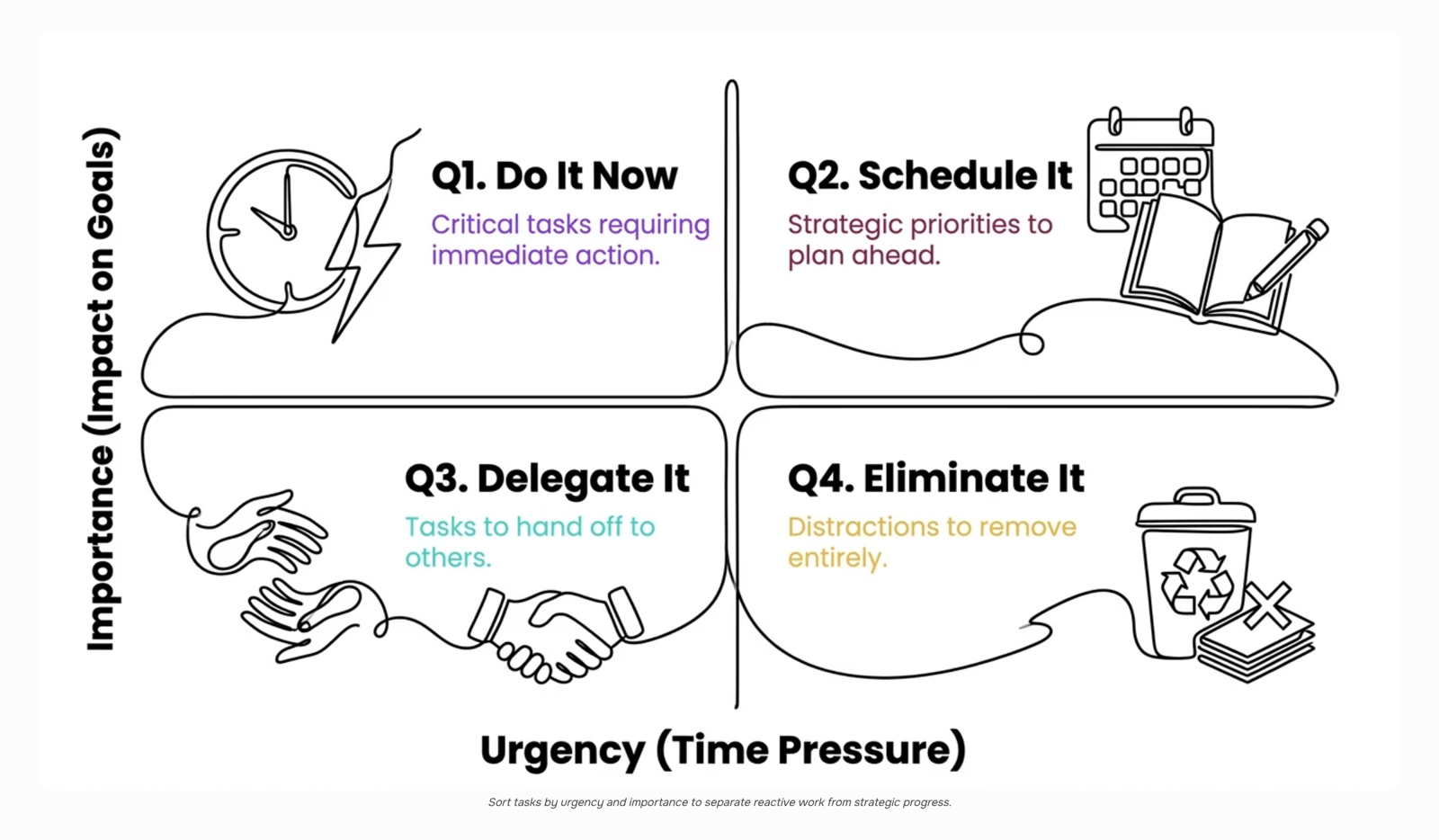
The Eisenhower matrix plots every task on two axes: urgency (does this need action now?) and importance (does this move a meaningful goal forward?). That two-by-two grid produces four quadrants, each with a distinct action rule.
Quadrant 1: Urgent and important — Do it now
Tasks that are both urgent and important demand immediate, personal attention. A production server going down at 2 a.m., a client escalation that threatens renewal, a security patch with an active exploit — these belong here. For IT company owners, Q1 is where fires live. The goal is not to eliminate this quadrant but to keep it small. A backlog full of Q1 tasks signals a planning problem, not a workload problem.
Quadrant 2: Not urgent but important — Schedule it
This is where strategic work lives: hiring decisions, architecture reviews, team development, process improvement. Because Q2 tasks carry no deadline pressure, they get pushed aside by whatever is loudest. That is the core trap the eisenhower time management matrix is designed to break. Protecting Q2 time is the highest-leverage thing a manager can do. If you want a deeper look at structuring this, priority management techniques covers the scheduling side in detail.
Quadrant 3: Urgent but not important — Delegate it
These tasks feel pressing but do not require your judgment. Status update requests, meeting invites that someone else could handle, routine approvals — they create the illusion of productivity while crowding out Q2. The right move is delegation. If your team lacks the capacity to absorb Q3 tasks, that is a resourcing signal worth acting on. For a practical framework on sorting urgent vs important tasks before they reach your calendar, how to prioritize tasks on a to-do list walks through the decision logic.
Quadrant 4: Not urgent and not important — Eliminate it
Q4 is where time disappears without return. Redundant reports nobody reads, low-signal meetings, tasks inherited from old processes — cut them. The test is simple: if this task disappeared tomorrow, would any goal or relationship suffer? If the answer is no, remove it from the list entirely. Task prioritization for teams gets easier once Q4 is cleared, because the remaining decisions are all genuinely consequential.
How does the Eisenhower matrix work for time management?
Using the eisenhower time management matrix in practice comes down to one repeatable action: placing each task into a quadrant before you start working on it, not after.
Start with your full task list — ideally pulled from one place so nothing gets missed. Then work through each item using two questions in sequence:
Is this task tied to a goal, outcome, or commitment that matters if it slips? If yes, it's important.
Does it have a deadline or consequence within the next 24 to 48 hours? If yes, it's urgent.
Those two answers place every task in a quadrant. Do, Schedule, Delegate, or Drop.
The hard classification problem comes when a task feels urgent because someone is waiting on you, but the underlying work isn't tied to any real outcome. That's almost always a Q3 task disguised as Q1. The test: if you pushed this back 48 hours, would a project slip or a client relationship break? If no, it belongs in Q3 or Q4, not Q1.
For task prioritization for teams, run this exercise as a group at the start of each sprint or planning cycle. Each person brings their top ten tasks. You classify together, then compare. Disagreements on quadrant placement usually reveal misaligned expectations about what "important" means on your team — which is exactly the conversation worth having.
A concrete example: a client asks for a same-day status update. Urgent, yes. Important? Only if the relationship is at risk. Otherwise, schedule a standard reply window and protect your Q2 time.
For a structured starting point, these daily task prioritization techniques pair directly with this process.
What are the benefits of using the Eisenhower matrix?
The eisenhower time management matrix does more than sort tasks. It changes how your team makes decisions about time, repeatedly, without burning through mental energy each morning.
Reduced decision fatigue: When every task has a pre-assigned quadrant, your team stops debating what to work on. The framework answers that question before the day starts.
Clearer delegation: Quadrant 3 tasks (urgent, not important) are the ones most IT managers handle personally when they shouldn't. The matrix makes the handoff obvious, not optional.
Fewer missed deadlines: Quadrant 2 work — strategic planning, process improvement, proactive client communication — gets scheduled before it becomes a crisis. That's where most deadline failures originate: tasks that were never urgent until they were.
Better visibility into low-value work: Using the matrix as a prioritization matrix for your full task list surfaces how much time your team spends on Quadrant 4 activities. Once you can see it, you can cut it.
Shared language for prioritization: For time management for IT managers running cross-functional teams, the matrix gives everyone the same vocabulary. "That's a Q3" lands faster than a five-minute explanation of why something can wait.
The next section covers applying this to a shared team backlog, where individual prioritization frameworks typically break down.
How to apply the Eisenhower matrix to your team's task backlog
Applying the eisenhower time management matrix to a personal to-do list is straightforward. Applying it to a shared team backlog of 80-plus tickets is where most IT managers stall.
The core problem is classification at scale. When tasks arrive from five different stakeholders, "urgent" becomes whatever the loudest person said last. To fix that, set two explicit criteria before your next backlog review: a task is urgent only if missing it triggers a client SLA breach or a production incident. Everything else, regardless of who asked, starts in the important-but-not-urgent quadrant until proven otherwise.
Run the quadrant sort as a team activity, not a solo exercise. A 20-minute weekly session where your leads categorize the top 30 backlog items together does two things: it distributes the cognitive load of task prioritization for teams, and it surfaces disagreements about priority before they become missed deadlines. The effort-impact matrix pairs well here for anything that lands in Q2, where impact and effort need a second filter.
Once quadrants are assigned, ownership must follow immediately. Q1 tasks get a named owner and a due date in the same session. Q3 tasks get delegated with a clear brief, not just reassigned. Q4 tasks get a deletion or deferral decision, not a parking lot.
Taro makes this concrete by letting you tag tasks with priority quadrants, assign owners, and surface Q1 items in a shared view your whole team sees. Time management for IT managers stops being a personal habit and becomes a visible team system.
Common mistakes when using the Eisenhower matrix
Three failure modes kill the eisenhower time management matrix in practice — and they're predictable.
Over-classifying tasks as urgent is the most common. When everything feels on fire, the urgent/important quadrant fills up and the matrix stops functioning as a prioritization matrix at all. The fix: set a hard cap. If more than three tasks land in Q1 on any given day, re-examine the ones without a real deadline or consequence.
Skipping the delegate quadrant wastes the matrix's biggest lever. Most IT managers sort tasks for themselves and ignore Q3 entirely. For a shared team backlog, that quadrant is where ownership gets assigned, not just noted.
Reviewing too infrequently turns the matrix into a snapshot instead of a system. A weekly reset is the minimum. Without it, urgent vs important tasks blur together and low-value work crowds out high-impact delivery.
Sorting tasks by priority consistently is what separates teams that use the matrix from teams that just understand it.
How AI is changing task prioritization in 2026
Manual quadrant sorting works when one person manages 20 tasks. It breaks down when your team is tracking 200, across three projects, with dependencies shifting daily.
The core problem with the eisenhower time management matrix at team scale is classification lag. By the time a task gets reviewed, its urgency has already changed. A ticket that was Q2 on Monday is Q1 by Thursday, and nobody updated the board.
AI-assisted task prioritization for teams closes that gap by re-scoring tasks continuously against real signals: deadline proximity, dependency blockers, and workload distribution across the team. Taro's AI backlog auto-prioritization does exactly this, flagging when a task's priority has drifted and redistributing work before a bottleneck forms rather than after.
For time management for IT managers specifically, this matters because your backlog isn't static. Client escalations, sprint carry-overs, and unplanned requests arrive daily. An AI task manager that surfaces priority shifts in real time removes the manual review cycle that most teams skip anyway.
The matrix gives you the framework. AI keeps it current.
Closing
The Eisenhower matrix gives you a mental model for sorting work — but at team scale, sorting tasks manually every sprint becomes its own time cost. Once your team agrees on what urgent and important mean, the real leverage comes from applying that logic consistently across your shared backlog, not just your personal to-do list.
That's where the framework hits a wall: the matrix works, but the execution doesn't scale without automation. Tools like Taro apply your prioritization rules automatically, so tasks move through quadrants as conditions change — no weekly re-sorting required. Ready to see how auto-prioritization works in practice? Check out Taro's prioritization feature and watch how it handles the sorting your team currently does by hand.
FAQ
How does the Eisenhower matrix work for time management?
Place each task on two axes—urgency (does it need action in 24-48 hours?) and importance (does it advance a meaningful goal?). That two-by-two grid produces four quadrants with distinct actions: Do it now, Schedule it, Delegate it, or Eliminate it.
What are the four quadrants of the Eisenhower time management matrix?
Q1 (urgent + important): fires requiring immediate attention. Q2 (not urgent + important): strategic work like hiring and architecture reviews. Q3 (urgent + not important): delegable tasks like status updates. Q4 (not urgent + not important): low-value work to eliminate.
What are the benefits of using the Eisenhower time management matrix?
It reduces decision fatigue, clarifies delegation, prevents missed deadlines by protecting Q2 time, surfaces low-value work, and gives teams shared language for prioritization—eliminating debate about what to work on.
How can I apply the Eisenhower matrix to my daily tasks?
Pull your full task list and classify each item using two questions: Is it tied to a goal that matters if it slips? Does it have a 24-48 hour deadline? Those answers place every task in a quadrant before you start working.
How does the Eisenhower matrix help with prioritization?
It separates urgency from importance—the core trap most teams fall into. By treating them as independent signals, you stop reacting to noise and start protecting time for strategic work that actually moves the business forward.


 Elena Petrova15 September 2026


