TL;DR: Most risk management plan guides hand you a template and call it done. This one walks IT company owners through the full operational loop: identifying risks, scoring threats, assigning owners, and running reviews that actually keep the plan current. You'll leave with a step-by-step framework you can put into practice this week, not a checklist you'll forget by Friday.
What a Risk Management Plan Actually Does
A risk management plan is a documented system that tells your team what could go wrong, how bad it would be, who owns the response, and what triggers action. It's not a one-time report. It's a living decision framework.
For IT company owners, the stakes are concrete. Scope creep, vendor dependencies, and sprint blockers don't announce themselves — they compound quietly until a deadline slips or a client escalates. A risk management plan forces those threats into the open before they cost you.
According to PMI, a significant share of IT project failures trace back to risks that were identified but never formally owned or tracked. Identifying a risk without assigning an owner and a response threshold is just a list. The plan is what turns that list into action.
Where a risk mitigation plan focuses on reducing the likelihood or impact of a specific risk, a risk management plan covers the full picture: identification, scoring, ownership, response, escalation, and review cadence. It's the container the mitigation work lives inside.
The next section breaks down the six components that make that container functional — starting with the risk log that anchors everything else.
What Are the Key Components of a Risk Management Plan?
A complete risk management plan has six working parts. Skip one and the whole thing starts to break down.
Risk register: This is the foundation — a structured log of every identified risk, its description, category, and current status. A sample risk log template for project management typically includes columns for risk ID, trigger conditions, and linked mitigation actions. Without it, risk management stays in people's heads.
Likelihood and impact scores: Each risk gets a probability rating (usually 1–5) and an impact rating (1–5). Multiply them for a priority score. A vendor going dark is high likelihood, high impact. A key hire leaving mid-sprint might be low likelihood but high impact. The scores tell you where to spend attention.
Risk owners: Every risk on the register needs one named person responsible for monitoring it. Not a team. One person. This is where most risk management plan templates fall short — they track risks but assign no one to watch them.
Response strategies: For each risk, define the response in advance: avoid, transfer, mitigate, or accept. In project management, this is where your risk mitigation plan and your contingency plan connect to the register.
Escalation thresholds: Define the score at which a risk moves from "monitor" to "act now." Without a threshold, every risk either gets ignored or triggers a fire drill.
Review schedule: Risks change. A plan reviewed once at kickoff is outdated by week three. Set a fixed cadence — weekly during active sprints, monthly during steady-state — and stick to it.
What Common Risks Should Your Plan Address?
Generic risk frameworks list categories like "operational risk" and "strategic risk" and leave you to figure out what that means for a 20-person IT shop. Here are the categories that actually show up in IT project management risk registers.
Scope creep is the most common silent killer. A client adds "just one more feature," the sprint extends two weeks, and the margin disappears. Your risk management plan in project management needs a formal change-control trigger, not a verbal agreement.
Vendor and third-party dependencies deserve their own row. If a cloud provider goes down or an API vendor deprecates an endpoint, your delivery timeline moves whether you planned for it or not. Document your single points of failure before they become incidents.
Security incidents carry both delivery and compliance consequences. A breach mid-project can freeze work entirely while your team handles containment and reporting.
Resource gaps hit hardest when a key developer leaves mid-sprint or a specialist is double-booked across projects. Pair this with a contingency plan that names a backup owner, not just a backup process.
Sprint blockers are the day-to-day version of all the above: blocked tickets, unclear acceptance criteria, missing approvals. Log them in a sample risk log so patterns surface before they become project failures.
Each category needs a named owner and a response threshold, which is exactly what the next section covers.
How Do You Build a Risk Management Plan Step by Step?
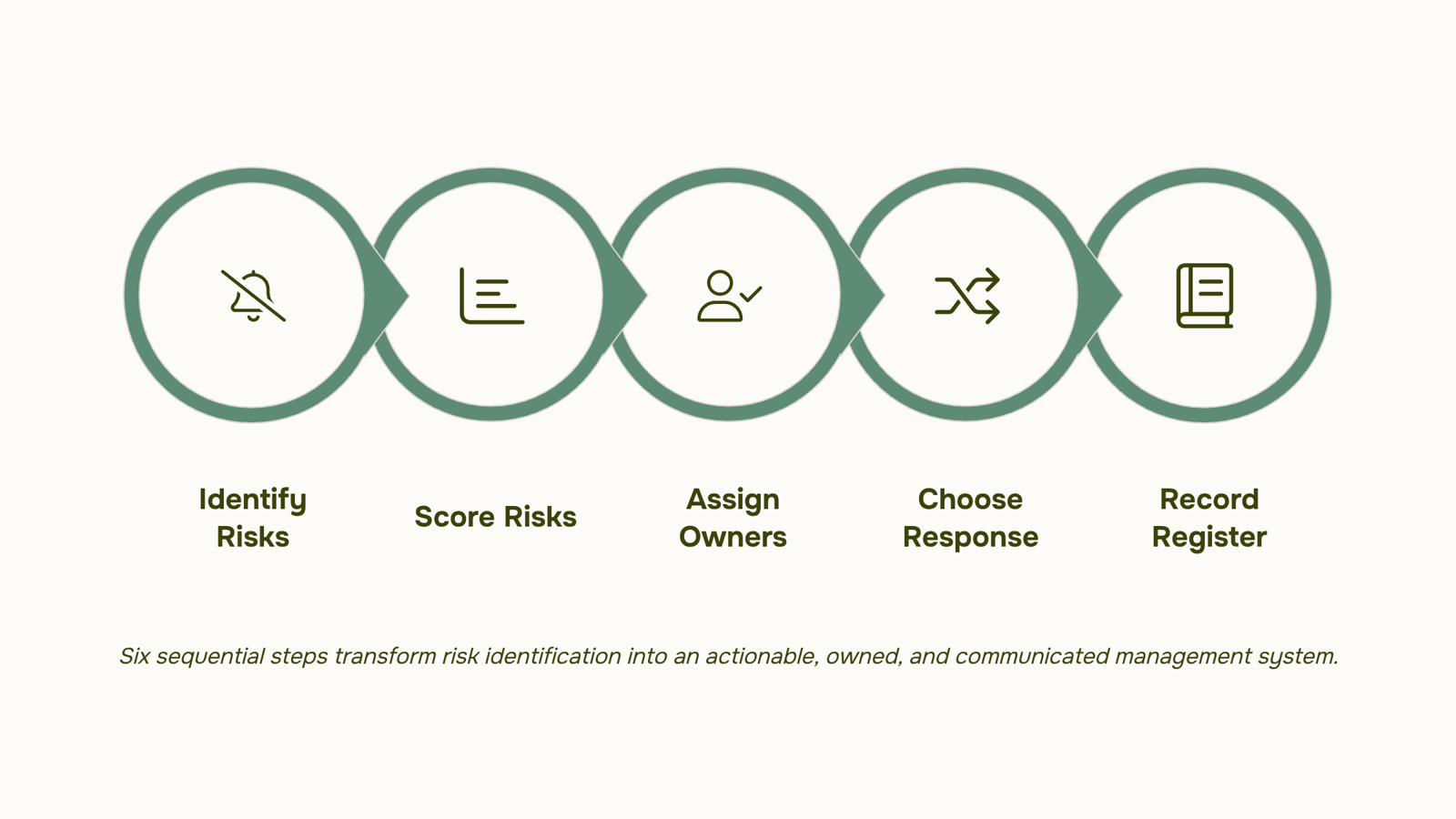
Six steps. That's all a working risk management plan in project management takes. The challenge isn't the number of steps — it's doing them in order and not skipping the ones that feel administrative.
Here's the sequence.
1. Identify every risk your project actually faces
Pull your team into a 30-minute session and list every threat specific to your work: scope creep from a client who keeps adding features, a vendor dependency that could slip your sprint, a security incident that could trigger compliance review. Use the categories from the previous section as your starting point. A sample risk log template keeps this structured so nothing falls off the list.
2. Score each risk by likelihood and impact
Assign a 1–5 score to both dimensions. Multiply them. A vendor dependency with a likelihood of 4 and an impact of 5 scores 20 — that's a priority risk. A minor sprint blocker scoring 4 can wait. This scoring step is what separates a plan that drives decisions from a list that collects dust.
3. Assign a named owner to every risk above your threshold
Unowned risks don't get managed. Pick a threshold — anything scoring above 10, for example — and assign one person to monitor and respond. Not a team. One person. When a security incident escalates at 2 a.m., there should be zero ambiguity about who acts first.
4. Define your response before the risk fires
For each priority risk, write one of four responses: avoid (change the plan to remove the risk), transfer (shift it to a vendor or insurer), mitigate (reduce its likelihood or impact), or accept (document it and move on). A risk mitigation plan with pre-written responses cuts your reaction time when something actually goes wrong. Pair each response with a contingency — why a contingency plan matters becomes obvious the first time a mitigation fails mid-project.
5. Document everything in one place
Your risk management plan template should include the risk description, score, owner, response type, contingency action, and current status. One row per risk. If it lives in a spreadsheet that only one person can find, it isn't a plan — it's a note. The document needs to be accessible to every stakeholder who might need to act on it.
6. Communicate the plan to everyone it touches
Send the plan to project leads, the client contact, and any vendor whose delay would trigger a response. Set a standing agenda item in your sprint review to walk through the top five risks. According to PMI, poor risk communication is one of the leading contributors to project failure — the plan only works if the people responsible for acting on it have actually read it.
Taro surfaces risk signals across tasks, sprints, and dependencies so your owners see emerging problems before they need to escalate. That's the difference between managing a risk register and actually preventing the incident it describes.
How Often Should You Review and Update Your Risk Management Plan?
Most teams set a review date once, miss it, and call the plan "current" anyway. That's how a vendor dependency that changed six months ago stays invisible until it kills a sprint.
The standard cadence for a risk management plan is quarterly for active projects and annually for standing operational plans. But cadence alone isn't enough. You also need clear triggers for unscheduled reviews.
Unscheduled review triggers:
A sprint scope change of 20% or more
A key vendor contract renewal, termination, or delay
A team member who owns a high-severity risk leaves the project
A new regulatory requirement lands (GDPR updates, SOC 2 scope changes)
An incident that a documented risk failed to predict
When any of these hit, you don't need a full plan revision. You need a targeted update: re-score the affected risks, confirm owners are still valid, and check whether your response plan still fits.
This is where a risk and control matrix earns its place alongside your plan. It gives you a structured way to cross-reference controls against live risks without rebuilding the whole document.
Taro's AI flags pattern shifts in task velocity, owner response times, and dependency chains before they surface as formal risks. That means your quarterly review becomes a confirmation of what the system already caught, not a discovery session.
For teams building this structure from scratch, creating a risk control matrix for your organization is a practical next step before your first scheduled review.
What Breaks Down When a Risk Management Plan Goes Stale?
A risk management plan doesn't fail at creation. It fails six months later when nobody owns it anymore.
Three patterns show up repeatedly in IT teams:
No owner accountability: The plan gets written, then assigned to "the team." When a sprint blocker surfaces or a vendor dependency shifts, nobody knows who decides whether it's a tracked risk or a fire drill. Without named owners per risk item, the risk mitigation plan becomes a document, not a system.
No live tracking: Most teams build a risk register during project kickoff and update it once, maybe twice. A well-maintained risk log should reflect current project reality, not the assumptions you had in week one. Scope creep and shifting vendor timelines move faster than quarterly reviews.
No escalation path: When a risk moves from amber to red, who gets notified and by when? Teams without a defined escalation path default to Slack threads and hope. That gap is where project failures in risk management plan project management contexts actually happen.
Each failure mode compounds the others. An unowned risk doesn't get tracked. An untracked risk never triggers escalation. Understanding why a contingency plan matters starts here: the plan only works if the structure around it holds.
Closing
A risk management plan only works if it stays connected to what's actually happening on your projects. The moment it lands in a folder, it becomes outdated — and an outdated plan is worse than no plan at all because it creates false confidence. The real work isn't building the plan; it's keeping it current as dependencies shift, sprints slip, and new threats surface. Once you've documented your risks and assigned owners, the question becomes: how do you make sure the plan reflects reality week to week? Start by picking one project this week and running through the six-step framework. Then ask yourself: when a risk actually fires, will your team know who owns the response, or will you spend the first hour figuring that out?
FAQ
How do I create a risk management plan for my business?
Identify every risk specific to your work, score each by likelihood and impact, assign named owners to priority risks, define responses in advance, document everything in one accessible place, and set a fixed review cadence. The six-step framework in the article walks you through each.
What are the key components of a risk management plan?
A risk register, likelihood and impact scores, named risk owners, response strategies, escalation thresholds, and a review schedule. Skip any one and the plan breaks down.
What are some common risks that a risk management plan should address?
Scope creep, vendor dependencies, security incidents, resource gaps, and sprint blockers are the most common in IT projects. Each needs a named owner and a response threshold.
How often should I review and update my risk management plan?
Weekly during active sprints, monthly during steady-state. A plan reviewed once at kickoff is outdated by week three.
What is the difference between a risk management plan and a risk mitigation plan?
A risk management plan covers the full loop: identification, scoring, ownership, response, and review. A risk mitigation plan focuses on reducing the likelihood or impact of a specific risk — it's the work that lives inside the plan.


 Elena Petrova15 September 2026


