TL;DR: Most email marketing guides stop at copy tips or campaign structure. This one walks IT company owners through the full Evox setup, from domain authentication and CRM configuration to lead scoring, inbox sync, and analytics, with each step tied to a sales outcome. You'll finish with a working system, not a checklist you still have to figure out.
What Evox actually is and what it replaces
Evox is a combined lead CRM, email campaign platform, and shared inbox built for teams that are tired of stitching together three separate tools to manage one sales conversation.
Most IT teams run something like this: HubSpot or a spreadsheet for contacts, a separate email tool for campaigns, and a shared Gmail alias that nobody fully owns. Evox replaces that stack. Contacts, campaign sequences, reply threads, and lead management workflows all live in one place, so a rep can see the full conversation history before they pick up the phone.
The email marketing automation side handles sequences, follow-up timing, and behavioral triggers. The CRM side tracks where each lead sits in the pipeline. The shared inbox means no reply falls through a gap between two teammates' personal accounts. You can connect your Gmail or Outlook inbox to Evox in minutes, which is where most teams start.
If you want a full picture of what's available before committing, the full list of Evox features covers every module. The short version: it's the tool you reach for when tool sprawl is costing you deals.
Four outcomes drive most IT teams toward Evox over a stack of disconnected tools.
Faster lead response: When a new lead comes in, Evox scores it based on email behavior and fires a rep alert immediately. No manual triage, no leads aging in a spreadsheet. How lead management works inside Evox shows the exact trigger logic.
Fewer dropped follow-ups: Research from RAIN Group puts the average number of touches needed before a B2B prospect responds at eight or more. Evox handles that sequence automatically through its automated follow-ups engine, so reps stay focused on conversations that are actually moving.
Cleaner pipeline visibility: Because the CRM, email campaign platform, and shared inbox live in one place, every rep sees the full conversation history before they reply. You can check open rates, reply rates, and deal stage from the Evox analytics dashboard without switching tabs.
Lower tool overhead: Most IT teams run a separate CRM, a separate email tool, and a shared inbox add-on. Evox replaces all three. If you want a side-by-side breakdown of what that consolidation looks like in practice, the Evox vs HubSpot Marketing Hub comparison covers the specifics.
The full list of Evox features maps each capability to the workflow gap it closes.
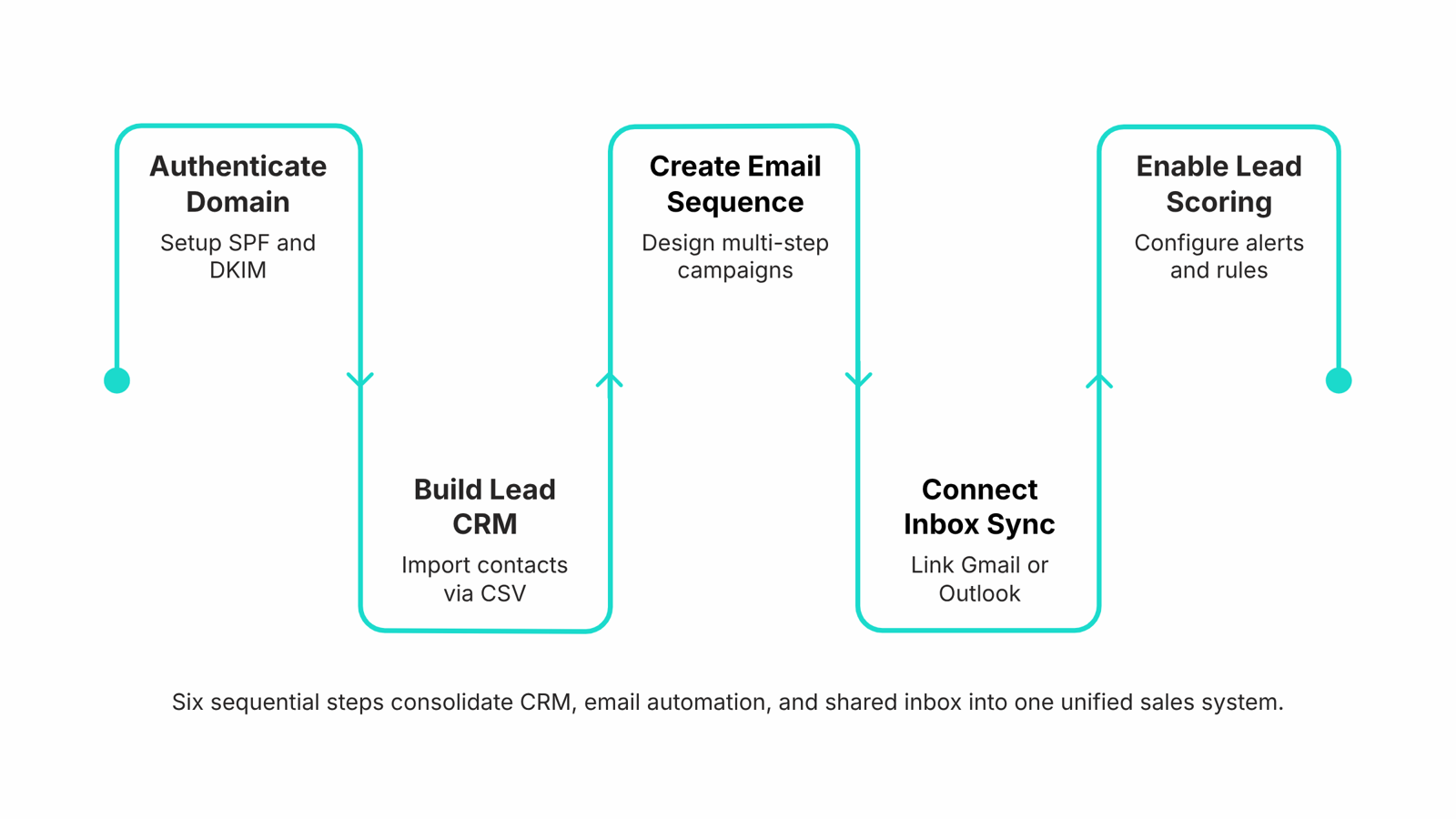
Step 1: Authenticate your domain before you send anything
Domain authentication is the unglamorous first step that determines whether your email marketing automation actually reaches anyone. Skip SPF and DKIM verification, and even a well-written campaign lands in spam or gets silently dropped before a prospect ever sees it. Mailgun's deliverability research puts the deliverability penalty for unauthenticated domains in the range of 10–20% of messages lost before inbox, and that's before factoring in domain reputation decay over time.
Inside Evox, domain authentication lives under Settings > Sending Domains. Add your domain, copy the SPF TXT record and DKIM CNAME values Evox generates, and paste them into your DNS provider. Most DNS changes propagate within an hour. Once Evox shows a green "Verified" status on both records, your sending domain is ready.
Two things worth knowing before you move on:
Verify the domain you actually send from. If your campaigns go out from outreach@yourdomain.com, authenticate yourdomain.com, not a subdomain you set up as a workaround.
Check the Evox analytics dashboard after your first send to confirm open rates look realistic. A suspiciously low open rate often signals a DNS record that didn't propagate correctly.
Authentication takes under 15 minutes. Every step after this one depends on it.
Step 2: Build your lead CRM before your first campaign
Before any email goes out, your lead CRM needs to be the single source of truth. A campaign built on incomplete or unowned records produces noise, not pipeline.
Start by importing your lead list into Evox as a CSV. Map each column to a field during import: company name, role, industry, and current deal stage at minimum. If your list has gaps, fix them before importing rather than patching them mid-campaign.
Next, create custom fields for anything your default setup doesn't capture. For IT company owners, that typically means fields like "tech stack," "contract renewal date," and "last inbound touchpoint." These fields drive segmentation later, so the more specific you are here, the sharper your lead nurturing sequences will be.
Then assign ownership. Every lead record needs a named rep before the first send. Unowned records are where follow-up dies. Evox lets you assign leads in bulk by territory, company size, or any custom field you've already set.
A concrete example: a 200-lead import for a mid-market IT campaign typically needs four to six custom fields and three ownership tiers (enterprise, mid-market, SMB) to segment cleanly. Setting that up takes under 30 minutes and prevents the misrouted follow-ups that kill response rates.
Once your lead CRM is structured this way, the sequence builder in the next step has real data to work with.
Step 3: Set up multi-step campaigns with the HTML email generator
With your leads imported and fields mapped, the next step is building the sequence itself.
Evox's HTML email generator takes plain-English instructions and produces formatted, deliverable emails without touching a template editor. Describe the tone, the offer, and the recipient context, and the AI drafts the HTML. You review, adjust subject lines, and publish.
For a multi-step campaign, structure matters more than volume. A practical starting point for B2B outreach:
Day 1: Introduction email. One clear value statement, no attachments.
Day 4: Follow-up referencing the first email. Add a specific proof point or case detail.
Day 8: A different angle, shorter copy, direct question or call-to-action.
Day 14: Final touch. Low-pressure, easy reply option.
Research from RAIN Group puts the average number of touches before a B2B prospect responds at eight. Four steps gets you halfway there before you need to reassess.
Subject line variation is not optional. Repeating the same subject line across a sequence trains spam filters to flag your domain. Evox flags this automatically and suggests alternates.
Exit conditions prevent wasted sends. Set the sequence to stop when a lead replies, books a meeting, or hits a negative engagement threshold. This is where the email marketing automation logic inside Evox separates it from a basic email campaign platform: behavior triggers the exit, not a manual unsubscribe.
Taro connects sequence activity back to the lead record, so rep context stays current as the campaign runs.
Step 4: Connect inbox sync so no reply falls through the cracks
Two-way inbox sync is what separates a campaign tool from a sales tool. Once you connect your Gmail or Outlook inbox to Evox, every reply, bounce, and thread update flows back into the platform automatically. Reps see the full conversation history inside Evox without opening a separate email client.
That context matters more than it sounds. When a prospect replies to touch three of a five-step sequence, the rep needs to know what was sent in touches one and two before responding. Without inbox sync, that context lives in a personal inbox nobody else can see, and the follow-up lands awkwardly or gets skipped entirely.
The sync also feeds your automated follow-ups logic. Evox reads reply status in real time, so a sequence exit condition like "stop if replied" actually fires when it should, not hours later when a batch job runs.
For teams running parallel sequences across multiple reps, this is where ownership confusion typically breaks down. Inbox sync gives every rep a shared record, so two people don't follow up on the same thread independently. Check the Evox analytics dashboard to confirm sync is active and replies are being captured before your next send.
Step 5: Use lead scoring and alerts to act on buying intent
Lead scoring in Evox works by tracking three email behaviors: opens, link clicks, and direct replies. Each action adds weight to a lead's score. A prospect who opens three emails and clicks a pricing link ranks higher than one who opened once and went quiet. That distinction matters because it tells your rep where to spend the next 30 minutes.
When a lead crosses a score threshold you set, Evox fires a rep alert and creates a follow-up task automatically. Your rep doesn't need to monitor a dashboard or run a filter. The signal reaches them when the buying intent is fresh, which is exactly when automated follow-ups have the highest chance of converting. According to RAIN Group, most B2B prospects require eight or more touches before they respond, and manual tracking breaks down long before that.
The scoring model connects directly to the inbox sync covered in the previous step. Because Evox holds the full conversation history, the alert your rep receives includes context: what was sent, what was opened, and what was clicked. No tab-switching, no guessing.
For teams running active lead nurturing sequences, this is where the campaign stops being a broadcast and starts being a conversation. Check the Evox analytics dashboard after your first week to see which score thresholds are generating the most rep activity, then adjust from there.
Step 6: Read your analytics dashboard to improve every campaign
Open rate below 30% usually means a subject line problem, not a deliverability one. Fix the subject line before touching anything else.
Reply rate below 3% points to sequence timing or message relevance. Check whether your follow-up cadence is compressing too many touches into the first 48 hours, then space them out.
Conversion to deal is the number that actually matters for IT company owners. If open and reply rates look healthy but deals aren't moving, the handoff between Evox's lead scoring and rep alerts is the first place to investigate.
The Evox analytics dashboard surfaces all three metrics in one view, filtered by campaign, sequence, or rep. Pull a weekly snapshot rather than checking daily. Daily variance creates noise; weekly trends show patterns you can act on.
For a broader look at what this email campaign platform tracks, see the full list of Evox features.
Closing
Domain authentication is the foundation—get that right and every campaign that follows lands where it should. From there, a structured lead CRM, multi-step sequences with behavioral exits, and two-way inbox sync turn Evox from a tool into a system. Your reps stop context-switching between three platforms and start closing deals faster because they see the full conversation before they reply. The next move is straightforward: head to the Evox features page, find the domain authentication section, and complete that verification step today. It takes 15 minutes and unlocks everything else.
FAQ
What does Evox do that a regular email tool does not?
Evox combines a lead CRM, email campaign platform, and shared inbox in one place. A regular email tool handles sends; Evox tracks lead behavior, scores prospects, syncs replies across your team, and routes follow-ups automatically—so reps see full conversation history before they reply.
Do I need a separate CRM if I use Evox?
No. Evox replaces the CRM layer entirely. Your contacts, deal stages, custom fields, and ownership all live inside Evox. You eliminate the spreadsheet or HubSpot sync overhead and work from a single source of truth.
How does Evox score leads based on email behavior?
Evox tracks opens, clicks, replies, and time-to-open, then assigns a score automatically. High engagement (opens within minutes, multiple clicks) signals buying intent and triggers an immediate rep alert so you respond while the prospect is paying attention.
What is two-way inbox sync and why does it matter for sales?
Two-way inbox sync connects your Gmail or Outlook to Evox. Every reply from a prospect lands in Evox automatically, and every email your team sends from Evox appears in their personal inbox. No replies slip through gaps between team members' accounts.
How do I authenticate my domain in Evox before sending campaigns?
Go to Settings > Sending Domains, add your domain, copy the SPF and DKIM records Evox generates, paste them into your DNS provider, and wait for propagation (usually under an hour). Evox shows green when verified. This step takes 15 minutes and is non-negotiable for deliverability.
Can Evox send automated follow-ups without manual input from my team?
Yes. Build a multi-step sequence once, set behavioral exit conditions (reply, meeting booked, disengagement threshold), and Evox handles timing and sends automatically. Reps only jump in when a prospect actually engages.
How is Evox different from Mailchimp or HubSpot for an IT company?
Mailchimp is broadcast-focused; Evox is built for one-to-one B2B outreach with lead scoring and shared inbox. HubSpot requires separate tools for email automation and shared inboxes; Evox bundles all three, eliminating tool sprawl and sync delays.


 Megan Foster15 September 2026


