TL;DR: Most guides on business process analysis hand you a framework and leave the hard part — knowing where to actually look — to you. This one shows IT company owners how to read the signals that point to broken processes, how to rank which ones to fix first, and how to decide when automation solves the problem versus when the process itself needs a redesign.
What is business process analysis?
Business process analysis is the practice of mapping, measuring, and evaluating how work actually gets done inside your company, so you can find where it breaks down and fix it.
For IT company owners, that definition has real teeth. Your delivery depends on repeatable processes: onboarding clients, managing tickets, scoping projects, billing. When any of those steps are unclear or manual, the cost compounds fast. Research from McKinsey suggests knowledge workers spend roughly 20% of their week on redundant or low-value tasks, time that comes directly out of billable capacity.
The output of a business process analysis is not a report. It is a prioritized list of places to act, whether that means reassigning ownership, cutting a step, or automating the processes your analysis flags as repetitive.
Most guides stop at the definition. This one connects the analysis to what you do next: how to identify areas for improvement in business process work, and how to turn those findings into a system that runs without you watching it. The next section walks through the five-step method.
How business process analysis works: the core steps
The five steps below give you a repeatable method for running a business process analysis from scratch.
Define the process scope: Pick one process to examine, name its start and end points, and identify who owns each step. Trying to analyze everything at once produces noise, not insight. A focused scope keeps the work actionable.
Map the process visually: Document what actually happens, not what the procedure manual says should happen. Mapping the process visually before analysis surfaces undocumented workarounds and handoff gaps that written descriptions miss entirely.
Collect data on current performance: Measure cycle time, error rate, handoff frequency, and volume at each step. Without numbers, you're guessing. Even rough data from spreadsheets or a ticketing system gives you a baseline to compare against after changes ship.
Identify bottlenecks and waste: Look for steps where work piles up, gets reworked, or requires manual intervention that could be eliminated. This is where the people, process, and technology framework helps you separate a skills gap from a workflow design problem.
Prioritize and act: Rank issues by impact and effort. High-impact, low-effort fixes go first. For steps that are repetitive and rule-based, use your analysis output to decide which ones are ready for automation. Once you know what to fix, building an efficient workflow is the logical next move.
The output of this method is a prioritized list of improvements, not just a diagram. That list is what makes the analysis worth running.
How to identify areas for improvement in a business process
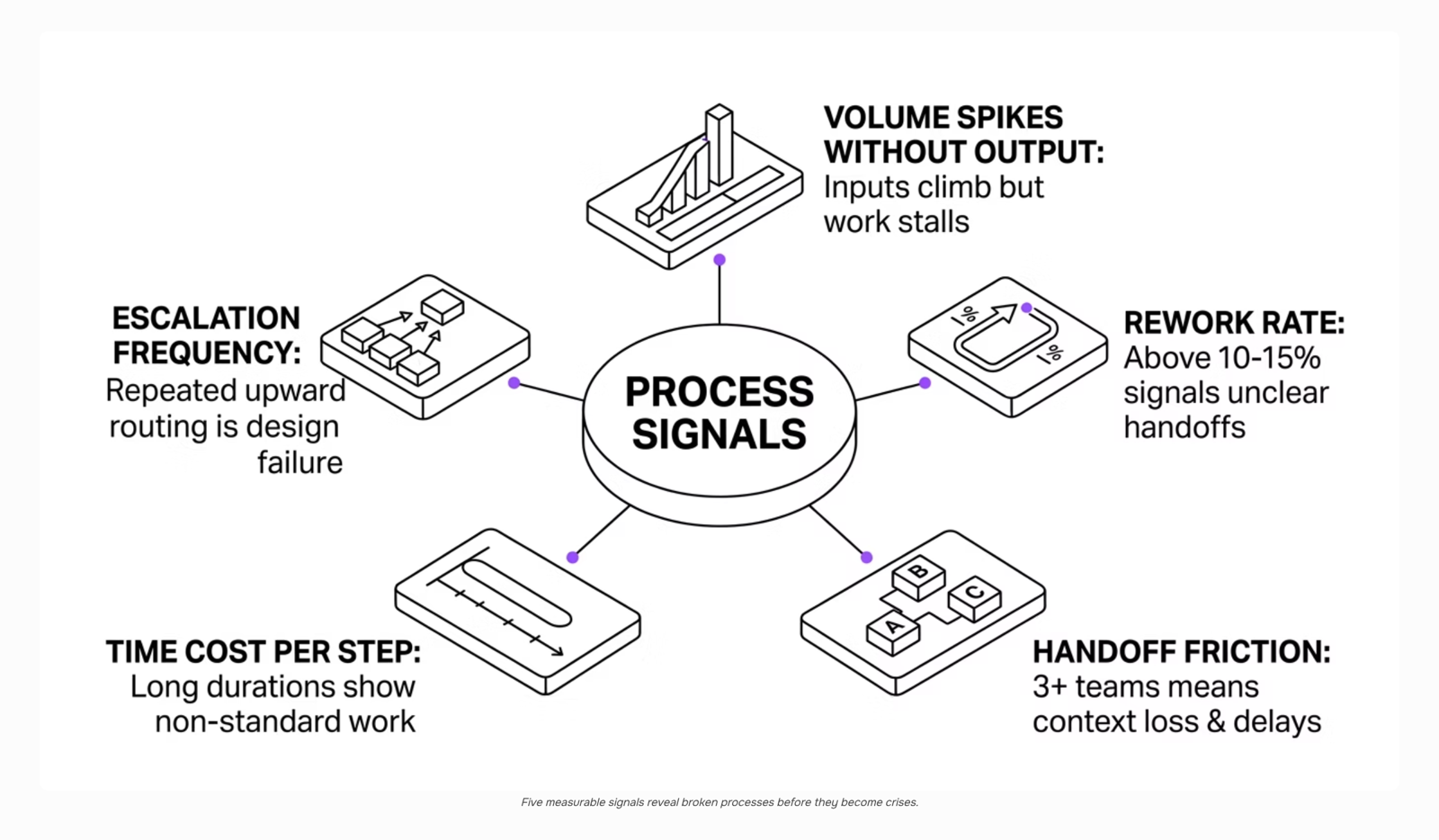
Most broken processes don't announce themselves. They show up as recurring complaints, missed SLAs, or that one team member everyone routes requests through because "they know how it works." To identify areas for improvement in business process analysis, you need to look at five specific signals rather than waiting for a crisis to surface them.
Volume spikes without matching output: If ticket volume or request count climbs but completed work doesn't keep pace, a process step is absorbing effort without producing results. Track input-to-output ratios monthly, not just headcount.
Error and rework rate: Count how often a completed task gets sent back. A rework rate above 10-15% in any single workflow usually points to an unclear handoff, a missing approval gate, or an ambiguous definition of "done."
Handoff friction: Count the number of tools, people, or status updates required to move one unit of work from start to finish. Every unnecessary handoff adds latency and a point where context gets lost. If a process crosses more than three teams before resolution, map each transition explicitly.
Time cost per step: Ask team members to log time on specific process stages for two weeks. The steps that consistently take longer than expected are your highest-priority candidates to standardize business processes around a fixed, documented method.
Escalation frequency: When frontline staff escalate decisions upward repeatedly, it signals either missing authority or missing clarity in the process design itself. Track escalation volume by process type, not just by person.
Once you have these five signals mapped, you have an evidence base rather than an opinion. For a broader view of how management practice connects to process health, improving business processes through management covers the organizational side of the same problem.
When to redesign a process versus automate it
The decision comes down to one question: is the process broken by design, or is it just slow because humans are doing it manually?
If your business process analysis reveals that steps are redundant, ownership is unclear, or the sequence produces errors regardless of who runs it, automation will lock in the dysfunction. Fix the design first. Automating a broken workflow doesn't remove the problem — it runs the problem faster.
Automate when the process logic is sound but execution is repetitive and rule-based. Ticket routing, invoice matching, onboarding checklists, status update emails — these are strong candidates. The steps are stable, the decisions are predictable, and the only reason humans are involved is that no one wired it up yet. That's where business process automation productivity gains are real and measurable.
A practical decision rule:
Redesign first if error rate stays high even when skilled people run the process, if handoff friction comes from unclear ownership, or if the steps themselves conflict
Automate first if the process runs correctly when followed but the volume makes manual execution unsustainable
Most teams get this backwards. They reach for automation tools the moment analysis surfaces a bottleneck, skipping the steps to optimize a business process at the structural level. The result is an automated mess that's harder to fix than the original.
For a broader view of keeping processes from drifting back into chaos after you've fixed them, managing business processes proactively covers the ongoing governance side.
Can business processes be standardized across departments?
Standardization works well for processes that are genuinely the same across departments: onboarding checklists, invoice approvals, change request logging. When your business process analysis reveals these shared patterns, applying a single standard cuts training time and reduces the errors that come from each team running a slightly different version of the same task.
The friction appears when you try to force the same standard onto processes that serve different operational realities. A sales team's client intake looks nothing like a DevOps team's incident triage, even if both involve "collecting information and routing it." Standardizing those creates compliance theater: people follow the documented process on paper and work around it in practice.
A useful decision rule: standardize the outcome, not always the method. Define what "complete" looks like for a given process, then let departments own the steps that get them there. This gives your business process workflow enough consistency to measure and compare, without breaking the workflows that actually fit how each team operates.
For IT teams managing varied tool stacks, mapping the process visually before analysis makes it easier to spot where true standardization is possible versus where it would just add overhead.
How often should business processes be reviewed and updated?
Most teams default to annual reviews. That's too slow for IT companies managing active client workflows, tool migrations, and shifting compliance requirements.
A practical cadence: quarterly for high-volume or client-facing processes, annually for stable back-office ones. Beyond the calendar, four specific triggers should force an immediate review regardless of schedule:
Team size crosses a threshold (adding 5+ people to a delivery function typically breaks handoff assumptions baked into the original process)
A tool migration is underway (new software exposes gaps that the old tool quietly papered over)
Error or escalation rate spikes (two consecutive weeks of above-baseline incidents is a signal worth acting on, not monitoring)
A new compliance requirement lands (GDPR, SOC 2 scope changes, or client-mandated security controls all invalidate existing process steps)
Once a trigger fires, start with mapping the process visually before analysis to see where the break actually is. Then use your business process analysis findings to decide whether to fix, standardize, or automate the flagged steps.
Closing
Once you've run a business process analysis and identified which processes are repetitive, error-prone, or slow, you know what to fix. The harder part is deciding how: redesign the workflow first, then automate it, or automate what's already working but manual. Revo handles the automation step for processes that meet those criteria—the ones where the logic is sound but humans are doing rule-based, repeatable work. See how Revo connects to the workflows you've already identified, and turn your analysis into a system that runs without manual intervention.
FAQ
How can I identify areas for improvement in my business process?
Track five signals: volume spikes without matching output, rework rates above 10-15%, handoff friction across teams, time cost per step, and escalation frequency. These point to broken processes faster than waiting for complaints.
What are the steps to optimize a business process?
Define scope, map the process visually, collect performance data, identify bottlenecks, then prioritize by impact and effort. High-impact, low-effort fixes go first. Redesign broken workflows before automating them.
How does business process automation increase productivity?
Automation removes manual, repetitive work from rule-based processes—ticket routing, invoice matching, onboarding checklists. When applied to sound processes, it frees capacity for higher-value work and cuts cycle time measurably.
Can business processes be standardized across different departments?
Yes, for processes that are genuinely the same across departments: onboarding, invoice approvals, change logging. Standardization cuts training time and errors. Avoid forcing one standard onto processes with different operational realities.
How often should business processes be reviewed and updated?
Review quarterly or when volume, team size, or tools change. Track escalation and rework rates monthly to catch drift early. Proactive review prevents processes from drifting back into chaos after fixes ship.


 Elena Petrova11 September 2026


