TL;DR: Most guides on invoice management software stop at feature lists. This one maps each capability to a specific cash flow or operational outcome for IT company owners, covering project-based invoicing, vendor bill tracking, and recurring subscriptions. You'll finish with a 6-step selection framework you can apply before your next billing cycle.
What invoice management software actually does
Invoice management software handles the full cycle of money moving in and out of your business through formal billing documents. That sounds broad because it covers two distinct problems, and most IT owners are dealing with both at once.
Accounts receivable is what you send: invoices to clients for project milestones, monthly retainers, or time-and-materials work. The software creates those invoices, delivers them, tracks whether they've been opened, and follows up automatically when payment is late.
Accounts payable is what you receive: bills from vendors, subcontractors, and SaaS subscriptions. Payable invoice management software captures those incoming documents, routes them for approval, and records payment against the right budget line. This is also called vendor invoice management software when the focus is supplier relationships specifically.
For IT companies, the billing mix is rarely simple. A single client might have a fixed-fee project, a recurring support retainer, and a variable hours component all running simultaneously. Software that handles only one invoice type creates gaps.
The six steps in this article apply to both directions of the cycle. Before you evaluate any tool, decide which problem is costing you more: slow collections, chaotic vendor bills, or both. That answer shapes every feature decision that follows. For a deeper look at invoice management best practices for IT companies, that context helps before you start comparing tools.
How invoice management software improves cash flow
Cash flow problems in IT services usually aren't caused by a lack of revenue. They're caused by slow invoicing, missed follow-ups, and no visibility into what's actually been paid.
Good invoice management software closes those gaps through four specific behaviors.
Automated payment reminders remove the manual follow-up loop. Instead of chasing clients by email, the system sends timed reminders at 7, 14, and 30 days past due. Most teams that wire this up see a measurable drop in average days sales outstanding (DSO) within the first billing cycle.
Faster approval cycles matter most for IT companies billing against project milestones. When approvals route automatically to the right person based on invoice amount or project type, the time between "work delivered" and "invoice approved" shrinks from days to hours.
Real-time payment status gives your team one source of truth. Instead of checking your bank account and your inbox and a spreadsheet, you see which invoices are paid, pending, or overdue in one view. That visibility changes how you forecast and when you decide to extend credit to a client.
Trigger-based invoice creation is where AI invoice management software earns its keep. When a CRM deal closes or a project milestone is marked complete, the invoice generates automatically, with the right line items, rates, and client details already populated. Inzo does this through its integration with Lio, WorksBuddy's lead and deal management agent, so the billing step happens without anyone manually initiating it.
Together, these four behaviors don't just reduce admin time. They compress the gap between delivering work and receiving payment, which is the actual definition of better cash flow.
For a deeper look at which capabilities matter most for IT billing, see what features to look for in an automated invoice management system.
Not all invoice management software does the same work. Six capabilities actually move the needle for IT companies billing across project milestones, recurring retainers, and one-off engagements.
Milestone-based invoice triggers: Most tools let you create an invoice manually. Fewer let you tie invoice creation to a project event, like a signed SOW or a completed sprint. For IT firms, that gap costs real money: a delayed trigger means a delayed invoice, which extends your days sales outstanding directly.
Automated payment reminders with escalation logic: A single reminder at 30 days is table stakes. What you need is configurable escalation: a soft nudge at day 7, a firmer message at day 21, and a hold-work notice at day 45. Tools that only send one reminder leave the follow-up to your team.
Real-time payment status across all open invoices: Knowing an invoice was sent is not the same as knowing where it stands. Look for a dashboard that shows sent, viewed, partially paid, and overdue in one place, so you can prioritize collections without opening individual records.
Vendor bill tracking alongside receivables: IT companies manage both sides of the ledger. A tool that handles outbound invoices but ignores vendor bills forces you into a second system. Understanding how a vendor invoice management system and how it works fits into your workflow is worth doing before you commit to any platform. This is where payable invoice management software earns its keep: one view of what you owe and what you're owed.
Estimate-to-invoice conversion: If your sales process produces estimates or proposals, the tool should convert them directly, without re-keying line items. Re-entry is where errors happen.
Audit trail and approval workflows: For teams with more than one person touching billing, you need a record of who approved what and when. This matters for client disputes and internal controls alike. See invoice management best practices for IT companies for how to structure those workflows.
How to choose invoice management software in 6 steps
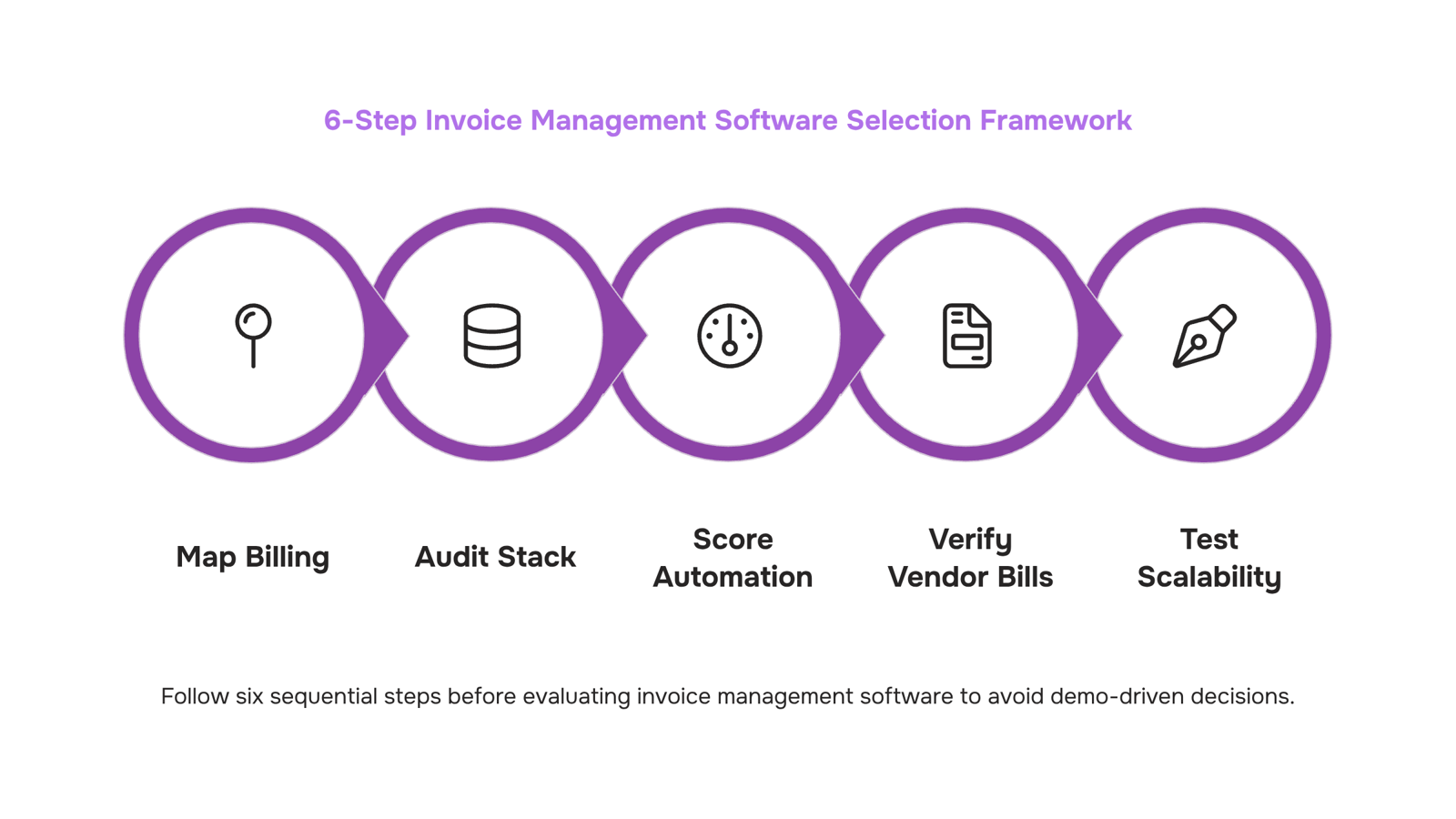
Choosing invoice management software without a framework turns into a demo-driven decision where the flashiest UI wins. Run these six steps before you talk to any vendor.
1. Map your billing model first: List every invoice type your IT business sends: project milestones, monthly retainers, time-and-materials, one-off hardware resales. If a tool can't handle all three in one workflow, you'll end up stitching systems together within six months.
2. Audit your current accounting stack: Write down every tool your finance team touches: your accounting platform, your CRM, your PSA or ticketing system. The invoice software you choose needs a direct integration with each one, not a Zapier workaround. A broken sync between invoicing and your general ledger creates reconciliation work that costs more than the software saves.
3. Score automation depth against your actual volume: Manual invoice processing costs roughly $10–$15 per invoice according to Ardent Partners AP research, compared to under $3 with automation. For an IT firm sending 80 invoices a month, that gap is significant. Ask each vendor specifically: does auto-billing trigger on contract dates, project milestones, or both? Can approval routing handle multiple signatories? Vague answers here are a red flag.
4. Verify vendor bill handling if you manage payables: Many IT companies pay subcontractors, SaaS vendors, and hardware suppliers while also billing clients. The best vendor invoice management software for vendor oversight treats payables and receivables as one connected workflow, not two separate modules bolted together. Confirm the tool tracks vendor payment terms, flags overdue payables, and logs everything in one place.
5. Test scalability before you need it: Ask for a demo environment with at least three entities or cost centers configured. If the vendor can't show you multi-entity billing, consolidated reporting, or role-based access in a live demo, assume those features are underdeveloped. This is the step most teams skip, then regret at 40 employees.
6. Calculate total cost of ownership, not just the subscription price: The most affordable invoice management software for SMBs in 2025 isn't always the one with the lowest monthly fee. Factor in implementation time, per-user pricing at your projected headcount, and whether you'll need a consultant to configure integrations. A $49/month tool that requires 20 hours of setup and a custom integration is more expensive than a $99/month tool that connects out of the box.
Once you've run all six steps, you'll have a short list of two or three tools that actually fit. Inzo is built for exactly this billing mix, handling invoice creation, payment tracking, and vendor management inside a single agent rather than requiring separate platforms for each.
Does invoice management software work for large enterprises
Yes, but the requirements change significantly once you cross into multi-entity or multi-client territory.
At scale, three things break down in tools built for smaller operations: approval hierarchies, multi-entity billing, and ERP integration. A 50-person IT company billing across five clients with mixed retainer and milestone structures needs role-based approval routing, not a single-approver workflow. Enterprise deployments also require the software to sync with systems like NetSuite or SAP natively, not through a manual export.
Before deploying any vendor invoice management software across a larger IT operation, verify four things:
Multi-entity support: can one account handle separate billing entities with isolated ledgers?
Approval chains: does the tool support conditional routing based on invoice value or vendor type?
ERP sync: is it a native API connection or a middleware workaround?
Audit trail: does every status change log a timestamp and user?
For a deeper look at what separates capable platforms from ones that stall at scale, the enterprise billing software criteria guide covers the specific feature thresholds worth checking before a demo.
The best vendor invoice management software in 2025 handles all four without custom development.
Can invoice management software connect to your accounting system
Yes, most invoice management software connects to accounting systems, but the type of connection matters more than the fact of it.
A native integration means the two systems share a live data layer. When you mark an invoice paid, your accounting ledger updates in seconds, no file export needed. A middleware connection (think Zapier-style automation) works, but adds a dependency: if the connector breaks or hits a rate limit, your books fall behind without warning.
For IT companies running a mix of project milestones and recurring retainers, that lag creates real reconciliation problems. Payable invoice management software with a native QuickBooks or Xero sync removes that risk entirely.
Ask these questions during any demo:
Does the sync run in real time or on a schedule?
Which accounting fields map automatically (tax lines, cost centers, project codes)?
What happens to historical data during the initial sync?
For a deeper look at how these connections affect day-to-day workflows, see how automated invoice processing works step by step and what to look for in enterprise billing software.
Closing
Invoice management software works best when it handles both sides of your billing cycle: client invoices and vendor bills, all in one workflow. The six-step selection framework above cuts through vendor demos and marketing claims by anchoring each decision to a real cash flow or operational outcome. Before you schedule any demos, map your billing model, audit your current stack, and score each tool against automation depth and integration strength. That groundwork takes an hour and saves weeks of post-purchase friction.
FAQ
What are the best invoice management software options for small businesses?
The best fit depends on your billing mix. If you bill projects, retainers, and vendor invoices in parallel, choose software that handles all three without forcing you into a second system. Verify direct integrations with your CRM and accounting platform before comparing features.
How does invoice management software improve cash flow?
It compresses the gap between delivering work and receiving payment through automated reminders, faster approvals, real-time payment visibility, and trigger-based invoice creation. Most teams see measurable drops in days sales outstanding within the first billing cycle.
What features should I look for in invoice management software?
Prioritize milestone-based triggers, configurable payment reminders with escalation, real-time payment dashboards, vendor bill tracking, estimate-to-invoice conversion, and audit trails. Each feature directly reduces admin time or accelerates collections.
Is invoice management software suitable for large enterprises?
Yes, if the tool scales to handle high invoice volume, multi-level approval workflows, and integration with enterprise accounting systems. Verify audit trails, role-based permissions, and API connectivity before committing.
Can invoice management software integrate with my existing accounting system?
It should. Before choosing any tool, confirm direct integrations with your CRM, PSA, and general ledger platform. Zapier workarounds create sync delays and reconciliation headaches that cost more than the software saves.
What is the difference between vendor invoice management software and general invoicing software?
General invoicing software handles outbound client invoices only. Vendor invoice management software also captures incoming bills, routes them for approval, and records payables. IT companies need both in one workflow to avoid stitching systems together.


 Elena Petrova15 September 2026


