TL;DR: Most guides on project programme templates hand you a field list without explaining what each component actually controls. This one breaks down the structural logic behind every element — what it prevents, how components connect, and where templates fail under real project pressure. If you're building or auditing a template for your IT operations, this gives you the reasoning, not just the checklist.
Project template vs programme template: what is the difference
A project plan template covers a single initiative: one scope, one timeline, one set of deliverables. A programme management template sits one level above that. It coordinates multiple related projects running in parallel — tracking how they connect, where they share resources, and what sequence they must follow to hit a shared outcome.
The confusion is common, especially in UK and Commonwealth contexts where "programme" carries a specific meaning in project governance. Treating a programme template as just a bigger project template is where teams run into trouble. A project template asks: what needs to happen, by when, and who owns it? A programme template asks: which projects depend on each other, where are the shared constraints, and what does success look like across all of them?
Practically, this means the two documents have different structures. A project plan template typically holds scope, milestones, task owners, and a timeline. A programme template adds a layer of cross-project dependency mapping, consolidated status views, and portfolio-level risk tracking.
If your team is running three to five concurrent projects that share resources or feed into a single business outcome, you need programme-level structure — not just a replicated project template. That distinction matters before you build anything, because the fields you configure, the task-level ownership and dependency logic you set up, and how you create a single source of truth for every project all follow from it.
The core components every project programme template must have
A project programme template is only as useful as the fields it forces you to fill in. Miss one structural element and you don't just have an incomplete document — you have a broken coordination system.
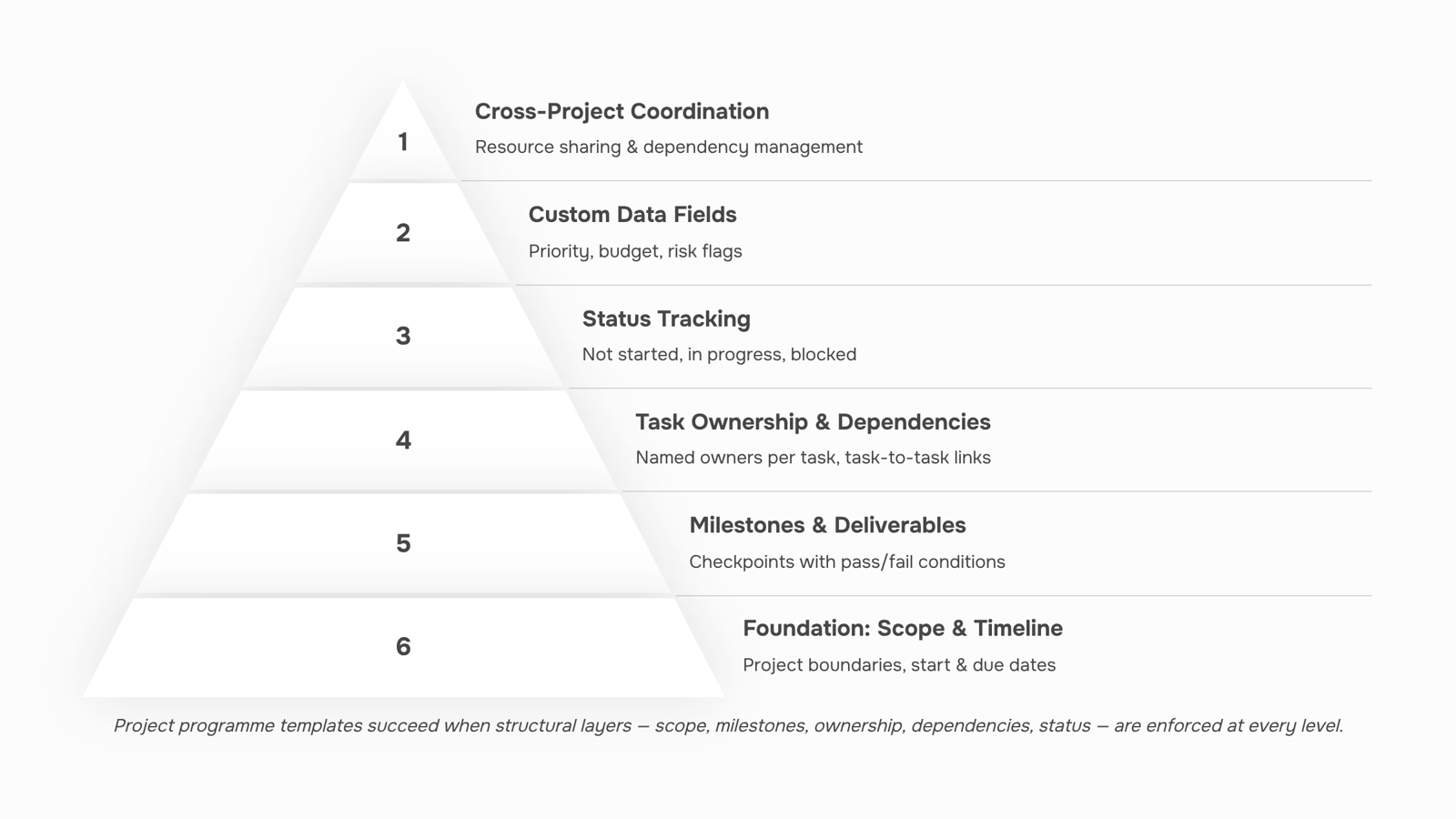
These are the components that matter, and what each one actually controls:
Project scope defines the boundary of work. Without it, teams add tasks throughout the project and the timeline drifts before the first milestone is reached. Scope belongs at the top of every template, not buried in an appendix.
Project milestones mark the moments when something meaningful is complete — a signed-off design, a deployed module, a client acceptance. They're not the same as tasks. A milestone has no duration; it's a checkpoint. Teams that skip formal project milestones in their template often discover mid-project that no one agrees on what "done" looks like.
Deliverables sit beneath milestones. Each one should be specific enough that a team member can confirm it's finished without asking. "Report completed" is a deliverable. "Progress update" is not.
Task owners assign accountability at the task level, not just the project level. A template without an owner column produces a familiar outcome: everyone assumes someone else is handling it.
Timeline and dates give the template its spine. This means start dates, due dates, and — critically — buffer time for review cycles. A template that only tracks due dates ignores the reality that most tasks require sign-off before they close.
Task dependencies are where most template designs fall short. A dependency tells you that Task B cannot start until Task A is done. Without this field, a delay in one workstream becomes invisible until it's already cascaded into two others. For IT teams running multiple concurrent projects, missing task dependencies in the template is one of the most common reasons deadlines slip.
Status tracking closes the loop. Each task needs a current state — not started, in progress, blocked, complete. This single field turns a static schedule into a live project record that a team lead can scan in under two minutes.
These seven project template components form the non-negotiable layer. Everything else — priority flags, budget columns, risk ratings — builds on top of them.
Data fields that make a template reusable, not just readable
The structural fields covered in the previous section tell you what a project contains. Custom data fields tell you how it's going — and that distinction is what separates a template you reuse from a document you abandon after one project.
Custom fields in project management are additional data columns you define beyond the defaults, tied to how your specific team tracks progress and risk.
Take a typical IT services project. The standard fields — owner, due date, status — don't capture whether a deliverable is blocked by a client approval, whether a task has been flagged as high-risk, or whether the budget for a phase has drifted. Add four custom columns: Priority (High/Medium/Low), Budget Allocation, Risk Flag (boolean), and Approval Status. Now the same row that shows "API integration — due Friday — In Progress" also shows "High priority, £4,200 allocated, risk flagged, pending client sign-off." That's a working project record, not a formatted list.
This matters more when you're managing several concurrent projects. Scanning a programme-level view across five engagements is only useful if every project uses the same field structure. Inconsistent columns mean you're reading five different documents instead of one consolidated picture.
When you save a project programme template with custom fields already configured, those fields carry forward to every new project that inherits the template. The team doesn't rebuild the schema each time — they just populate it.
Taro's custom fields capability lets you define these columns once at the template level, so every project spun from that template starts with the same data structure, ready to track what actually matters to your workflow.
How to build a project programme template from scratch
Building a project programme template from scratch takes about six deliberate steps. Skip any of them and you end up with a document that looks like a plan but doesn't function as one.
1. Define scope boundaries first. Before you add a single task, write down what the project includes and what it explicitly does not. Scope drift is one of the most common reasons IT projects miss deadlines, and a template that bakes in scope boundaries forces every future project to answer the same question upfront.
2. Map the phase structure. Group work into logical phases: discovery, design, build, test, deploy, handover. The exact labels matter less than having a clear sequence that your team recognises across projects.
3. Add milestone gates. Each phase transition should have a named milestone with a pass/fail condition. "Dev complete" is not a milestone. "Client sign-off on UAT report received" is.
4. Assign ownership at the task level. A task with no owner is a task that slips. Build role-based ownership into the template itself, even if specific names get filled in later. Taro's task-level ownership and dependency logic makes this part of the template structure, not an afterthought.
5. Set dependency logic. Map which tasks block others before you save the template. Dependency chains are where most schedule failures originate. If task B cannot start until task A is approved, that relationship needs to live in the template, not in someone's memory.
6. Save as a reusable template. Once the structure is validated on a live project, lock it. Future projects inherit the phase logic, milestones, and dependencies. Teams that define custom columns per project can also carry forward field configurations like risk flags and approval status, so the template becomes a single source of truth for every project from day one.
Revo can automate the handoff steps between phases, so the template doesn't just document the process — it runs it.
How to customise a template without breaking its structure
The safest rule: separate what the template enforces from what it suggests.
Fixed components are the ones that break downstream logic if you change them. Phase sequence, dependency chains, and milestone gates fall into this category. If your programme management template shows "UAT" before "development complete," every downstream date becomes wrong. If you remove a client sign-off gate to save time, you lose the approval checkpoint that protects scope. These elements define the structural skeleton — don't touch them when adapting a template to a new client or project type.
Flexible components are everything else. Field labels, assignees, task durations, and status names are all safe to adjust. You can define custom columns per project to match a client's terminology without touching the underlying phase logic. You can swap assignees and adjust durations without disturbing task-level ownership and dependency logic that the template was built around.
A practical test before saving any customised version: trace the critical path from project kick-off to final delivery. If every milestone still connects in the right sequence, the structure is intact. If a gate is missing or a dependency now points to nothing, you've broken something load-bearing.
The goal is a single source of truth for every project that adapts to context without requiring a rebuild each time. Customise the surface; protect the spine.
Common gaps that make project programme templates fail in practice
Four structural gaps account for most project programme template failures. Each one looks minor at setup and becomes expensive mid-delivery.
Missing task dependencies is the most common. When tasks aren't linked, a delayed deliverable in week two doesn't automatically flag the work that depends on it. Teams discover the knock-on effect too late to recover the schedule. According to PMI research, schedule slippage is the leading cause of IT project overruns — and most of it traces back to dependency chains that were never mapped in the template.
No approval checkpoints means project milestones get marked complete without sign-off. Work moves forward, rework gets discovered later, and the cost of fixing it compounds.
Undefined scope boundaries are quieter but just as damaging. When the template doesn't enforce a field for what's explicitly out of scope, scope creep enters through informal conversations and undocumented requests. Teams with task-level ownership and dependency logic baked into their template catch this earlier because every task has a named owner and a defined boundary.
No status taxonomy is the fourth gap. "In progress" means different things to different people. Without agreed status labels, reporting becomes a manual interpretation exercise rather than a single source of truth for every project.
Fix all four before the template goes near a live project.
Closing
A project programme template is only useful if it enforces structure — scope boundaries, milestone gates, task ownership, dependencies, and status tracking — rather than just collecting data. The real payoff comes when you build it once and reuse it across every new project without rebuilding the schema each time. If you're managing multiple concurrent projects, ask yourself: does your current template force the same questions every time, or does it let teams skip the hard thinking? Taro lets you configure the structural components covered here at the template level, so every project that inherits it starts with the right fields, dependencies, and ownership logic already in place. Start by auditing what your team actually tracks across projects — then build a template that captures it.
FAQ
Q. What are the key components of a project programme template?
A. Project scope, milestones, deliverables, task owners, timeline and dates, task dependencies, and status tracking. These seven elements form the non-negotiable layer; everything else builds on top.Q. What is the difference between a project template and a programme template?
A. A project template covers one initiative with its own scope and timeline. A programme template coordinates multiple related projects running in parallel, tracking how they connect, share resources, and sequence together.Q. How do I create a project programme template from scratch?
A. Define scope boundaries, map phase structure, add milestone gates, assign task-level ownership, set dependency logic, configure custom fields for your workflow, and test it on one real project before rolling it out.Q. How can I customise a project programme template to fit my needs?
A. Add custom data fields — Priority, Budget Allocation, Risk Flag, Approval Status — that capture how your team tracks progress. Configure these once at the template level so every new project inherits the same structure.Q. Can I download a free project programme template online?
A. Yes, generic templates exist, but they rarely enforce the structural logic — dependencies, milestone gates, custom fields — that prevents projects from slipping. Build or configure one that matches your team's actual workflow instead.


 Elena Petrova15 September 2026


