



Recurring revenue that bills itself.
On every cycle. Every customer.
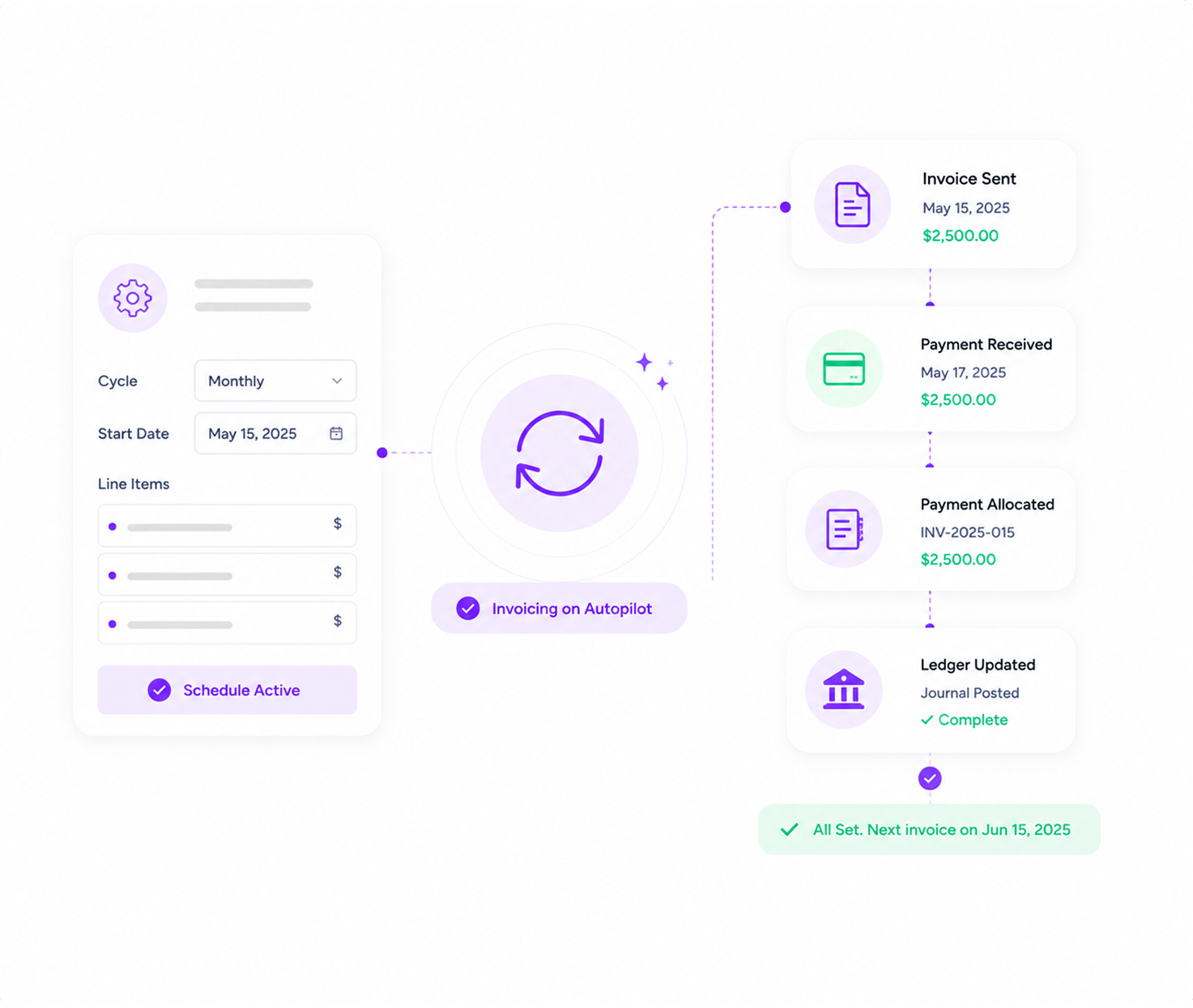
Set up the subscription once — cycle (weekly, monthly, quarterly, annual, custom), start date, optional end date, line items. Inzo generates and sends a full billing invoice on every cycle date. Recurring revenue shows on the dashboard. Active toggle pauses without re-keying. Late fees apply the same way they do for one-offs.
Recurring
Monthly cycle · 8 customers
Auto-generated and emailed at 9am · $32K total
Quarterly retainer · Vandelay
Next cycle in 4 days · $18K invoice ready
Annual renewal · Hooli Corp
Cycle in 12 days · auto-send enabled
At-risk · Initech (payment failing)
AI: reliability score down · check before next cycle
Your billing should grow with the customer base.
Not your headcount.
Recurring invoices go out manually
Someone on the team has a calendar reminder for every retainer. They open the template, change the date, change the period, send. By the time you're at fifty customers, this is half a person's job. Half-people don't scale.
You can't see recurring revenue at a glance
Recurring revenue is in a Google Sheet. Someone updates it monthly. Investor decks pull from the sheet. The sheet is wrong because three customers churned and one upgraded and nobody told the sheet.
Failed payments don't trigger anything
A customer's card declines on cycle. The first time anyone notices is when the customer churns "because I didn't realize you were still charging me." The save call that should have happened three weeks earlier never happens.
 Inzo runs subscriptions as workflows. Auto-generate, auto-send, auto-track, AI-flag the risk.
Every cycle, every customer,
without you in the loop.

Set the subscription, forget the cycle
Configure cycle (weekly, monthly, quarterly, semi-annual, annual, or custom interval), start date, optional end date, line items. Every cycle date Inzo generates a full billing invoice and emails the customer. Recurring revenue shows on the dashboard. Active toggle pauses without re-keying.
- Cycles: weekly, monthly, quarterly, annual, custom
- Auto-generate and auto-send each cycle
- Active/inactive toggle, start and end dates

Recurring revenue, visible live
Recurring revenue surfaces on the dashboard the moment a subscription activates and updates on every churn. Cycle-by-cycle history per customer. Drill into any subscription to see every generated invoice and every payment that lands against it.
- Live recurring revenue on the dashboard
- Per-subscription history of cycles and payments
- Drill from total to source subscription

AI catches the customer about to churn
Payment Reliability Score watches every customer. When a customer who has always paid on time starts paying late, or when their behaviour shifts in a way the model recognises as pre-churn, Inzo flags it before the next cycle. You get the save call before the cancellation email.
- Payment Reliability Score per customer
- Payment Behavior Analysis flags pre-churn
- Alert before next cycle, not after
Three plays for recurring-revenue ops.
Set the cycle. Walk away
Configure once: cycle, start date, line items. From there, Inzo generates and sends the invoice on every cycle date. Customer pays. Payment allocates to the right invoice. Ledger journals itself. You handle exceptions, not routine.
Numbers from real
recurring-revenue businesses.
We were at 80 subscriptions when the manual cycle process broke. Inzo handles 340 of them now without anyone touching a template, and the AI catches the at-risk accounts before they churn.
— Founder, B2B SaaS, $4M ARR
0
Billing cycles supported
0%
AI features in the platform
0
Subs auto-generated daily
0%
Recurring revenue tracking
SaaS, services retainers,
or hybrid.

B2B SaaS
Monthly or annual cycles per customer. Live recurring revenue. Pre-churn AI on every subscription. Stripe handles the collection, Inzo handles the invoicing.

Services Retainers
Monthly retainers per client. Project-billed work alongside, with milestone invoices from Taro. One platform handles both the recurring and the one-off side.

Hybrid Pricing
Base subscription plus usage. Set a recurring base, add metered line items per cycle. Customer sees one invoice, not two. Recurring revenue still tracks cleanly.

Enterprise Subscription
Annual contracts with quarterly billing cycles. Multi-year deals with year-on-year price escalators. Active/inactive toggle for paused customers. SSO for the finance team.
What recurring-revenue founders ask before they migrate the billing system.
How is Inzo different from QuickBooks, Xero, or Zoho Books?
QuickBooks and Xero are accounting engines — they stop at the ledger. Inzo runs the full operational loop on top of a real double-entry ledger: estimates, sales orders, payment plans, subscriptions, project billing, OCR for vendor bills, AI escalation advice, native Lio/Taro/Revo integrations. You get the GL plus the operating workflow plus the automation, in one product, with per-org SSO and role-based permissions out of the box.
What AI features does Inzo include?
How does the Lio, Taro, and Revo automation work?
Does Inzo handle subscriptions and recurring billing?
Is the General Ledger real, or is this just an invoicing tool?
How does the OCR for vendor bills work?
How fast can we get set up?
Bill every cycle without lifting a finger.
See cycle configuration, live recurring revenue, and pre-churn AI in a 30-minute demo.