Drag, drop, ship. Your quarter is on the calendar.

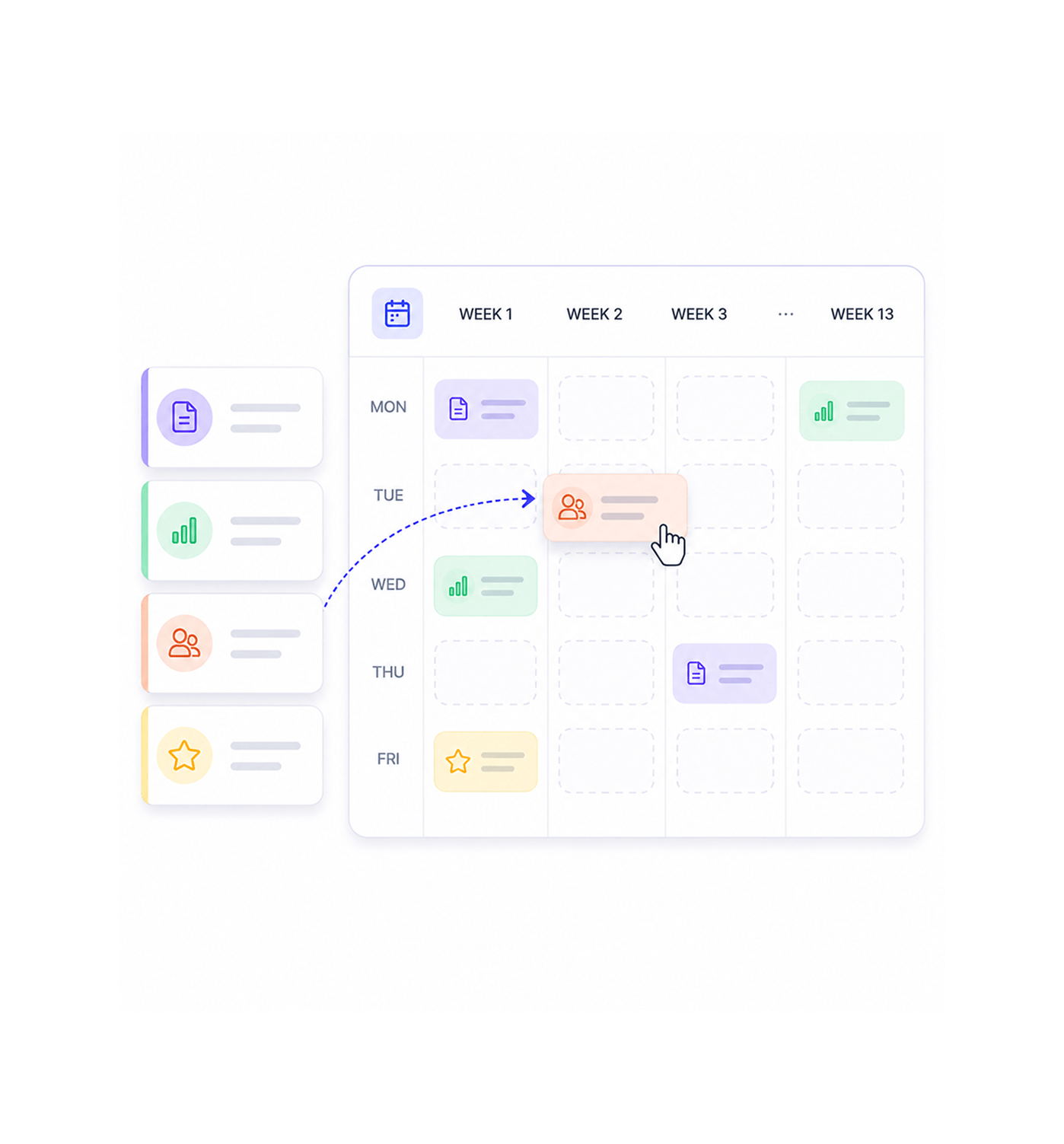
Take the clusters Ranko has built and drag them straight onto a ninety day publishing calendar. Each card already carries its pillar topic, its supporting terms, the suggested article type, and the suggested links to your existing pages. Reposition cards into the weeks you want, hand them off in one click, and the next quarter of publishing is a schedule rather than a wish. The operations surface where strategy stops being a deck and starts being a calendar your team actually ships against.

Drag, drop, ship.
How it works

From cluster to scheduled calendar in 4 steps

Every approved cluster appears as an enriched card in the calendar's library. Drag cards into the weeks you want and they slot into place. Each card is already a hand off ready brief pillar topic, supporting terms, suggested article type, suggested internal links to your existing pages. When the calendar is ready, send it to your writers or to Content Forge in a single click and the next quarter of publishing is on the schedule.

1
2
3
4

Enriched Cards

Approved clusters appear as cards

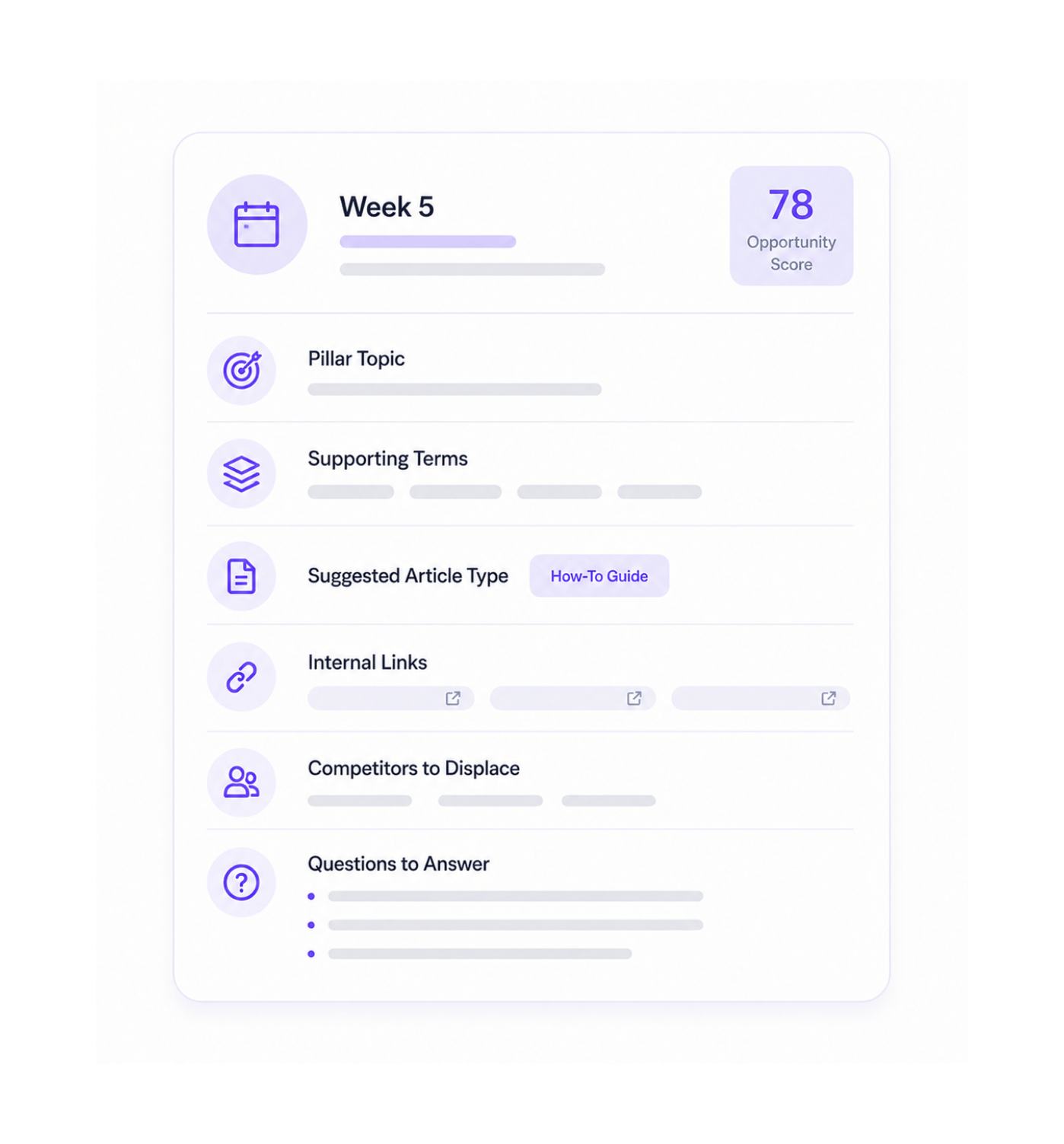
Every cluster the team has approved shows up in the calendar's library as a card. The card already carries the pillar topic, the supporting terms, the suggested article type, the Opportunity Score, the suggested links to your existing pages, and the rationale for why the cluster matters. The team is not staring at a blank calendar wondering what to fill it with they are looking at a stack of ready cards waiting to be slotted into the right weeks.

Pre-Enriched CardsPillar & SupportsOpportunity ScoreReady to Slot

Drag and Drop

Drag cards into the weeks you want

The calendar shows thirteen weeks at a glance with a slot for every publishing day the team has configured. Pick up a card and drop it into the week you want. Reorder, swap, shuffle, push out, pull forward the calendar updates instantly with every move. The work that used to require a spreadsheet, a project manager and a four hour meeting collapses into the few minutes it takes to drag the cards into the shape the strategy calls for.

13 Week ViewDrag and DropInstant ReorderNo Meeting Needed

Cards Are Briefs

Each card is a hand off ready brief

Open any card on the calendar and the full brief is already there. The pillar topic the article should anchor on. The supporting terms the article should cover. The suggested article type comparison, how to, listicle, deep dive, buying guide. The internal links to existing pages on your site that should be referenced. The Opportunity Score, the cited competitors to displace, the questions the article needs to answer. The brief the team's writer used to spend an afternoon writing is already written, attached to the card, ready to hand over.

Full Brief on CardArticle Type SuggestedInternal Links AttachedZero Brief Writing

One Click Hand Off

Send to your team or Content Forge

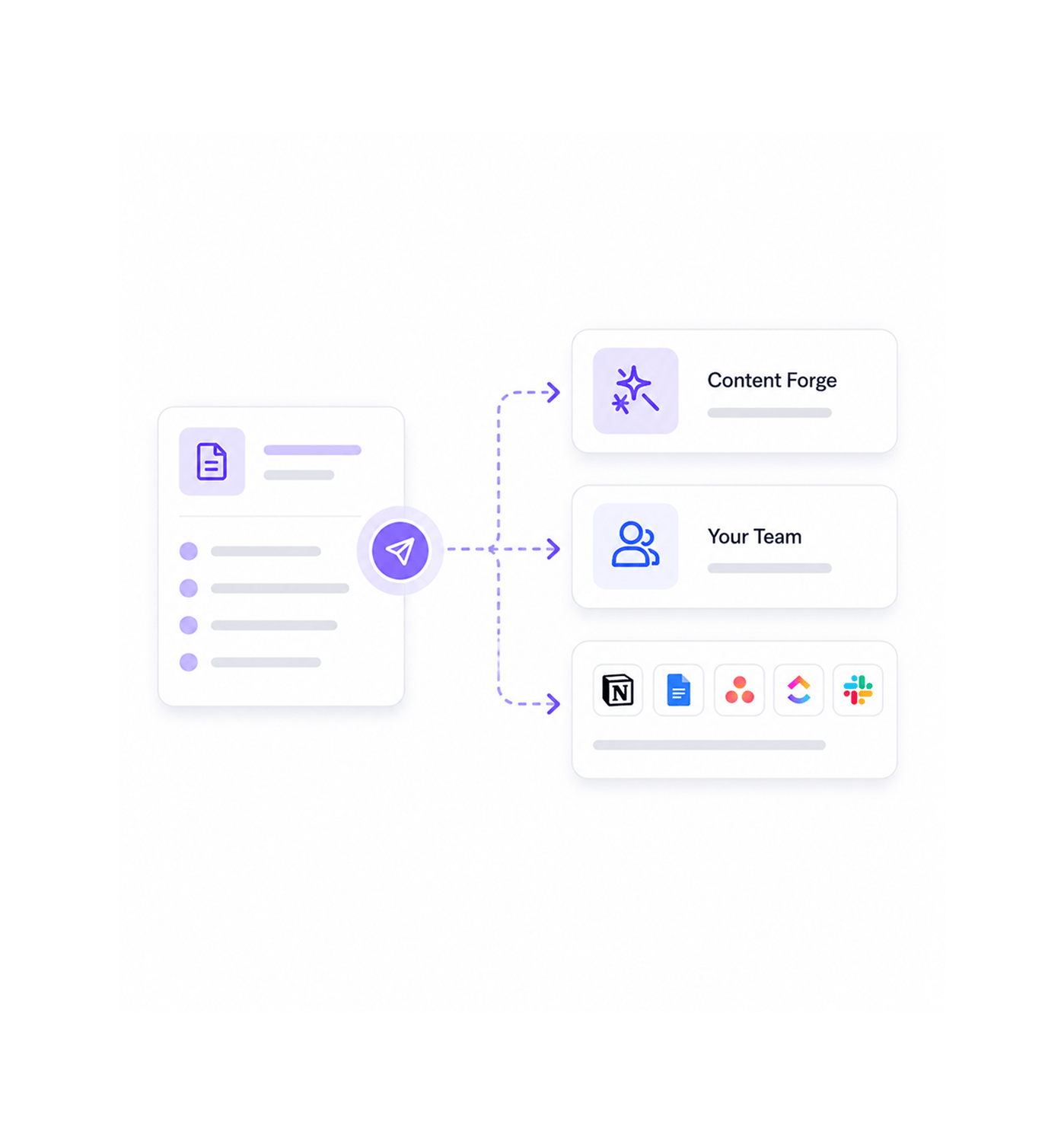
When the calendar is approved, the hand off is one click. Send the card directly to Content Forge to have the article drafted in your brand voice. Send to your team's writing platform Notion, Google Docs, Asana, ClickUp, Slack, whatever the team already uses with the full brief attached. Or export to a portable format and hand off through whichever process the team prefers. The calendar is not a dead document the team has to copy from manually. It is a live operations surface that sends the work directly into the next stage.

To Content ForgeTo Your TeamNotion · Docs · AsanaLive Hand Off
Why Teams Choose RANKO

Six reasons the calendar stops being a wish list

Once a team can drag approved clusters straight onto a ninety day calendar with every card already carrying its pillar, supports, article type, and internal linking targets the old pattern of half maintained content spreadsheets that nobody quite trusts stops being acceptable. These are the changes that show up first.

The calendar replaces the spreadsheet

The calendar replaces the spreadsheet

Most content calendars are spreadsheets that get out of date the week after they are built. The 90-Day Calendar is a live operations surface every card stays linked to its source cluster, every Opportunity Score updates as the engines shift, every internal link suggestion reflects the current state of your site. The calendar the team is looking at today is the calendar that is actually true today, which is something most spreadsheets cannot honestly claim.

Every card arrives already enriched

Every card arrives already enriched

The pillar topic, the supporting terms, the article type, the internal linking targets, the Opportunity Score, the cited competitors to displace all of it is on the card before anyone drags it anywhere. The writer who used to spend an afternoon turning a topic into a brief opens the card and finds the brief already written. The bottleneck between strategy and writing simply does not exist as a separate step.

Reordering is a drag, not a rebuild

Reordering is a drag, not a rebuild

When priorities change a launch shifts, a competitor moves, an opportunity opens up the calendar reshuffles in seconds. Pick up the cards that need to move, drop them into the new positions, and the rest of the calendar adjusts around the change. The we need to rebuild the calendar panic that used to follow every strategic shift simply does not happen because the calendar was designed to be moved, not rebuilt.

Internal linking targets are pre-attached

Internal linking targets are pre-attached

Internal linking is one of the highest leverage moves in content strategy and one of the most consistently neglected because doing it manually across a publishing calendar is exhausting. Each card on the calendar already includes the suggested internal links to your existing pages, so the writer's first draft can include the linking that signals authority from the moment it ships. The wiring that used to happen later and usually never happens at the brief stage where it actually belongs.

Hand off is one click

Hand off is one click

The calendar is not a destination it is a hand off surface. Send the card to Content Forge to have the article drafted. Send the brief to your writers in the platform they already work in. Export to whichever format your downstream process needs. The calendar shrinks the distance between we have decided to publish this and the writer has started from a multi step relay race to a single click which is exactly where most content operations leak the time they cannot afford to lose.

The team finally publishes on schedule

The team finally publishes on schedule

The shift from we publish when something is ready to we publish what is on the calendar for this week changes the entire rhythm of a content team. The compounding that only happens with a consistent publishing cadence finally starts to compound. The team that used to ship two posts when they meant to ship eight starts shipping eight when they planned for eight, because the calendar is doing the planning and the hand off and the team is just doing the writing.

From cluster to calendar to brief to ship. In a single workspace.

Drag and drop cluster cards. Thirteen week view. Pre-enriched briefs with pillar, supports, article type, and internal linking targets. One click hand off to Content Forge or your team. The operations surface your content engine has always needed.

Who uses RANKO calendar
Deepak MehrotraDeepak MehrotraDeepak MehrotraDeepak Mehrotra

9600+

Teams shipping content from a calendar instead of a wish list

Built for teams who want their calendar to mean something

Founders who refuse to let content slip below a steady publishing cadence, content marketing leads building calendars they can defend in front of leadership without endless spreadsheet justifications, agencies running publishing programmes for multiple clients from one cockpit, growth teams at SaaS companies who need a calendar their writers, designers, and developers can all read the same way, ecommerce operators shipping a steady drumbeat of buying guides and category pages, and operations leaders who treat content as a function that needs the same operational rigour as the rest of the business all use Ranko's 90-Day Calendar as the surface where strategy stops being a deck and starts being a schedule the team actually ships against. Every team a small business shipping one piece a week or a larger organisation orchestrating dozens of pieces across every content track gets the same drag and drop calendar, the same enriched cards, and the same one click hand off.

Drag

& Drop

90 Day

View

Enriched

Cards

One Click

Hand Off

Calendar Layer

Drag, drop, reorder, schedule

A live ninety day calendar showing thirteen weeks at a glance with a slot for every publishing day the team has configured. Drag approved cluster cards into the weeks you want, reorder them when priorities shift, swap them out when something better opens up. The calendar updates instantly with every move and the team always works from the current shape rather than a snapshot somebody emailed around last week.

Drag, drop, reorder, schedule
Features

Everything the calendar surface ships with

A complete content operations toolkit built into the same answer engine optimisation platform your team already uses. Drag and drop cluster cards, ninety day calendar view, pre-enriched brief cards, suggested internal linking targets, article type recommendations, and one click hand off come together so the team finally publishes from a calendar that means something instead of wrestling with a spreadsheet that nobody quite trusts.

Drag and Drop Cluster Cards

Drag and Drop Cluster Cards

Approved clusters appear as cards in the calendar's library. Pick up a card and drop it onto the week you want and it slots into place. Reorder, swap, push out, pull forward every move updates the calendar instantly. The reshuffling that used to require a meeting and a spreadsheet happens in the few seconds it takes to drag the cards into the new shape.

90 Day Publishing Calendar

90 Day Publishing Calendar

A live thirteen week view of the next quarter's publishing schedule, with a slot for every publishing day the team has configured. The calendar updates as you move cards around, as Opportunity Scores refresh, and as new clusters get approved into the library. Always current, always accurate, always the calendar the team is actually publishing from.

Pre-Enriched Brief Cards

Pre-Enriched Brief Cards

Every card on the calendar already carries the full brief pillar topic, supporting terms the article should cover, the Opportunity Score, the cited competitors to displace, the questions the article needs to answer. The brief writing step that used to be a separate afternoon's work is already done by the time the card lands on the calendar.

Suggested Internal Linking Targets

Suggested Internal Linking Targets

Each card includes the suggested internal links to your existing pages the pillar pages the new article should link back to, the related supports that should link sideways, the older articles that would benefit from being linked to from the new piece. The wiring that signals topical authority is on the card from the start, so the first draft ships with the linking already correct.

Article Type Recommendations

Article Type Recommendations

Each card includes the suggested article type comparison, how to, listicle, deep dive, buying guide, hub page, glossary entry based on the cluster's pillar, the questions it needs to answer, and how competitors are currently being cited for the topic. The writer never has to guess what shape the article should take because the card has already worked it out.

One Click Hand Off

One Click Hand Off

Send the card directly to Content Forge to have the article drafted in your brand voice. Send the brief to your writers in their platform Notion, Google Docs, Asana, ClickUp, Slack, whatever the team already uses. Or export to a portable format for any other process. The calendar is a hand off surface, not a destination, which is the difference between operations that ship and operations that stall.

Drag and Drop Cluster Cards

Drag and Drop Cluster Cards

Approved clusters appear as cards in the calendar's library. Pick up a card and drop it onto the week you want and it slots into place. Reorder, swap, push out, pull forward every move updates the calendar instantly. The reshuffling that used to require a meeting and a spreadsheet happens in the few seconds it takes to drag the cards into the new shape.

90 Day Publishing Calendar

90 Day Publishing Calendar

A live thirteen week view of the next quarter's publishing schedule, with a slot for every publishing day the team has configured. The calendar updates as you move cards around, as Opportunity Scores refresh, and as new clusters get approved into the library. Always current, always accurate, always the calendar the team is actually publishing from.

Pre-Enriched Brief Cards

Pre-Enriched Brief Cards

Every card on the calendar already carries the full brief pillar topic, supporting terms the article should cover, the Opportunity Score, the cited competitors to displace, the questions the article needs to answer. The brief writing step that used to be a separate afternoon's work is already done by the time the card lands on the calendar.

Suggested Internal Linking Targets

Suggested Internal Linking Targets

Each card includes the suggested internal links to your existing pages the pillar pages the new article should link back to, the related supports that should link sideways, the older articles that would benefit from being linked to from the new piece. The wiring that signals topical authority is on the card from the start, so the first draft ships with the linking already correct.

Article Type Recommendations

Article Type Recommendations

Each card includes the suggested article type comparison, how to, listicle, deep dive, buying guide, hub page, glossary entry based on the cluster's pillar, the questions it needs to answer, and how competitors are currently being cited for the topic. The writer never has to guess what shape the article should take because the card has already worked it out.

One Click Hand Off

One Click Hand Off

Send the card directly to Content Forge to have the article drafted in your brand voice. Send the brief to your writers in their platform Notion, Google Docs, Asana, ClickUp, Slack, whatever the team already uses. Or export to a portable format for any other process. The calendar is a hand off surface, not a destination, which is the difference between operations that ship and operations that stall.

Questions & answers

Everything you need to know

Common questions about exactly what is on a cluster card, how the article type recommendations work, where the internal linking suggestions come from, whether the team can run multiple calendars, what happens after the hand off, and how the Calendar connects to Topic Planner and Opportunity Score.

Every card carries the full brief from the moment it lands in the calendar library. The pillar topic the article should anchor on. The five to fifteen supporting terms the article should cover. The suggested article type. The current Opportunity Score and which engines contributed to it. The cited competitors to displace, with the specific pages on their sites that the article needs to out-write. The suggested internal links to existing pages on your site. The questions the article must answer to take the citation. The rationale for why the cluster matters. Open the card and the writer has everything they would have needed an afternoon to assemble manually.

Network background
RANKO · 90-Day Calendar

Stop wrangling a content spreadsheet.
Start shipping a content calendar.

Drag and drop cluster cards. Thirteen week publishing view. Pre-enriched briefs with pillar, supports, article type, and internal linking targets. One click hand off to Content Forge or your team. The operations surface your content engine has always deserved.