The morning report only contains what actually changed overnight new errors, score drops, new orphan pages, broken page data tags, position drops. Alerts push to Slack, email, or webhook the moment they fire. The team sets exactly how loud the threshold is, so the inbox stays quiet on quiet days and loud on the days when something genuinely needs attention.
Five specific signals get tracked every night new errors, score drops, new orphan pages, broken page data tags, position drops. The team sets a threshold that filters the noise so only meaningful changes trigger an alert. When a real signal fires, the alert pushes to Slack, email, or webhook the moment it happens, with a one click ticket attached so the fix flows straight into the team's project tracker.
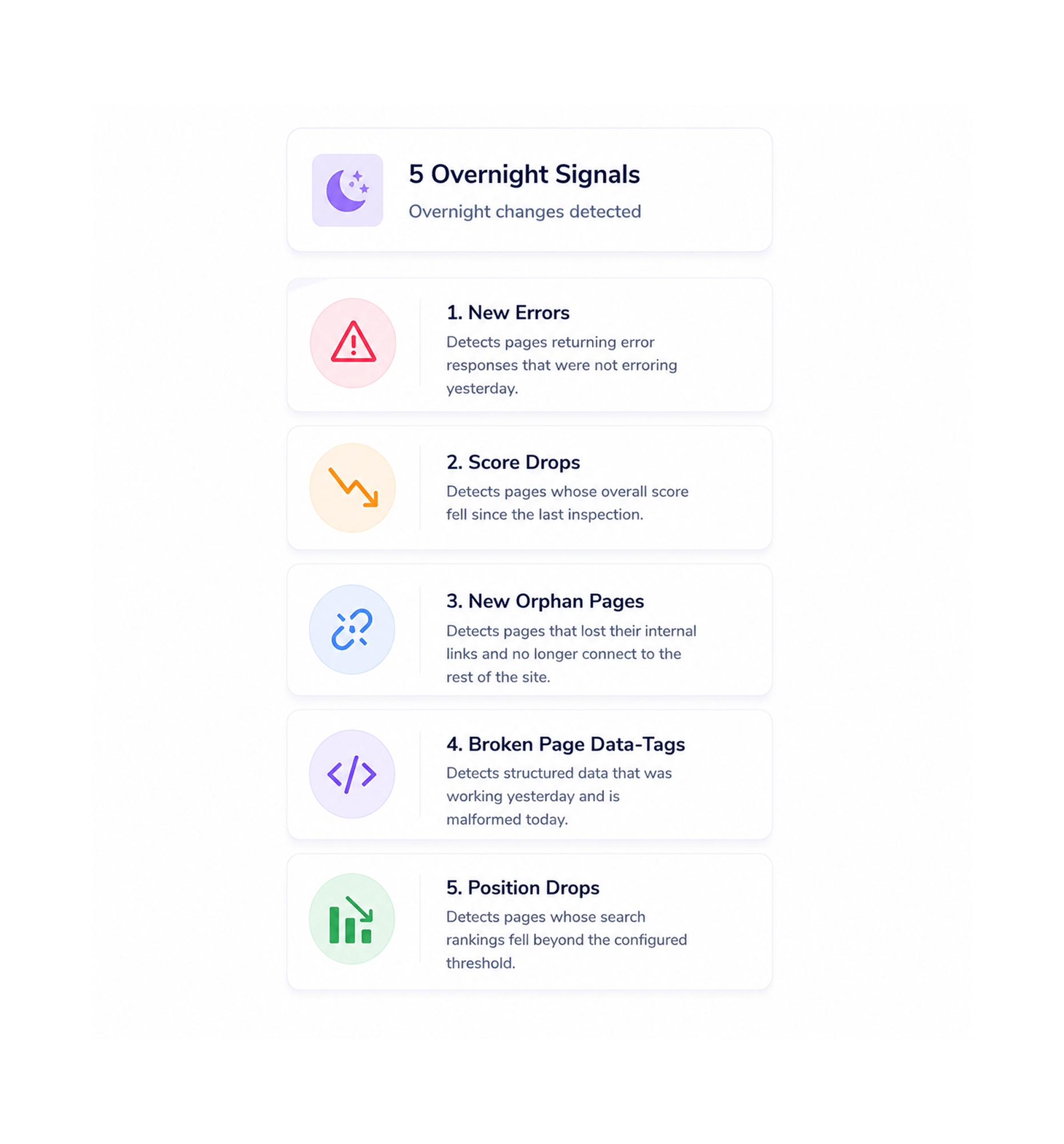
5 Overnight Signals
Five specific signals get tracked every night, not vague anomaly detection on dozens of metrics that produces false alarms by Wednesday. New errors detects pages returning error responses that were not erroring yesterday. Score drops detects pages whose overall score fell since the last inspection. New orphan pages detects pages that lost their internal links and no longer connect to the rest of the site. Broken page data tags detects structured data that was working yesterday and is malformed today. Position drops detects pages whose search rankings fell beyond the configured threshold. Five concrete signals, each with a specific failure mode, each genuinely worth knowing about the moment it happens.
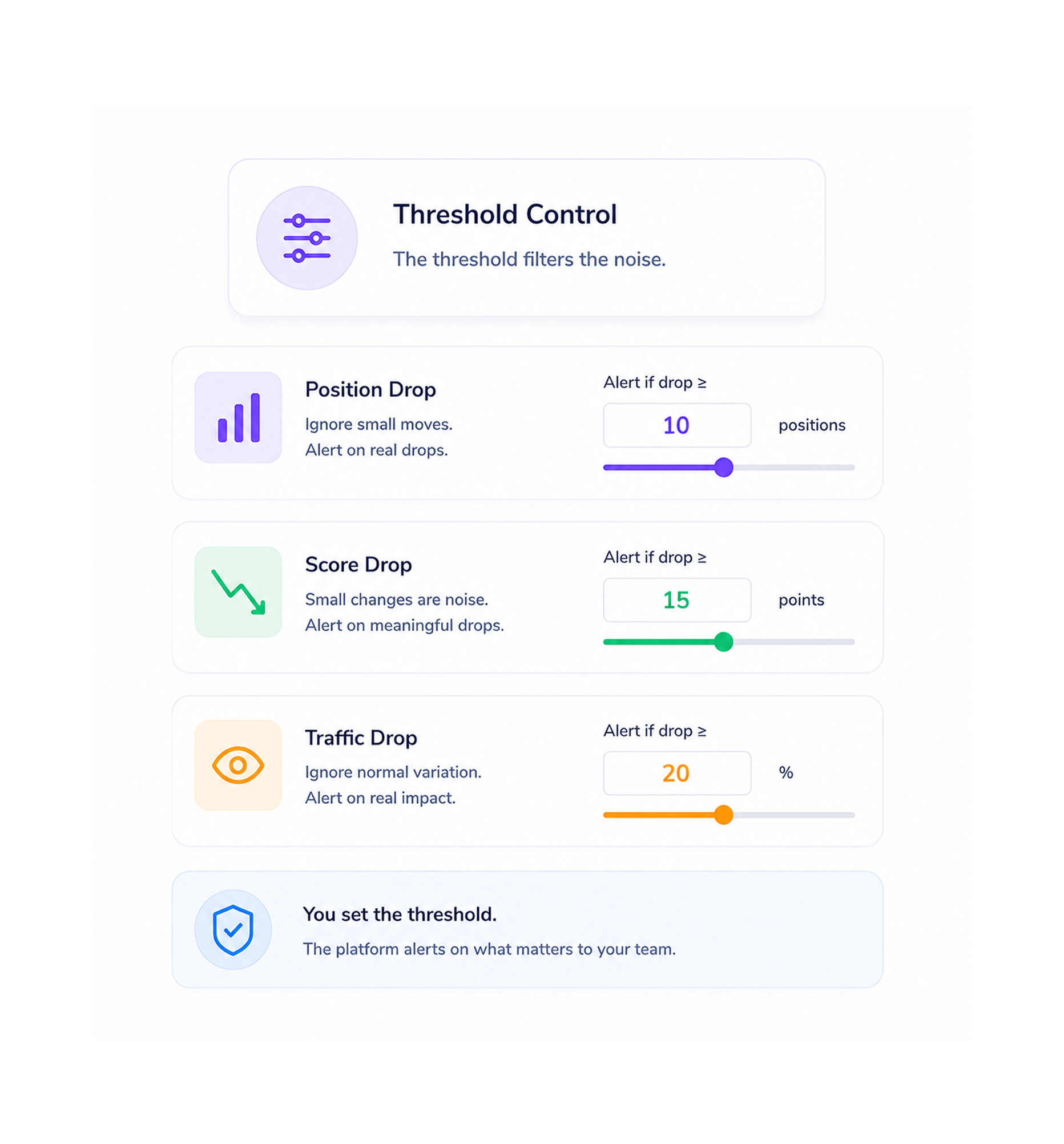
Threshold Control
The team controls how loud each signal is. A position drop of two places might be background noise the team does not need to hear about a position drop of ten places probably is. A score drop of one point on a single page is rarely meaningful a score drop of fifteen points across a pillar page absolutely is. The threshold for each signal is the team's call, and it can be tightened during a sensitive product launch or loosened during a quieter season. The platform never decides what is loud enough to interrupt the team the team does.
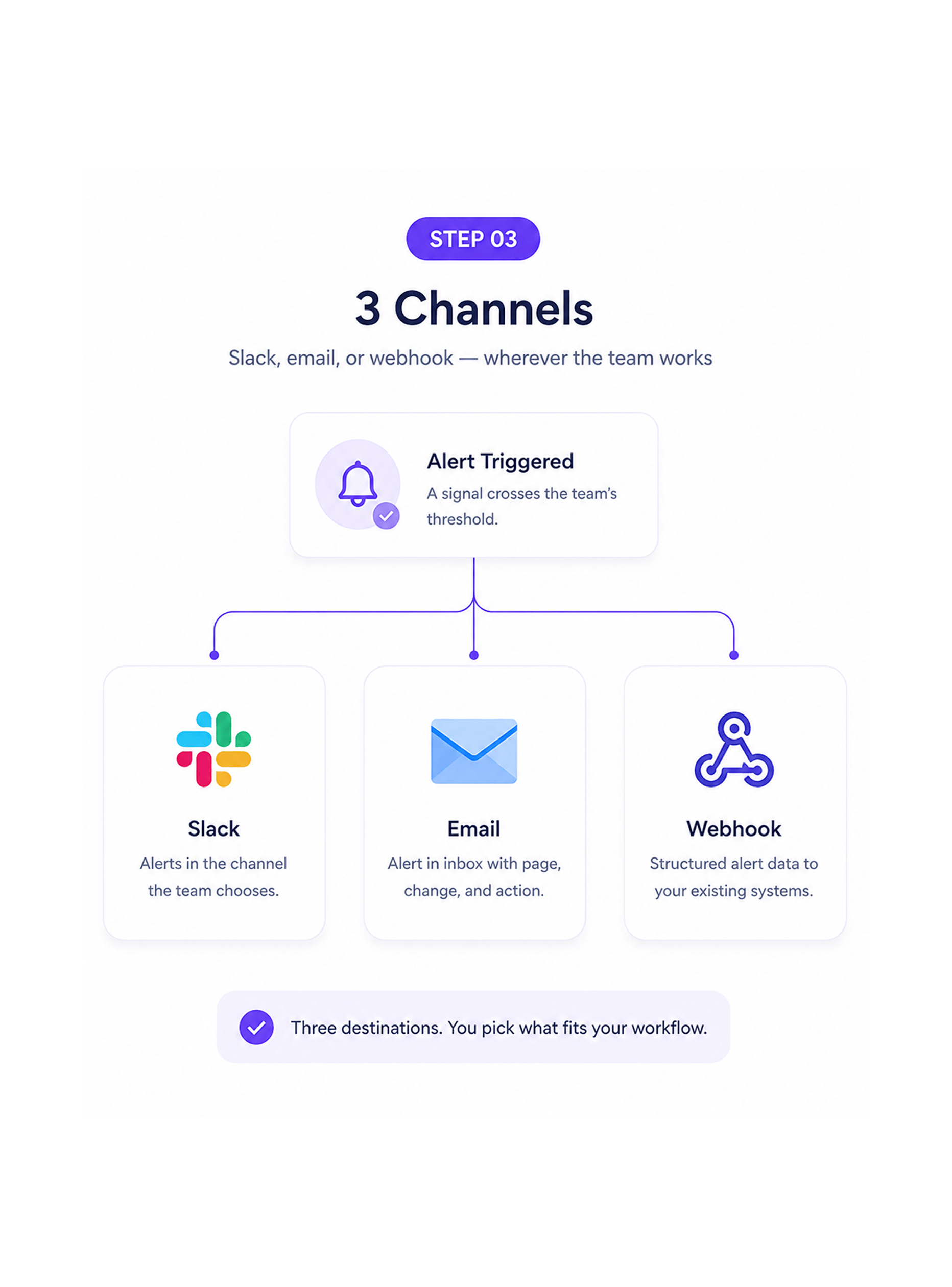
3 Channels
When a signal crosses the team's threshold, the alert pushes to wherever the team is already operating. Slack drops the alert into the channel the team picks the whole team or just the relevant specialist depending on the signal. Email lands in the assignee's inbox with the affected page, the change detected, and the suggested action. Webhook pushes the alert as structured data into whatever internal alerting infrastructure the team already runs, for teams whose operations centre runs through a dedicated incident system. Three destinations, the team picks the one or the combination that fits their workflow.
Tickets Attached
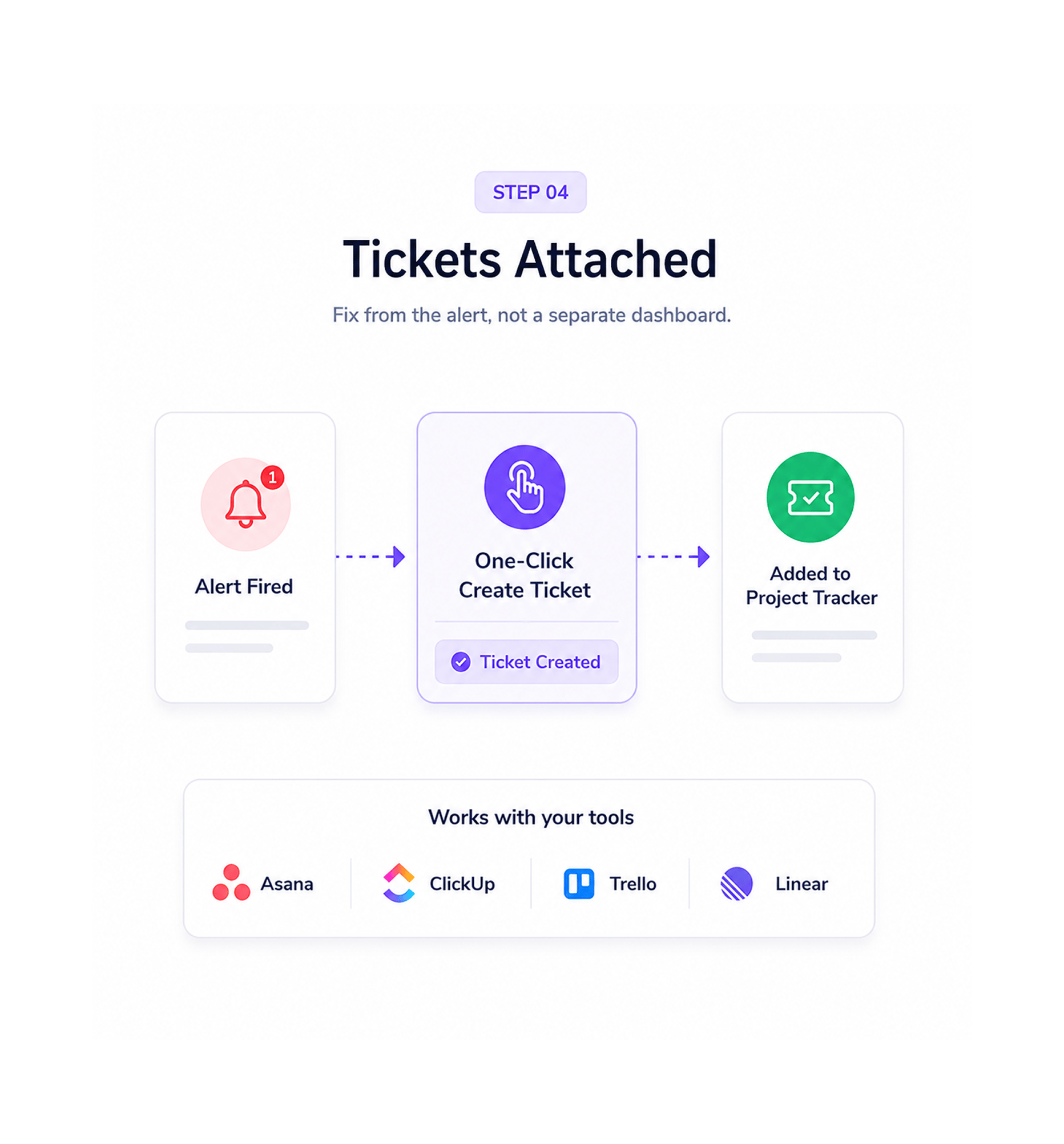
Every alert arrives with a one click button that pushes a ticket into the team's project tracker Asana, ClickUp, Trello, or Linear. The team responds to the alert in the channel where they live, presses one button, and the work appears in the tracker the team already runs. No bouncing between the alert, the dashboard, the affected page, and the tracker to manually translate an alert into a ticket. The full workflow from alert fires to fix scheduled collapses into a single click.
Once a team can wake up to a Slack notification that fires only when something genuinely changed and only when the change crosses a threshold the team set themselves the old pattern of either drowning in alert fatigue or missing real regressions for weeks stops being acceptable. These are the changes that show up first.
Most alerting tools have one of two failure modes either they fire constantly and the team mutes the channel within a week, or they almost never fire and the team forgets they exist until a real problem has been brewing for a month. Only-What Changed Alerts solves both. On days when nothing meaningful changed, the team hears nothing. On days when something crossed the threshold, the alert lands clearly and quickly. The signal stays trustworthy because the noise has been engineered out.
Platform decided thresholds are how most alerting tools fail what counts as significant varies wildly by site, by team, by season. The team running a high stakes ecommerce site at peak season needs tighter thresholds than the team running an evergreen content site in a quiet quarter. Letting the team set their own thresholds per signal and adjust them whenever the situation calls for it is the only architecture that lets the alerting layer keep working across the team's actual operational reality.
Generic anomaly detection produces alerts the team cannot interpret. Something looks unusual is not an alert the team can act on. Five named, specific signals new errors, score drops, orphan pages, broken data tags, position drops are alerts the team understands immediately and knows exactly how to investigate. The clarity of the signal is what makes the team trust it enough to keep listening.
Alerts that arrive somewhere the team does not check get ignored. Letting the team route alerts to Slack channels, email inboxes, or webhook endpoints singly or in combination means the alert lands where the team is already paying attention. The platform meets the team where they work rather than asking the team to come to a separate dashboard to find out something fired.
A regression that started Tuesday and gets noticed in next quarter's audit is a regression that has been costing the team for ninety days. Real time alerts on the night the change actually happened collapse that ninety day window to a single morning. The compounding cost of late detection lost traffic, lost rankings, lost trust gets eliminated by the cadence rather than just reduced by it.
Alerts the team has to manually translate into tickets are alerts the team eventually stops translating. The one click ticket push from every alert into Asana, ClickUp, Trello, or Linear means the work appears where work already happens, without any manual relay step. The friction between alert fired and fix scheduled gets engineered out, which is what turns alerts into actual operational outcomes rather than notifications that quietly pile up unaddressed.
Five overnight change signals tracked. Threshold the team sets per signal. Alerts to Slack, email, or webhook. One click to a ticket in your project tracker. The notification layer your monitoring has always needed.
14400+
Teams getting alerts they actually listen to
Founders who want a quiet morning Slack notification instead of opening a dashboard, content marketing leads tired of either drowning in low signal noise or missing real regressions for weeks, search and AEO managers who want push notifications for the specific signals that actually matter to them, agencies running content programmes for ten different clients who need per client alert routing without manually configuring each channel, ops leads who want the alerts to flow straight into the project tracker the team already runs, developer and engineering teams who want webhook integration into their existing incident infrastructure, and any team that has ever muted an alert channel because it was too noisy and then quietly missed something important all use Ranko's Only What Changed Alerts as the notification layer that makes alerting trustworthy again. Every team a small business watching one site or a larger organisation managing dozens gets the same five tracked signals, the same configurable threshold per signal, the same three destination channels, and the same one click ticket attachment.
Push
Tracked
Threshold
Push
New errors, score drops, new orphan pages, broken page data tags, position drops. Five concrete signals tracked every night, each with a configurable threshold the team controls. Quiet days stay quiet because nothing crossed the threshold. Loud days get loud because something genuinely did.
A complete trustworthy alerting toolkit built into the same answer engine optimisation platform your team already uses. Five overnight change signals, configurable threshold per signal, three push destinations, one click ticket attachment, and the controls that make alerting actually work come together so the team finally gets notifications they listen to instead of mute.
New errors, score drops, new orphan pages, broken page data tags, position drops. Five concrete signals each with a specific failure mode, each genuinely worth knowing about tracked every night. Not vague anomaly detection on dozens of metrics, just five named signals the team understands immediately.
Each signal has a threshold the team controls. Position drop of two places versus ten. Score drop of one point versus fifteen. The team sets the bar for each signal independently, and can tighten the bar during a sensitive launch or loosen it during a quieter season. The platform never decides what is loud enough the team does.
Alerts drop into the Slack channel the team picks. The whole team channel for general operational awareness, a specialist channel for specific signal types, or a dedicated alerting channel for the on call rotation. The Slack integration includes the affected page, the change detected, the threshold that fired, and the one click ticket button.
For teams who prefer email or for stakeholders outside the day to day operating channel, alerts land in the right inbox with full context the page affected, the signal that fired, the threshold that was crossed, and the recommended action. The team configures who gets which alerts during onboarding.
For teams running a dedicated incident or alerting infrastructure, alerts push as structured data to a webhook endpoint the team configures. The full alert payload arrives with all the metadata the team's downstream systems need to route, escalate, or correlate the signal with other operational data.
Every alert arrives with a one click button that pushes a ticket into Asana, ClickUp, Trello, or Linear with the affected page linked, the signal that fired named, the suggested fix outlined, and the priority weighted. The full workflow from alert fires to fix scheduled collapses into a single click, no manual translation needed.
New errors, score drops, new orphan pages, broken page data tags, position drops. Five concrete signals each with a specific failure mode, each genuinely worth knowing about tracked every night. Not vague anomaly detection on dozens of metrics, just five named signals the team understands immediately.
Each signal has a threshold the team controls. Position drop of two places versus ten. Score drop of one point versus fifteen. The team sets the bar for each signal independently, and can tighten the bar during a sensitive launch or loosen it during a quieter season. The platform never decides what is loud enough the team does.
Alerts drop into the Slack channel the team picks. The whole team channel for general operational awareness, a specialist channel for specific signal types, or a dedicated alerting channel for the on call rotation. The Slack integration includes the affected page, the change detected, the threshold that fired, and the one click ticket button.
For teams who prefer email or for stakeholders outside the day to day operating channel, alerts land in the right inbox with full context the page affected, the signal that fired, the threshold that was crossed, and the recommended action. The team configures who gets which alerts during onboarding.
For teams running a dedicated incident or alerting infrastructure, alerts push as structured data to a webhook endpoint the team configures. The full alert payload arrives with all the metadata the team's downstream systems need to route, escalate, or correlate the signal with other operational data.
Every alert arrives with a one click button that pushes a ticket into Asana, ClickUp, Trello, or Linear with the affected page linked, the signal that fired named, the suggested fix outlined, and the priority weighted. The full workflow from alert fires to fix scheduled collapses into a single click, no manual translation needed.
Common questions about what each of the five signals specifically catches, how the threshold actually works in practice, what happens when bulk changes affect many pages at once, whether the team can set different thresholds per signal, how alerts can be muted temporarily, and how the live alerts differ from the morning report.
Each signal targets a specific kind of overnight change the team would want to know about. New errors catches pages that returned an error response in the overnight crawl when they were healthy the night before server errors, page not found responses, redirects landing somewhere unexpected. Score drops catches pages whose overall AEO score fell beyond the threshold since the last inspection, signalling a structural or content regression on a page that was previously healthy. New orphan pages catches pages that lost their inbound internal links and no longer connect to the rest of the site, which is how pages quietly fall out of the search engine view. Broken page data-tags catches structured data that was valid yesterday and is malformed today, which silently breaks the answer engine signals the page had been sending. Position drops catches pages whose search rankings fell beyond the configured threshold, captured from the Google Search Console connection. Five named signals, each catching a real failure mode the team would actually want to act on.
Five overnight change signals. Threshold the team sets per signal. Alerts to Slack, email, or webhook. One click to a ticket in your project tracker. The notification layer your monitoring has always deserved.