Build your own integration ship it to every Revo customer

Register any external application through the Developer Console. Generate client credentials, define custom triggers and actions with JSON schema, configure secure authentication flows for your users, set rate limits to protect your service, and publish to the Revo app marketplace. Full software development kit and webhook guide included. A workflow automation platform that lets you ship your own integration to every Revo customer without running an integration platform yourself.

Build
How It Works

From idea to shipped integration in 4 steps

Register your application in the Developer Console and get a clean workspace for your integration. Define the triggers and actions you want to expose with JSON schema declarations. Configure the secure authentication flow that connects your users to your service. Publish to the Revo app marketplace and every Revo customer can find and install your integration in one click.

1
2
3
4

Developer Console

Register your app in the Developer Console

Open the Developer Console and create a new application entry. Set the name, the icon, the category, the support contact, and the description that will appear in the marketplace when end users browse. The console generates a fresh set of client credentials for your application a public identifier and a secret key that authenticate your service when it talks to Revo. Rotate the secret at any time without affecting the application's identity.

Developer ConsoleClient CredentialsRotatable SecretMarketplace Profile

JSON Schema Definitions

Define custom triggers and actions

Triggers and actions are defined declaratively with JSON schema. Specify the inputs your action accepts, the outputs your trigger produces, the required fields, the optional ones, the types, the descriptions that will appear inline in the user's workflow editor. The platform validates every workflow that uses your integration against the schema you publish, so the shape contract between your service and the workflow is enforced automatically.

JSON SchemaDeclarativeInputs & OutputsAuto Validation

Authentication & Rate Limits

Configure secure authentication and rate limits

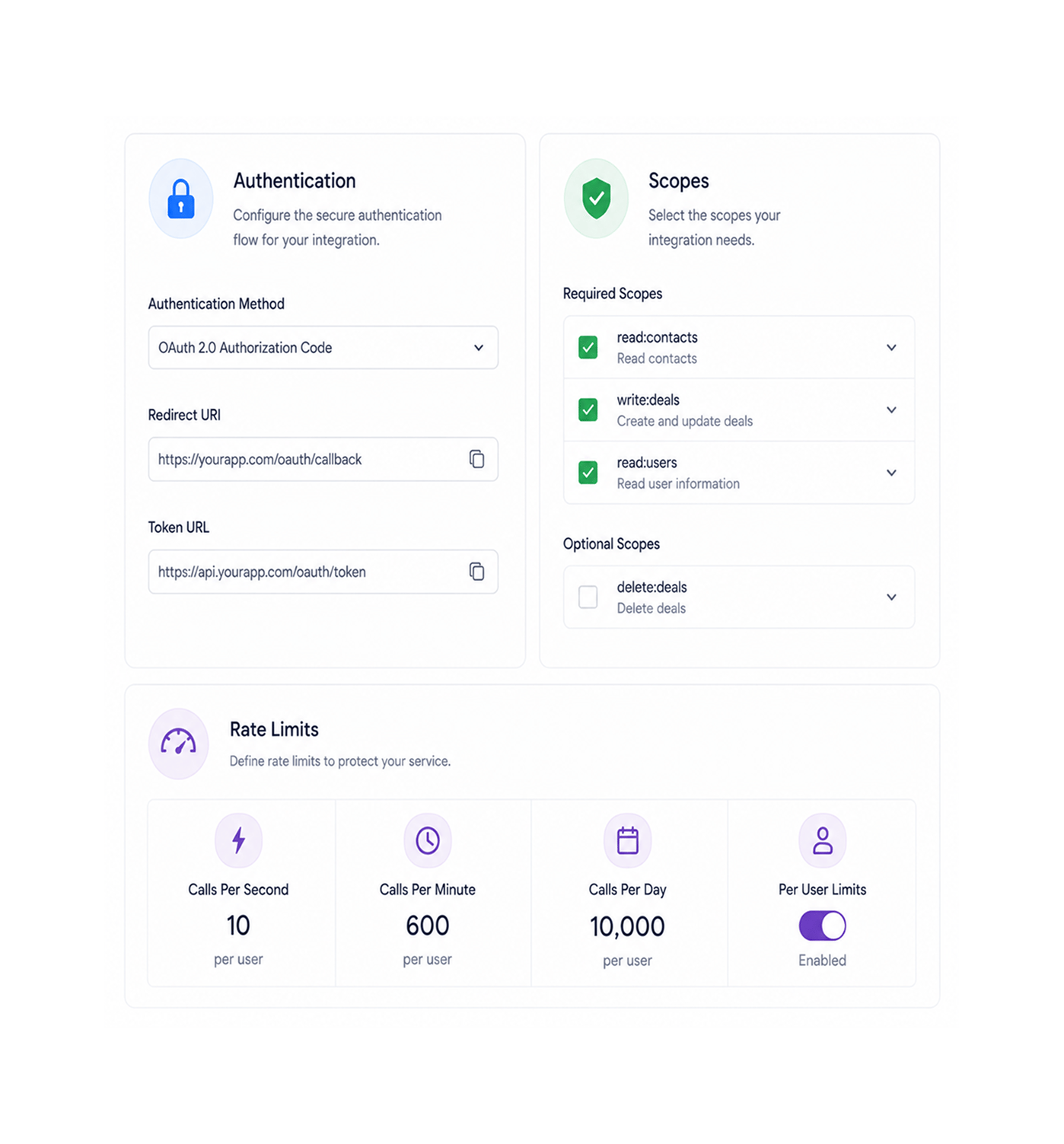
Set up the secure authentication flow your end users complete when they install your integration pick the authentication method your service supports, configure the redirect path, set the scopes you need. Define the rate limits that protect your service from runaway workflows calls per second, calls per minute, calls per day, with optional per user limits. The platform enforces both your authentication rules and your rate limits on every workflow that uses your integration.

Secure Auth FlowConfigurable ScopesRate LimitsPer User Limits

Marketplace Publishing

Publish to the app marketplace

When your integration is ready, submit it to the marketplace. The platform reviews the application for documentation completeness, schema correctness, and basic quality standards, then makes it available to every Revo customer. End users find your integration in the marketplace alongside the well known providers, install it in one click, and start building workflows against your service. The full software development kit and webhook guide give your engineering team everything they need from the first integration to the hundredth.

Marketplace PublishQuality ReviewOne Click InstallFull SDK & Webhook Guide
Why Developers Choose REVO

Six reasons developers ship on Revo

Once a team can register an application, declare triggers and actions with schema, secure authentication and rate limits with configuration rather than code, and publish to a marketplace with one click running your own integration platform on top of your own product starts looking like work somebody else has already solved for you. These are the changes that show up first.

Ship integrations to every ReVO customer

Ship integrations to every ReVO customer

The classic problem of "we built an integration but nobody can find it" disappears the moment your application is in the Revo marketplace. Every Revo customer can search for your integration, install it in one click, and start building workflows against your service. The distribution problem that used to take a year of partnership work collapses to publishing one application to one marketplace.

Declarative trigger and action definitions

Declarative trigger and action definitions

JSON schema describes the shape of your triggers and actions instead of you writing custom validation in every endpoint. Inputs, outputs, required fields, types, descriptions all declared once, enforced everywhere, and rendered automatically in the user's workflow editor as documentation. The schema is the contract, and the contract is the documentation, and the documentation never falls out of date with the implementation.

Secure authentication handled for you

Secure authentication handled for you

The authentication flow that connects your end users to your service is configured in the Developer Console rather than implemented from scratch in your codebase. Pick the authentication method, set the scopes, configure the redirect path. The platform handles the user facing connection experience, token storage, refresh cycles, and revocation. Your engineering team stops maintaining the same authentication code in every integration they build.

Rate limits protect your service

Rate limits protect your service

A misbehaving customer workflow that calls your service in a tight loop should not be your problem to debug. Configure rate limits in the console calls per second, calls per minute, calls per day, optional per user limits and the platform enforces them on every workflow that uses your integration. Your service sees a clean stream of well behaved traffic instead of an unpredictable flood, and the limits are tunable as your capacity grows.

Software development kit covers every language

Software development kit covers every language

The software development kit ships in every popular language your engineering team is likely using TypeScript, Python, Go, Ruby, PHP, Java. Each one wraps the same set of capabilities behind native idioms, so the team writing the integration in TypeScript reads the same documentation as the team writing it in Go, and both get the type safety and tooling support they would expect from a library in their own ecosystem.

Documentation that stays accurate

Documentation that stays accurate

The schema definitions, the rate limit settings, the authentication configuration, and the published integration metadata are all the source of truth and the documentation surfaced to end users in the workflow editor reads directly from those sources. There is no separate documentation site to maintain, no stale page that does not match the current behaviour, and no support ticket triggered by an outdated example.

Build it once. Ship it to every Revo customer.

Developer Console, JSON schema declarations, secure authentication, configurable rate limits, marketplace publishing, and a software development kit that covers every language your team writes in.

Who builds on REVO
Deepak MehrotraDeepak MehrotraDeepak MehrotraDeepak Mehrotra

4200+

Developers shipping integrations on the
Revo platform

Built for developers who build on top of Revo

Software companies extending their reach through workflow automation, internal developer teams building integrations between their stack and the Revo agents, agency engineers shipping reusable connectors for client work, and platform teams who need their service to plug cleanly into customer automations all use the Revo Developer Platform as the surface they build against. The console is the workspace. The JSON schema is the contract. The authentication configuration is the connection layer. The rate limits are the safety net. The marketplace is the distribution channel. Every developer a solo builder shipping their first integration or a platform team running hundreds of business process automations on top of their own product gets the same console, the same schema model, and the same path from registered application to marketplace listing.

Developer

Console

JSON

Schema

Full

SDK

Marketplace

Distribution

Build Surface

Console, schema, credentials, limits

The Developer Console is the workspace where your integration lives. Generate client credentials, declare triggers and actions with JSON schema, configure the secure authentication flow for your users, and set rate limits to protect your service. Every piece of the integration is described declaratively in one place, so the contract between your service and Revo workflows stays explicit and version controlled.

Console, schema, credentials, limits
Features

Everything the developer platform ships with

A complete integration building toolkit built into the same workflow automation platform your customers already use. Developer Console for registration and management, JSON schema for declarative trigger and action definitions, secure authentication configuration, rate limit controls, marketplace publishing, and a software development kit that wraps it all in native libraries for every major language.

Developer Console with Client Credentials

Developer Console with Client Credentials

A dedicated workspace for every registered application with its name, icon, category, description, support contact, and a fresh set of client credentials. Rotate the secret at any time without changing the application's identity. Manage every integration your team owns from one console with a clean overview of installation counts, usage metrics, and error rates.

Custom Triggers via JSON Schema

Custom Triggers via JSON Schema

Define the triggers your integration exposes with declarative JSON schema. Specify the output shape, the required fields, the optional ones, the types, and the inline descriptions that will appear in the user's workflow editor. The schema is the contract, the contract is the documentation, and the platform validates every workflow that uses your trigger against the shape you published.

Custom Actions via JSON Schema

Custom Actions via JSON Schema

Define the actions your integration accepts with the same JSON schema model inputs, required fields, optional fields, types, descriptions, default values, and validation rules. End users see your action in the workflow editor with the same field mapping experience as every other step on the platform, and the platform enforces your schema on every call.

Secure Authentication Configuration

Secure Authentication Configuration

Configure the secure authentication flow your end users complete when they install your integration. Pick the authentication method, set the requested scopes, configure the redirect path, and provide the connection metadata. The platform handles the user facing experience, the credential storage, the renewal cycles, and the revocation events, so your engineering team stops maintaining authentication boilerplate.

Configurable Rate Limits

Configurable Rate Limits

Set rate limits that protect your service from runaway workflows. Configure calls per second, calls per minute, calls per day, and optional per user limits at the integration level. The platform enforces every limit on every workflow that uses your integration, so your service sees a clean stream of well behaved traffic. Adjust the limits as your capacity grows without redeploying anything.

App Marketplace Publishing

App Marketplace Publishing

Submit your application to the Revo marketplace and reach every Revo customer the moment the review is complete. End users find your integration in the same marketplace as the well known providers, install it in one click, and start building workflows against your service immediately. Track installation counts, active users, and customer feedback from the same console.

Developer Console with Client Credentials

Developer Console with Client Credentials

A dedicated workspace for every registered application with its name, icon, category, description, support contact, and a fresh set of client credentials. Rotate the secret at any time without changing the application's identity. Manage every integration your team owns from one console with a clean overview of installation counts, usage metrics, and error rates.

Custom Triggers via JSON Schema

Custom Triggers via JSON Schema

Define the triggers your integration exposes with declarative JSON schema. Specify the output shape, the required fields, the optional ones, the types, and the inline descriptions that will appear in the user's workflow editor. The schema is the contract, the contract is the documentation, and the platform validates every workflow that uses your trigger against the shape you published.

Custom Actions via JSON Schema

Custom Actions via JSON Schema

Define the actions your integration accepts with the same JSON schema model inputs, required fields, optional fields, types, descriptions, default values, and validation rules. End users see your action in the workflow editor with the same field mapping experience as every other step on the platform, and the platform enforces your schema on every call.

Secure Authentication Configuration

Secure Authentication Configuration

Configure the secure authentication flow your end users complete when they install your integration. Pick the authentication method, set the requested scopes, configure the redirect path, and provide the connection metadata. The platform handles the user facing experience, the credential storage, the renewal cycles, and the revocation events, so your engineering team stops maintaining authentication boilerplate.

Configurable Rate Limits

Configurable Rate Limits

Set rate limits that protect your service from runaway workflows. Configure calls per second, calls per minute, calls per day, and optional per user limits at the integration level. The platform enforces every limit on every workflow that uses your integration, so your service sees a clean stream of well behaved traffic. Adjust the limits as your capacity grows without redeploying anything.

App Marketplace Publishing

App Marketplace Publishing

Submit your application to the Revo marketplace and reach every Revo customer the moment the review is complete. End users find your integration in the same marketplace as the well known providers, install it in one click, and start building workflows against your service immediately. Track installation counts, active users, and customer feedback from the same console.

Questions & Answers

Everything you need to know

Common questions about what the Developer Console covers, how JSON schema definitions work in practice, how the authentication flow is configured for end users, what rate limit options are available, which languages the software development kit supports, and what the marketplace approval process involves.

The Developer Console is a dedicated workspace for every integration your team builds. Register a new application, set its marketplace profile (name, icon, category, description, support contact), generate and rotate client credentials, declare triggers and actions, configure authentication and rate limits, manage marketplace publishing, and monitor installation and usage metrics. Every piece of the integration is managed from one place, and every change is captured in a version history so reverting a misconfiguration is one click.

Network background
REVO · Developer Platform

Stop running your own integration platform. Start building on Revo.

Developer Console. JSON schema definitions. Secure authentication. Configurable rate limits. Marketplace distribution. Full software development kit and webhook guide. The developer platform your customers have been asking for.