Run the workflow only when it actually should

Filter every trigger with conditional logic before the workflow ever runs. Combine multiple conditions with AND or OR for compound checks. Fourteen comparison operators cover every test you could need. Reach into nested fields with a clean path picker. Match text patterns when simple equality is not enough. All built into a visual condition builder anyone on the team can use. A workflow automation platform that fires workflows only on the events that actually matter, instead of running for everything that arrives.

Run
How it works

From every incoming event to only the right workflows firing

Filter every trigger with conditional logic before the workflow ever runs. Combine multiple conditions with AND or OR, compare against 14 operators, and match nested fields with a visual builder anyone on the team can use.

1
2
3
4

Add a Condition

Add a condition to the trigger

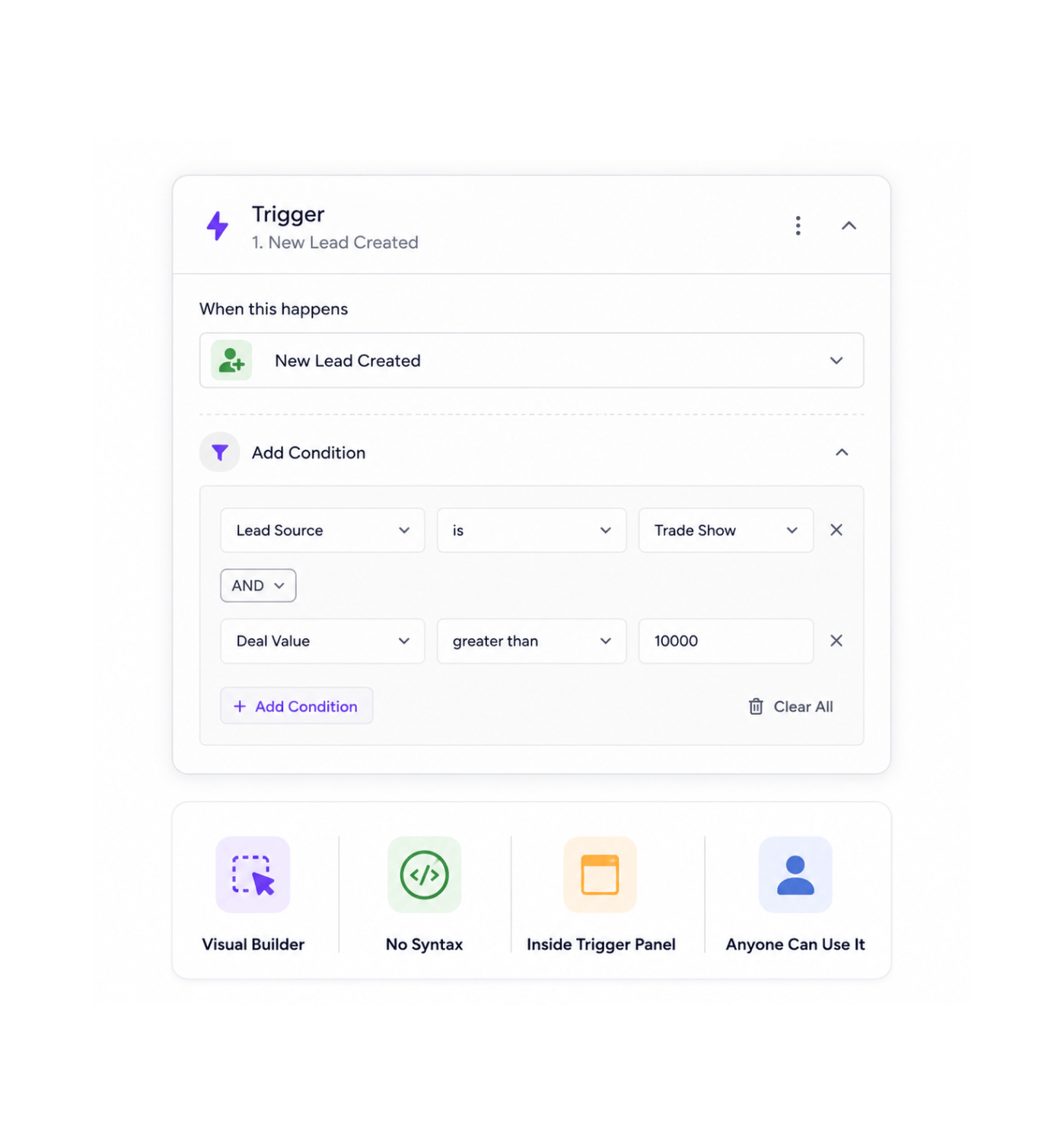
Open the trigger configuration panel of any workflow and click add condition. The visual condition builder opens right inside the panel, with no syntax to learn, no expression language to write. The team member who knows the business rule the marketing lead who only wants to act on trade show leads, the operations specialist who only cares about deals over a certain value adds the condition themselves in seconds.

Visual BuilderNo SyntaxInside Trigger PanelAnyone Can Use It

Field, Operator, Value

Pick a field, an operator, a value

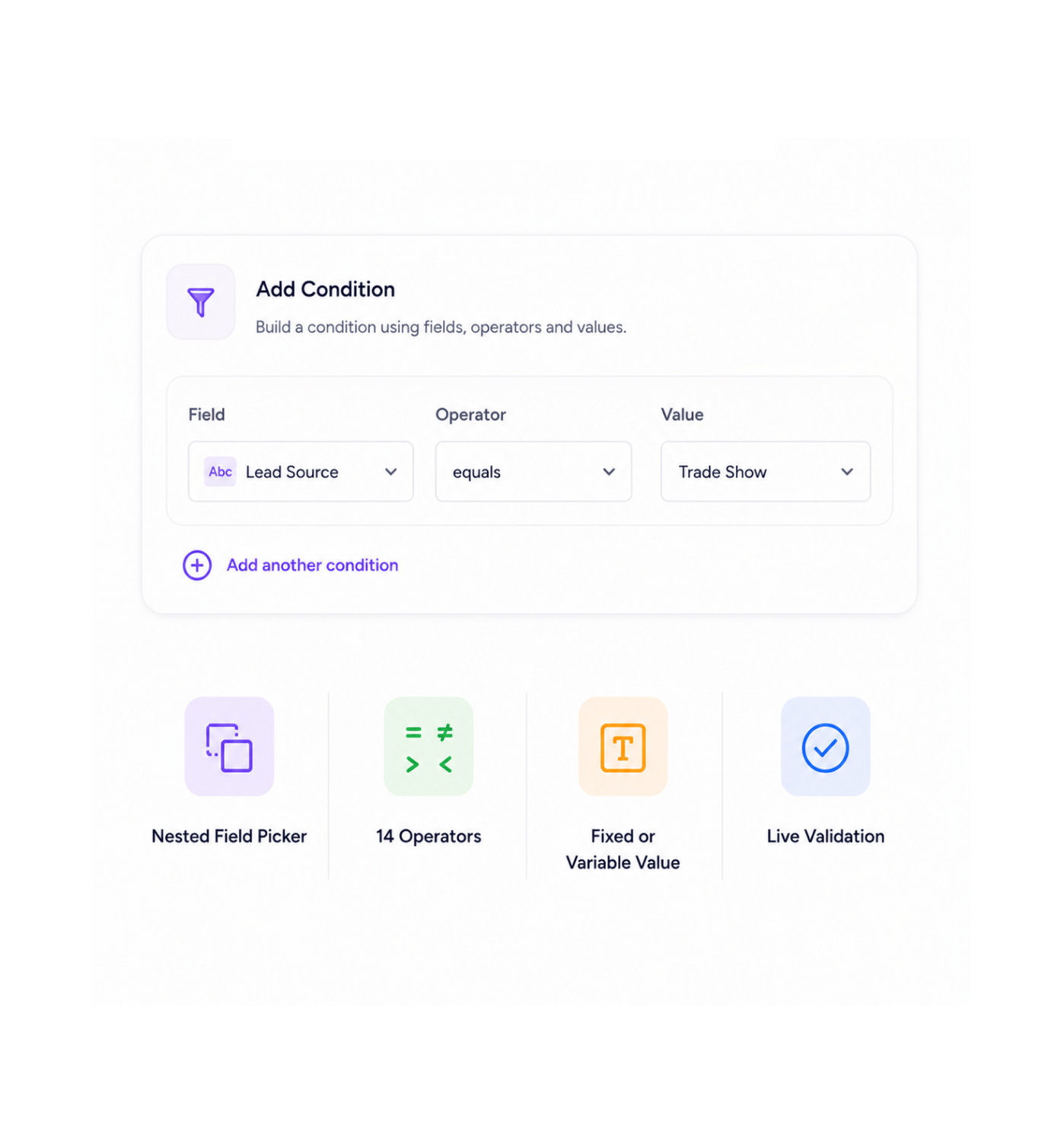
Every condition is three picks. Pick the field from the incoming event using the nested path selector that can reach any nested value, however deep it sits. Pick one of the fourteen comparison operators that cover every check from simple equality to range, list membership, emptiness, and pattern matching. Set the value to compare against, either as a fixed value or a reference to another variable. The condition is live the moment all three are set

Nested Field Picker14 OperatorsFixed or Variable ValueLive Validation

Combine Conditions

Combine conditions with AND or OR

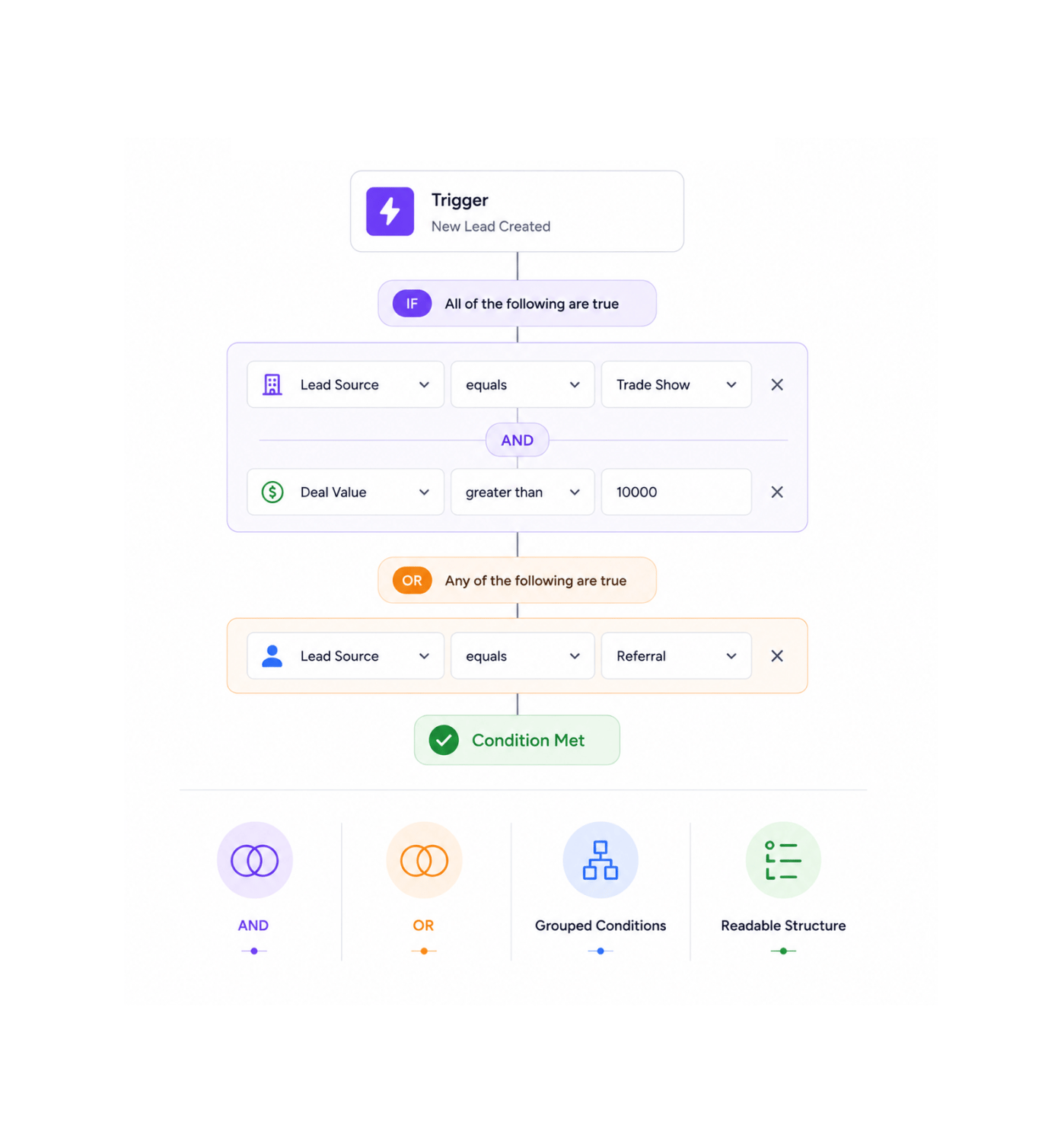
A single condition is rarely enough. Combine multiple conditions with AND when every check needs to pass, OR when any one of them is enough. Group conditions to express compound rules fire only when the lead is from a trade show AND the deal value is over ten thousand, OR when the source is a referral regardless of value. The visual builder shows the logic structure clearly so the rule is always readable later.

ANDORGrouped ConditionsReadable Structure

Filter Before Firing

Only matching events fire the workflow

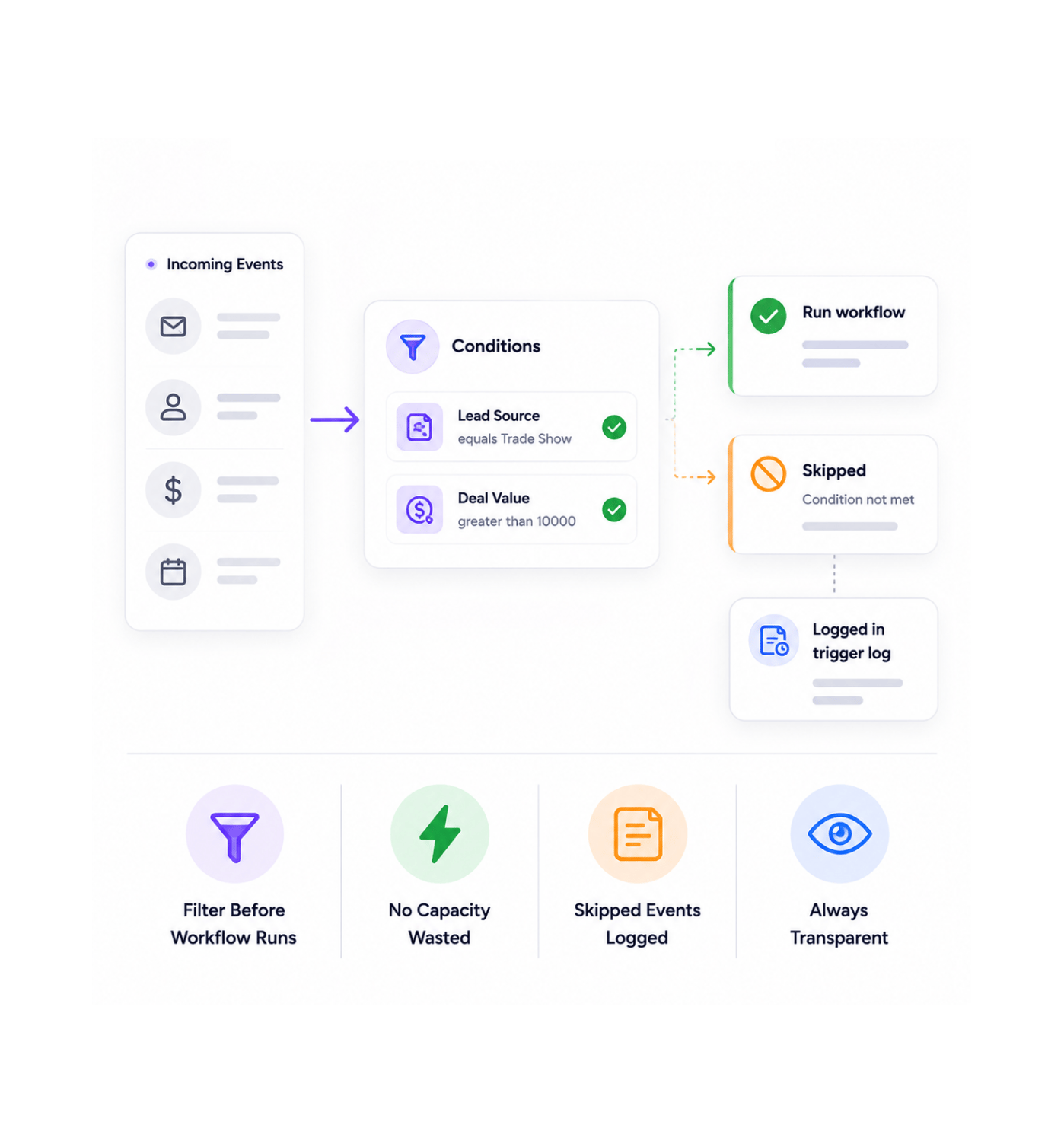
Conditions run on every incoming event before any downstream node executes. Events that match all the conditions fire the workflow normally with the full payload. Events that fail the conditions get quietly skipped without consuming any workflow capacity. The skipped events still appear in the trigger log with their condition result, so you always know exactly which events were filtered and why.

Filter Before Workflow RunsNo Capacity WastedSkipped Events LoggedAlways Transparent
Why Teams Choose REVO

Six reasons teams never go back

Once a team can filter at the trigger level instead of running a full workflow just to discover at the first condition node that this event was not worth reacting to the old pattern of firing on everything and filtering inside the workflow starts looking like the slow and expensive version of the same automation. These are the changes that show up first.

Workflows fire on the right events only

Workflows fire on the right events only

The classic problem of "the workflow runs for every new lead but we only care about the leads from a specific source" simply disappears. The condition lives on the trigger, so the workflow fires only for the events that genuinely deserve a reaction. Every run that happens is a run worth happening, which makes the execution log a reflection of the real business activity rather than a sea of skipped events.

Fourteen operators cover every check

Fourteen operators cover every check

Equals, does not equal, contains, does not contain, starts with, ends with, is greater than, is less than, is greater than or equal, is less than or equal, is in a list, is not in a list, is empty, matches a text pattern. The fourteen operators cover every comparison a business condition has ever needed, so the team never reaches the limit of what the condition builder can express.

Nested fields finally accessible

Nested fields finally accessible

Real event payloads are not flat. The information you actually want to filter on sits two or three levels deep the line items inside an invoice, the address inside a contact, the metadata inside a webhook event. The nested field path picker lets you click through to any value at any depth, with autocomplete on every level, so the condition can refer to exactly the value you care about rather than the surface field next to it.

Pattern matching when equality is not enough

Pattern matching when equality is not enough

Some checks are not equality checks. Filter incoming events where the email address ends in a specific company domain, where the subject line matches a known support pattern, where the order identifier follows a specific format. Pattern matching handles the cases where the simple operators do not quite express what you mean, with the same visual configuration as everything else.

Conditions everyone can build

Conditions everyone can build

The visual condition builder is the same kind of point and click experience as every other configuration on the platform. The marketing lead who wants to filter on lead source, the operations specialist who only cares about high value deals, the customer success manager who only wants to react to the right ticket priorities all of them set up their own conditions without filing a ticket or waiting for engineering to write something in a configuration file.

Cheaper than filtering inside the workflow

Cheaper than filtering inside the workflow

A condition node inside the workflow still requires the workflow to start, allocate capacity, and run at least one step. A condition on the trigger stops the workflow from ever starting in the first place. For high volume triggers webhook events from a busy source, frequent internal events the difference between filtering at the trigger and filtering inside the workflow shows up as a meaningful reduction in execution overhead.

Stop running workflows for nothing. Start firing only on what matters.

Visual condition builder, fourteen operators, AND or OR combinators, nested field selection, and pattern matching all inside the trigger configuration panel, all run before the workflow ever starts.

Who uses REVO trigger conditions
Deepak MehrotraDeepak MehrotraDeepak MehrotraDeepak Mehrotra

12700+

Teams filtering events at the trigger,
not in the workflow

Built for teams that only want to act on what matters

Operations leaders, marketing operations specialists, customer success managers, sales operations teams, automation engineers, and founders use REVO trigger conditions to filter the events that should actually drive a workflow. The visual condition builder is the entry point for everyone. The fourteen operators are the toolkit. The nested field picker is the precision instrument. The AND / OR combinators are the compound logic. Every team from small businesses reacting to selective events to larger organisations orchestrating hundreds of workflow automations gets the same builder, the same operator library, and the same level of precision over what actually fires a workflow.

14

Operators

AND / OR

Logic

Nested

Fields

Pattern

Matching

Condition Builder

Visual, combinable, complete

A point and click condition builder that anyone on the team can use, with fourteen comparison operators, nested field selection, AND or OR combinators, and pattern matching for the cases where simple equality is not enough. Every condition appears inline in the trigger configuration panel, so the filtering logic stays right next to the trigger it controls.

Visual, combinable, complete
Features

Everything the condition layer ships with

A complete trigger filtering toolkit built into the same workflow automation platform your team already uses. Visual condition builder, fourteen comparison operators, AND or OR combinators, nested field selection, pattern matching, and real time validation come together so workflows fire only on the events they actually should react to.

Visual Condition Builder

Visual Condition Builder

A point and click condition builder that lives inside every trigger configuration panel. No syntax to learn, no expression language to write pick the field, pick the operator, pick the value, and the condition is live. The team member who knows the business rule adds the filter themselves in seconds instead of asking engineering to write it.

Fourteen Comparison Operators

Fourteen Comparison Operators

Equals, does not equal, contains, does not contain, starts with, ends with, greater than, less than, greater than or equal, less than or equal, is in a list, is not in a list, is empty, matches a text pattern. Fourteen operators cover every check a business condition will ever need, so the team never reaches the limit of what the condition builder can express.

Combine Conditions with AND / OR

Combine Conditions with AND / OR

Multiple conditions combine cleanly with AND when every check needs to pass and OR when any one of them is enough. Group conditions to express compound rules. The visual builder shows the logic structure clearly so the rule is always readable later, by you or by a teammate who comes to maintain it.

Nested Field Path Selection

Nested Field Path Selection

Real event payloads are not flat. The nested field path picker lets you click through to any value at any depth the line items inside an invoice, the address inside a contact, the metadata inside a webhook event with autocomplete on every level, so the condition refers to exactly the value you care about.

Pattern Matching

Pattern Matching

Some checks are not equality. Pattern matching with regular expressions handles the cases where simple operators fall short email addresses ending in a specific domain, subject lines that follow a known support pattern, order identifiers in a specific format. The pattern editor sits right inside the condition builder with syntax highlighting and live preview against sample data.

Real Time Validation

Real Time Validation

Every condition is validated as you build it. Missing fields, mismatched types, references to values that do not exist, malformed patterns all flagged inline with plain English explanations of what needs fixing. The condition either configures correctly or tells you exactly what to fix, so the trigger goes live with logic you can trust.

Visual Condition Builder

Visual Condition Builder

A point and click condition builder that lives inside every trigger configuration panel. No syntax to learn, no expression language to write pick the field, pick the operator, pick the value, and the condition is live. The team member who knows the business rule adds the filter themselves in seconds instead of asking engineering to write it.

Fourteen Comparison Operators

Fourteen Comparison Operators

Equals, does not equal, contains, does not contain, starts with, ends with, greater than, less than, greater than or equal, less than or equal, is in a list, is not in a list, is empty, matches a text pattern. Fourteen operators cover every check a business condition will ever need, so the team never reaches the limit of what the condition builder can express.

Combine Conditions with AND / OR

Combine Conditions with AND / OR

Multiple conditions combine cleanly with AND when every check needs to pass and OR when any one of them is enough. Group conditions to express compound rules. The visual builder shows the logic structure clearly so the rule is always readable later, by you or by a teammate who comes to maintain it.

Nested Field Path Selection

Nested Field Path Selection

Real event payloads are not flat. The nested field path picker lets you click through to any value at any depth the line items inside an invoice, the address inside a contact, the metadata inside a webhook event with autocomplete on every level, so the condition refers to exactly the value you care about.

Pattern Matching

Pattern Matching

Some checks are not equality. Pattern matching with regular expressions handles the cases where simple operators fall short email addresses ending in a specific domain, subject lines that follow a known support pattern, order identifiers in a specific format. The pattern editor sits right inside the condition builder with syntax highlighting and live preview against sample data.

Real Time Validation

Real Time Validation

Every condition is validated as you build it. Missing fields, mismatched types, references to values that do not exist, malformed patterns all flagged inline with plain English explanations of what needs fixing. The condition either configures correctly or tells you exactly what to fix, so the trigger goes live with logic you can trust.

Questions & Answers

Everything you need to know

Common questions about the full list of operators, how AND or OR grouping is configured, how deep the nested field picker can go, what pattern matching supports, what happens when conditions are not met, and how trigger level conditions compare to condition nodes inside the workflow.

The fourteen operators cover every comparison a business condition will ever need equals, does not equal, contains, does not contain, starts with, ends with, greater than, less than, greater than or equal, less than or equal, is in a list, is not in a list, is empty, and matches a text pattern. Each operator has clear semantics and appears in a single dropdown when you build a condition, so picking the right one is a matter of recognising the name rather than learning the syntax.

Network background
REVO · Trigger Conditions

Stop reacting to every event. Start reacting to the right ones.

Visual condition builder. Fourteen operators. AND or OR logic. Nested field picker. Pattern matching. The filtering layer your triggers have been waiting for.