Reshape every value between every step

JavaScript powered JSON transforms when you need them, plus a visual editor that handles field mapping, filtering, aggregation, string operations, date arithmetic, and math calculations without writing a single line of code. Two ways to transform data, one platform that runs both. A workflow automation platform that finally takes the glue code out of every workflow your team builds.

Reshape
How it works

From raw values to clean data in 4 steps

Pick the data you want to reshape from any earlier step in the workflow. Choose the transformation that fits a filter, an aggregation, a string operation, a date calculation, a math expression, or a custom JavaScript block when the visual editor does not cover it. Configure visually with no code required. Pass the clean output to the next step.

1
2
3
4

Pick the Source

Pick the data source

Every value from every earlier step in the workflow is available as an input single fields, full records, arrays of records, nested objects, anything the previous nodes produced. Browse the variables panel, click the value you want to reshape, and it lands in the transform node ready to be operated on. No copying, no manual references, no transformation expressions to write out by hand.

Variables PanelAny Earlier StepFields & RecordsNested Objects

Choose Transform

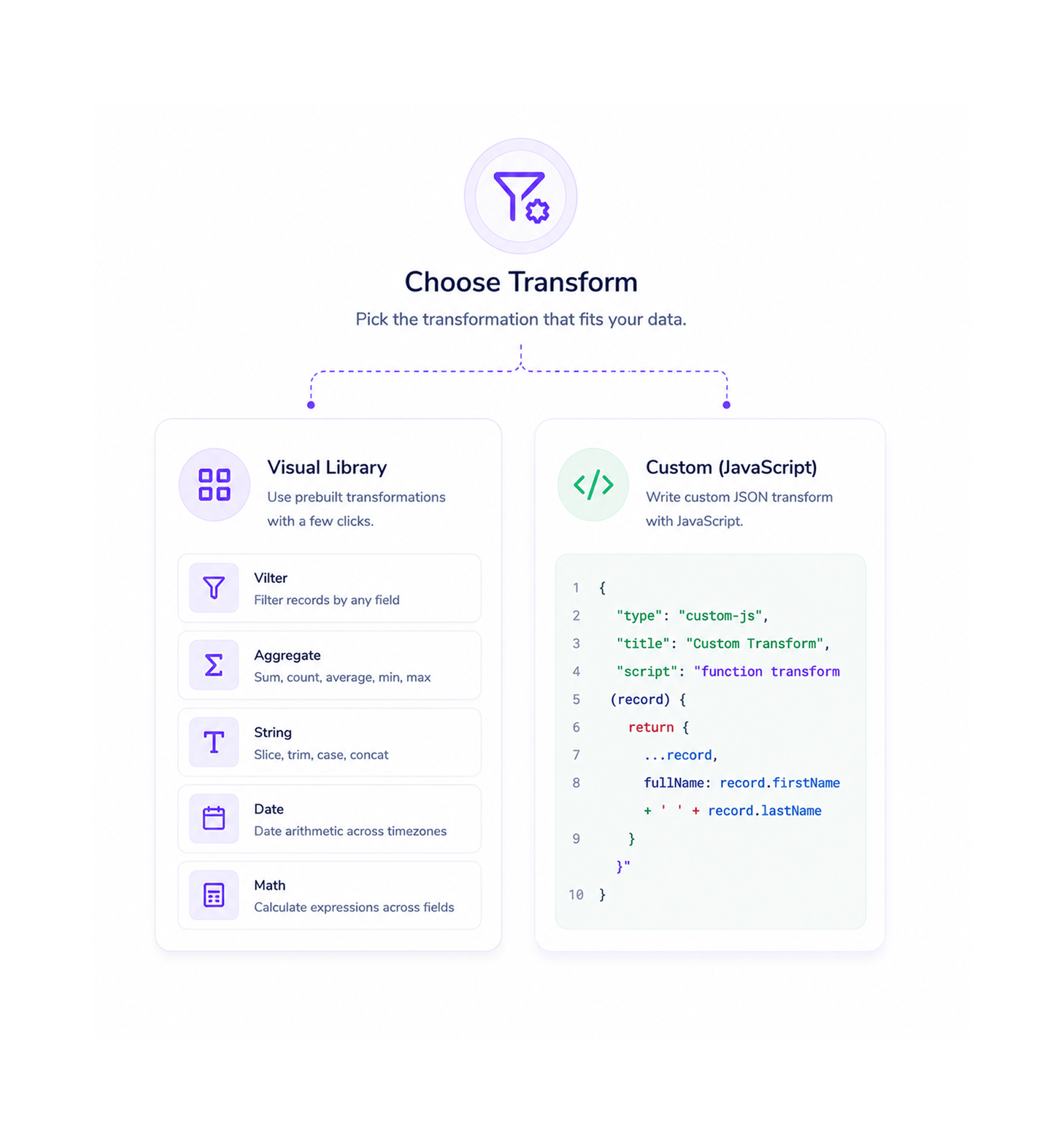
Choose the transformation

Pick from the visual transformation library filter records by any field, aggregate a list with sum, count, average, minimum, or maximum, slice and reshape strings, do date arithmetic across timezones, calculate math expressions across multiple fields. When the visual library does not cover an edge case, drop into the JavaScript editor to write a custom JSON transform with the full power of the language at your fingertips.

FilterAggregateFormatCalculateJavaScript

Configure Visually

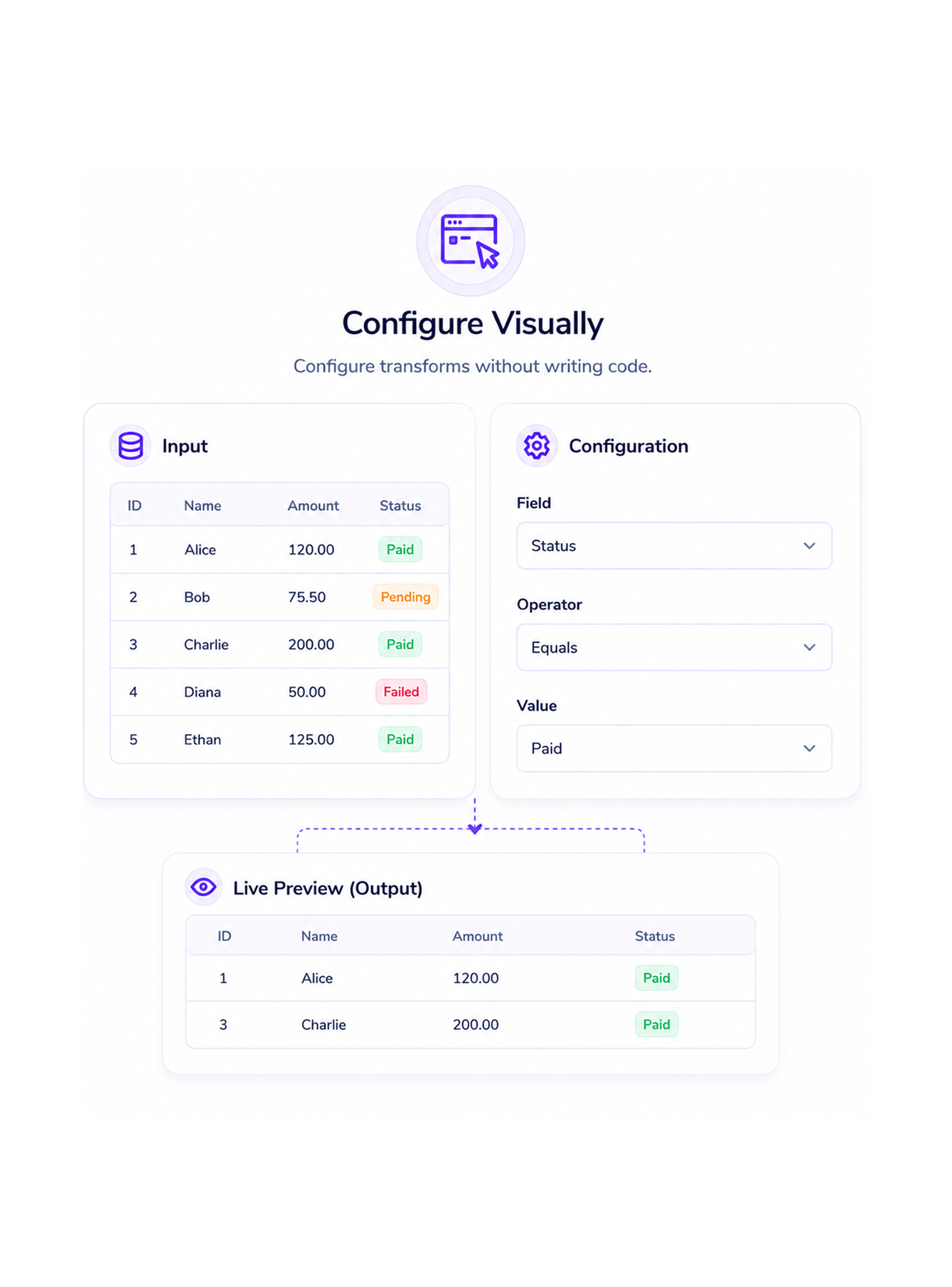
Configure without writing code

The visual editor opens with the input on the left and the configuration on the right. Pick the field to filter on, the operator to compare with, and the value to match. Pick the field to aggregate and the function to apply. Pick the string operation and the parameters it needs. Every choice updates a live preview of the output, so you see what the transform produces before saving anything.

Input PreviewLive Output PreviewNo ExpressionsPick & Configure

Pass Clean Output

Pass the clean output forward

The transformed value lands in the workflow as a new variable, available to every node that comes after. The next step picks it up the same way it would pick up any other variable drop it into the field that needs it from the variables panel and the workflow flows on. The glue code step that used to require a custom function or a manual copy paste becomes a clean visual node in the same canvas as everything else.

New VariableAvailable DownstreamNo Glue CodeSame as Any Step
Why Teams Choose REVO

Six reasons teams never go back

Once a team has a transformation layer that handles the everyday data reshaping visually and gives developers a JavaScript escape hatch when the visual editor genuinely does not cover something the old pattern of writing glue code in every workflow starts to look like manual labour nobody needed to do. These are the changes that show up first.

No more glue code between steps

No more glue code between steps

The integration step in every workflow that used to require a developer to write a small transformation function disappears. Filtering a list of records, picking three fields from a larger object, renaming the keys to match the next step's expectations all visual configuration now. The data shape mismatch friction that used to slow every new automation evaporates.

Aggregations finally make sense

Aggregations finally make sense

Sum, count, average, minimum, and maximum over a list of records used to mean explaining to a developer what you needed in a meeting, waiting for them to write it, testing it, and trying again when the output was not quite right. With the visual aggregation editor, the marketing lead who wants the total deal value across this week's leads picks the field, picks sum, and is done in seconds.

Date math without timezone headaches

Date math without timezone headaches

Adding seven days to a date, calculating the difference between two timestamps, formatting a date the way a partner system expects it, converting between timezones all built into the visual editor with the timezone handled correctly by default. The class of bugs that used to come from someone in operations doing date math by hand in a free text expression simply stops happening.

Strings reshaped with one click

Strings reshaped with one click

Concatenating a full name from first and last, extracting a domain from an email, replacing template tokens with real values, trimming whitespace, converting to upper or lower case, splitting a delimited list every string operation a workflow ever needs is a click away in the visual editor. The team stops writing the same five lines of string handling in every workflow and starts shipping more workflows instead.

JavaScript only when you actually need it

JavaScript only when you actually need it

The visual editor covers about ninety percent of the transformations any business workflow will ever need. For the genuine edge cases a complex deduplication rule, a custom format parser, a calculation with conditional logic that does not fit a single expression the JavaScript editor opens with full language access. Developers get the power, non technical teammates get the visual flow, both work in the same workflow.

Errors caught before they reach production

Errors caught before they reach production

Every transformation runs through real time validation as you configure it. Missing fields, mismatched types, references to data that does not exist, operations on values that do not support them all flagged inline with plain English explanations. The live preview shows exactly what the output will look like before you save, so the transform either configures correctly or tells you why it cannot.

Stop pasting into spreadsheets. Start transforming on the canvas.

Visual filters, visual aggregations, visual date math, visual string operations plus JavaScript for the genuine edge cases. The transformation layer your workflows have been waiting for.

Who uses REVO transforms
Deepak MehrotraDeepak MehrotraDeepak MehrotraDeepak Mehrotra

9700+

Teams transforming data without
writing code

Built for teams that want power without writing code

Operations specialists, marketing operations leads, customer success managers, automation engineers, and founders use the Revo transformation layer as the data shaping toolkit their workflows actually run on. The visual editor is the default for the team. The JavaScript editor is the escape hatch for developers when the visual library does not cover the edge case. Every team a small business reshaping a handful of fields between two applications or a larger organisation orchestrating complex multi step business process automations gets the same transformation power, with the right level of code involvement for each person doing the work.

Visual

Editor

Zero

Code Default

JS

Optional

Live

Preview

Visual Transforms

Every common operation, no code

Filtering, aggregation, string operations, date arithmetic, math calculations, field mapping. The visual editor handles every common transformation a business workflow will ever need, with a configure and preview flow that makes the output visible before anything gets saved. The team ships the workflow without anyone writing a transformation function.

Every common operation, no code
Features

Every transformation, every step

A complete data transformation toolkit built into the same workflow automation platform your team already uses. Field mapping, filtering, aggregation, string operations, date arithmetic, and a JavaScript editor for the edge cases come together in one transformation layer so your workflows finally stop needing glue code in every other step.

Field Mapping Between Steps

Field Mapping Between Steps

Move values from one step's output to another step's input with a click. Pick the source field from the variables panel, drop it into the target field in the configuration. Rename keys, restructure objects, flatten or nest as needed all visually, with every change reflected in the live preview before saving.

Visual Filtering on Any Field

Visual Filtering on Any Field

Filter a list of records by any field, with any combination of conditions. Equality, ranges, contains, starts with, ends with, regex match, is empty, is not empty. Combine conditions with and or or for compound filters. The matching subset of records flows on to the next step, the rest is discarded.

Aggregation Functions

Aggregation Functions

Sum, count, average, minimum, and maximum across any list of records. Total the deal values for the week, count the leads from a specific source, average the time spent on a stage, find the largest invoice in the month. Group by any field for sub aggregations sum revenue by region, count tickets by owner, average response time by team.

String Operations

String Operations

Concatenate, split, replace, trim, change case, extract substrings, match patterns, format with templates. Every string operation a workflow will ever need is one click in the visual editor. The class of small string handling chores that used to live in custom code now lives in the same configuration panel as every other transformation.

Date Arithmetic and Formatting

Date Arithmetic and Formatting

Add or subtract days, hours, minutes, or any other unit. Calculate the difference between two timestamps. Convert between timezones with the right rules applied automatically. Format dates the way the next system expects them. The timezone bugs that used to come from manual date math simply do not happen here.

JavaScript JSON Transforms

JavaScript JSON Transforms

When the visual editor does not cover the edge case, the JavaScript editor opens with full language access, syntax highlighting, autocomplete on the variables in scope, and a real time preview of the output. Write a custom deduplication rule, a complex parsing routine, or a multi step calculation in code, and the rest of the workflow keeps working visually around it.

Field Mapping Between Steps

Field Mapping Between Steps

Move values from one step's output to another step's input with a click. Pick the source field from the variables panel, drop it into the target field in the configuration. Rename keys, restructure objects, flatten or nest as needed all visually, with every change reflected in the live preview before saving.

Visual Filtering on Any Field

Visual Filtering on Any Field

Filter a list of records by any field, with any combination of conditions. Equality, ranges, contains, starts with, ends with, regex match, is empty, is not empty. Combine conditions with and or or for compound filters. The matching subset of records flows on to the next step, the rest is discarded.

Aggregation Functions

Aggregation Functions

Sum, count, average, minimum, and maximum across any list of records. Total the deal values for the week, count the leads from a specific source, average the time spent on a stage, find the largest invoice in the month. Group by any field for sub aggregations sum revenue by region, count tickets by owner, average response time by team.

String Operations

String Operations

Concatenate, split, replace, trim, change case, extract substrings, match patterns, format with templates. Every string operation a workflow will ever need is one click in the visual editor. The class of small string handling chores that used to live in custom code now lives in the same configuration panel as every other transformation.

Date Arithmetic and Formatting

Date Arithmetic and Formatting

Add or subtract days, hours, minutes, or any other unit. Calculate the difference between two timestamps. Convert between timezones with the right rules applied automatically. Format dates the way the next system expects them. The timezone bugs that used to come from manual date math simply do not happen here.

JavaScript JSON Transforms

JavaScript JSON Transforms

When the visual editor does not cover the edge case, the JavaScript editor opens with full language access, syntax highlighting, autocomplete on the variables in scope, and a real time preview of the output. Write a custom deduplication rule, a complex parsing routine, or a multi step calculation in code, and the rest of the workflow keeps working visually around it.

Questions & Answers

Everything you need to know

Common questions about when to use the visual editor versus the JavaScript editor, what aggregations cover, how date math handles timezones, the full list of string operations, and what happens when a transformation hits an error at runtime.

Start with the visual editor it covers about ninety percent of the data transformations any business workflow will ever need, including all the common cases of filtering, aggregation, string handling, date math, math calculations, and field mapping. Switch to the JavaScript editor only for genuine edge cases: a complex deduplication rule with custom logic, a parsing routine for an unusual input format, a calculation with conditional branches that does not fit a single expression. The visual editor is the default, the code editor is the escape hatch.

Network background
REVO · Data Transformation

Stop fighting your data. Start shaping it.

Visual filters, aggregations, string operations, date arithmetic, math calculations, field mapping plus JavaScript when you actually need it. The transformation layer your workflows deserve.