Every workflow organised every version recoverable

Create, edit, duplicate, and organise workflows into custom categories that match how your team actually thinks about the work. Built in version control with one click rollback, import and export as JSON, activate or deactivate without deleting anything, draft mode for safe edits, and real time structure validation that catches problems before they ship. A workflow automation platform that treats your library as an asset, not a list.

Every workflow
How it works

From a scattered list to a managed library in 4 steps

Build workflows and drop them into the custom categories that match how your team thinks. Edit safely in draft mode while the live version keeps running in the background. Let version control track every change so a rollback is one click away when you need it. Activate, deactivate, duplicate, or move workflows across environments without ever losing what already works.

1
2
3
4

Create & Organise

Create and organise

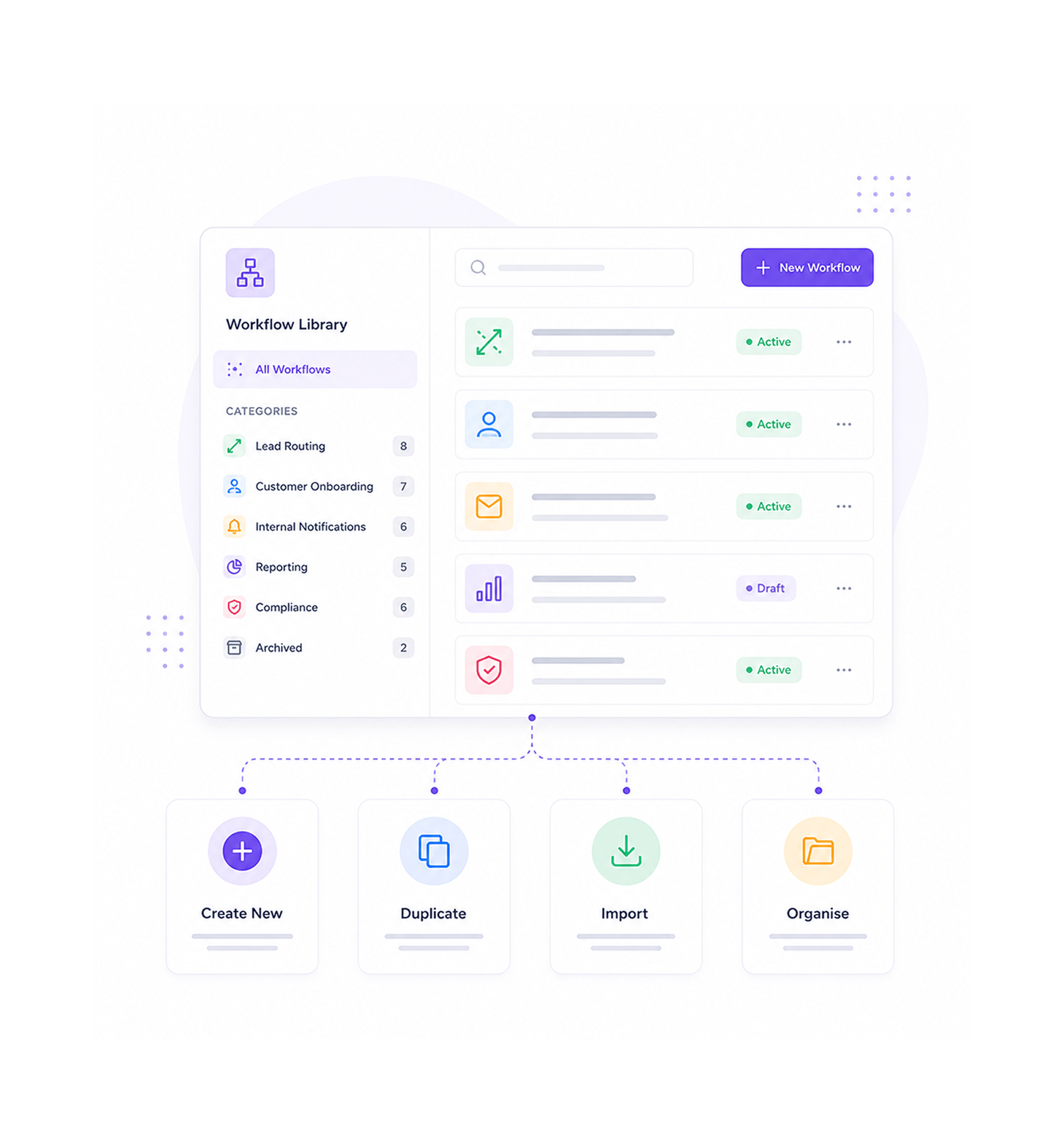
Build a new workflow from scratch, duplicate an existing one as a starting point, or import a workflow you have used somewhere else. Sort the library into custom categories Lead Routing, Customer Onboarding, Internal Notifications, Reporting, Compliance, anything you actually need. The library that used to be a flat list of forty workflows becomes a structured catalogue every teammate can navigate.

Create from ScratchDuplicateImportCustom Categories

Draft Mode

Edit in draft mode

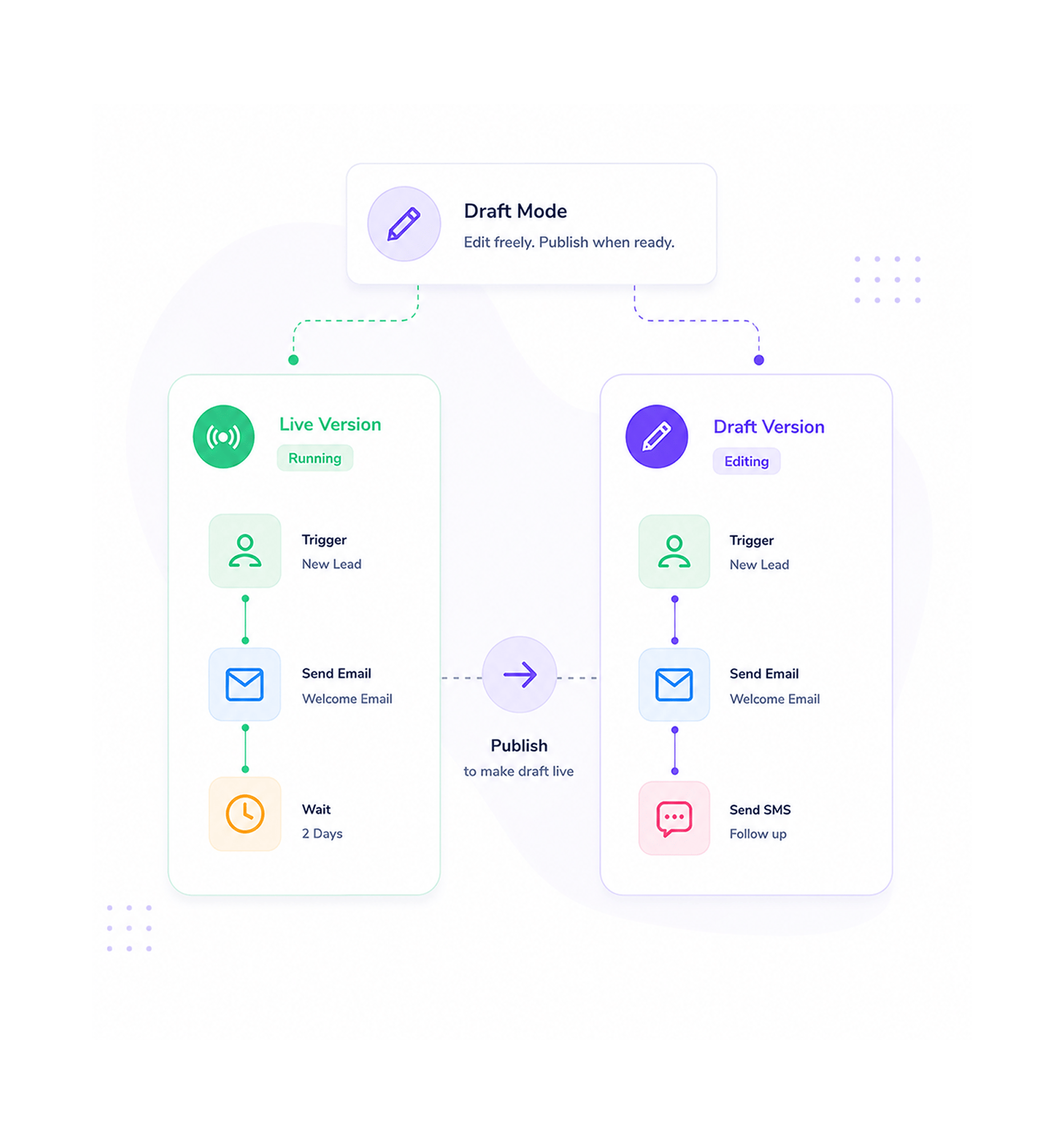
Every workflow has a live version that keeps running and a draft version you can edit freely. Make changes, try ideas, restructure branches none of it affects the production workflow until you choose to publish. Real time structure validation runs while you edit, so problems get caught and fixed in the draft before they have any chance of reaching the live version.

Live Stays LiveSafe Draft EditsReal Time ValidationPublish When Ready

Version Control

Version control tracks everything

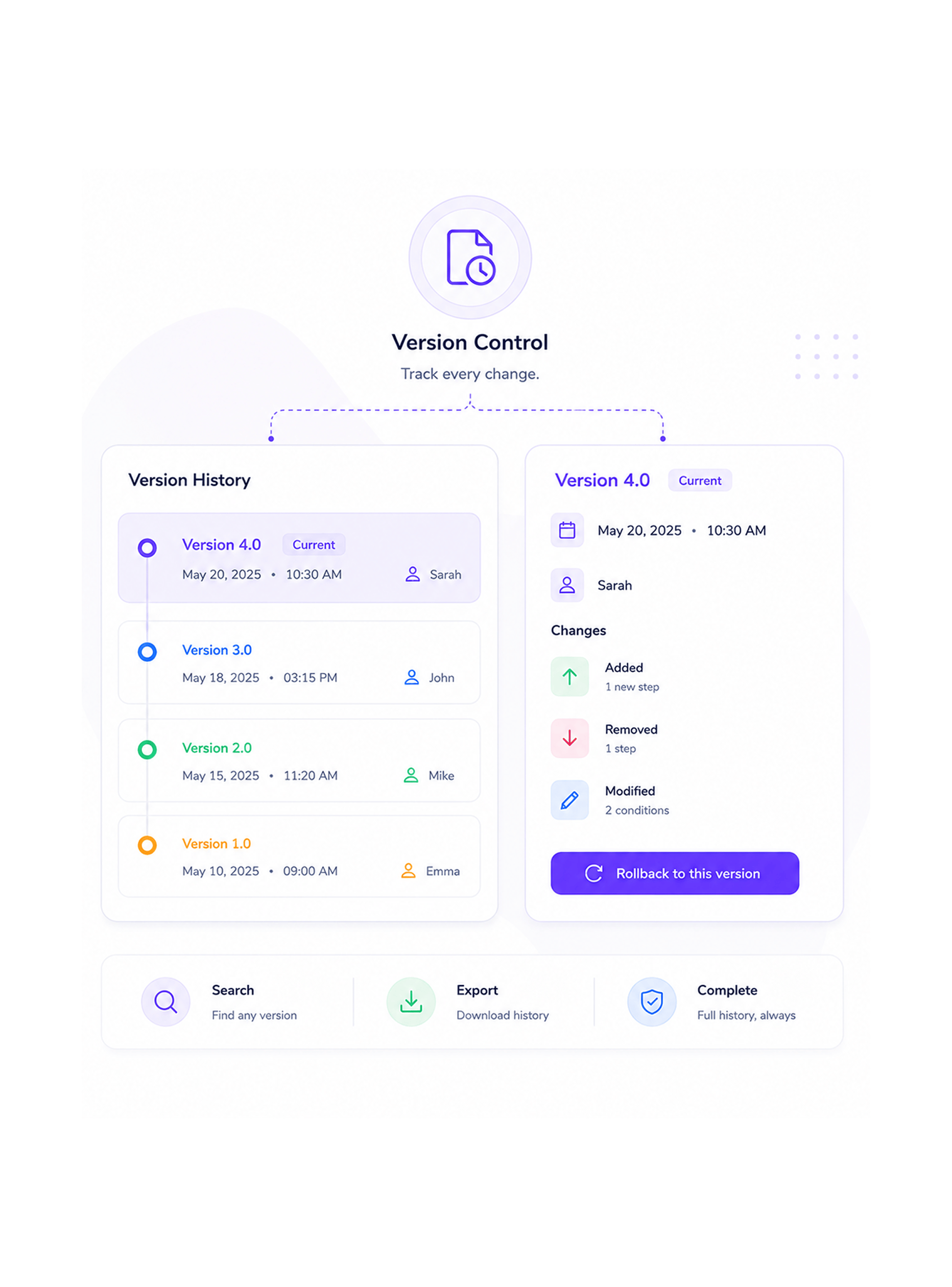
Every published change creates a new version in the workflow's history, with a timestamp, the user who made the change, and the differences from the previous version. A change that turned out to be wrong is one click away from being rolled back. The history is searchable, exportable, and complete which means experimentation on production workflows stops carrying the kind of risk that makes teams avoid changing them in the first place.

Full Version HistoryOne Click RollbackChange DiffsAudit Trail

Activate or Move

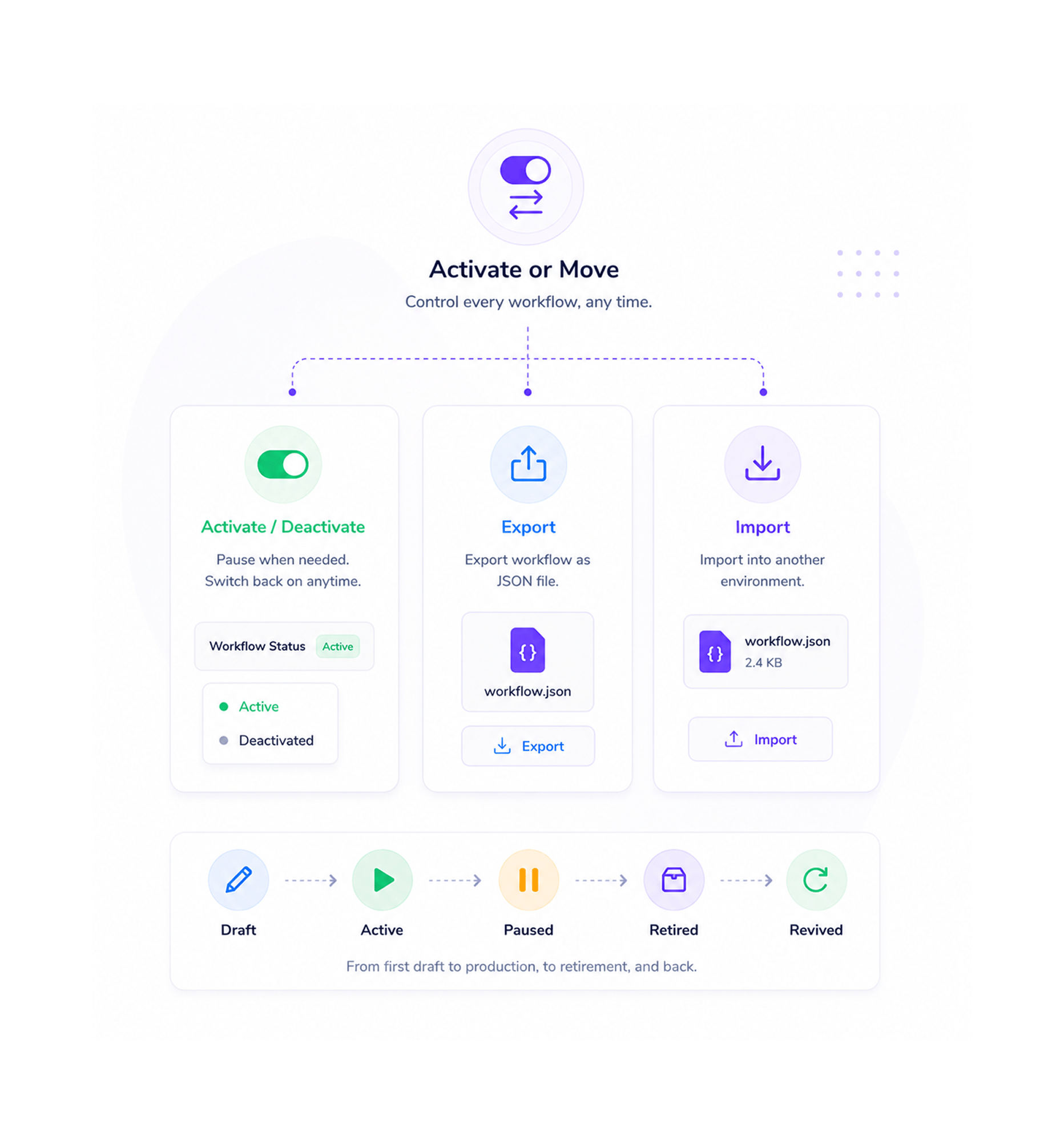
Activate, deactivate, or move

A workflow you want to pause for a week stays in the library, just deactivated no deletion, no loss of history, ready to switch back on whenever you need it. A workflow you want to ship to another environment exports cleanly to a JSON file you can import elsewhere. The library handles the lifecycle of every workflow you have ever built, from first draft to production, to retirement, to revival.

Activate ToggleDeactivate SafelyJSON ExportImport to Any Workspace
Why Teams Choose REVO

Six reasons teams never go back

Once a team treats workflows as a real library with categories, versions, drafts, exports, and a rollback button always within reach the old way of working in a flat list with no safety net feels like editing production code directly on a server. These are the changes that show up first.

Workflows organised, not scattered

Workflows organised, not scattered

A workspace running forty workflows stops looking like a flat list nobody can navigate and starts looking like a structured library with Lead Routing here, Customer Onboarding there, Internal Notifications in their own folder. New teammates find what they are looking for. Stakeholders understand what the team actually owns. The cognitive overhead of managing the library disappears as the library starts managing itself.

Edit safely without breaking production

Edit safely without breaking production

Draft mode means every edit happens on a separate version while the live workflow keeps running. Experiment with a new branch, restructure the trigger logic, swap an action for a different one the production workflow keeps doing its job in the background. The fear of breaking a workflow that the business depends on stops being a reason to leave it broken in the first place.

One click rollback saves the day

One click rollback saves the day

Every published change creates a version in the workflow's history. A change that turned out to be wrong rolls back with a single click to any earlier version you trust. The middle of the night production incident that used to require somebody to remember exactly what they changed three days ago becomes a quick selection from the version history, fixed in seconds, with the team back to healthy.

Duplicate and remix what works

Duplicate and remix what works

A workflow you spent two weeks perfecting becomes the starting point for the next three you build. Duplicate it, rename it, change the parts that need to be different, and ship a new automation in an afternoon instead of from scratch. The patterns the team has learned over time get reused instead of forgotten, which is the only way an automation library actually compounds.

Move workflows between environments

Move workflows between environments

Built a workflow in staging that needs to run in production? Export it as JSON, import it into the production workspace, done. Want to share a useful pattern with a sister team? Send them the JSON. The portability problem that used to keep good workflows trapped inside the workspace where they were built disappears entirely, and the team finally has a clean way to move automations between development and production environments.

Pause without losing anything

Pause without losing anything

A workflow you want to stop running for a week stays in the library, just deactivated. The trigger stops firing, no new runs happen, but every node, every connection, every version, every test result stays exactly where it was. Switch it back on when you need it and it picks up from where you paused. The deletion that used to be the only off switch disappears in favour of a real activation toggle.

Keep every workflow. Recover every version.

Custom categories. Draft mode. Version history with one click rollback. JSON export. The management layer your workflow library has been asking for.

Who uses REVO management
Deepak MehrotraDeepak MehrotraDeepak MehrotraDeepak Mehrotra

8400+

Teams managing workflow libraries,
not lists

Built for teams that run dozens of workflows, not three

Operations leaders, automation specialists, customer success managers, marketing operations teams, and founders use the Revo management layer to keep their workflow library organised, versioned, and recoverable as it grows from three workflows to thirty to three hundred. The custom categories are the structure. The draft mode is the safety net. The version history is the audit trail. The JSON export is the portability. Every team a small business with a handful of workflows or a larger organisation orchestrating hundreds of business process automations gets the same management discipline built right into the platform.

Version

Control

JSON

Export

Draft

Mode

Categories

Library Organisation

Custom categories, clean structure

Sort the workflow library into the categories your team actually uses Lead Routing, Customer Onboarding, Internal Notifications, Reporting, Compliance. Duplicate working patterns to bootstrap new automations. The library that used to be forty workflows in a flat list becomes a structured catalogue every teammate can navigate with their eyes closed.

Custom categories, clean structure
Features

Everything the management layer ships with

A complete workflow management toolkit built into the same workflow automation platform your team already uses. Custom categories, version control with rollback, JSON import and export, draft mode, activate and deactivate toggles, and real time structure validation come together so the library scales cleanly from your first three workflows to your three hundredth.

Custom Categories and Organisation

Custom Categories and Organisation

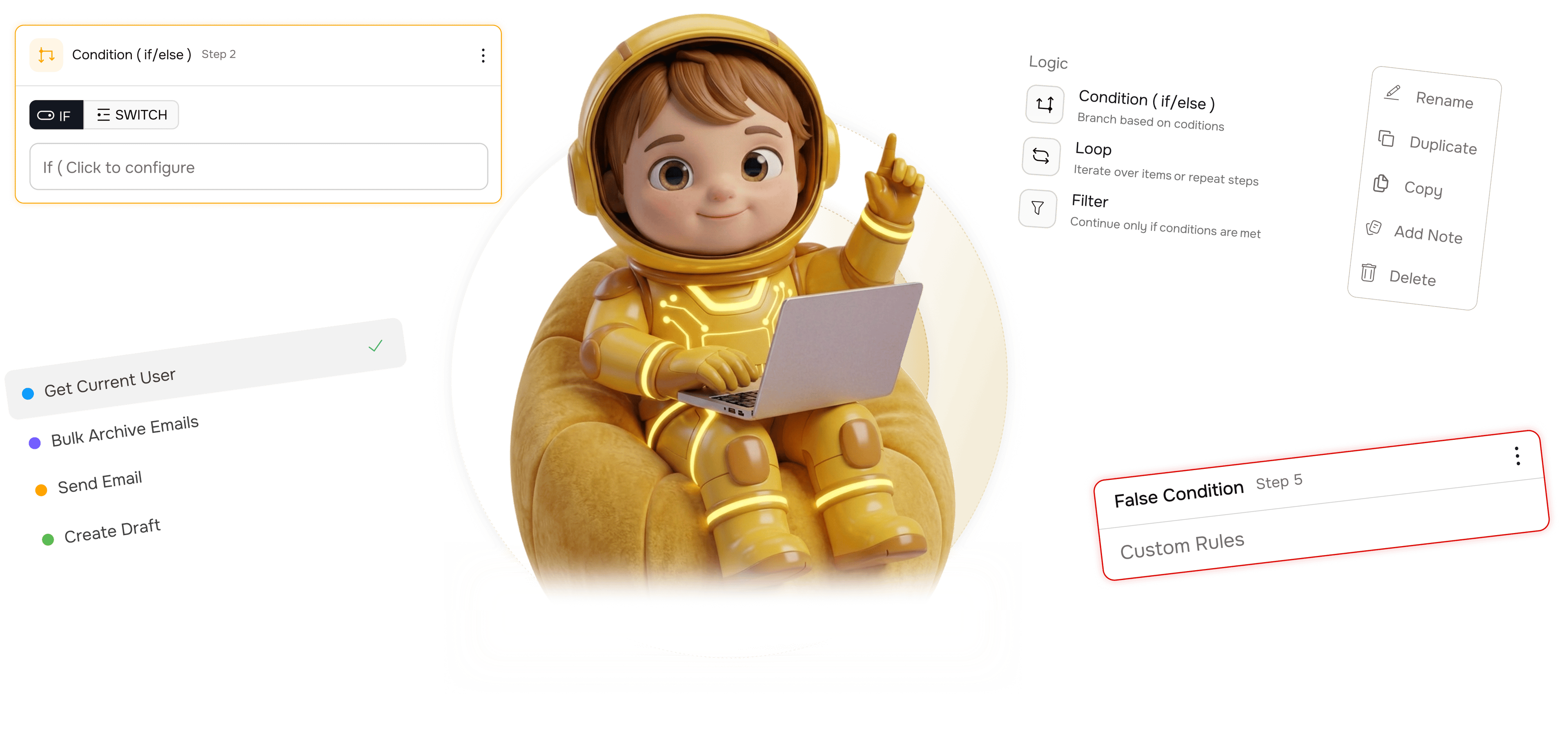
Sort the workflow library into the categories that match how your team thinks Lead Routing, Customer Onboarding, Internal Notifications, Reporting, Compliance, whatever you actually need. Workflows can sit in one category or several. Search across the whole library, or scope it down to a single category when you know exactly where to look.

Version Control with Rollback

Version Control with Rollback

Every published change creates a new version in the workflow's history with a timestamp, the user who made the change, and a clean diff of what is different from the previous version. One click rolls back to any earlier version you trust. Experimentation stops carrying the kind of risk that makes teams avoid changing workflows in the first place.

Import and Export as JSON

Import and Export as JSON

Every workflow exports to a clean JSON file you can save, share, or import into another workspace. Move automations from staging to production, share useful patterns with a sister team, or keep an offline backup of a workflow you care about. The portability problem that used to trap good workflows inside one environment disappears entirely.

Draft Mode for Safe Edits

Draft Mode for Safe Edits

Every workflow has a live version running production traffic and a draft version you can edit freely. Experiment with new branches, restructure the trigger logic, swap actions for different ones the live workflow keeps doing its job in the background until you choose to publish your changes. The safety net every team needed is finally built in.

Activate and Deactivate Toggle

Activate and Deactivate Toggle

Pause a workflow for a day, a week, a month, or forever all without deleting anything. Deactivated workflows stop running but keep every node, every version, every test result intact. Switch the toggle back on and the workflow resumes from where you paused it, ready to run as if it had never stopped.

Real Time Structure Validation

Real Time Structure Validation

The platform watches the structure of every workflow as you build and edit. Disconnected nodes, broken branches, missing required configuration, infinite loops without a safe limit all flagged in real time with plain English explanations of what needs fixing. Problems get caught in the draft, never in production.

Custom Categories and Organisation

Custom Categories and Organisation

Sort the workflow library into the categories that match how your team thinks Lead Routing, Customer Onboarding, Internal Notifications, Reporting, Compliance, whatever you actually need. Workflows can sit in one category or several. Search across the whole library, or scope it down to a single category when you know exactly where to look.

Version Control with Rollback

Version Control with Rollback

Every published change creates a new version in the workflow's history with a timestamp, the user who made the change, and a clean diff of what is different from the previous version. One click rolls back to any earlier version you trust. Experimentation stops carrying the kind of risk that makes teams avoid changing workflows in the first place.

Import and Export as JSON

Import and Export as JSON

Every workflow exports to a clean JSON file you can save, share, or import into another workspace. Move automations from staging to production, share useful patterns with a sister team, or keep an offline backup of a workflow you care about. The portability problem that used to trap good workflows inside one environment disappears entirely.

Draft Mode for Safe Edits

Draft Mode for Safe Edits

Every workflow has a live version running production traffic and a draft version you can edit freely. Experiment with new branches, restructure the trigger logic, swap actions for different ones the live workflow keeps doing its job in the background until you choose to publish your changes. The safety net every team needed is finally built in.

Activate and Deactivate Toggle

Activate and Deactivate Toggle

Pause a workflow for a day, a week, a month, or forever all without deleting anything. Deactivated workflows stop running but keep every node, every version, every test result intact. Switch the toggle back on and the workflow resumes from where you paused it, ready to run as if it had never stopped.

Real Time Structure Validation

Real Time Structure Validation

The platform watches the structure of every workflow as you build and edit. Disconnected nodes, broken branches, missing required configuration, infinite loops without a safe limit all flagged in real time with plain English explanations of what needs fixing. Problems get caught in the draft, never in production.

Questions & Answers

Everything you need to know

Common questions about how categories work, how version history is retained, what JSON portability unlocks, the difference between draft and live, what structure validation catches, and why deactivation is better than deletion.

Categories are flexible folders you create to match how your team thinks about the work Lead Routing, Customer Onboarding, Reporting, Compliance, anything you find useful. A workflow can sit in a single category, in multiple categories, or in none at all. Search across the whole library or scope to a single category. Rename, merge, or split categories at any time without affecting the underlying workflows.

Network background
REVO · Workflow Management

Stop losing workflows. Start managing them.

Custom categories. Draft mode. Version control with rollback. JSON export. Activate, deactivate, duplicate, and recover every workflow you have ever built.