A visual schedule builder anyone on the team can use, plus full advanced schedule expressions for the engineers who want them. Every schedule is timezone aware, so the workflow that should run at nine in the morning runs at nine wherever the team is. Common presets for daily, weekly, and monthly. One time runs for one off jobs. A next run preview before you save anything. A workflow automation platform that finally makes scheduling something every teammate can do, not just the developer in the corner.
Pick a schedule type that matches what you actually need a common preset, a custom schedule, or a one time run. Build it visually with day pickers and time pickers, or drop into the advanced expression editor when you want fine grained control. Set the timezone so the workflow runs in the timezone you mean. Preview the next several runs before you save anything.
Pick a Type
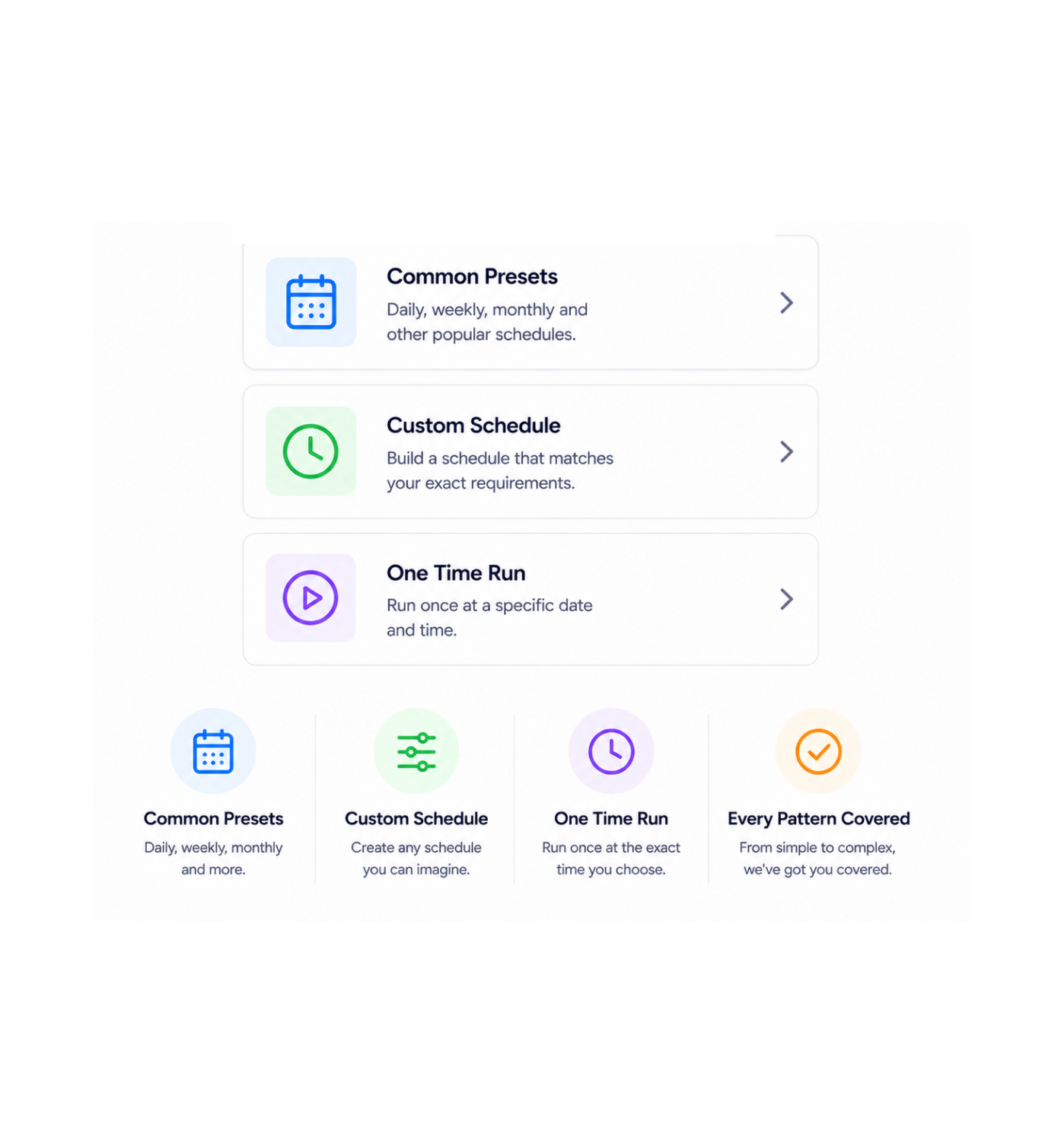
Three categories cover every scheduling need a workflow will ever have. Common presets handle the daily, weekly, and monthly runs that make up most of the work. Custom schedules let you describe an unusual pattern every weekday at noon, every Tuesday and Thursday at three thirty, every fifteen minutes during business hours. One time schedules cover the one off jobs that should run exactly once at a specific moment.
Visual Schedule Builder
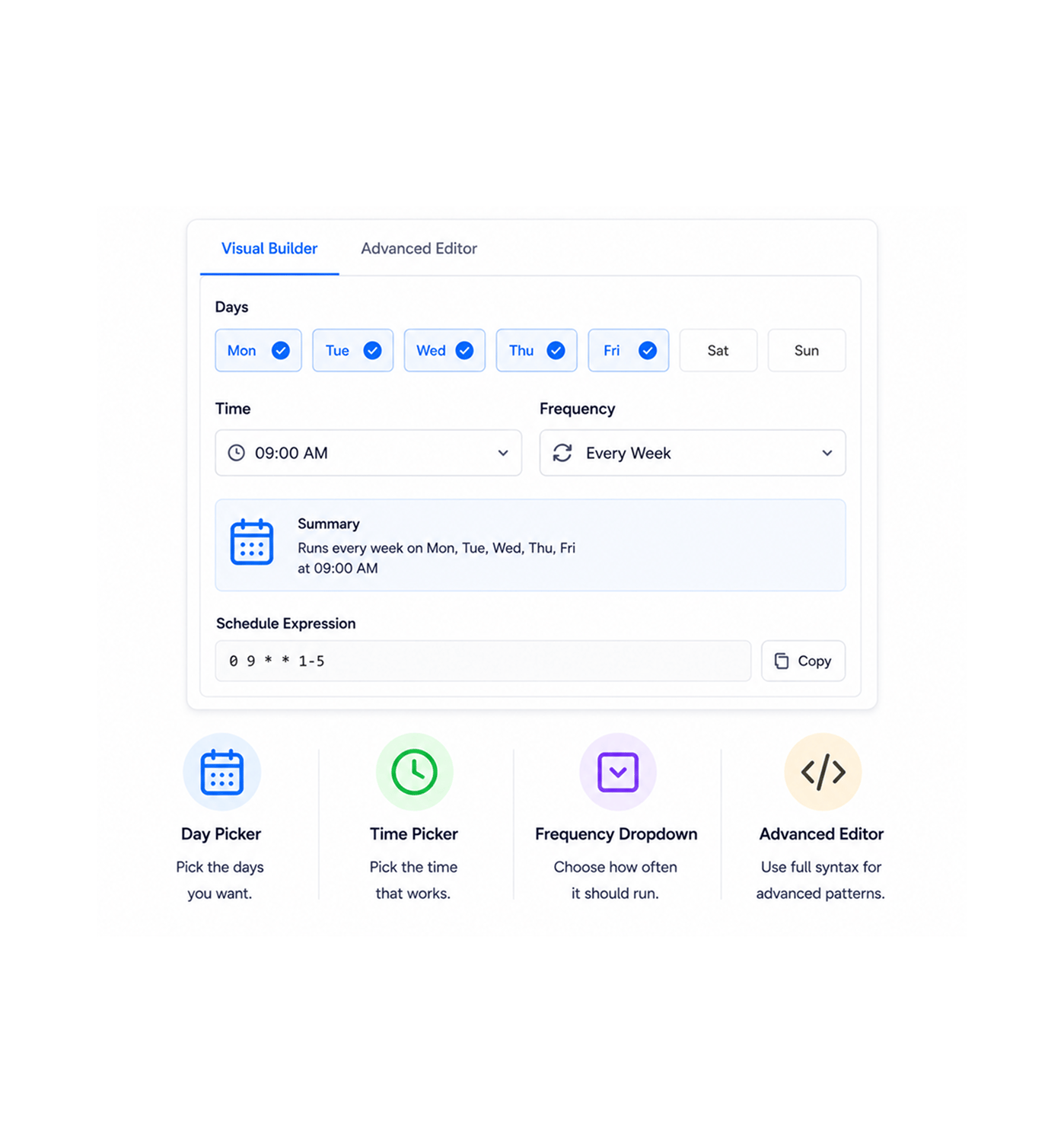
The visual builder uses day pickers, time pickers, and frequency dropdowns that anyone on the team can use. Pick the days you want, pick the time, set the frequency, and the platform composes the underlying schedule expression for you. For the engineers who prefer it, the advanced expression editor accepts the full schedule syntax for unusual patterns, with the visual builder updating in real time to show the same schedule both ways.
Timezone Aware
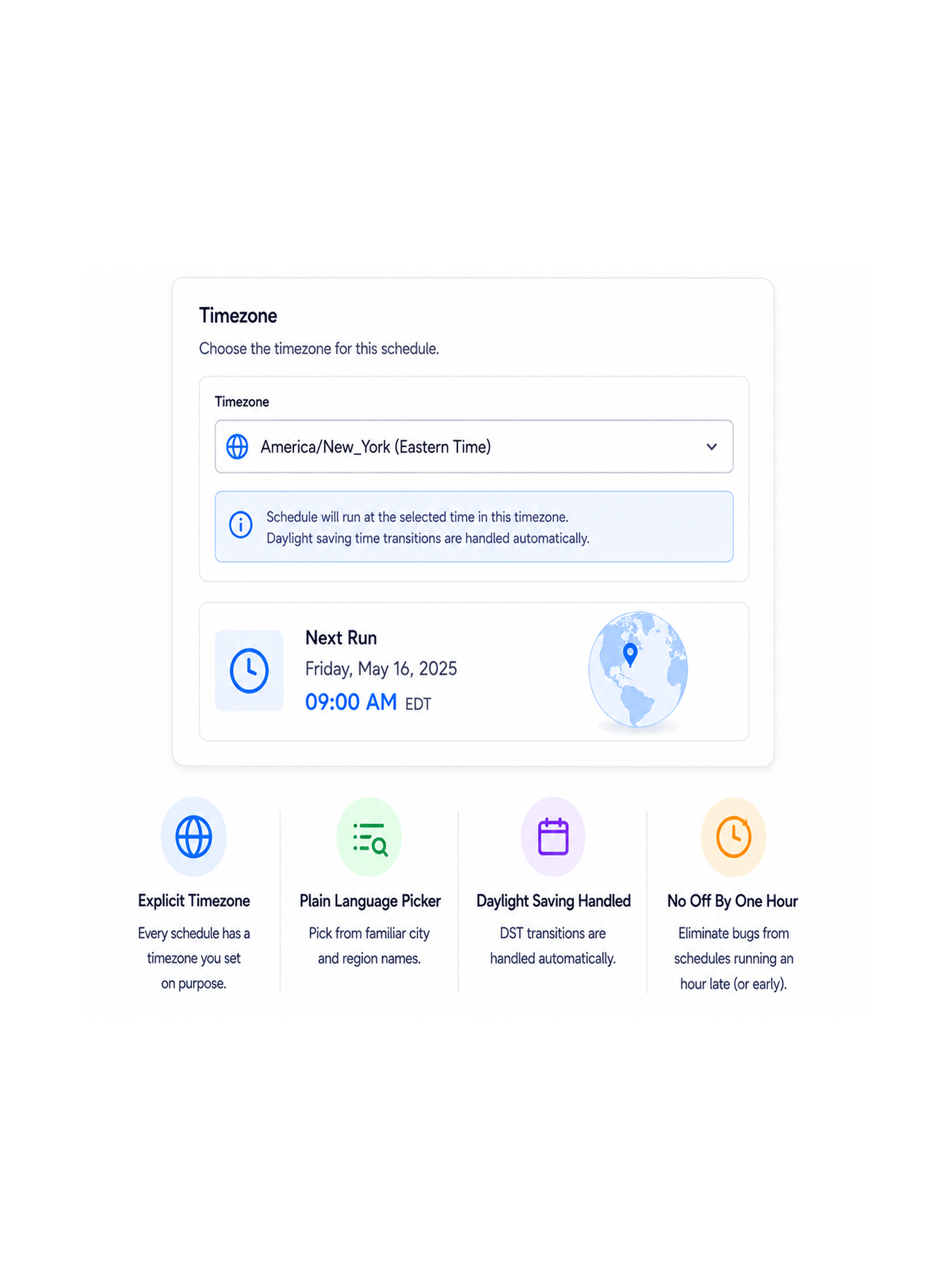
A workflow that should run at nine in the morning needs to know which nine in the morning you meant. Every schedule has an explicit timezone that you set in plain language pick from a familiar list of city or region names, and the schedule respects daylight saving transitions automatically. The class of bugs that used to come from a workflow firing an hour late twice a year simply does not happen.
Next Run Preview
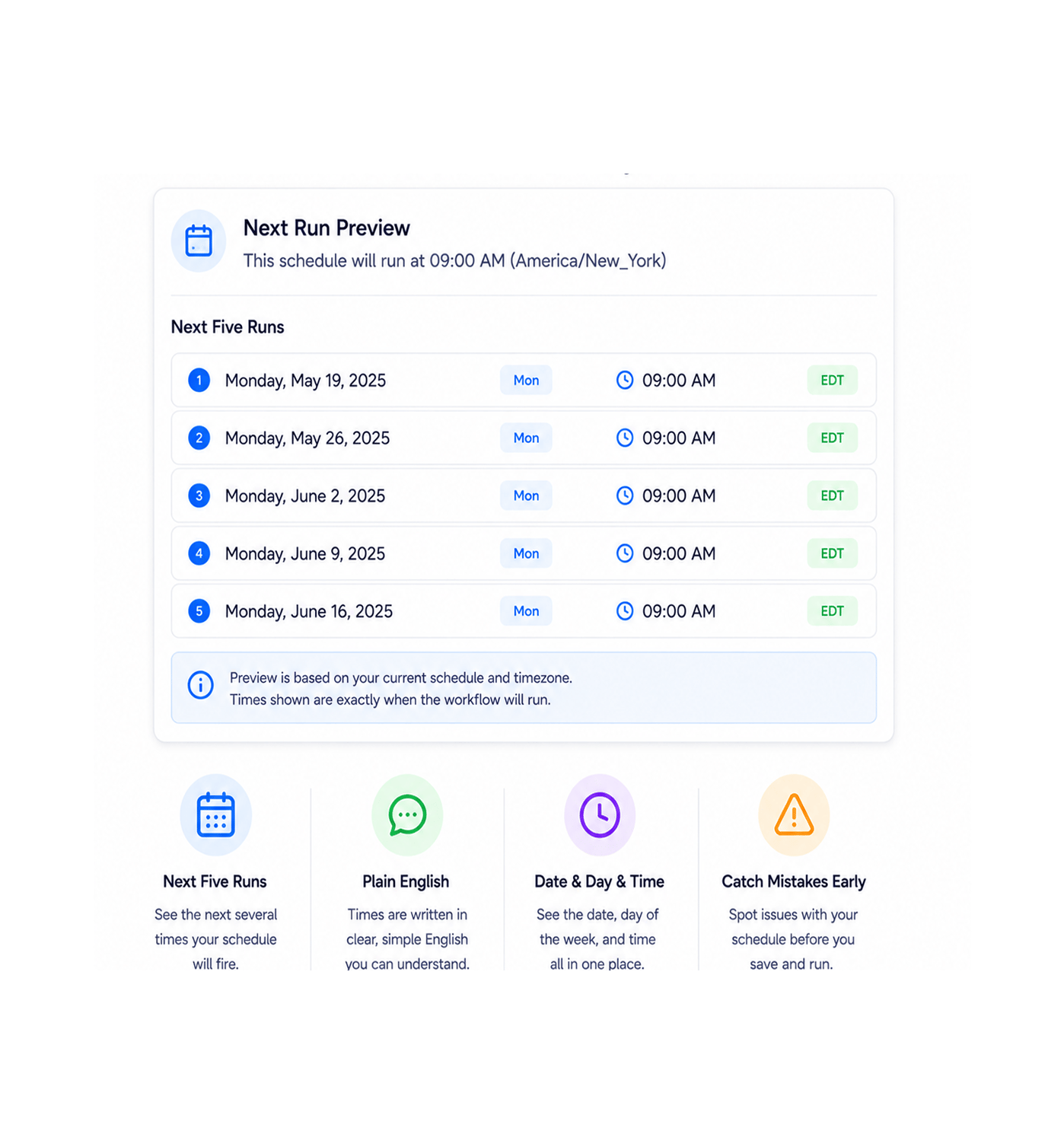
The next run preview shows the next several times the schedule will fire, written out in plain English with the date, the day of the week, and the time in your chosen timezone. The schedule that you thought would run every Monday but actually runs on the first Monday of each month gets caught here, not three weeks later when nobody can figure out why the report keeps not arriving. What you see in the preview is exactly what will happen.
Once a team has a schedule builder that anyone on the team can use, a timezone model that just works, and a preview that catches the mistakes before they ship the old pattern of asking an engineer to write a schedule expression and hoping it does the right thing in three months starts looking like the slow version of the same workflow. These are the changes that show up first.
The visual schedule builder uses day pickers, time pickers, and frequency dropdowns that any teammate can use without learning anything new. The marketing operations lead who needs a Monday morning report, the customer success manager who wants a weekly digest, the finance specialist who runs a monthly reconciliation all of them set up their own schedules in seconds instead of filing a ticket and waiting for engineering to write something in a configuration file.
Daily at a specific time, weekly on specific days, monthly on a specific date the patterns that make up most scheduling needs are one click away as presets. The team picks the preset, adjusts the time, and is done. The every Monday at nine or first of every month at midnight schedule that used to require a few minutes of fiddling with expression syntax becomes a thirty second decision.
Every schedule has an explicit timezone you set in plain language, and the platform handles daylight saving transitions automatically. The workflow that fires twice an hour late on a Sunday morning in March because somebody forgot about the clock change becomes a story from the past. The team in Berlin gets nine in the morning Berlin time. The team in New York gets nine in the morning New York time. Nobody guesses, nobody calculates, nothing breaks at the seasonal switchover.
The next run preview shows the next several times your schedule will actually fire, in plain English, before you save anything. The schedule you thought would run every Monday but actually runs on the first Monday of each month gets caught at setup time, not three weeks later when somebody wonders why the report keeps not arriving. The save and pray cycle gets replaced with save and know.
Not everything should be recurring. The data export for next Friday's board meeting, the cleanup run before Tuesday's product launch, the migration job that should run at exactly midnight on the thirty first all natural fits for a one time schedule rather than a recurring pattern. Pick the date, pick the time, save. The workflow fires exactly once and then stays quietly in the library until you need it again.
The visual builder covers the common patterns elegantly, and the advanced expression editor covers the unusual ones for the engineers who want fine grained control. Every fifteen minutes during business hours on weekdays only, the last Friday of every quarter, every weekday at noon but skip the first of the month patterns the visual builder cannot quite express get handled with full schedule syntax, and both views stay in sync so the engineer who wrote it and the operations lead who maintains it are looking at the same schedule.
Visual builder, common presets, one time runs, advanced expressions for power users, timezone aware scheduling, and a next run preview that catches mistakes before they ship.
9300+
Teams scheduling recurring work without
a developer
Operations leaders, marketing operations specialists, customer success managers, finance teams, automation engineers, and founders use Revo as the workflow automation platform where every recurring job the morning report, the weekly digest, the monthly reconciliation, the quarterly audit finally has a real home. The visual builder is the entry point for everyone. The presets are the fast lane for the common patterns. The timezone awareness is the safety net. The next run preview is the confidence check. Every team a small business running a handful of recurring jobs or a larger organisation orchestrating hundreds of business process automations on dozens of schedules gets the same builder, the same timezone model, and the same level of confidence before saving.
Builder
Aware
Presets
Preview
Day pickers, time pickers, and frequency dropdowns let anyone on the team build a schedule without learning syntax. Common presets cover the everyday patterns in one click. The advanced expression editor handles the unusual patterns for the engineers who want fine grained control, with both views staying in sync so the team can read each other's work.
A complete scheduling toolkit built into the same workflow automation platform your team already uses. Visual builder, common presets, advanced schedule expressions, timezone aware runs, one time schedules, and a next run preview come together so recurring work finally gets the kind of scheduling story it always deserved.
Day pickers, time pickers, and frequency dropdowns let anyone on the team build a schedule without learning new syntax. Pick the days, pick the time, set the frequency, and the platform composes the underlying schedule for you. The marketing lead and the customer success manager set up their own schedules in seconds without filing a ticket.
Daily at a specific time, weekly on specific days, monthly on a specific date the patterns that make up most scheduling needs are one click away as presets. The team picks the preset, adjusts the time if needed, and is done. The every Monday at nine or first of every month at midnight schedule becomes a thirty second decision.
Standard schedule expression syntax for power users who need fine grained control over unusual patterns. Every fifteen minutes during business hours on weekdays only, the last Friday of every quarter, every weekday at noon but skip the first of the month patterns the visual builder cannot quite express get handled with full expression syntax, with the visual view staying in sync.
Every schedule has an explicit timezone you pick in plain language from a familiar list of city or region names. The platform handles daylight saving transitions automatically so the workflow that runs at nine in the morning runs at nine all year round, not eight half the year because somebody forgot about the clock change.
Not everything should be recurring. One time schedules let you pick a specific date and time for a workflow to run exactly once. The data export for next Friday's board meeting, the cleanup before Tuesday's launch, the migration that should run at midnight on the thirty first all natural fits, all configured in seconds, all staying in the library after the run for the next time you need them.
Before you save the schedule, the platform shows the next several times it will fire written out in plain English with the date, the day of the week, and the time in your chosen timezone. The schedule that you thought would run every Monday but actually runs on the first Monday of each month gets caught here, not three weeks later when nobody can figure out why the report keeps missing.
Day pickers, time pickers, and frequency dropdowns let anyone on the team build a schedule without learning new syntax. Pick the days, pick the time, set the frequency, and the platform composes the underlying schedule for you. The marketing lead and the customer success manager set up their own schedules in seconds without filing a ticket.
Daily at a specific time, weekly on specific days, monthly on a specific date the patterns that make up most scheduling needs are one click away as presets. The team picks the preset, adjusts the time if needed, and is done. The every Monday at nine or first of every month at midnight schedule becomes a thirty second decision.
Standard schedule expression syntax for power users who need fine grained control over unusual patterns. Every fifteen minutes during business hours on weekdays only, the last Friday of every quarter, every weekday at noon but skip the first of the month patterns the visual builder cannot quite express get handled with full expression syntax, with the visual view staying in sync.
Every schedule has an explicit timezone you pick in plain language from a familiar list of city or region names. The platform handles daylight saving transitions automatically so the workflow that runs at nine in the morning runs at nine all year round, not eight half the year because somebody forgot about the clock change.
Not everything should be recurring. One time schedules let you pick a specific date and time for a workflow to run exactly once. The data export for next Friday's board meeting, the cleanup before Tuesday's launch, the migration that should run at midnight on the thirty first all natural fits, all configured in seconds, all staying in the library after the run for the next time you need them.
Before you save the schedule, the platform shows the next several times it will fire written out in plain English with the date, the day of the week, and the time in your chosen timezone. The schedule that you thought would run every Monday but actually runs on the first Monday of each month gets caught here, not three weeks later when nobody can figure out why the report keeps missing.
Common questions about the visual builder versus the advanced expression editor, how timezones are handled across daylight saving transitions, what the common presets cover, how one time schedules work, what the next run preview shows, and what happens if a scheduled run is missed because of downtime.
Start with the visual builder it covers the vast majority of scheduling needs through day pickers, time pickers, and frequency dropdowns that anyone on the team can use. Switch to the advanced expression editor only when the visual builder cannot quite express the pattern you need, such as every fifteen minutes during business hours, the last Friday of every quarter, or skipping specific days within a recurring pattern. Both editors stay in sync, so a schedule built in one view can be read in the other.
Visual builder. Common presets. Advanced expressions. Timezone aware runs. One time schedules. Next run preview. The scheduling story your recurring work has been waiting for.