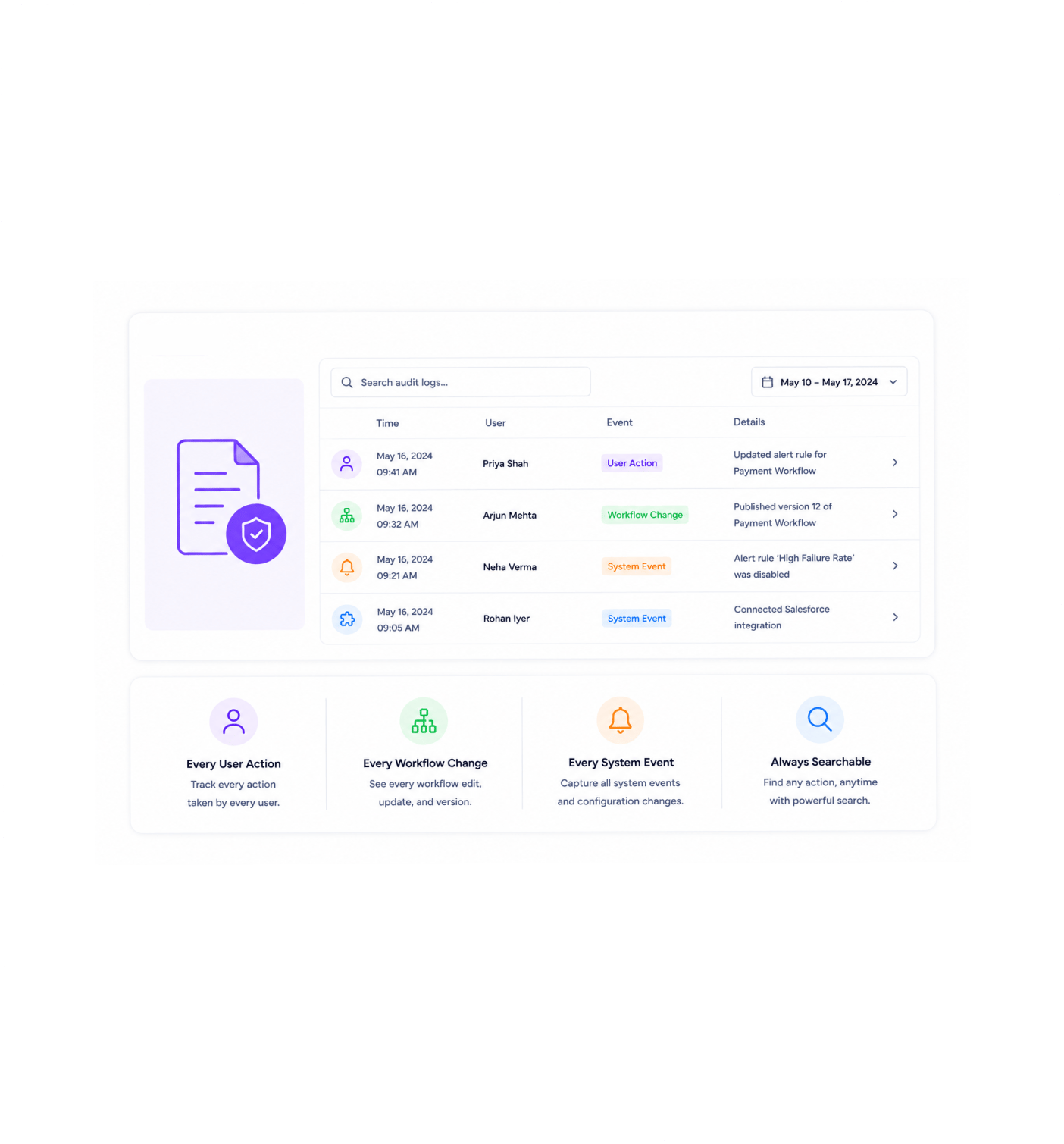
Get notified the moment a workflow fails through email and in app notifications. Optional success notifications for the workflows you want to confirm. Custom alert conditions for the specific patterns your team cares about. Execution alerts configurable per workflow. Audit logs that track every user action, every workflow change, and every system event. A workflow automation platform where the right person finds out at the right moment, instead of three days later when a customer complains.
Workflow failures send instant alerts through email and in app the moment they happen. Optional success notifications confirm the workflows you actively want to track. Custom alert conditions catch the specific patterns your team cares about. Per workflow configuration tunes every rule to the workflow it belongs to. Audit logs capture every user action, every workflow change, and every system event so the who did what question always has an answer.
Instant Failure Alerts
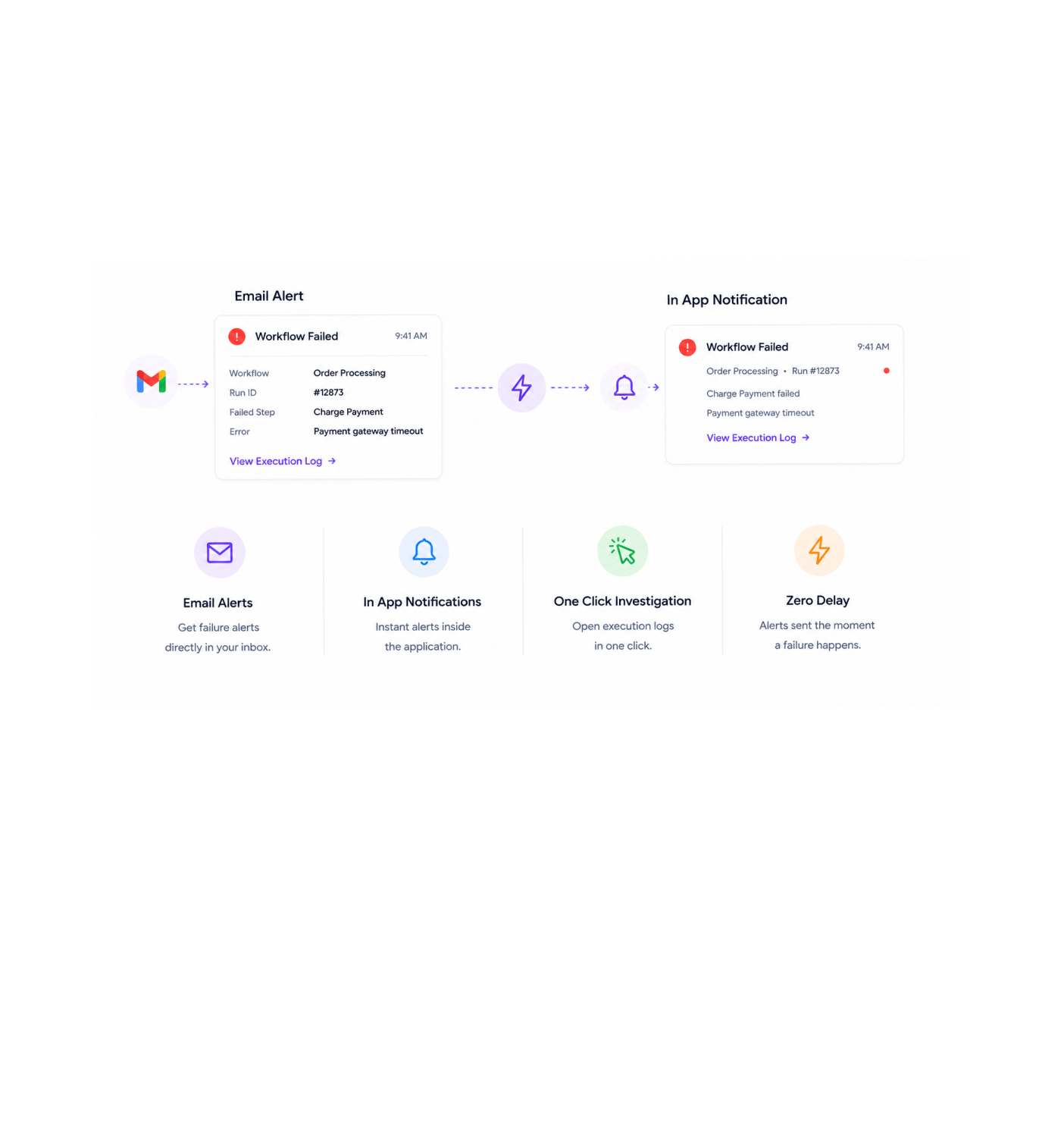
The moment a workflow fails, the right people on the team get notified through email and in app no delay, no batching, no waiting for the next polling cycle. The notification includes the workflow name, the run identifier, the failing step, the error message, and a direct link straight into the execution log so the person who got the alert can start investigating in one click. The we found out the workflow had been failing for three days because a customer complained experience simply stops happening.
Custom Conditions
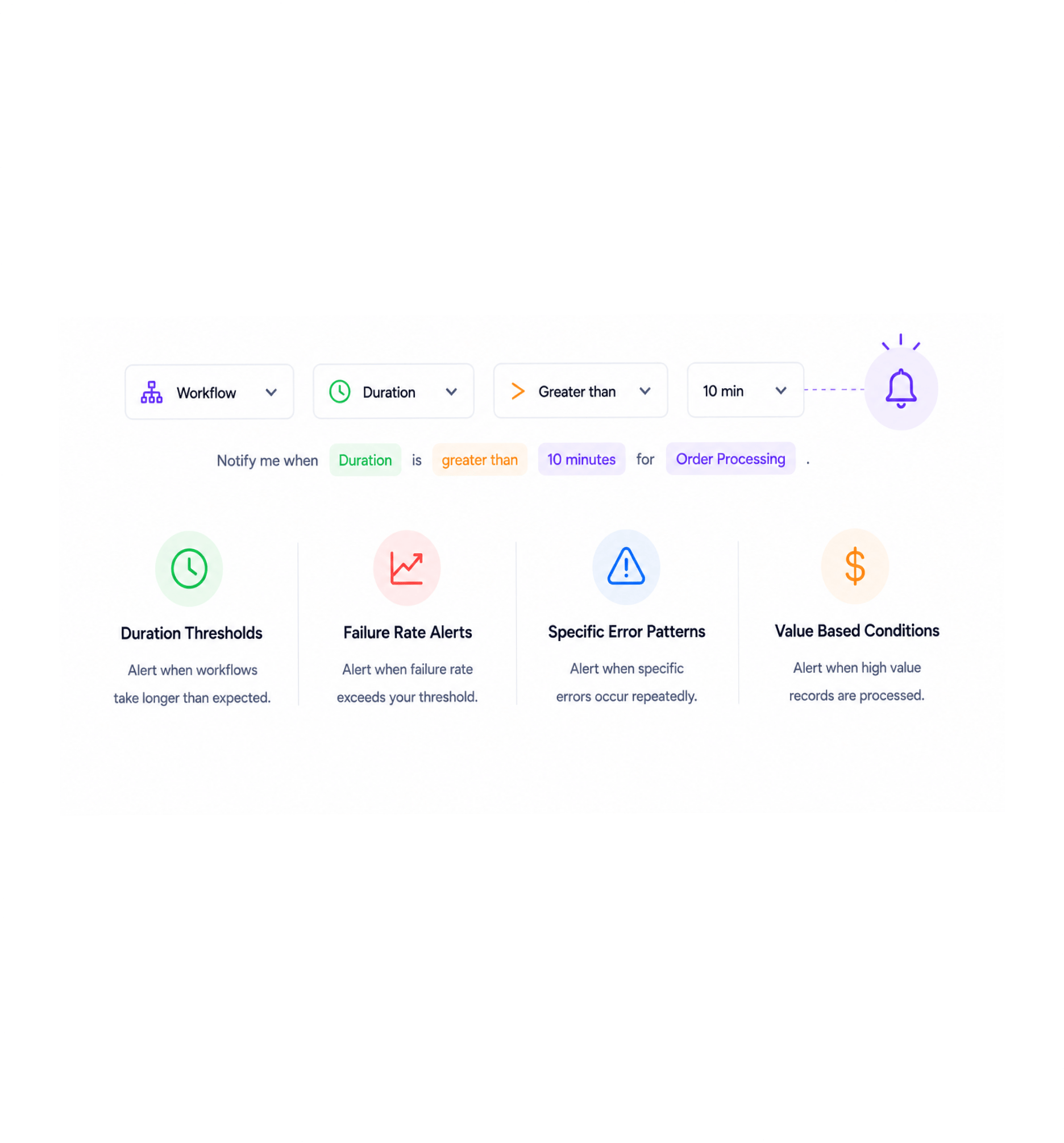
Beyond the default failure alerts, every workflow can have custom alert conditions for the specific patterns that matter to your team. Fire an alert when a workflow takes longer than expected. Fire when more than a threshold of runs fail in a window. Fire when a specific error category appears repeatedly. Fire when a high value record flows through a workflow. The condition builder uses the same visual interface as triggers, so the team can describe the exact alert situation without writing any code.
Per Workflow Rules
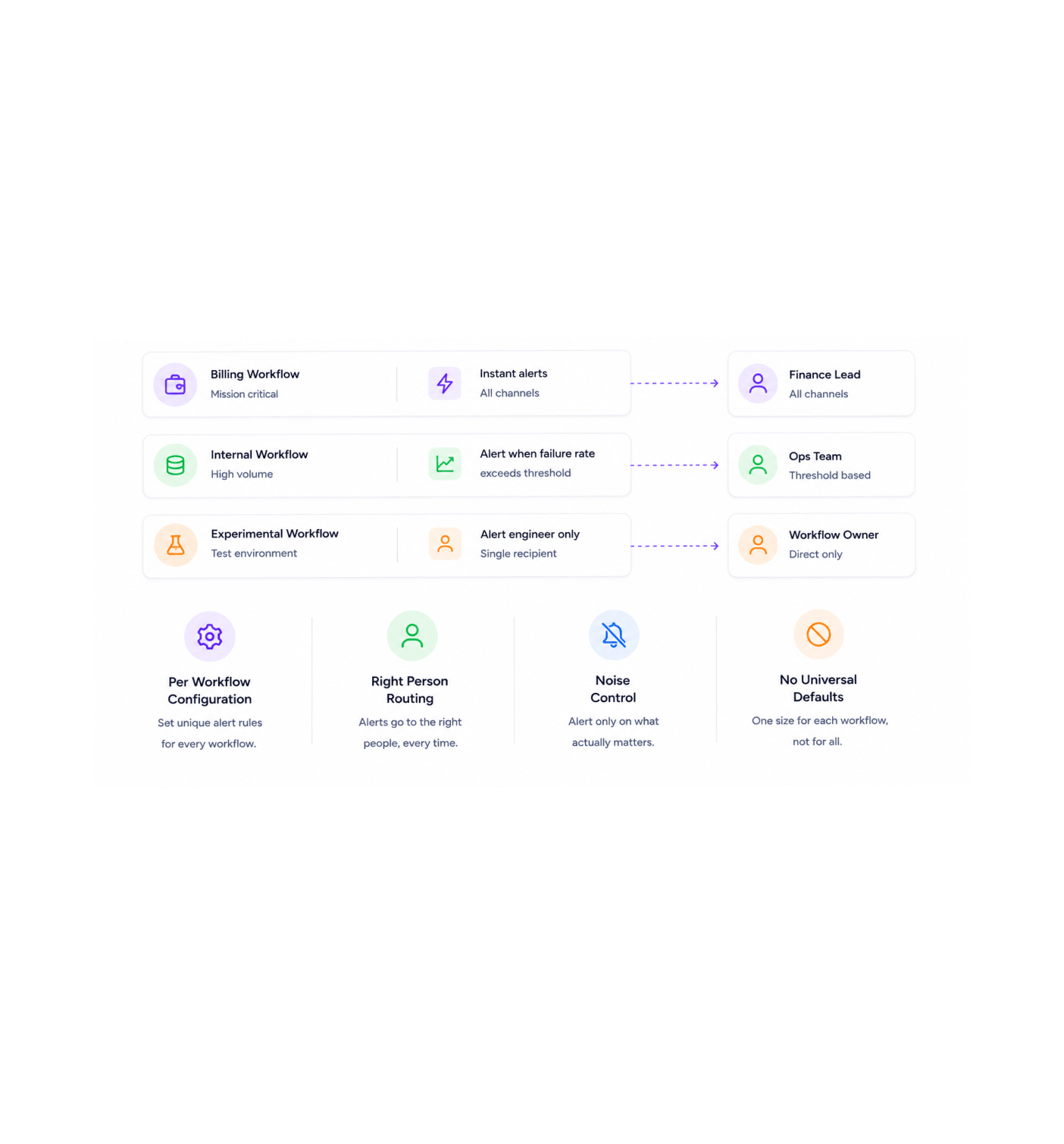
Every workflow has its own notification rules. The mission critical billing workflow sends instant alerts to the finance lead through every channel. The high volume internal workflow only alerts when the failure rate exceeds a threshold so the team is not overwhelmed by noise. The experimental workflow on the test environment alerts the engineer who built it and nobody else. One size fits all alerting becomes one size for each workflow, which is what teams running automation at scale actually need.
Full Audit Trail
Every user action, every workflow change, every system event lands in the audit log with the timestamp, the user, the workspace, and the full context of what changed. Who edited the workflow last Tuesday. Who turned off the alert that nobody received. Who connected the third party integration that now needs renewing. The we cannot reconstruct what happened experience that used to follow every incident gets replaced with a search across the audit log that returns an answer.
Once a team has alerts the moment something goes wrong routed to the right person, tuned to each workflow's importance, captured against a complete audit trail the old pattern of finding out about failures hours or days later from frustrated customers stops being acceptable. These are the changes that show up first.
The moment a workflow fails, the right people get notified through email and in app immediately. The we found out the workflow had been broken for three days because a customer complained story stops happening. Every failure surfaces fast, gets investigated fast, and gets fixed fast, which is the pace automation teams actually need to run reliable services on top of moving parts.
For the workflows where confirmation matters as much as detection the end of month reconciliation that needs to complete cleanly, the regulated report that has to send by a specific time, the migration job that has to run exactly once optional success notifications confirm that the workflow actually finished. The team sleeps better at night knowing the silence is healthy silence rather than uncertain silence.
Beyond failures, custom alert conditions catch the patterns your team actually wants to know about a workflow that takes longer than expected, a failure rate that crosses a threshold, a specific error category appearing repeatedly, a high value record flowing through. The early warning signals every team wishes they had finally exist as one click rules rather than separate monitoring projects.
The billing workflow that handles every customer payment gets instant alerts to the finance lead through every channel. The internal high volume workflow that fires a thousand times a day only alerts when something is genuinely wrong. The test workflow alerts the engineer who built it and nobody else. Different workflows deserve different alerting rules, and the platform finally treats them that way.
Email for the people who live in their inbox, in app for the team members who work inside the platform every day, integrations with the messaging tools the team already uses for the urgent stuff that needs immediate attention. Routing rules send the right alert to the right channel for the right person, so the message arrives where the recipient is actually looking instead of where the platform happens to default.
Every user action, every workflow change, every system event is captured in the audit log with the timestamp, the user, and the full context. Who edited the workflow last Tuesday. Who turned off the alert. Who installed the new integration. The compliance question that used to require detective work returns an answer in a search, which is the property regulated industries always needed and unregulated ones quickly come to depend on too.
Instant failure alerts. Optional success notifications. Custom alert conditions. Per workflow configuration. Multiple notification channels. Complete audit logs. The watchful layer your automation has always deserved.
11800+
Teams running automation with
instant alerting and full audit trails
Operations leaders running automation at scale, on call engineers responsible for the health of mission critical workflows, customer success managers who need to know when something affecting customers breaks, finance specialists running regulated workflows that demand audit grade visibility, compliance officers tracking who changed what and when, and founders who want the right person to know the right thing at the right time all use Revo notifications and alerts as the watchful layer over every workflow. Every team a small business tracking a handful of automations or a larger organisation orchestrating hundreds of business process automations across the full stack gets the same instant alerting, the same custom rule engine, and the same complete audit trail.
Alerts
Channel
Rules
Audit
Instant failure alerts the moment a workflow breaks, optional success notifications for the workflows where confirmation matters, custom alert conditions for the patterns your team specifically cares about, and per workflow configuration so the noise level matches the importance of each automation. Routing rules send the right alert to the right channel for the right person every time.
A complete notifications, alerts, and audit toolkit built into the same workflow automation platform your team already uses. Instant failure notifications, optional success confirmations, custom alert conditions, per workflow rules, multiple delivery channels, and a full audit log come together so the right person finds out about the right thing at the right time and the team always has the answer to what happened and who did it.
The moment a workflow fails, the right people on the team get notified through email and in app. The notification includes the workflow name, run identifier, failing step, error message, and a direct link straight into the execution log. No delay, no batching, no waiting for the next polling interval failures surface fast so they can be fixed fast.
For the workflows where confirmation matters as much as detection the end of month reconciliation, the regulated report, the one off migration optional success notifications confirm that the workflow actually finished cleanly. The team sleeps better knowing silence means success rather than wondering if something went wrong without anyone noticing.
Beyond failures, custom conditions fire alerts on the patterns your team cares about a workflow taking longer than expected, a failure rate crossing a threshold, a specific error category appearing repeatedly, a high value record flowing through. The condition builder uses the same visual interface as triggers, so building custom alerts feels like building any other rule on the platform.
Every workflow has its own notification rules. The mission critical billing workflow sends instant alerts to the finance lead through every channel. The high volume internal workflow only alerts when the failure rate exceeds a threshold. The experimental workflow alerts the engineer who built it. Different workflows deserve different alerting, and now they get it.
Email for the people who live in their inbox, in app for the team members working inside the platform every day, plus integrations with the messaging tools the team already uses for the urgent stuff. Routing rules send the right alert to the right channel for the right person so the message arrives where the recipient is actually looking.
Every user action, every workflow change, every system event captured with the timestamp, the user, the workspace, and the full context. The audit log is searchable, filterable, and exportable so the question of who did what to which workflow at which point always has an answer that takes seconds to find rather than days to reconstruct.
The moment a workflow fails, the right people on the team get notified through email and in app. The notification includes the workflow name, run identifier, failing step, error message, and a direct link straight into the execution log. No delay, no batching, no waiting for the next polling interval failures surface fast so they can be fixed fast.
For the workflows where confirmation matters as much as detection the end of month reconciliation, the regulated report, the one off migration optional success notifications confirm that the workflow actually finished cleanly. The team sleeps better knowing silence means success rather than wondering if something went wrong without anyone noticing.
Beyond failures, custom conditions fire alerts on the patterns your team cares about a workflow taking longer than expected, a failure rate crossing a threshold, a specific error category appearing repeatedly, a high value record flowing through. The condition builder uses the same visual interface as triggers, so building custom alerts feels like building any other rule on the platform.
Every workflow has its own notification rules. The mission critical billing workflow sends instant alerts to the finance lead through every channel. The high volume internal workflow only alerts when the failure rate exceeds a threshold. The experimental workflow alerts the engineer who built it. Different workflows deserve different alerting, and now they get it.
Email for the people who live in their inbox, in app for the team members working inside the platform every day, plus integrations with the messaging tools the team already uses for the urgent stuff. Routing rules send the right alert to the right channel for the right person so the message arrives where the recipient is actually looking.
Every user action, every workflow change, every system event captured with the timestamp, the user, the workspace, and the full context. The audit log is searchable, filterable, and exportable so the question of who did what to which workflow at which point always has an answer that takes seconds to find rather than days to reconstruct.
Common questions about what triggers a default failure alert, how to set up success and custom alerts, which notification channels are available, the difference between per workflow and workspace wide rules, exactly what gets captured in the audit log, and how long audit data is retained and how it can be exported.
A default failure alert fires the moment a workflow run ends in a failure state which means any step in the workflow ran into an error that was not recovered through retries and the workflow stopped without reaching its end state. The alert includes the workflow name, the run identifier, the step that failed, the error message, the inputs that produced it, and a direct link into the execution log for one click investigation. Default alerts are enabled out of the box for every workflow, so the team is never silently exposed to a failure they did not know about.
Instant failure alerts. Optional success notifications. Custom alert conditions. Per workflow configuration. Multiple notification channels. Complete audit logs. The watchful layer your automation has always deserved.