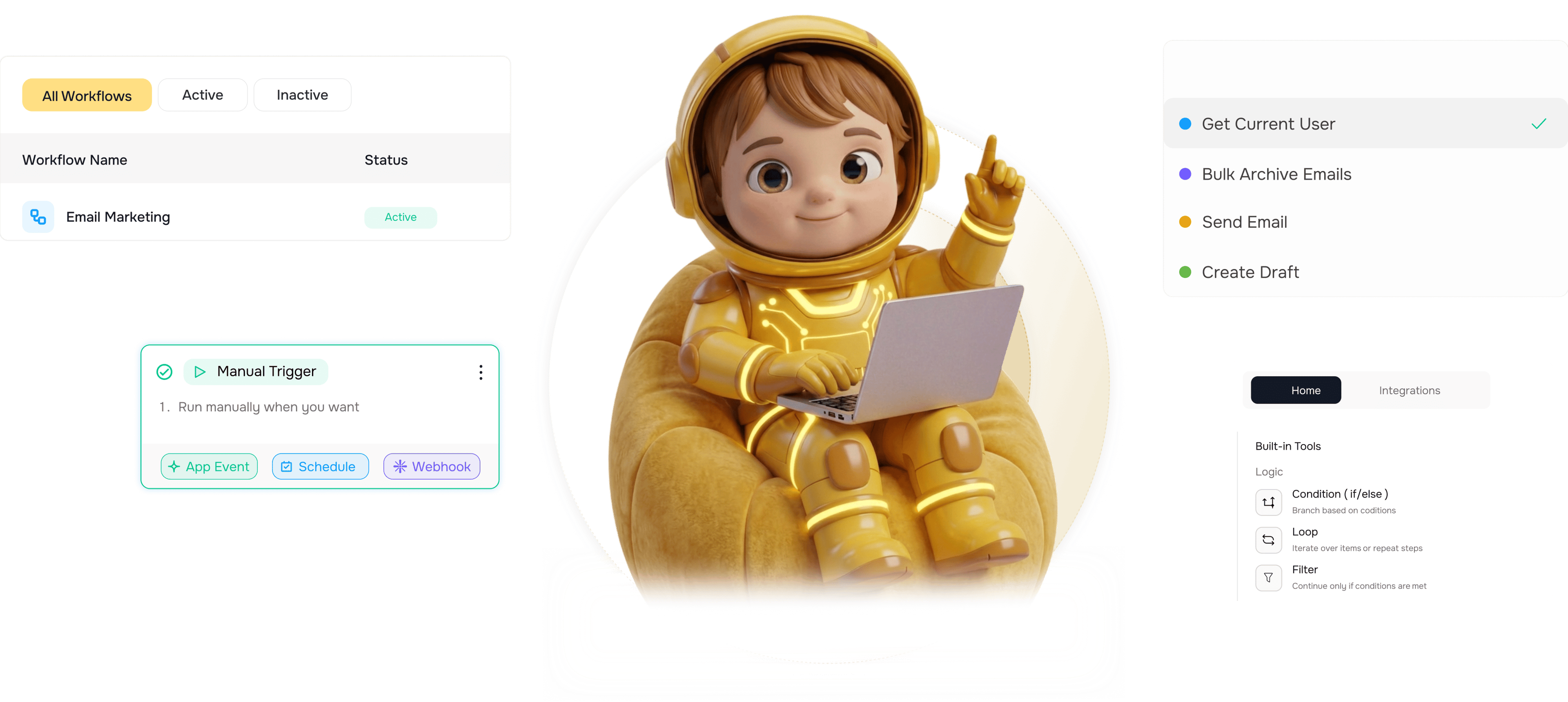
Seventy plus actions across every Worksbuddy agent

More than seventy pre built actions across every Worksbuddy agent create or assign or complete a task in Taro, create a lead or update a contact in Lio, create an estimate or send an invoice in Inzo, trigger a document send in Sigi. Every action is secured by the platform itself, with no credentials to configure, no addresses to share, and no code to write. A workflow automation platform that finally lets your team run every operation across every internal agent from one workflow editor.

Seventy
How it works

From picking an action to a running step in 4 steps

Pick the Worksbuddy agent the action belongs to Taro, Lio, Inzo, or Sigi. Choose the action you want from the pre built list. Map fields from earlier workflow steps into the action's configuration. Run the action and use the result downstream. Every action is secured by the platform, with no credentials to configure on your side.

1
2
3
4

Pick the Action

Pick the agent and action

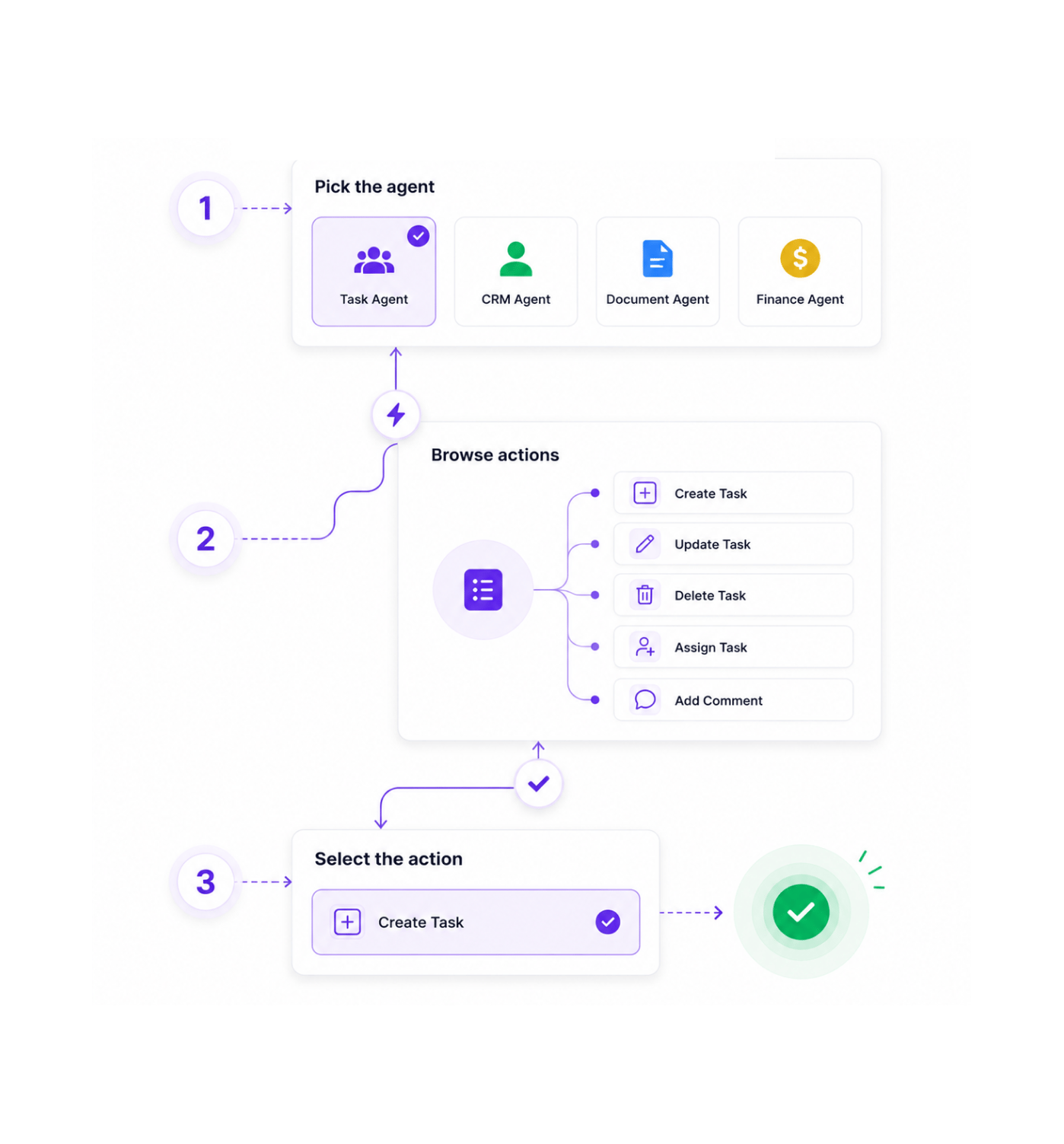
More than seventy pre built actions sit waiting across the four Worksbuddy agents. Pick the agent the operation belongs to, browse the categorised list of actions inside that agent, and select the one you need. Every action is named in business language create task, update contact, send invoice, trigger document send so finding the right one feels like reading a menu rather than searching documentation.

Taro · TasksLio · Leads & ContactsInzo · BillingSigi · Documents

Map the Fields

Map fields from earlier steps

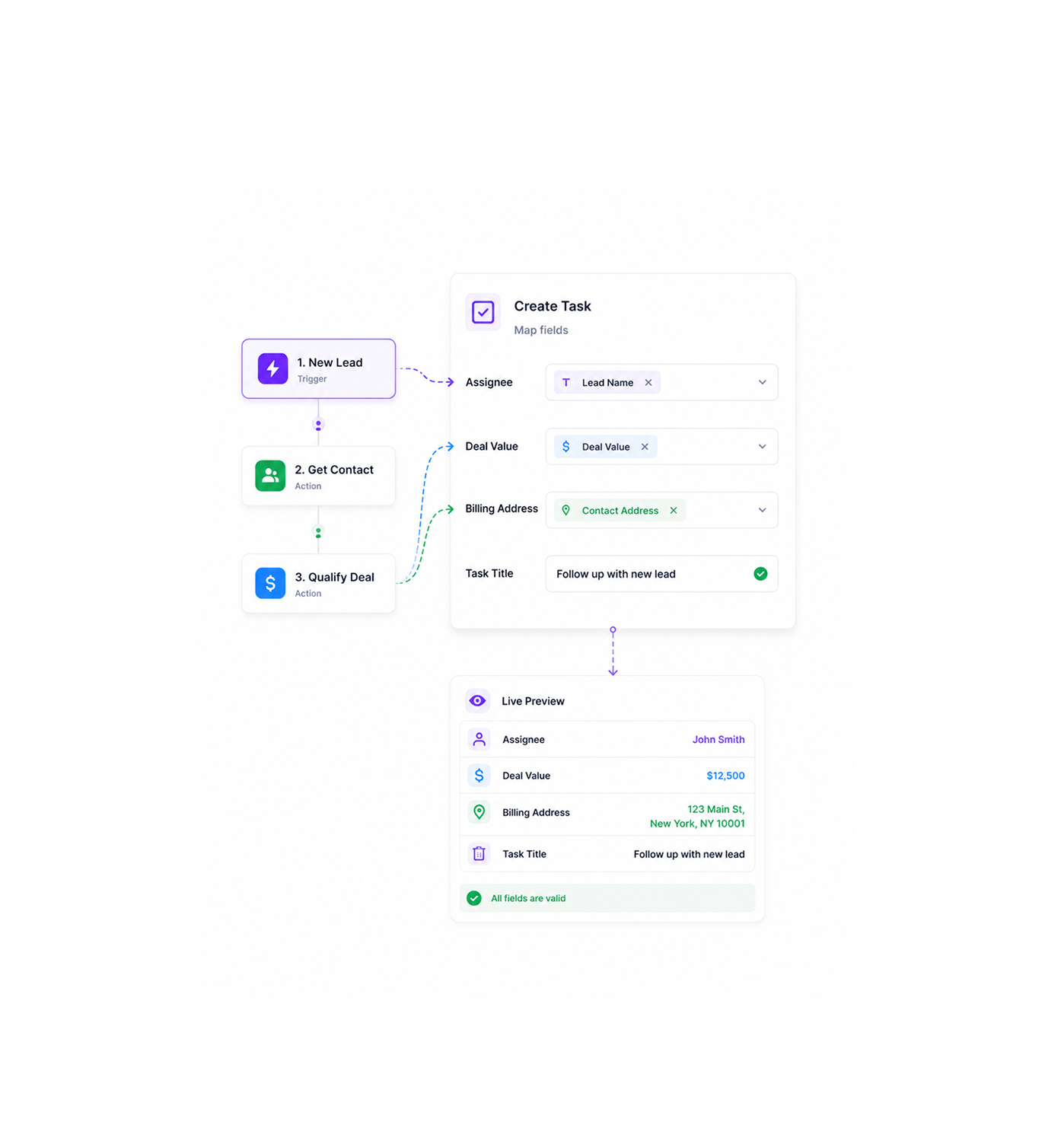
Every action opens a configuration panel that shows the fields it needs to run. Pick variables from earlier workflow steps and drop them straight into the action's inputs the name from the trigger lead becomes the assignee on the task, the deal value flows into the estimate line item, the contact address goes onto the invoice. Field mapping is the same visual experience as everywhere else on the platform, so there is nothing new to learn.

Variables PanelVisual MappingLive PreviewValidation as You Type

Run the Action

Run the action, no credentials needed

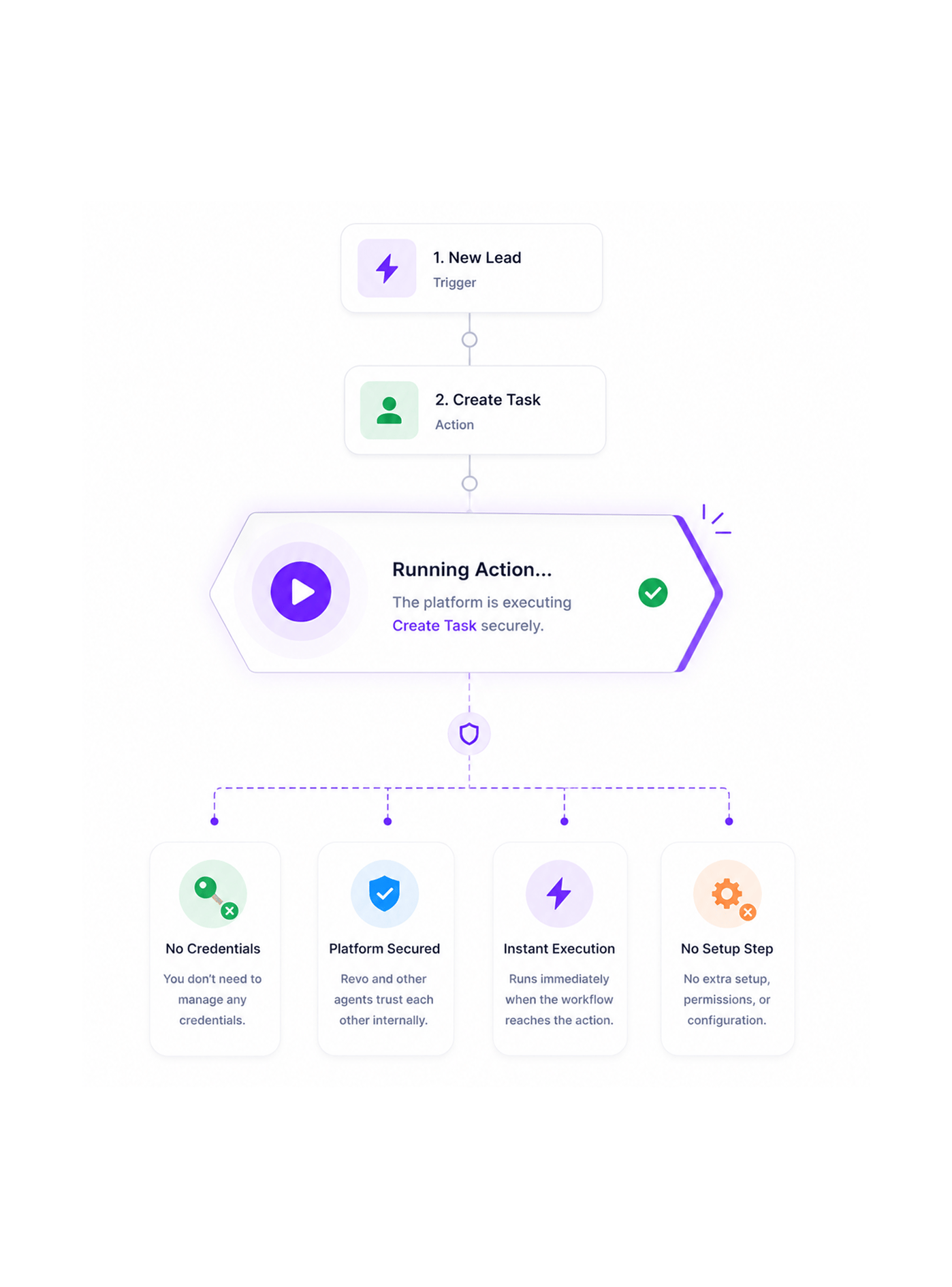
When the workflow reaches the action node, the platform handles the call to the target agent automatically. There are no credentials to manage on your side, no addresses to share, no permissions to grant in a separate dashboard. Revo and the other Worksbuddy agents trust each other internally, so the action runs with the right authority from the moment you enable it, the same way every other step in the workflow does.

No CredentialsPlatform SecuredInstant ExecutionNo Setup Step

Use the Result

Use the result downstream

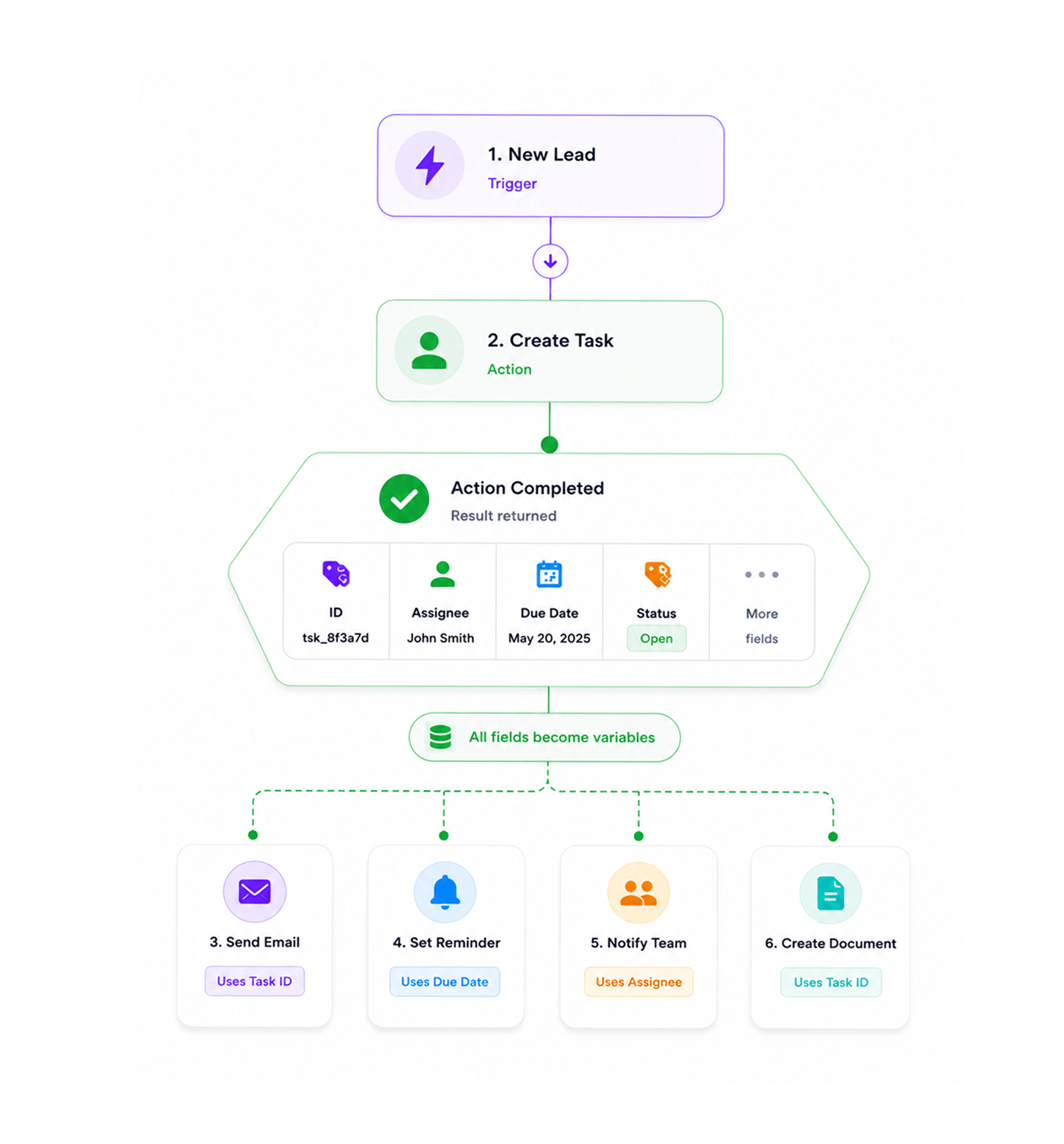
The action returns the full record of whatever it just did the created task with its identifier and assignee, the new lead with its score and tags, the sent invoice with its number and due date, the document send with its tracking handle. Every field of the response becomes a variable for downstream nodes to use, so the next step can chain off whatever the action produced without an extra lookup in between.

Full Response AvailableVariables DownstreamChain to Next StepsNo Extra Lookups
Why Teams Choose REVO

Six reasons teams never go back

Once a team can run every operation across every Worksbuddy agent from a single workflow editor with no credentials to manage, no integration project to start, and no glue code to write the old pattern of opening four different agents to do four parts of the same business process stops making sense. These are the changes that show up first.

Every action your team needs

Every action your team needs

The seventy plus pre built actions cover the operations every team runs across the Worksbuddy stack task creation and assignment, lead and contact management, estimate and invoice handling, document workflows. The action your workflow needs is almost certainly already there, ready to enable, instead of waiting on an engineering project to add it.

No credentials to configure

No credentials to configure

The classic friction of setting up an integration generating credentials, copying them around, exchanging permissions, testing the connection simply does not exist for internal actions. Revo and the other Worksbuddy agents trust each other inside the platform, which means the action node goes from added to functional the moment you drop it on the canvas.

Cross agent workflows fully composable

Cross agent workflows fully composable

A workflow can create a task in Taro from a Lio lead, then create an estimate in Inzo against the same contact, then trigger a document send in Sigi referencing the estimate all in one workflow, with the data flowing cleanly between every agent at every step. The business process that used to span four separate tools becomes a single composable automation that reads like the work itself.

Map fields the same way every time

Map fields the same way every time

Every internal action uses the same field mapping interface as every other step on the platform the same variables panel, the same drag and drop into input fields, the same real time validation. Learning one action effectively means learning all of them, which means the team builds across the whole agent library at the same speed regardless of which agent they are reaching into.

Results flow straight downstream

Results flow straight downstream

Every action returns the full record of what it just did, available as variables to every node that comes after. The created task, the new lead, the sent invoice, the triggered document send all of them surface their identifiers, their statuses, and their full field contents to the next step, so chained automations stop needing a separate lookup node in the middle just to recover what the previous step already had.

Maintained by the platform itself

Maintained by the platform itself

When a Worksbuddy agent ships a new action or extends an existing one, it appears in the Revo action library automatically. There is no provider package to update, no integration that quietly breaks because somebody on the other side changed something, and no team time spent maintaining the seams between products built in the same place. The platform takes care of its own connections.

Seventy plus actions. Four agents. One editor.

Run every Worksbuddy operation as a workflow step. Pre built. Pre secured. Pre mapped. No credentials, no addresses, no code the cross agent action layer your team actually deserves.

Who uses REVO internal actions
Deepak MehrotraDeepak MehrotraDeepak MehrotraDeepak Mehrotra

15400+

Teams running cross agent actions
inside Revo

Built for teams running the full Worksbuddy stack together

Operations leaders, sales teams, customer success managers, finance specialists, and founders use Revo as the workflow automation platform that finally lets every Worksbuddy agent work together inside one editor. Taro for task management. Lio for leads and contacts. Inzo for estimates and invoices. Sigi for documents. The action library is the toolkit. The field mapping is the wiring. The internal security is the safety net. Every team a small business orchestrating a handful of cross agent flows or a larger organisation running hundreds of business process automations across the full stack gets the same seventy plus actions with the same zero configuration experience and the same composability across every agent.

70+

Pre Built Actions

4

Worksbuddy Agents

Zero

Configuration

Instant

Execution

Action Library

Every operation, every agent

Seventy plus pre built actions span the four Worksbuddy agents, covering task management in Taro, lead and contact operations in Lio, billing and invoicing in Inzo, and document workflows in Sigi. Every action is named in business language, configured through the same field mapping interface, and ready to drop into any workflow without setup.

Every operation, every agent
Features

Every action, every agent

A complete internal action library built into the same workflow automation platform your team already uses. Seventy plus pre built actions across four Worksbuddy agents, zero configuration, visual field mapping, full result variables downstream, platform secured internally, and a library that grows with every agent release.

Taro Actions Task Management

Taro Actions Task Management

Create a task, assign a task to a teammate, mark a task as complete, add a comment to a task, change a task's priority, set a due date, link a task to a deal or a contact, and more. The full task management toolkit lives inside Revo as workflow actions, ready to chain off a trigger from any other agent or any external event.

Lio Actions Lead & Contact Operations

Lio Actions Lead & Contact Operations

Create a new lead, update an existing lead, change a lead stage, assign a lead to an owner, create a contact, update a contact's details, tag a contact, add a note to a record, and more. The full lead and contact lifecycle is reachable from a workflow step, with every field of the record available to map in from earlier steps.

Inzo Actions Billing Operations

Inzo Actions Billing Operations

Create an estimate, send an estimate to a client, convert an approved estimate into an invoice, send an invoice, record a payment, mark an invoice as paid, issue a refund, generate a payment reminder, and more. The billing operations that used to require somebody to manually open Inzo become a step in any workflow that needs them.

Sigi Actions Document Operations

Sigi Actions Document Operations

Trigger a document send, request a signature from a party, send a reminder for a pending signature, void a document in progress, retrieve the status of a document, fetch the signed copy, and more. Document workflows that used to live inside Sigi alone now compose cleanly with task creation, lead updates, and billing actions in the same automation.

Pre Built, Zero Configuration

Pre Built, Zero Configuration

Every internal action is pre built and ready to use. No credentials to generate, no addresses to copy, no permissions to negotiate separately, no documentation to find inside another agent's admin panel. Drop the action on the canvas, map the fields, and it works secured automatically by the platform.

Field Mapping Between Steps

Field Mapping Between Steps

Every action uses the same field mapping interface as every other step on the platform. Drag variables from the variables panel into the action's inputs, pick from autocomplete, use the live preview to confirm the values look right before saving. The familiar mapping experience extends across the whole agent library without surprise.

Taro Actions Task Management

Taro Actions Task Management

Create a task, assign a task to a teammate, mark a task as complete, add a comment to a task, change a task's priority, set a due date, link a task to a deal or a contact, and more. The full task management toolkit lives inside Revo as workflow actions, ready to chain off a trigger from any other agent or any external event.

Lio Actions Lead & Contact Operations

Lio Actions Lead & Contact Operations

Create a new lead, update an existing lead, change a lead stage, assign a lead to an owner, create a contact, update a contact's details, tag a contact, add a note to a record, and more. The full lead and contact lifecycle is reachable from a workflow step, with every field of the record available to map in from earlier steps.

Inzo Actions Billing Operations

Inzo Actions Billing Operations

Create an estimate, send an estimate to a client, convert an approved estimate into an invoice, send an invoice, record a payment, mark an invoice as paid, issue a refund, generate a payment reminder, and more. The billing operations that used to require somebody to manually open Inzo become a step in any workflow that needs them.

Sigi Actions Document Operations

Sigi Actions Document Operations

Trigger a document send, request a signature from a party, send a reminder for a pending signature, void a document in progress, retrieve the status of a document, fetch the signed copy, and more. Document workflows that used to live inside Sigi alone now compose cleanly with task creation, lead updates, and billing actions in the same automation.

Pre Built, Zero Configuration

Pre Built, Zero Configuration

Every internal action is pre built and ready to use. No credentials to generate, no addresses to copy, no permissions to negotiate separately, no documentation to find inside another agent's admin panel. Drop the action on the canvas, map the fields, and it works secured automatically by the platform.

Field Mapping Between Steps

Field Mapping Between Steps

Every action uses the same field mapping interface as every other step on the platform. Drag variables from the variables panel into the action's inputs, pick from autocomplete, use the live preview to confirm the values look right before saving. The familiar mapping experience extends across the whole agent library without surprise.

Questions & Answers

Everything you need to know

Common questions about which actions each agent exposes, how the platform handles security for internal actions, whether actions can be chained across agents, what comes back from each action, how errors are handled, and what happens when a new action ships.

Each agent ships a comprehensive set of operations covering its core domain. Taro covers task management create, assign, complete, comment, set priority, set due date, link to a deal or contact, and several more. Lio covers leads and contacts create lead, update lead, change stage, assign owner, create contact, update contact, tag, note, and more. Inzo covers billing create estimate, send estimate, convert to invoice, send invoice, record payment, mark paid, issue refund, send reminder, and more. Sigi covers documents trigger send, request signature, send reminder, void, retrieve status, fetch signed copy, and more. The full action list crosses the seventy mark and grows with every release.

Network background
REVO · Internal App Actions

Stop scripting agent calls. Start running them as workflow steps.

Seventy plus pre built actions across Taro, Lio, Inzo, and Sigi. Secured by the platform. Mapped through the same visual interface. Results flow straight downstream. The cross agent action layer your team has been waiting for.