Five distinct digital workflow architectures, each built for a different shape of work. Graph based with a visual node canvas for complex flows. Step based with linear logic and conditions for straightforward sequences. Manual one click runs for on demand actions. Scheduled jobs on a recurring timer. Event driven workflows triggered by external applications. A workflow automation platform with the right architecture for every kind of business automation your team will ever build.
Match the workflow shape to the actual work. Build it in the architecture that fits visual canvas, linear steps, manual button, scheduled timer, or external event. Trigger it the way that makes sense for the use case. Mix and match different architectures across the same workspace so every kind of business process gets the shape it deserves.
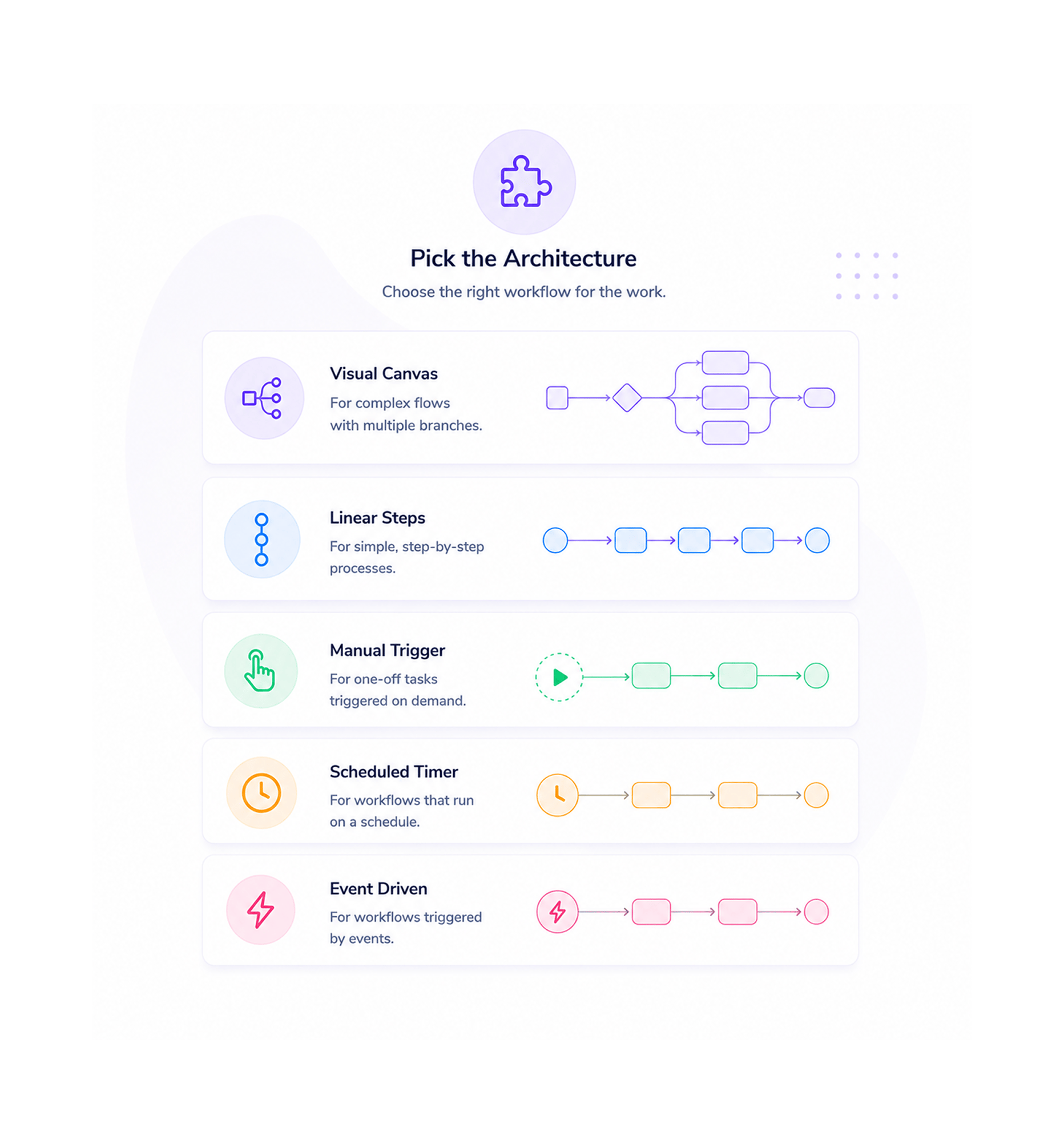
Pick the Architecture
Different workflows have different shapes. A complex lead routing flow with five branches wants a visual canvas. A simple onboarding sequence wants linear steps. A one off data export wants a manual trigger. A weekly digest wants a scheduled timer. A reaction to a payment event wants an event driven trigger. Pick the architecture that fits the work, not the work that fits the architecture.
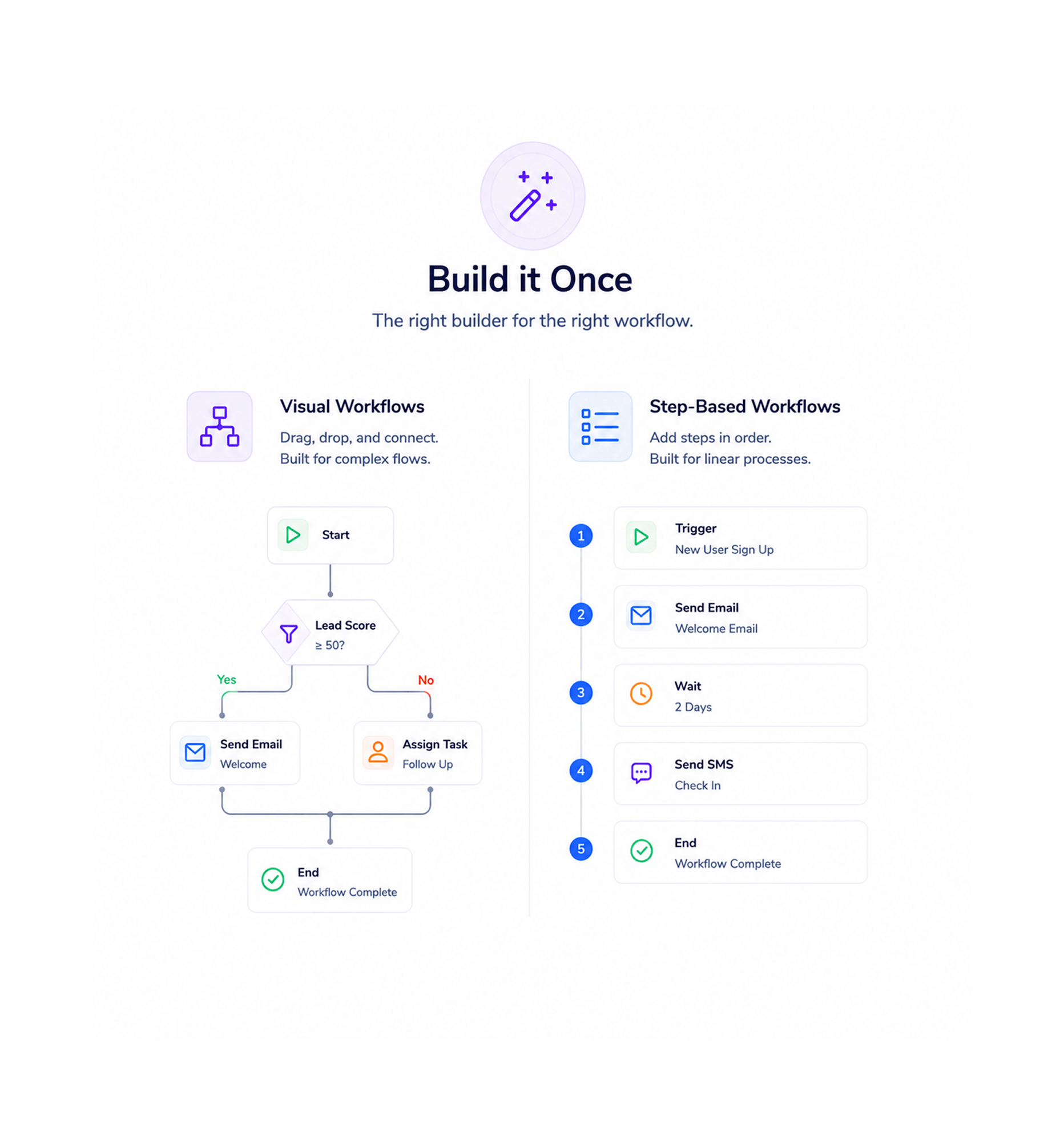
Build it Once
Visual workflows open the drag and drop canvas with the full node library. Step based workflows open a linear editor where each step sits below the last with inline conditions. Both feel native to the architecture they belong to neither is the visual canvas pretending to be linear, neither is a linear list pretending to draw a graph. The build experience matches the shape of the work, every time.
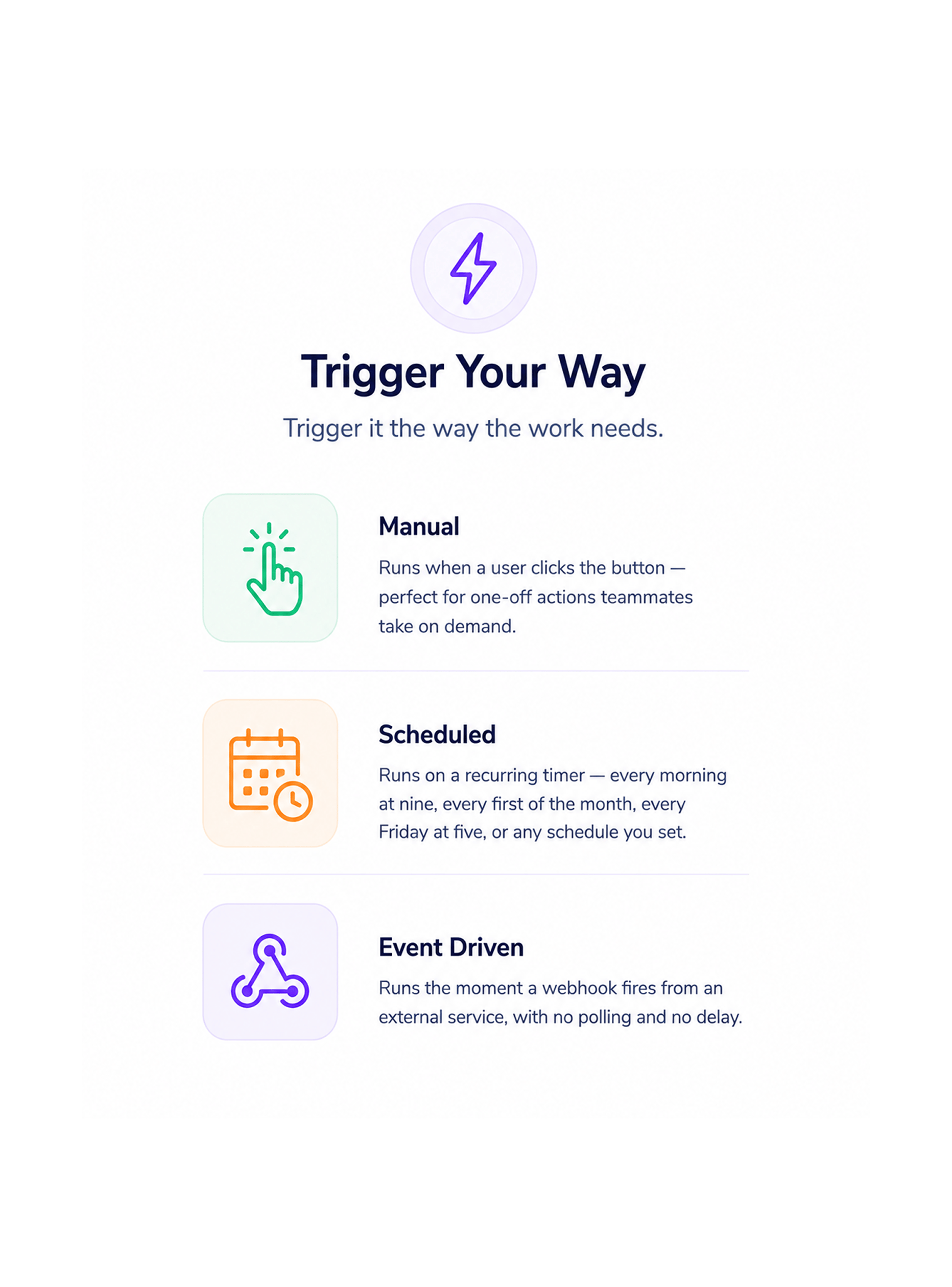
Trigger Your Way
A manual workflow runs when a user clicks the button perfect for the one off action a teammate wants to take on demand. A scheduled workflow runs on a recurring timer every morning at nine, every first of the month, every Friday at five, anything the recurring schedule editor supports. An event driven workflow runs the moment a webhook fires from an external service, with no polling and no delay.
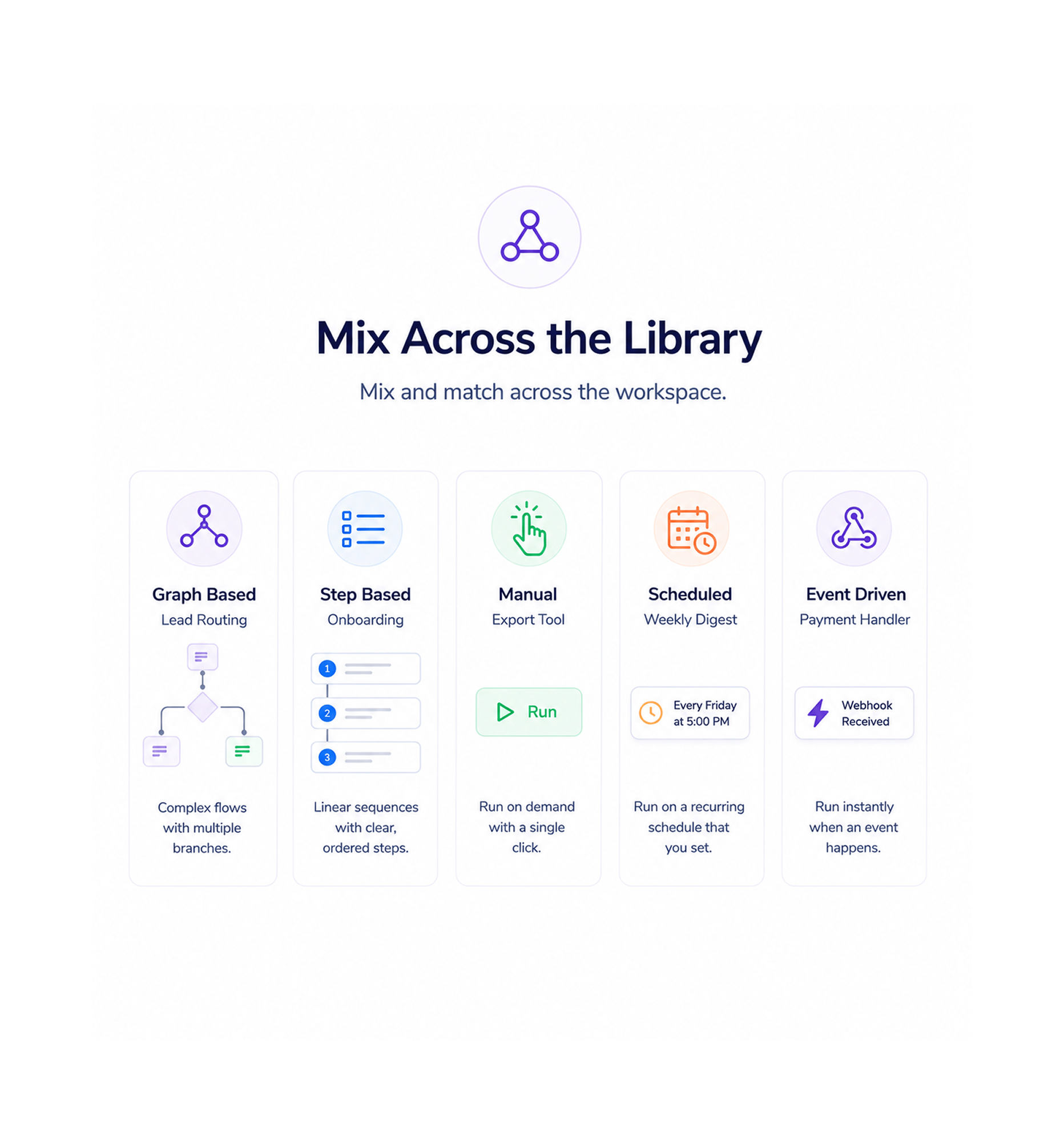
Mix Across the Library
Your workspace runs a graph based lead routing flow, a step based onboarding sequence, a manual export tool, a scheduled weekly digest, and an event driven payment handler all side by side. Every workflow in the library uses the architecture that fits it best, the team picks the right shape for each new automation, and nothing gets forced into the wrong mould.
Once a team has a platform that offers five workflow architectures and lets them pick the right shape for each automation instead of forcing every flow into the same template the tool happens to support going back to a single architecture builder feels like writing every document in a spreadsheet. These are the changes that show up first.
Different workflows are genuinely different shapes. Forcing a five branch lead routing flow into a linear editor or forcing a three step onboarding into a visual graph wastes time and makes the workflow harder to maintain later. Five architectures means the right shape is always available, and the team stops bending the work to fit the tool.
Complex workflows with multiple branches, parallel paths, and conditional logic become unreadable as text. The graph based architecture opens them on a visual canvas where the whole flow reads at a glance, the branches are obvious, and a stakeholder reviewing the workflow can follow it without needing the build to be explained in a meeting.
A straightforward sequence with five steps and one or two conditions does not need a canvas. The step based architecture opens a clean linear editor where each step sits below the last, conditions are inline, and the whole flow reads top to bottom. Building, editing, and reviewing a simple workflow takes seconds instead of minutes spent dragging nodes that did not need to move.
Not everything should be automatic. A data export, a one off cleanup, a quarterly reconciliation, a manual reset all useful, none of them suited to a recurring schedule or an event trigger. Manual workflows give teammates a button to click when the work needs doing, with the full power of the platform behind the click. The run this on demand use case finally has a first class home.
The recurring digest every Monday morning, the weekly pipeline report every Friday afternoon, the monthly billing reconciliation on the first all the work that used to live in a separate scheduling tool or a forgotten server cron job now lives in the same workflow library as everything else. Scheduled workflows turn one of the most common automation needs into a first class architecture.
A payment captured in your billing platform, a form submission on your marketing site, a deal closed in another tool, an alert from your monitoring stack all useful triggers, all wanting to flow into a workflow the moment they happen. Event driven workflows accept webhooks from any external application and start running immediately, with no polling, no delay, and no extra integration layer in between.
Graph. Step. Manual. Scheduled. Event driven. Pick the right shape for every workflow, build them all in the same workspace, and ship the right kind of automation every time.
9100+
Teams running multiple architectures
side by side
Operations leaders, automation specialists, marketing operations teams, customer success managers, and revenue leaders use Revo to run every kind of business automation under one roof. Graph based flows for the complex routing. Step based for the linear sequences. Manual for the on demand work. Scheduled for the recurring jobs. Event driven for the external triggers. Every team a small business with a handful of automations or a larger organisation orchestrating hundreds of business process automations gets every architecture available from day one, with the freedom to use the right one for each job.
Based
Based
Schedule
Driven
Graph based for complex flows that need a visual canvas. Step based for simple sequences that read top to bottom. Manual for on demand runs. Scheduled for recurring jobs on a cron timer. Event driven for reactions to external webhooks. Five distinct architectures, each native to its shape, all available from day one.
Five workflow architectures plus the freedom to combine them all inside the same workflow automation platform. Graph based for visual complexity, step based for linear simplicity, manual for on demand work, scheduled for recurring jobs, event driven for external triggers. Use one, use all five every team gets the architecture flexibility their business actually needs.
Open the visual node canvas, drag triggers and actions onto the surface, draw connections between them, branch with conditions, loop over lists, and let the workflow read like a diagram. Built for complex flows where the shape of the logic matters multiple branches, parallel paths, conditional joins, the kind of workflow that needs to be seen to be understood.
Open a clean linear editor where each step sits below the last, conditions appear inline, and the whole workflow reads top to bottom like a checklist. Built for straightforward sequences three to ten steps, one or two conditions, no branching to speak of. Building one takes seconds, editing one takes seconds, reviewing one takes seconds.
A workflow that runs only when a teammate clicks the button. Perfect for one off data exports, quarterly reconciliations, ad hoc cleanups, manual resets, and any work that should not run on a schedule but still deserves the power of the platform behind it. Pin the manual workflows the team uses most to the top of the dashboard for one click access.
A workflow that runs on a recurring timer using a familiar cron style schedule. Every morning at nine, every Friday at five, every first of the month, every Tuesday and Thursday at three thirty the schedule editor speaks plain English for the common patterns and accepts full cron syntax for the unusual ones. The weekly digest and the monthly reconciliation finally have a real home.
A workflow that fires the moment a webhook arrives from an external application a payment captured in your billing platform, a form submission on your marketing site, a deal closed in another tool, an alert from your monitoring stack. No polling, no delay, no integration layer in between. The event hits the endpoint and the workflow starts running immediately.
Run a graph based routing flow, a step based onboarding sequence, a manual data export, a scheduled weekly digest, and an event driven payment handler all in the same workspace, all in the same library, all under the same set of categories and permissions. The architecture you pick is per workflow, not per workspace, which is the only configuration that actually scales with how teams really work.
Open the visual node canvas, drag triggers and actions onto the surface, draw connections between them, branch with conditions, loop over lists, and let the workflow read like a diagram. Built for complex flows where the shape of the logic matters multiple branches, parallel paths, conditional joins, the kind of workflow that needs to be seen to be understood.
Open a clean linear editor where each step sits below the last, conditions appear inline, and the whole workflow reads top to bottom like a checklist. Built for straightforward sequences three to ten steps, one or two conditions, no branching to speak of. Building one takes seconds, editing one takes seconds, reviewing one takes seconds.
A workflow that runs only when a teammate clicks the button. Perfect for one off data exports, quarterly reconciliations, ad hoc cleanups, manual resets, and any work that should not run on a schedule but still deserves the power of the platform behind it. Pin the manual workflows the team uses most to the top of the dashboard for one click access.
A workflow that runs on a recurring timer using a familiar cron style schedule. Every morning at nine, every Friday at five, every first of the month, every Tuesday and Thursday at three thirty the schedule editor speaks plain English for the common patterns and accepts full cron syntax for the unusual ones. The weekly digest and the monthly reconciliation finally have a real home.
A workflow that fires the moment a webhook arrives from an external application a payment captured in your billing platform, a form submission on your marketing site, a deal closed in another tool, an alert from your monitoring stack. No polling, no delay, no integration layer in between. The event hits the endpoint and the workflow starts running immediately.
Run a graph based routing flow, a step based onboarding sequence, a manual data export, a scheduled weekly digest, and an event driven payment handler all in the same workspace, all in the same library, all under the same set of categories and permissions. The architecture you pick is per workflow, not per workspace, which is the only configuration that actually scales with how teams really work.
Common questions about when to use which workflow architecture, how the scheduled timer works, what counts as an event source, whether architectures can be combined, and the performance differences between the five types.
The architecture should match the shape of the work. Graph based for complex flows with multiple branches, parallel paths, and conditional joins that need to be seen to be understood. Step based for simple linear sequences of three to ten steps with one or two conditions. Manual for one off actions that should run when a teammate clicks a button. Scheduled for recurring jobs on a timer like a weekly digest or a monthly reconciliation. Event driven for reactions to webhooks from external applications.
Graph. Step. Manual. Scheduled. Event driven. Five architectures for every shape of business automation, all in the same workspace, all built native to the work they are doing.