


Time bound contracts stop lapsing.
Reminders fire automatically.
Documents with validity windows trigger emails at 7, 3, and 1 day to sender and signers. Hourly scans mark expired.
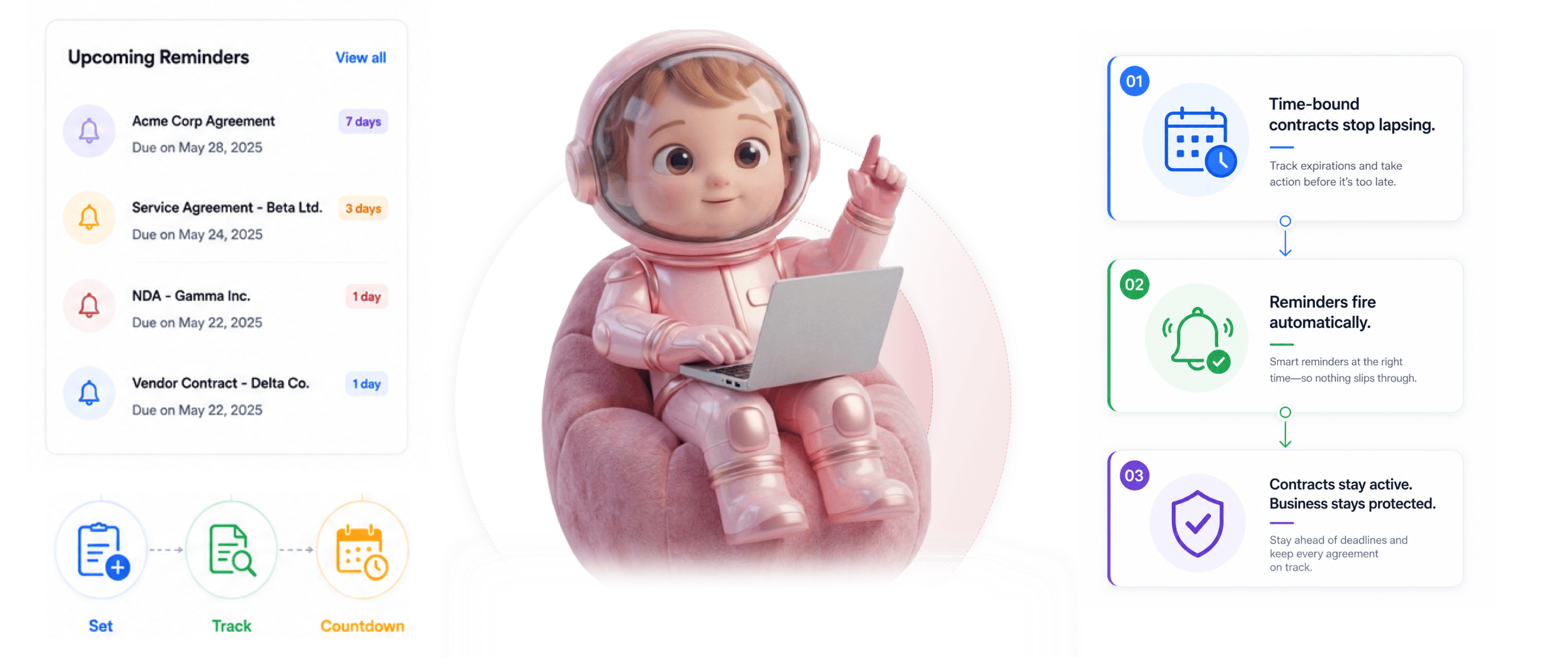
From validity window to closed contract in 4 steps
Document gets a validity window, reminders fire at 7, 3, and 1 day, sender and signers notified, expired marked hourly.
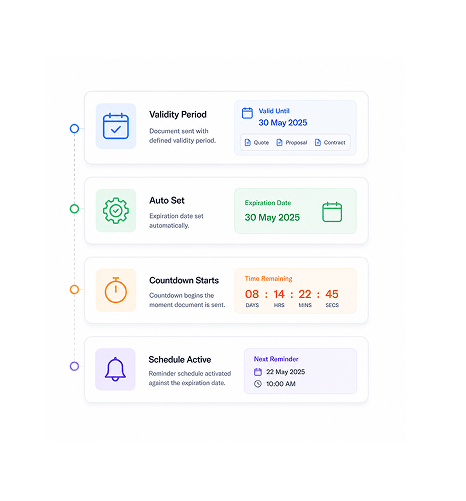
Validity Window
Document gets a validity window
When the team sends a document with a defined validity period, the expiration date is set automatically: quote validity, proposal expiry, contract acceptance window. The countdown starts on send and the reminder schedule activates.
- Validity Period
- Auto Set
- Countdown Starts
- Schedule Active
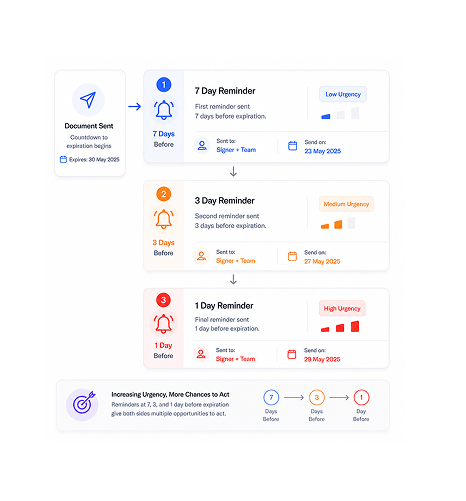
Three Reminders
Reminders fire at 7, 3, and 1 day before
Seven days out, the first reminder fires. Three days out, the second. One day out, the final one. The schedule gives multiple chances to act with rising urgency, so the team and counterparty both see the deadline at three checkpoints.
- 7 Day Reminder
- 3 Day Reminder
- 1 Day Reminder
- Increasing Urgency
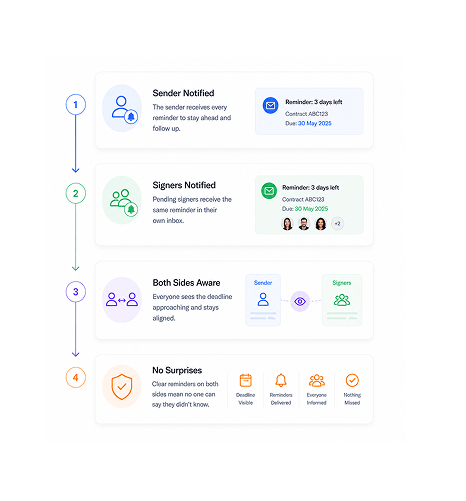
Both Sides Notified
Sender and pending signers both notified
Each reminder goes to both the sender and the pending signers. The sender knows the deadline is near and can follow up. The signers see it in their own inbox and know to act. Visibility on both sides means nobody can claim they didn't know.
- Sender Notified
- Signers Notified
- Both Sides Aware
- No Surprises
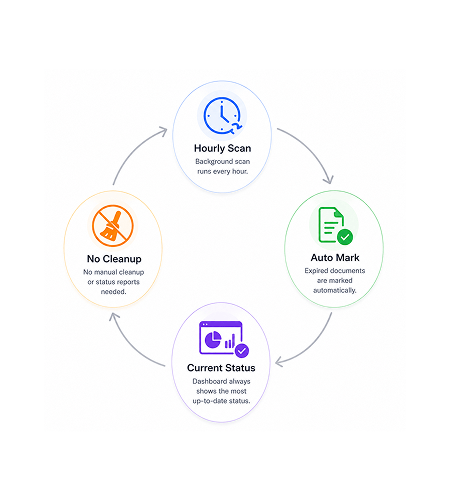
Auto Mark Expired
Expired documents auto marked hourly
The background scan runs every hour to check which documents have passed their expiration date. Any past expiration is marked expired automatically. The dashboard reflects current state with no manual cleanup or status report needed.
- Hourly Scan
- Auto Mark
- Current Status
- No Cleanup
Six reasons time bound contracts stop lapsing
Three reminders at 7, 3, and 1 day. Sender and signers both notified. Hourly scans auto mark expired so time bound contracts close on schedule.

Time bound contracts stop lapsing silently
A quote that expires unsigned is a deal redone from scratch; a lapsed proposal is a wasted cycle. Reminders keep windows from closing unnoticed.

Three reminders give multiple chances to act
One reminder is easy to ignore. Three checkpoints build rising urgency: seven days for awareness, three for priority, one for the final push.

Both sides notified, not just internal team
Sender only reminders depend on the team chasing the counterparty. Notifying pending signers directly puts the deadline in their own inbox, where they cannot miss the urgency.

Hourly background scans catch expirations
Daily or weekly scans leave windows where a document is expired but still shows active. Hourly scans catch expiration within an hour.

Status always reflects current state
A dashboard showing expired contracts as active is misleading. Auto-marking keeps it honest: what shows active is active, what shows expired is gone.

Works with the team's existing email tools
Reminders fire as standard emails to the sender's and signers' inboxes. No new app, no separate system. They land where everyone already looks.


8900+
Teams whose time bound contracts close on schedule
Built for teams whose contracts lapse if they don't close in time
Sales ops teams chasing quote and proposal deadlines who lose deals when windows close unsigned. Founders signing time bound deals. Account managers on renewal windows. Legal ops tracking validity across high volumes.
Schedule
Audience
Mark Cycle
Status Update
Three reminders at 7, 3, and 1 day
Reminders fire automatically at three checkpoints before expiration. The rising urgency catches different moments of attention, and notifying both sender and pending signers means nobody is surprised.
Everything the expiration layer ships with
Seven day, three day, and one day reminders, sender plus signers notified, hourly expiration scan, auto marked expired.

Seven Day Reminder
The first reminder fires seven days before expiration. Early enough that both sides can act, late enough to feel real.

Three Day Reminder
The second reminder fires three days before expiration. Now close enough that priority shifts and the window is clearly closing.

One Day Reminder
The final reminder fires one day before expiration. Last chance to act before the window closes. Both sides get the signal that this is the final push.

Sender Plus Pending Signers Notified
Each reminder goes to both sender and pending signers. The sender can follow up; the signers see it in their own inbox.

Hourly Expiration Scan
Background scans run every hour to find documents past their expiration date. Hourly cadence keeps status accurate all day long.

Auto Marked Expired Status
Documents past expiration are marked expired automatically. No manual cleanup, no status reports. The view always reflects reality.
Everything you need to know
Questions on which documents qualify, the schedule, expiration, custom schedules, and extending.
Any document with a defined validity window. Quotes with acceptance deadlines, proposals with offer windows, contracts with signing deadlines, time bound agreements with specific validity periods. If the document has an expiration date, the reminder schedule activates automatically. Documents without validity windows do not trigger reminders since the time pressure does not apply.