Worksbuddy Logo

Sign how you want. Field what you need.

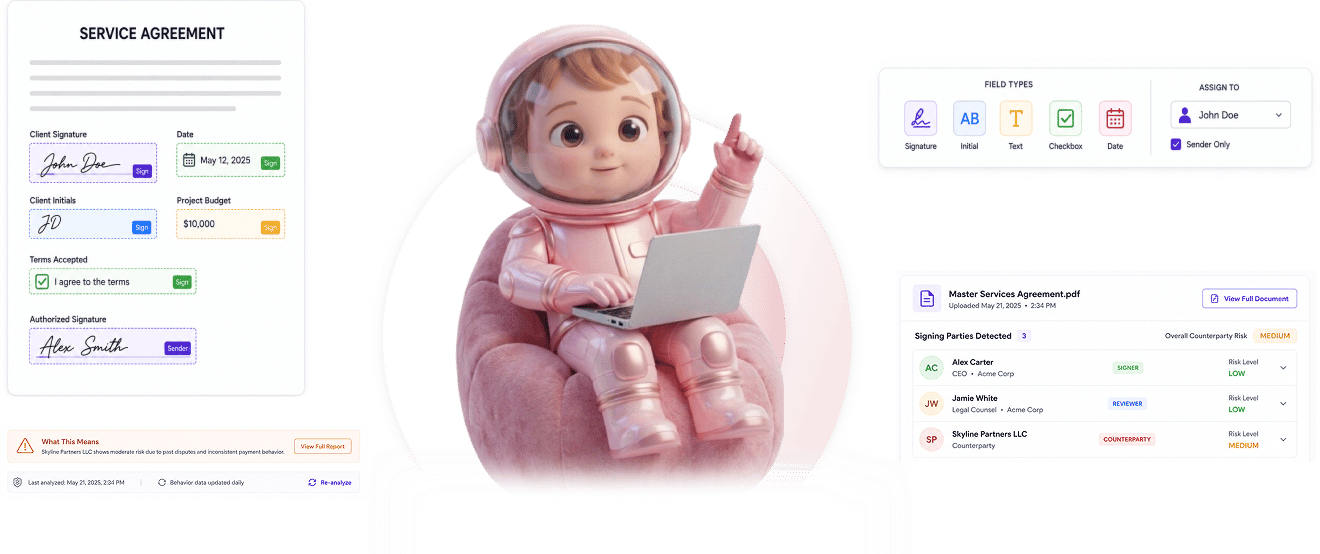
Create signatures by drawing, uploading an image, or typing. Drag signature, initial, text, checkbox, and date fields onto any page. Assign each field to a specific signer or mark sender only, then position exactly where the contract needs them.

Sign
How it works

From signature choice to placed fields in 4 steps

Choose the signature type, drag fields onto any page, assign per signer or sender only, position fields exactly where they belong.

1
2
3
4

Three Signature Methods

Choose how the signature gets created

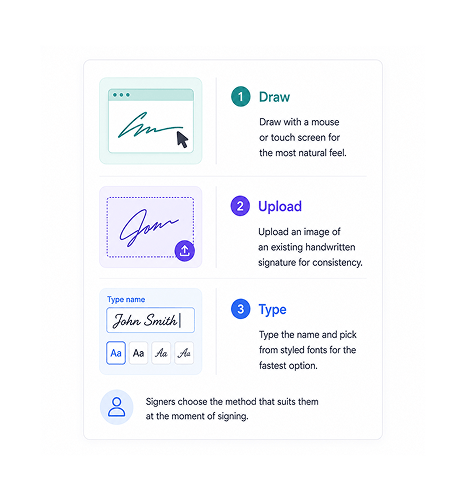
Three signature methods accommodate every signer. Draw with a mouse or touch screen for the most natural feel. Upload an image of an existing handwritten signature for consistency across documents. Type the name and pick from styled fonts for the fastest option. Signers choose the method that suits them at the moment of signing.

DrawnUploaded ImageTyped With FontsSigner Picks

Field Placement

Drag fields onto any page

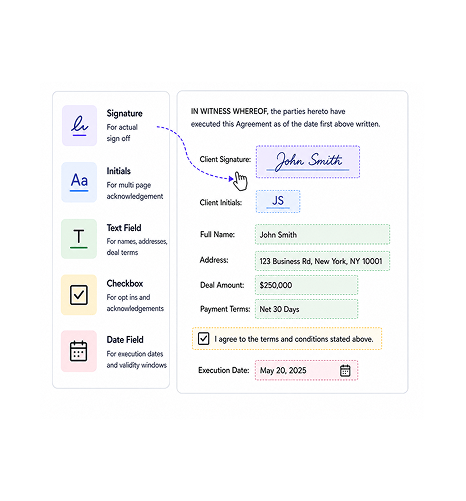
Five field types cover every real document need. Signature fields for the actual sign off. Initials for multi page acknowledgement. Text fields for names, addresses, deal terms. Checkboxes for opt ins and acknowledgements. Date fields for execution dates and validity windows. Drag and drop placement puts each field exactly where the contract requires it.

Signature · InitialsText · CheckboxDate FieldsDrag And Drop

Per Signer Assignment

Assign each field to a specific signer

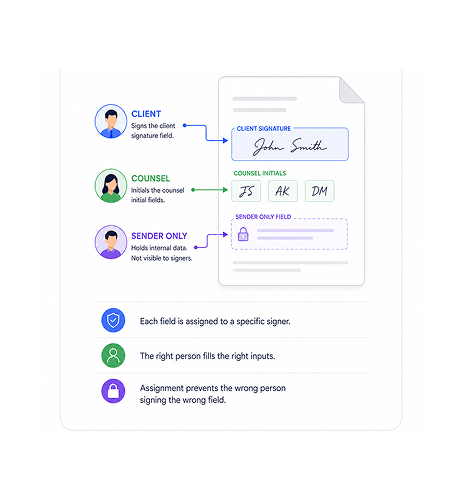
Every field gets assigned to a specific signer so the right person fills the right inputs. The client signs the client signature field. The counsel initials the counsel initial fields. Sender only fields hold internal data without the external signer ever seeing or touching them. Assignment prevents the wrong person signing the wrong field.

Per SignerSender OnlyNo Wrong SignsInternal Fields Hidden

Page Specific Positioning

Position fields on specific pages

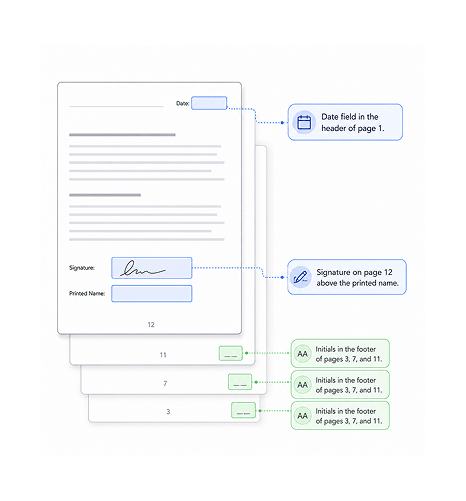
Multi page documents need fields in specific places on specific pages. Signature on page 12 above the printed name. Initials in the footer of pages 3, 7, and 11. Date field in the header of page 1. Field positioning is page specific and pixel precise, so the layout matches the contract's actual structure rather than approximate placement.

Page SpecificPixel PreciseMulti PageLayout Matches
Why Teams Choose SIGI

Six reasons signature setup actually works

Three signature creation methods, five field types, per signer assignment, sender only fields, drag and drop placement, page specific positioning. The signature and field layer that contracts actually need.

Three signature methods accommodate every signer

Three signature methods accommodate every signer

Some signers prefer drawing on a touch screen. Others have a saved signature image they always use. Others type and pick a styled font. Forcing every signer into one rigid method creates friction. Supporting three methods means every signer uses whichever feels natural at the moment of signing.

Five field types cover real document needs

Five field types cover real document needs

Just a signature box at the bottom is fine for the simplest contracts. Real documents need initials per page, text fields for deal terms, checkboxes for opt ins, date fields for execution dates. Five field types cover every real document need rather than forcing workarounds.

Per signer assignment prevents wrong person signing

Per signer assignment prevents wrong person signing

When fields aren't assigned, signers can accidentally sign the wrong field, fill out fields meant for the other party, or skip fields they should have filled. Per signer assignment locks each field to its intended signer so the right person fills the right inputs every time.

Sender only fields hold internal data

Sender only fields hold internal data

Some fields need to hold information the sender fills but the signer never sees or touches. Internal reference numbers, deal classifications, routing codes. Sender only fields keep that data on the document without giving the signer access to fill or modify it.

Drag and drop placement puts fields where needed

Drag and drop placement puts fields where needed

Field placement that snaps to a grid or forces fields into predefined zones never matches what the contract actually needs. Drag and drop placement gives the sender precise control over where every field sits, so the document looks how it should rather than how the tool allows.

Page specific positioning works across multi page documents

Page specific positioning works across multi page documents

Multi page contracts need fields in specific positions on specific pages. Signature on the execution page, initials at the bottom of each clause page, date in the header. Page specific positioning handles real document structure without forcing all fields to live on one summary page.

Stop fighting clunky signature tools. Start placing every field exactly where it belongs.

Three signature creation methods. Five field types. Per signer and sender only assignment. Page specific positioning across multi page documents. The signature and field layer your contracts have always needed.

Who uses SIGI signature fields & types
Deepak MehrotraDeepak MehrotraDeepak MehrotraDeepak Mehrotra

10800+

Teams placing fields exactly where their contracts need them

Built for teams whose contracts need more than just a signature box at the bottom

Sales operations teams creating quotes and proposals with custom fields for deal terms and pricing. Legal operations teams building complex multi signer contracts with per page initials. HR teams running offer letters that capture employee details, start dates, and signatures. Procurement teams with vendor contracts requiring approval initials at multiple points. Founders signing high value deals with custom field requirements that generic tools cannot handle.

3 Signature

Types Supported

5 Field

Types Available

Per Signer

Assignment

Page Specific

Positioning

Signature Layer

Drawn, uploaded image, or typed

Three signature creation methods accommodate every signer. Draw with mouse or touch screen for natural feel. Upload an image of an existing handwritten signature. Type and pick from styled fonts. The signer chooses at the moment of signing.

Drawn, uploaded image, or typed
Features

Everything the signature and field layer ships with

Drawn, uploaded, or typed signatures, signature field placement, initial fields, text and checkbox fields, date fields, per signer and sender only assignment.

Drawn, Uploaded, or Typed Signatures

Drawn, Uploaded, or Typed Signatures

Three signature creation methods. Draw with mouse or touch screen for natural feel. Upload an image of an existing handwritten signature for consistency. Type the name and pick from styled fonts for the fastest option. Signers choose at the moment of signing.

Signature Field Placement

Signature Field Placement

Signature fields drag and drop onto any page at any position. Pixel precise placement matches the contract's actual structure. Multi page documents support signature fields on different pages for different signers as the document needs.

Initial Fields

Initial Fields

Initial fields capture per page acknowledgement of long contracts. Drop initials in the footer of each page so the signer confirms reading each section. Smaller than signature fields and visually distinct, designed specifically for multi page acknowledgement patterns.

Text and Checkbox Fields

Text and Checkbox Fields

Text fields capture names, addresses, deal terms, custom inputs the contract requires. Checkboxes handle opt ins, acknowledgements, conditional terms. Both field types support required or optional flags so the signer cannot complete without the inputs the contract needs.

Date Fields

Date Fields

Date fields capture execution dates, effective dates, validity windows. Auto fill with the current date for execution moments or leave blank for signer entry. Format consistent across the document so all dates display the same way regardless of who fills them.

Per Signer and Sender Only Assignment

Per Signer and Sender Only Assignment

Every field assigns to a specific signer so the right person fills the right inputs. Sender only fields hold internal data the signer never sees or touches. The assignment prevents wrong signing and keeps internal information on the document without exposure.

Drawn, Uploaded, or Typed Signatures

Drawn, Uploaded, or Typed Signatures

Three signature creation methods. Draw with mouse or touch screen for natural feel. Upload an image of an existing handwritten signature for consistency. Type the name and pick from styled fonts for the fastest option. Signers choose at the moment of signing.

Signature Field Placement

Signature Field Placement

Signature fields drag and drop onto any page at any position. Pixel precise placement matches the contract's actual structure. Multi page documents support signature fields on different pages for different signers as the document needs.

Initial Fields

Initial Fields

Initial fields capture per page acknowledgement of long contracts. Drop initials in the footer of each page so the signer confirms reading each section. Smaller than signature fields and visually distinct, designed specifically for multi page acknowledgement patterns.

Text and Checkbox Fields

Text and Checkbox Fields

Text fields capture names, addresses, deal terms, custom inputs the contract requires. Checkboxes handle opt ins, acknowledgements, conditional terms. Both field types support required or optional flags so the signer cannot complete without the inputs the contract needs.

Date Fields

Date Fields

Date fields capture execution dates, effective dates, validity windows. Auto fill with the current date for execution moments or leave blank for signer entry. Format consistent across the document so all dates display the same way regardless of who fills them.

Per Signer and Sender Only Assignment

Per Signer and Sender Only Assignment

Every field assigns to a specific signer so the right person fills the right inputs. Sender only fields hold internal data the signer never sees or touches. The assignment prevents wrong signing and keeps internal information on the document without exposure.

Questions & Answers

Everything you need to know

Common questions about signature types, field placement, field types, per signer assignment, sender only fields, and connection to Signing Workflows.

Three creation methods all produce legally valid signatures. Drawn signatures captured by mouse or touch screen for the most natural handwritten feel. Uploaded image signatures for signers who have an existing handwritten signature they prefer using consistently across documents. Typed signatures where the signer types their name and picks from styled signature fonts. Signers choose which method to use at the moment of signing, and the platform records the method along with the audit trail.

Network background
SIGI · Signature Fields & Types

Stop forcing every signer into one rigid format. Start giving them flexible signatures and the fields they actually need.

Three signature creation methods. Five field types. Per signer and sender only assignment. Page specific positioning across multi page documents. The signature and field layer your contracts have always deserved.

Sigi · AI documents and e-signature

Sigi drafts, sends, and gets it signed without the chasing.

Turn a contract into a signed, audited document in minutes while AI flags risky clauses before they reach your signer.

5 min
average time to signed
0
risky clauses missed
100%
documents with audit trail
6
signing workflows supported