Worksbuddy Logo

Every document. Organised, handled, signed.

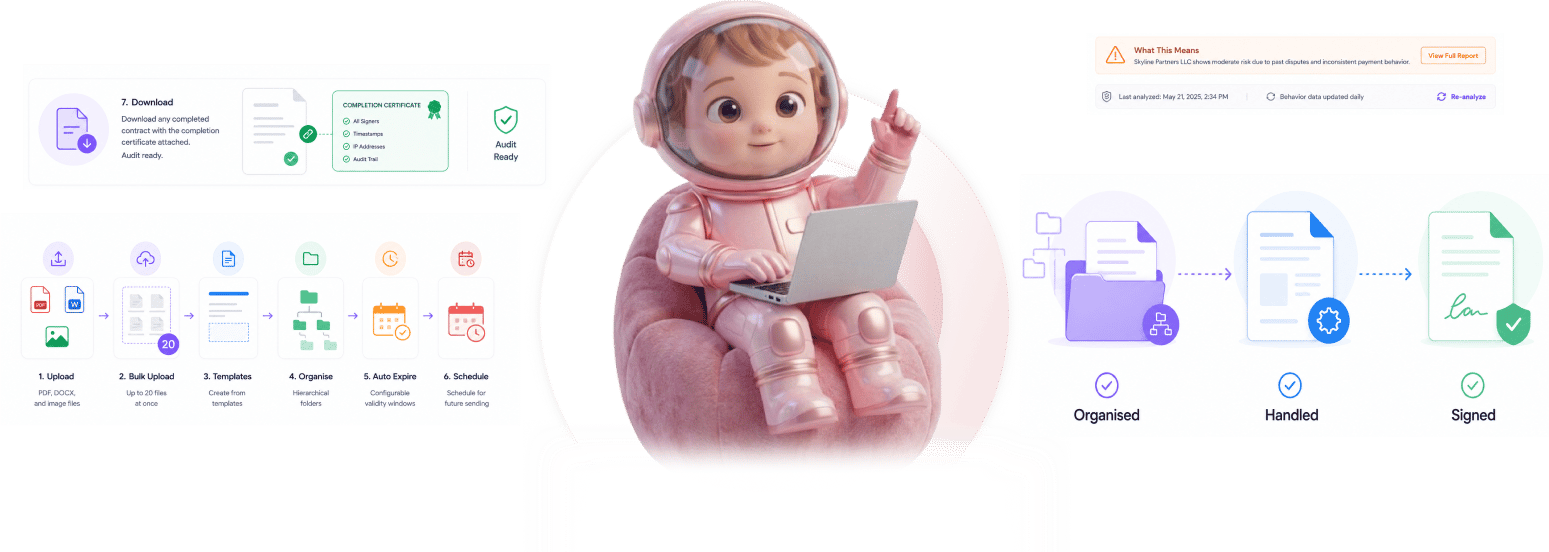
Upload PDF, DOCX, and image files. Bulk upload up to 20 at once. Create from templates, organise in hierarchical folders, auto expire with configurable validity windows, schedule for future sending. Download any completed contract with the completion certificate attached, audit ready.

Every
How it works

From upload to certified download in 4 steps

Upload or create from templates, organise in folders, send manually or schedule, download with completion certificate.
1
2
3
4

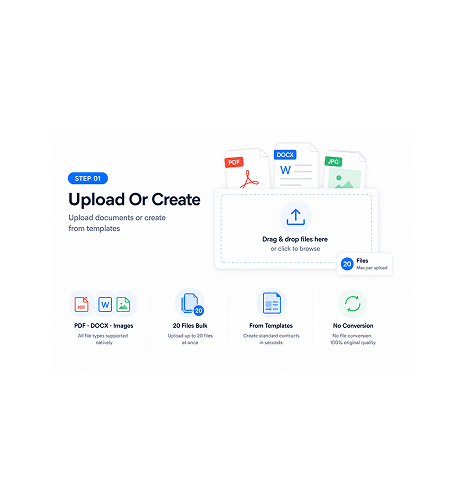
Upload Or Create

Upload documents or create from templates

PDF, DOCX, and image files all upload natively. Bulk upload handles up to 20 files at once, so the team can import a whole batch in one action rather than dragging files one by one. Templates handle repeat document types, so the team creates new contracts of standard types in seconds rather than starting from a blank document.

PDF · DOCX · Images20 Files BulkFrom TemplatesNo Conversion
AI score appliedLive table update

Hierarchical Folders

Organise in hierarchical folders

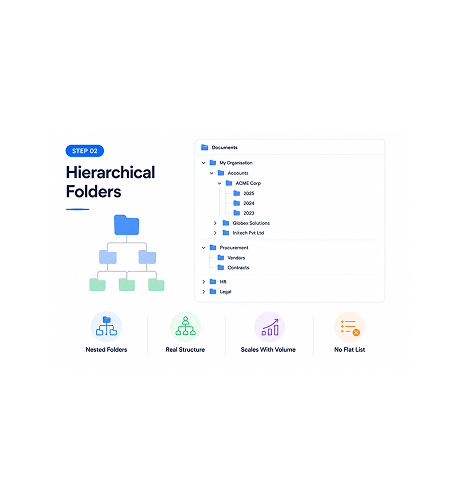
Folders nest as deep as the team's structure needs. Client folders inside an account folder. Vendor folders inside procurement. Year folders inside each client. The structure matches the team's real operational organisation rather than forcing a flat document list that scales poorly with volume.

Nested FoldersReal StructureScales With VolumeNo Flat List

Send Or Schedule

Send manually or schedule for future

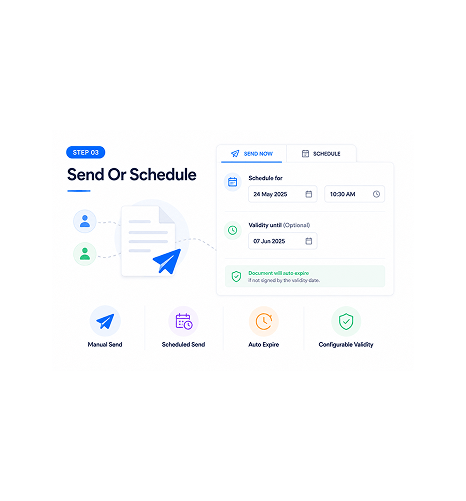
Send the document immediately, or schedule it for a specific future date and time. Optional validity windows automatically expire documents that don't get signed by the deadline. The team configures the lifecycle rules once and the system handles sending, expiration, and status updates automatically.

Manual SendScheduled SendAuto ExpireConfigurable Validity

Certified Download

Download with completion certificate attached

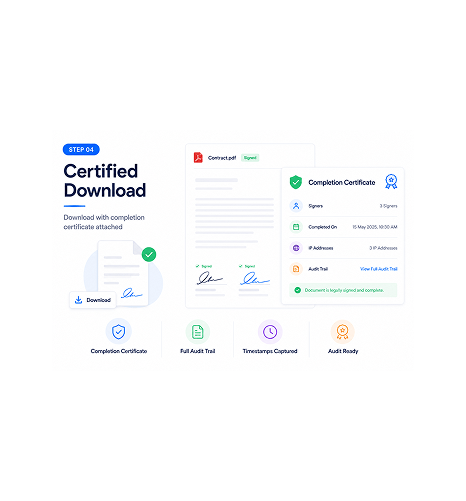
Once the document is signed, the team downloads the final version with the completion certificate attached. The certificate captures every signer, timestamps, IP addresses, and the full audit trail of the signing flow. Audit ready by default, no separate report needed.

Completion CertificateFull Audit TrailTimestamps CapturedAudit Ready
Why Teams Choose SIGI

Six reasons the document layer just works

Bulk upload, templates, hierarchical folders, auto expire, scheduled sending, completion certificates. The full document lifecycle handled in one platform.

Bulk upload up to 20 files at once

Bulk upload up to 20 files at once

Uploading documents one at a time is the kind of friction that adds up across high contract volumes. Bulk upload of up to 20 files at once turns a 20 minute task into a single action. The team's intake operations scale without the manual upload tax.

Templates speed up repeat document types

Templates speed up repeat document types

Standard contracts have repeated structures. NDAs, service agreements, vendor onboarding. Creating each one from scratch wastes time. Templates capture the structure once and the team generates new instances in seconds rather than starting from a blank document every time.

Hierarchical folders match real team structure

Hierarchical folders match real team structure

A flat list of documents scales poorly past 50 contracts. Hierarchical folders let the team's organisation match their actual operational structure. Client folders inside account folders. Year folders inside each. The library stays navigable at any volume.

Auto expire keeps the library current

Auto expire keeps the library current

Documents with validity windows that pass their expiration date should not still show as active. Configurable validity automatically expires unsigned documents past the deadline, so the team's contract library reflects current reality rather than a mix of active and stale documents.

Scheduled sending handles timed releases

Scheduled sending handles timed releases

Quarter end mass sending, coordinated launch contracts, time zone aware delivery. Scheduled sending handles every case where the contract needs to go out at a specific moment rather than the moment of preparation. Set it up now, send it then.

Completion certificate attached to every download

Completion certificate attached to every download

Audit reviews want to see the full signing trail, not just the signed document. Every completed contract downloads with the completion certificate attached. Signers, timestamps, IP addresses, the full audit trail. Audit ready by default rather than reconstructed after the fact.

Stop managing documents across scattered drives. Start running the full lifecycle in one place.

Upload PDF, DOCX, and images with bulk handling. Create from templates, organise in folders, auto expire, schedule sending, download with certificate. The document layer your contract operations have always needed.

Who uses SIGI document management
Deepak MehrotraDeepak MehrotraDeepak MehrotraDeepak Mehrotra

10300+

Teams running the full document lifecycle in one platform

Built for teams whose contract library needs real organisation and real lifecycle handling

Legal operations teams managing high document volumes who need bulk upload and structured folder organisation. Sales operations teams running contract libraries who need templates to speed up repeat document types. HR teams managing personnel document portfolios where audit trails matter for compliance. Procurement teams maintaining vendor agreement archives with validity windows and approval chains. Contract managers running the full document lifecycle from intake through certified download.

3 Formats

Supported

20 Files

Bulk Upload

Hierarchical

Folders

Completion

Certificate

Intake Layer

Upload, bulk import, create from templates

PDF, DOCX, and image files all upload natively. Bulk upload handles up to 20 files at once. Templates handle repeat document types so new instances generate in seconds rather than from blank documents.

Upload, bulk import, create from templates
Features

Everything the document layer ships with

PDF, DOCX, and image upload, bulk upload up to 20 files, create from templates, hierarchical folders, auto expire with configurable validity, download with completion certificate.

PDF, DOCX, and Image Upload

PDF, DOCX, and Image Upload

Three file formats supported natively. PDF for finalised documents, DOCX for editable contracts, image files for scanned originals. No conversion required, no preprocessing needed. The document uploads and works as expected.

Bulk Upload Up To 20 Files

Bulk Upload Up To 20 Files

Upload up to 20 files in a single action. The team's intake operations scale without manual one-by-one uploading. A whole batch of contracts becomes one drag and drop rather than 20 separate operations.

Create From Templates

Create From Templates

Standard contract types saved as templates generate new instances in seconds. NDAs, service agreements, vendor onboarding. The template captures the structure once and the team produces new instances faster than starting from blank documents.

Hierarchical Folder Organisation

Hierarchical Folder Organisation

Folders nest as deep as the team's real structure requires. Client folders inside account folders, year folders inside each client. The library stays navigable at any volume because the organisation matches actual operational structure.

Auto Expire With Configurable Validity

Auto Expire With Configurable Validity

Set a validity window on any document. Documents past the deadline auto expire automatically. The team's library reflects current reality rather than a mix of active and stale documents that needs manual cleanup.

Download With Completion Certificate

Download With Completion Certificate

Every completed contract downloads with the completion certificate attached. Signers, timestamps, IP addresses, full audit trail of the signing flow. Audit ready by default rather than reconstructed from logs after the fact.

PDF, DOCX, and Image Upload

PDF, DOCX, and Image Upload

Three file formats supported natively. PDF for finalised documents, DOCX for editable contracts, image files for scanned originals. No conversion required, no preprocessing needed. The document uploads and works as expected.

Bulk Upload Up To 20 Files

Bulk Upload Up To 20 Files

Upload up to 20 files in a single action. The team's intake operations scale without manual one-by-one uploading. A whole batch of contracts becomes one drag and drop rather than 20 separate operations.

Create From Templates

Create From Templates

Standard contract types saved as templates generate new instances in seconds. NDAs, service agreements, vendor onboarding. The template captures the structure once and the team produces new instances faster than starting from blank documents.

Hierarchical Folder Organisation

Hierarchical Folder Organisation

Folders nest as deep as the team's real structure requires. Client folders inside account folders, year folders inside each client. The library stays navigable at any volume because the organisation matches actual operational structure.

Auto Expire With Configurable Validity

Auto Expire With Configurable Validity

Set a validity window on any document. Documents past the deadline auto expire automatically. The team's library reflects current reality rather than a mix of active and stale documents that needs manual cleanup.

Download With Completion Certificate

Download With Completion Certificate

Every completed contract downloads with the completion certificate attached. Signers, timestamps, IP addresses, full audit trail of the signing flow. Audit ready by default rather than reconstructed from logs after the fact.

Questions & Answers

Everything you need to know

FiCommon questions about file formats, bulk upload, templates, folder structure, connections to other Sigi features, and completion certificate contents.

PDF, DOCX, and image files all upload natively. PDF for finalised documents that should not be edited further. DOCX for contracts the team or counterparty may still modify. Image files for scanned originals, signed paper documents, or any visual contract. No conversion required and no preprocessing needed, the document works as expected from the moment it uploads.

Network background
Connects

Stop scattering contracts across drives and emails. Start running the full document lifecycle in Sigi.

Upload PDF, DOCX, and images with bulk handling up to 20 files. Templates, hierarchical folders, auto expire, scheduled sending, completion certificates. The document layer your contract operations have always deserved.

Sigi · AI documents and e-signature

Sigi drafts, sends, and gets it signed without the chasing.

Turn a contract into a signed, audited document in minutes while AI flags risky clauses before they reach your signer.

5 min
average time to signed
0
risky clauses missed
100%
documents with audit trail
6
signing workflows supported